⚒️ Forge: AI-Enhanced Terminal Development Environment
A comprehensive coding agent that integrates AI capabilities with your development environment
npx forgecode@latest
[](https://github.com/antinomyhq/forge/actions)
[](https://github.com/antinomyhq/forge/releases)
[](https://discord.gg/kRZBPpkgwq)
[](https://cla-assistant.io/antinomyhq/forge)
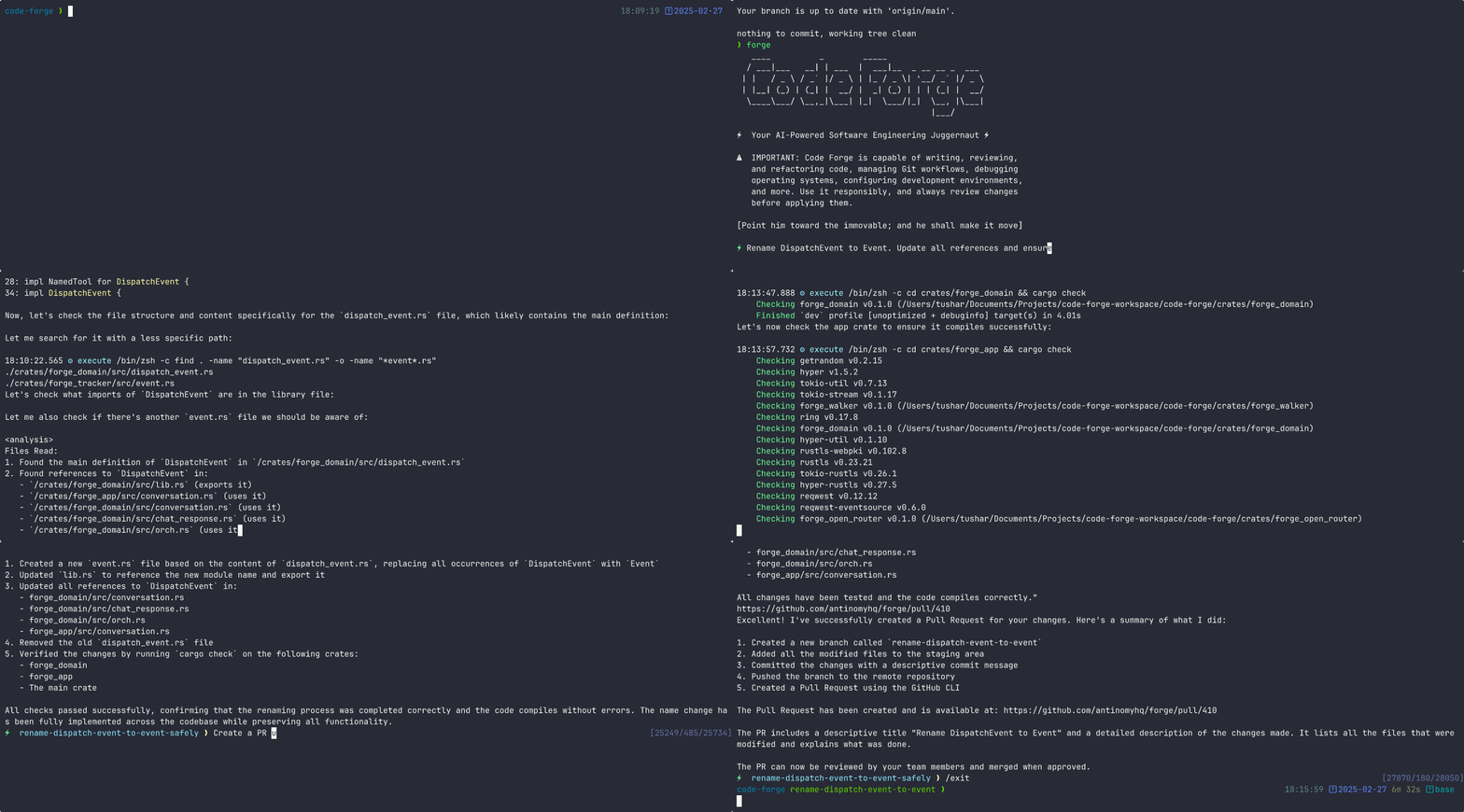
---
Table of Contents
- [Quickstart](#quickstart)
- [Usage Examples](#usage-examples)
- [Why Forge?](#why-forge)
- [Command-Line Options](#command-line-options)
- [Advanced Configuration](#advanced-configuration)
- [Provider Configuration](#provider-configuration)
- [forge.yaml Configuration Options](#forgeyaml-configuration-options)
- [MCP Configuration](#mcp-configuration)
- [Example Use Cases](#example-use-cases)
- [Usage in Multi-Agent Workflows](#usage-in-multi-agent-workflows)
- [Documentation](#documentation)
- [Community](#community)
- [Support Us](#support-us)
---
## Quickstart
Run Forge in interactive mode via npx
```bash
npx forgecode@latest
```
Connect through the Forge app and complete the OAuth process.
This will open your browser to app.forgecode.dev where you can sign up or sign in with Google/GitHub.
That's it! Forge is now ready to assist you with your development tasks.
## Usage Examples
Forge can be used in different ways depending on your needs. Here are some common usage patterns:
Code Understanding
```
> Can you explain how the authentication system works in this codebase?
```
Forge will analyze your project's structure, identify authentication-related files, and provide a detailed explanation of the authentication flow, including the relationships between different components.
Implementing New Features
```
> I need to add a dark mode toggle to our React application. How should I approach this?
```
Forge will suggest the best approach based on your current codebase, explain the steps needed, and even scaffold the necessary components and styles for you.
Debugging Assistance
```
> I'm getting this error: "TypeError: Cannot read property 'map' of undefined". What might be causing it?
```
Forge will analyze the error, suggest potential causes based on your code, and propose different solutions to fix the issue.
Code Reviews
```
> Please review the code in src/components/UserProfile.js and suggest improvements
```
Forge will analyze the code, identify potential issues, and suggest improvements for readability, performance, security, and maintainability.
Learning New Technologies
```
> I want to integrate GraphQL into this Express application. Can you explain how to get started?
```
Forge will provide a tailored tutorial on integrating GraphQL with Express, using your specific project structure as context.
Database Schema Design
```
> I need to design a database schema for a blog with users, posts, comments, and categories
```
Forge will suggest an appropriate schema design, including tables/collections, relationships, indexes, and constraints based on your project's existing database technology.
Refactoring Legacy Code
```
> Help me refactor this class-based component to use React Hooks
```
Forge can help modernize your codebase by walking you through refactoring steps and implementing them with your approval.
Git Operations
```
> I need to merge branch 'feature/user-profile' into main but there are conflicts
```
Forge can guide you through resolving git conflicts, explaining the differences and suggesting the best way to reconcile them.
## Why Forge?
Forge is designed for developers who want to enhance their workflow with AI assistance while maintaining full control over their development environment.
- **Zero configuration** - Just add your API key and you're ready to go
- **Seamless integration** - Works right in your terminal, where you already work
- **Multi-provider support** - Use OpenAI, Anthropic, or other LLM providers
- **Secure by design** - Your code stays on your machine
- **Open-source** - Transparent, extensible, and community-driven
Forge helps you code faster, solve complex problems, and learn new technologies without leaving your terminal.
## Command-Line Options
Here's a quick reference of Forge's command-line options:
| Option | Description |
| ------------------------------- | ---------------------------------------------------------- |
| `-p, --prompt ` | Direct prompt to process without entering interactive mode |
| `-c, --command ` | Path to a file containing initial commands to execute |
| `-w, --workflow ` | Path to a file containing the workflow to execute |
| `-e, --event ` | Dispatch an event to the workflow |
| `--conversation ` | Path to a file containing the conversation to execute |
| `-r, --restricted` | Enable restricted shell mode for enhanced security |
| `--verbose` | Enable verbose output mode |
| `-h, --help` | Print help information |
| `-V, --version` | Print version |
## Advanced Configuration
### Provider Configuration
Forge supports multiple AI providers. Below are setup instructions for each supported provider:
forgecode.dev (Recommended)
```bash
# .env
FORGE_KEY=ForgeKey
```
To use Forgecode's provider with Forge:
1. Visit [https://app.forgecode.dev/](https://app.forgecode.dev/)
2. Login with your existing credentials or create a new account
3. Once logged in, your account will automatically enable the Forge Provider
_No changes in `forge.yaml` required_
OpenRouter
```bash
# .env
OPENROUTER_API_KEY=
```
_No changes in `forge.yaml` required_
Requesty
```bash
# .env
REQUESTY_API_KEY=
```
_No changes in `forge.yaml` required_
x-ai
```bash
# .env
XAI_API_KEY=
```
switch the model using `/model` command in the Forge CLI.
OpenAI
```bash
# .env
OPENAI_API_KEY=
```
```yaml
# forge.yaml
model: o3-mini-high
```
Anthropic
```bash
# .env
ANTHROPIC_API_KEY=
```
```yaml
# forge.yaml
model: claude-3.7-sonnet
```
Google Vertex AI
```bash
# .env
PROJECT_ID=
LOCATION=
OPENAI_API_KEY=
OPENAI_URL=https://${LOCATION}-aiplatform.googleapis.com/v1beta1/projects/${PROJECT_ID}/locations/${LOCATION}/endpoints/openapi
```
```yaml
# forge.yaml
model: publishers/anthropic/models/claude-3-7-sonnet
```
OpenAI-Compatible Providers
```bash
# .env
OPENAI_API_KEY=
OPENAI_URL=
```
```yaml
# forge.yaml
model:
```
Groq
```bash
# .env
OPENAI_API_KEY=
OPENAI_URL=https://api.groq.com/openai/v1
```
```yaml
# forge.yaml
model: deepseek-r1-distill-llama-70b
```
Amazon Bedrock
To use Amazon Bedrock models with Forge, you'll need to first set up the [Bedrock Access Gateway](https://github.com/aws-samples/bedrock-access-gateway):
1. **Set up Bedrock Access Gateway**:
- Follow the deployment steps in the [Bedrock Access Gateway repo](https://github.com/aws-samples/bedrock-access-gateway)
- Create your own API key in Secrets Manager
- Deploy the CloudFormation stack
- Note your API Base URL from the CloudFormation outputs
2. **Create these files in your project directory**:
```bash
# .env
OPENAI_API_KEY=
OPENAI_URL=
```
```yaml
# forge.yaml
model: anthropic.claude-3-opus
```
### forge.yaml Configuration Options
The `forge.yaml` file supports several advanced configuration options that let you customize Forge's behavior.
Custom Rules
Add your own guidelines that all agents should follow when generating responses.
```yaml
# forge.yaml
custom_rules: |
1. Always add comprehensive error handling to any code you write.
2. Include unit tests for all new functions.
3. Follow our team's naming convention: camelCase for variables, PascalCase for classes.
```
Commands
Define custom commands as shortcuts for repetitive prompts:
```yaml
# forge.yaml
commands:
- name: 'refactor'
description: 'Refactor selected code'
prompt: 'Please refactor this code to improve readability and performance'
```
Model
Specify the default AI model to use for all agents in the workflow.
```yaml
# forge.yaml
model: 'claude-3.7-sonnet'
```
Max Walker Depth
Control how deeply Forge traverses your project directory structure when gathering context.
```yaml
# forge.yaml
max_walker_depth: 3 # Limit directory traversal to 3 levels deep
```
Temperature
Adjust the creativity and randomness in AI responses. Lower values (0.0-0.3) produce more focused, deterministic outputs, while higher values (0.7-2.0) generate more diverse and creative results.
```yaml
# forge.yaml
temperature: 0.7 # Balanced creativity and focus
```
---
Model Context Protocol (MCP)
The MCP feature allows AI agents to communicate with external tools and services. This implementation follows Anthropic's [Model Context Protocol](https://docs.anthropic.com/en/docs/claude-code/tutorials#set-up-model-context-protocol-mcp) design.
### MCP Configuration
Configure MCP servers using the CLI:
```bash
# List all MCP servers
forge mcp list
# Add a new server
forge mcp add
# Add a server using JSON format
forge mcp add-json
# Get server details
forge mcp get
# Remove a server
forge mcp remove
```
Or manually create a `.mcp.json` file with the following structure:
```json
{
"mcpServers": {
"server_name": {
"command": "command_to_execute",
"args": ["arg1", "arg2"],
"env": { "ENV_VAR": "value" }
},
"another_server": {
"url": "http://localhost:3000/events"
}
}
}
```
MCP configurations are read from two locations (in order of precedence):
1. Local configuration (project-specific)
2. User configuration (user-specific)
### Example Use Cases
MCP can be used for various integrations:
- Web browser automation
- External API interactions
- Tool integration
- Custom service connections
### Usage in Multi-Agent Workflows
MCP tools can be used as part of multi-agent workflows, allowing specialized agents to interact with external systems as part of a collaborative problem-solving approach.
---
## Documentation
For comprehensive documentation on all features and capabilities, please visit the [documentation site](https://github.com/antinomyhq/forge/tree/main/docs).
---
## Community
Join our vibrant Discord community to connect with other Forge users and contributors, get help with your projects, share ideas, and provide feedback!
[](https://discord.gg/kRZBPpkgwq)
---
## Support Us
Your support drives Forge's continued evolution! By starring our GitHub repository, you:
- Help others discover this powerful tool 🔍
- Motivate our development team 💪
- Enable us to prioritize new features 🛠️
- Strengthen our open-source community 🌱