|
| 1 | +# Profiling MXNet Models |
| 2 | + |
| 3 | +It is often helpful to understand what operations take how much time while running a model. This helps optimize the model to run faster. In this tutorial, we will learn how to profile MXNet models to measure their running time and memory consumption using the MXNet profiler. |
| 4 | + |
| 5 | +## The incorrect way to profile |
| 6 | + |
| 7 | +If you have just begun using MXNet, you might be tempted to measure the execution time of your model using Python's `time` module like shown below: |
| 8 | + |
| 9 | +```python |
| 10 | +from time import time |
| 11 | +from mxnet import autograd, nd |
| 12 | +import mxnet as mx |
| 13 | + |
| 14 | +start = time() |
| 15 | +x = nd.random_uniform(shape=(2000,2000)) |
| 16 | +y = nd.dot(x, x) |
| 17 | +print('Time for matrix multiplication: %f sec\n' % (time() - start)) |
| 18 | + |
| 19 | +start = time() |
| 20 | +print(y.asnumpy()) |
| 21 | +print('Time for printing the output: %f sec' % (time() - start)) |
| 22 | +``` |
| 23 | + |
| 24 | + |
| 25 | +**Time for matrix multiplication: 0.005051 sec**<!--notebook-skip-line--> |
| 26 | + |
| 27 | +[[501.1584 508.29724 495.65237 ... 492.84705 492.69092 490.0481 ]<!--notebook-skip-line--> |
| 28 | + |
| 29 | + [508.81058 507.1822 495.1743 ... 503.10526 497.29315 493.67917]<!--notebook-skip-line--> |
| 30 | + |
| 31 | + [489.56598 499.47015 490.17722 ... 490.99945 488.05008 483.28836]<!--notebook-skip-line--> |
| 32 | + |
| 33 | + ...<!--notebook-skip-line--> |
| 34 | + |
| 35 | + [484.0019 495.7179 479.92142 ... 493.69952 478.89194 487.2074 ]<!--notebook-skip-line--> |
| 36 | + |
| 37 | + [499.64932 507.65094 497.5938 ... 493.0474 500.74512 495.82712]<!--notebook-skip-line--> |
| 38 | + |
| 39 | + [516.0143 519.1715 506.354 ... 510.08878 496.35608 495.42523]]<!--notebook-skip-line--> |
| 40 | + |
| 41 | +**Time for printing the output: 0.167693 sec**<!--notebook-skip-line--> |
| 42 | + |
| 43 | + |
| 44 | +From the output above, it seems as if printing the output takes lot more time that multiplying two large matrices. That doesn't feel right. |
| 45 | + |
| 46 | +This is because, in MXNet, all operations are executed asynchronously. So, when `nd.dot(x, x)` returns, the matrix multiplication is not complete, it has only been queued for execution. `asnumpy` in `print(y.asnumpy())` however, waits for the result to be computed and hence takes longer time. |
| 47 | + |
| 48 | +While it is possible to use `NDArray.waitall()` before and after operations to get running time of operations, it is not a scalable method to measure running time of multiple sets of operations, especially in a Sequential or Hybrid network. |
| 49 | + |
| 50 | +## The correct way to profile |
| 51 | + |
| 52 | +The correct way to measure running time of MXNet models is to use MXNet profiler. In the rest of this tutorial, we will learn how to use the MXNet profiler to measure the running time and memory consumption of MXNet models. |
| 53 | + |
| 54 | +To use the profiler, you need to build MXNet with `USE_PROFILER=1`. Check the [installation](http://mxnet.incubator.apache.org/install/index.html) page for more information on how to install MXNet from source. After building with `USE_PROFILER=1` and installing, you can import the profiler and configure it from Python code. |
| 55 | + |
| 56 | +```python |
| 57 | +from mxnet import profiler |
| 58 | +profiler.set_config(profile_all=True, aggregate_stats=True, filename='profile_output.json') |
| 59 | +``` |
| 60 | + |
| 61 | +`profile_all` enables all types of profiling. You can also individually enable the following types of profiling: |
| 62 | + |
| 63 | +- `profile_symbolic` (boolean): whether to profile symbolic operators |
| 64 | +- `profile_imperative` (boolean): whether to profile imperative operators |
| 65 | +- `profile_memory` (boolean): whether to profile memory usage |
| 66 | +- `profile_api` (boolean): whether to profile the C API |
| 67 | + |
| 68 | +`aggregate_stats` aggregates statistics in memory which can then be printed to console by calling `profiler.dumps()`. |
| 69 | + |
| 70 | +### Setup: Build a model |
| 71 | + |
| 72 | +Let's build a small convolutional neural network that we can use for profiling. |
| 73 | + |
| 74 | +```python |
| 75 | +from mxnet import gluon |
| 76 | +net = gluon.nn.HybridSequential() |
| 77 | +with net.name_scope(): |
| 78 | + net.add(gluon.nn.Conv2D(channels=20, kernel_size=5, activation='relu')) |
| 79 | + net.add(gluon.nn.MaxPool2D(pool_size=2, strides=2)) |
| 80 | + net.add(gluon.nn.Conv2D(channels=50, kernel_size=5, activation='relu')) |
| 81 | + net.add(gluon.nn.MaxPool2D(pool_size=2, strides=2)) |
| 82 | + net.add(gluon.nn.Flatten()) |
| 83 | + net.add(gluon.nn.Dense(512, activation="relu")) |
| 84 | + net.add(gluon.nn.Dense(10)) |
| 85 | +``` |
| 86 | + |
| 87 | +We need data that we can run through the network for profiling. We'll use the MNIST dataset. |
| 88 | + |
| 89 | +```python |
| 90 | +from mxnet.gluon.data.vision import transforms |
| 91 | +train_data = gluon.data.DataLoader(gluon.data.vision.MNIST(train=True).transform_first(transforms.ToTensor()), |
| 92 | + batch_size=64, shuffle=True) |
| 93 | +``` |
| 94 | + |
| 95 | +Let's define a method that will run one training iteration given data and label. |
| 96 | + |
| 97 | +```python |
| 98 | +# Use GPU if available |
| 99 | +ctx = mx.gpu() if mx.test_utils.list_gpus() else mx.cpu() |
| 100 | + |
| 101 | +# Initialize the parameters with random weights |
| 102 | +net.collect_params().initialize(mx.init.Xavier(), ctx=ctx) |
| 103 | + |
| 104 | +# Use SGD optimizer |
| 105 | +trainer = gluon.Trainer(net.collect_params(), 'sgd', {'learning_rate': .1}) |
| 106 | + |
| 107 | +# Softmax Cross Entropy is a frequently used loss function for multi-classs classification |
| 108 | +softmax_cross_entropy = gluon.loss.SoftmaxCrossEntropyLoss() |
| 109 | + |
| 110 | +# A helper function to run one training iteration |
| 111 | +def run_training_iteration(data, label): |
| 112 | + |
| 113 | + # Load data and label is the right context |
| 114 | + data = data.as_in_context(ctx) |
| 115 | + label = label.as_in_context(ctx) |
| 116 | + |
| 117 | + # Run the forward pass |
| 118 | + with autograd.record(): |
| 119 | + output = net(data) |
| 120 | + loss = softmax_cross_entropy(output, label) |
| 121 | + |
| 122 | + # Run the backward pass |
| 123 | + loss.backward() |
| 124 | + |
| 125 | + # Apply changes to parameters |
| 126 | + trainer.step(data.shape[0]) |
| 127 | +``` |
| 128 | + |
| 129 | +### Starting and stopping the profiler from Python |
| 130 | + |
| 131 | +When the first forward pass is run on a network, MXNet does a number of housekeeping tasks including inferring the shapes of various parameters, allocating memory for intermediate and final outputs, etc. For these reasons, profiling the first iteration doesn't provide accurate results. We will, therefore skip the first iteration. |
| 132 | + |
| 133 | +```python |
| 134 | +# Run the first iteration without profiling |
| 135 | +itr = iter(train_data) |
| 136 | +run_training_iteration(*next(itr)) |
| 137 | +``` |
| 138 | + |
| 139 | +We'll run the next iteration with the profiler turned on. |
| 140 | + |
| 141 | +```python |
| 142 | +data, label = next(itr) |
| 143 | + |
| 144 | +# Ask the profiler to start recording |
| 145 | +profiler.set_state('run') |
| 146 | + |
| 147 | +run_training_iteration(*next(itr)) |
| 148 | + |
| 149 | +# Ask the profiler to stop recording |
| 150 | +profiler.set_state('stop') |
| 151 | +``` |
| 152 | + |
| 153 | +Between running and stopping the profiler, you can also pause and resume the profiler using `profiler.pause()` and `profiler.resume()` respectively to profile only parts of the code you want to profile. |
| 154 | + |
| 155 | +### Starting profiler automatically using environment variable |
| 156 | + |
| 157 | +The method described above requires code changes to start and stop the profiler. You can also start the profiler automatically and profile the entire code without any code changes using the `MXNET_PROFILER_AUTOSTART` environment variable. |
| 158 | + |
| 159 | +MXNet will start the profiler automatically if you run your code with the environment variable `MXNET_PROFILER_AUTOSTART` set to `1`. The profiler output is stored into `profile.json` in the current directory. |
| 160 | + |
| 161 | +Note that the profiler output could be large depending on your code. It might be helpful to profile only sections of your code using the `set_state` API described in the previous section. |
| 162 | + |
| 163 | +### Increasing granularity of the profiler output |
| 164 | + |
| 165 | +MXNet executes computation graphs in 'bulk mode' which reduces kernel launch gaps in between symbolic operators for faster execution. This could reduce the granularity of the profiler output. If you need profiling result of every operator, please set the environment variables `MXNET_EXEC_BULK_EXEC_INFERENCE` and `MXNET_EXEC_BULK_EXEC_TRAIN` to `0` to disable the bulk execution mode. |
| 166 | + |
| 167 | +### Viewing profiler output |
| 168 | + |
| 169 | +There are two ways to view the information collected by the profiler. You can either view it in the console or you can view a more graphical version in a browser. |
| 170 | + |
| 171 | +#### 1. View in console |
| 172 | + |
| 173 | +You can use the `profiler.dumps()` method to view the information collected by the profiler in the console. The collected information contains time taken by each operator, time taken by each C API and memory consumed in both CPU and GPU. |
| 174 | + |
| 175 | +```python |
| 176 | +print(profiler.dumps()) |
| 177 | +``` |
| 178 | + |
| 179 | +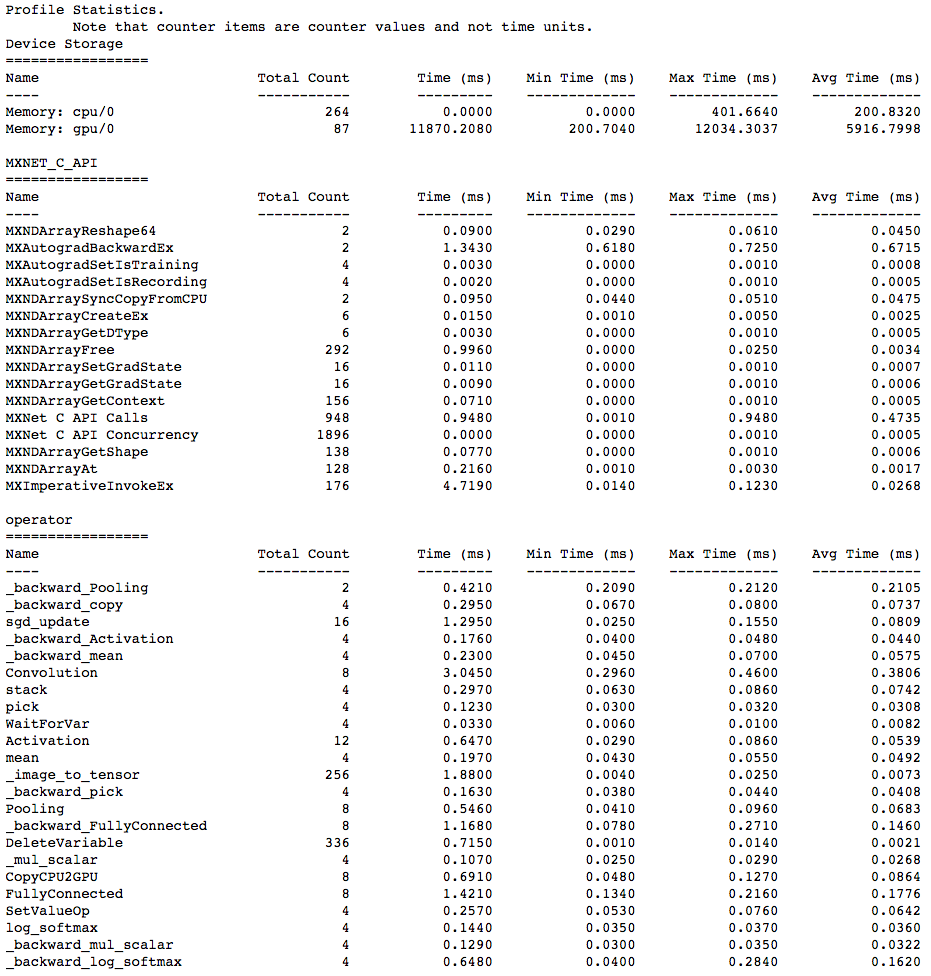<!--notebook-skip-line--> |
| 180 | + |
| 181 | +#### 2. View in browser |
| 182 | + |
| 183 | +You can also dump the information collected by the profiler into a `json` file using the `profiler.dump()` function and view it in a browser. |
| 184 | + |
| 185 | +```python |
| 186 | +profiler.dump() |
| 187 | +``` |
| 188 | + |
| 189 | +`dump()` creates a `json` file which can be viewed using a trace consumer like `chrome://tracing` in the Chrome browser. Here is a snapshot that shows the output of the profiling we did above. |
| 190 | + |
| 191 | +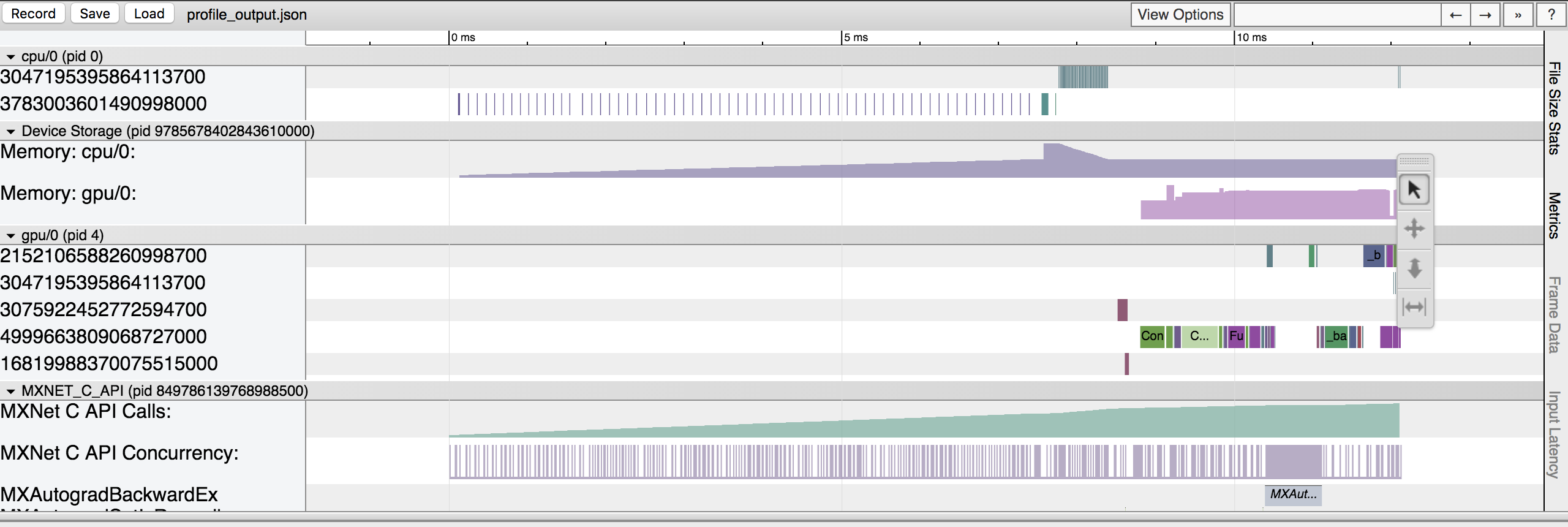 |
| 192 | + |
| 193 | +Let's zoom in to check the time taken by operators |
| 194 | + |
| 195 | +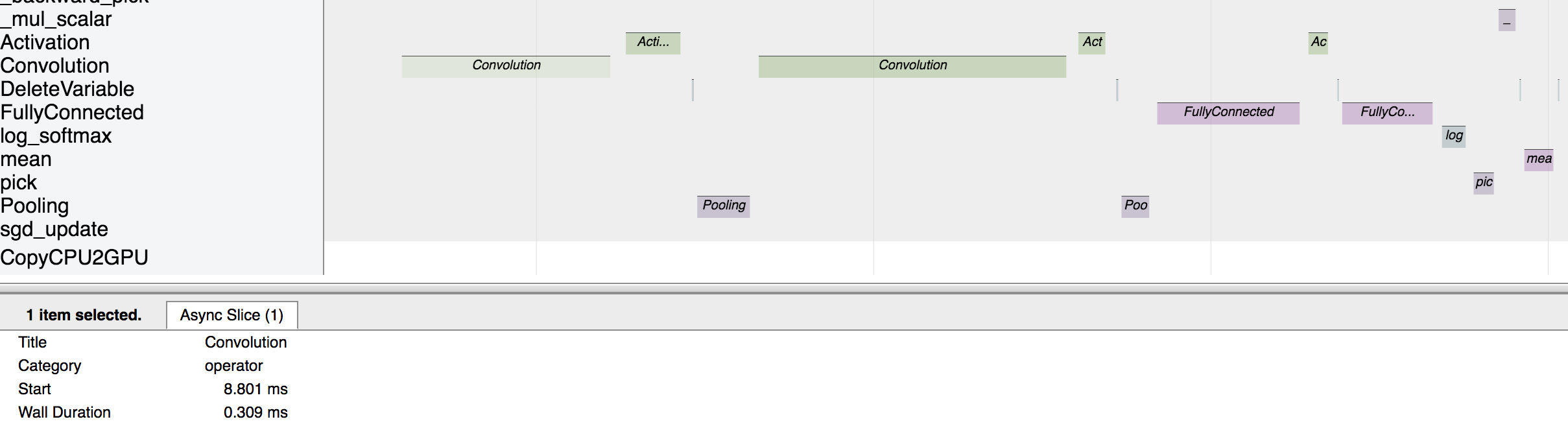 |
| 196 | + |
| 197 | +The above picture visualizes the sequence in which the operators were executed and the time taken by each operator. |
| 198 | + |
| 199 | +### Further reading |
| 200 | + |
| 201 | +- [Examples using MXNet profiler.](https://github.com/apache/incubator-mxnet/tree/master/example/profiler) |
| 202 | +- [Some tips for improving MXNet performance.](https://mxnet.incubator.apache.org/faq/perf.html) |
| 203 | + |
| 204 | +<!-- INSERT SOURCE DOWNLOAD BUTTONS --> |
| 205 | + |
0 commit comments