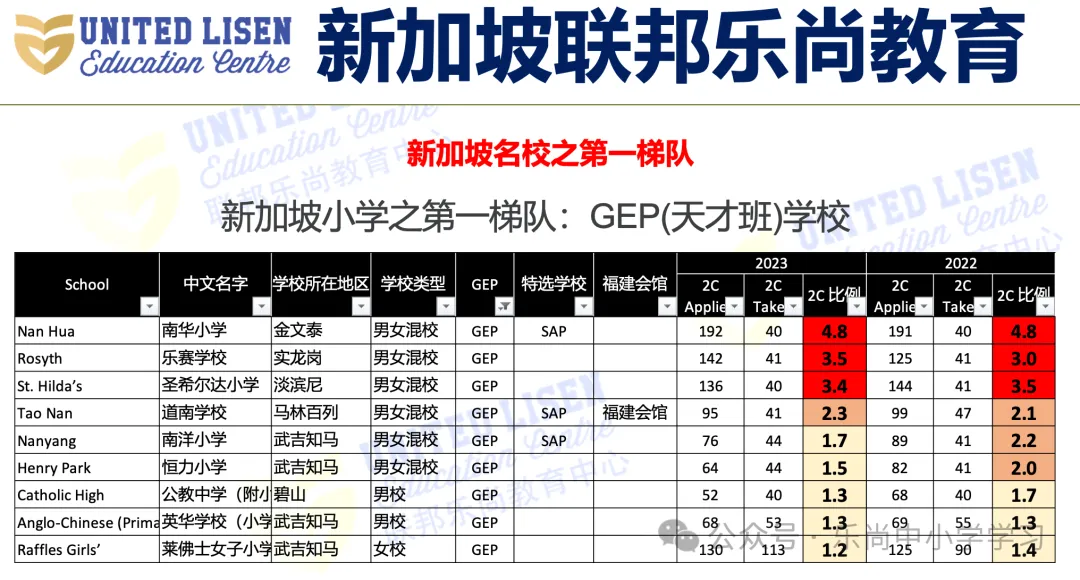
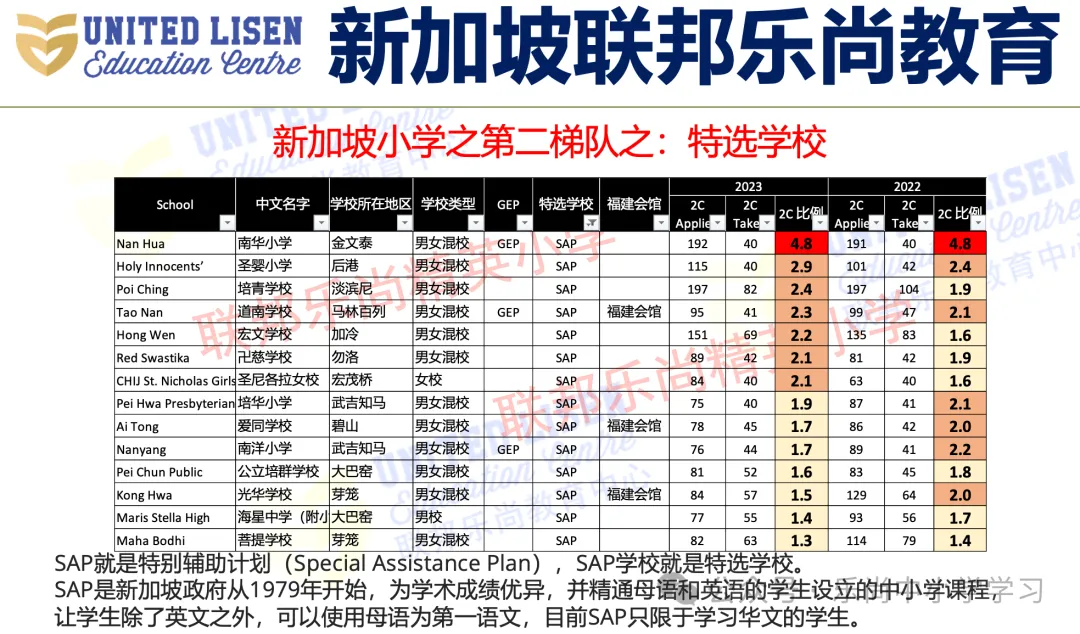
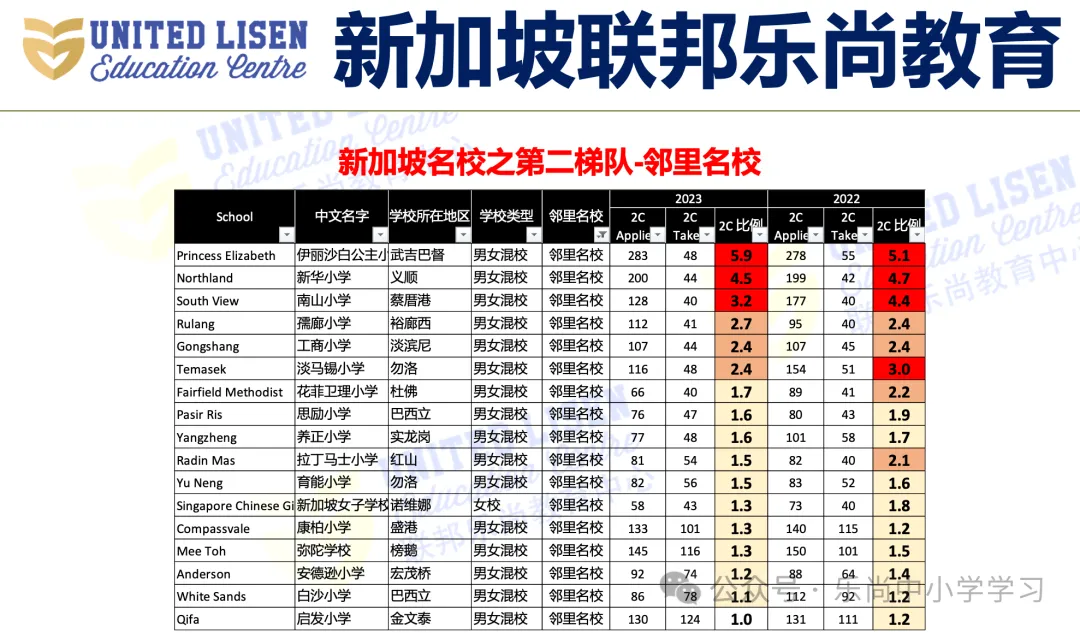
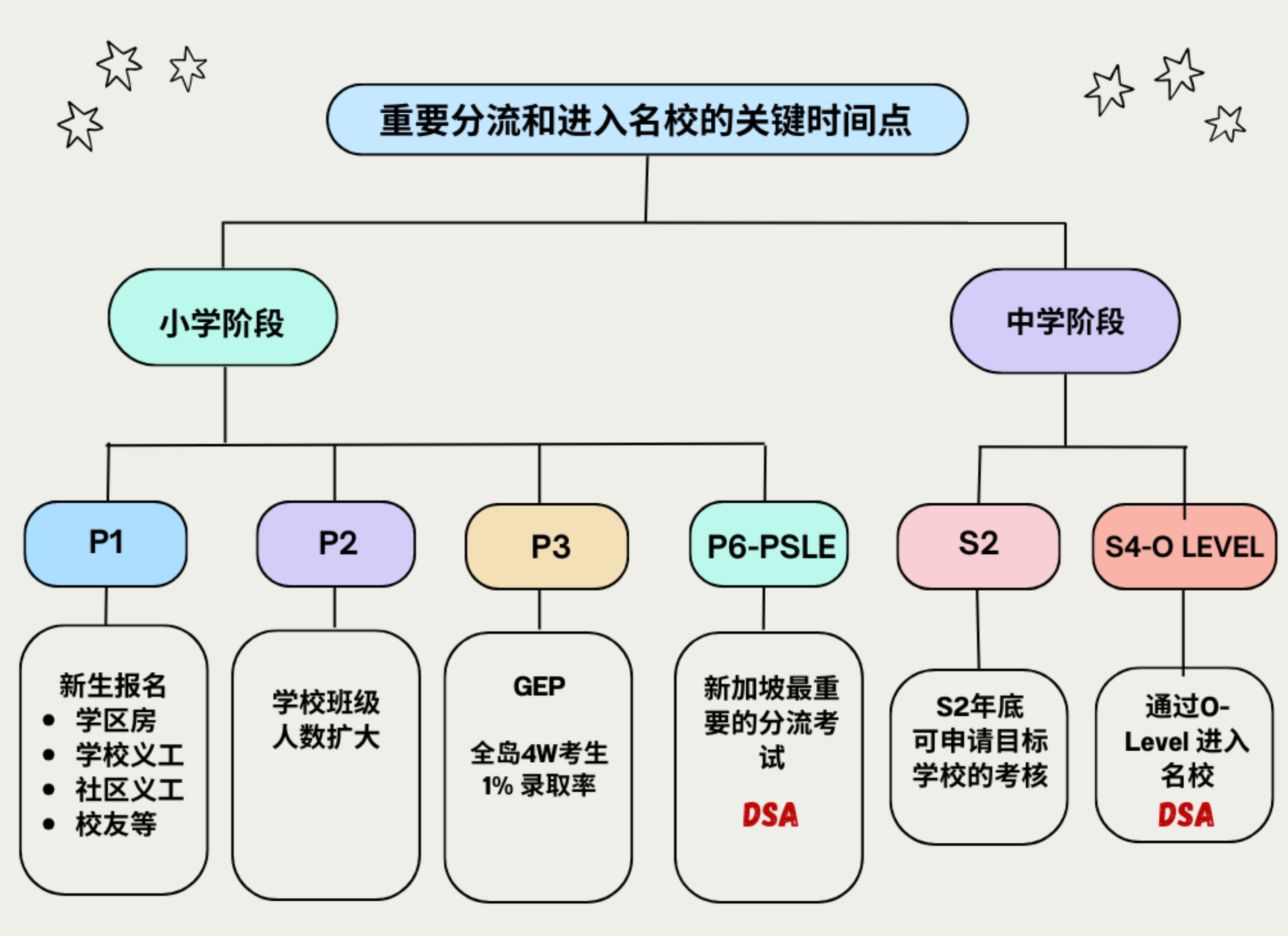
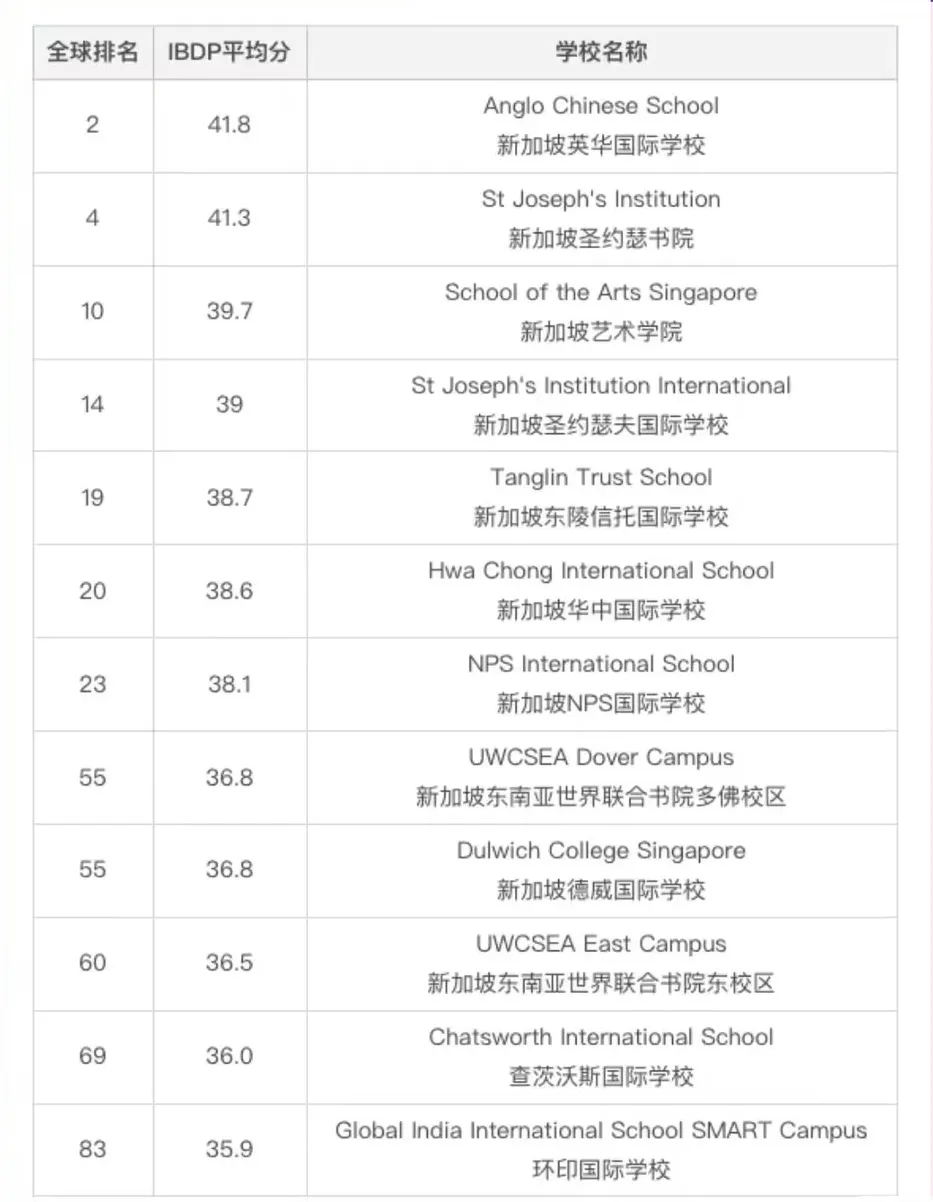
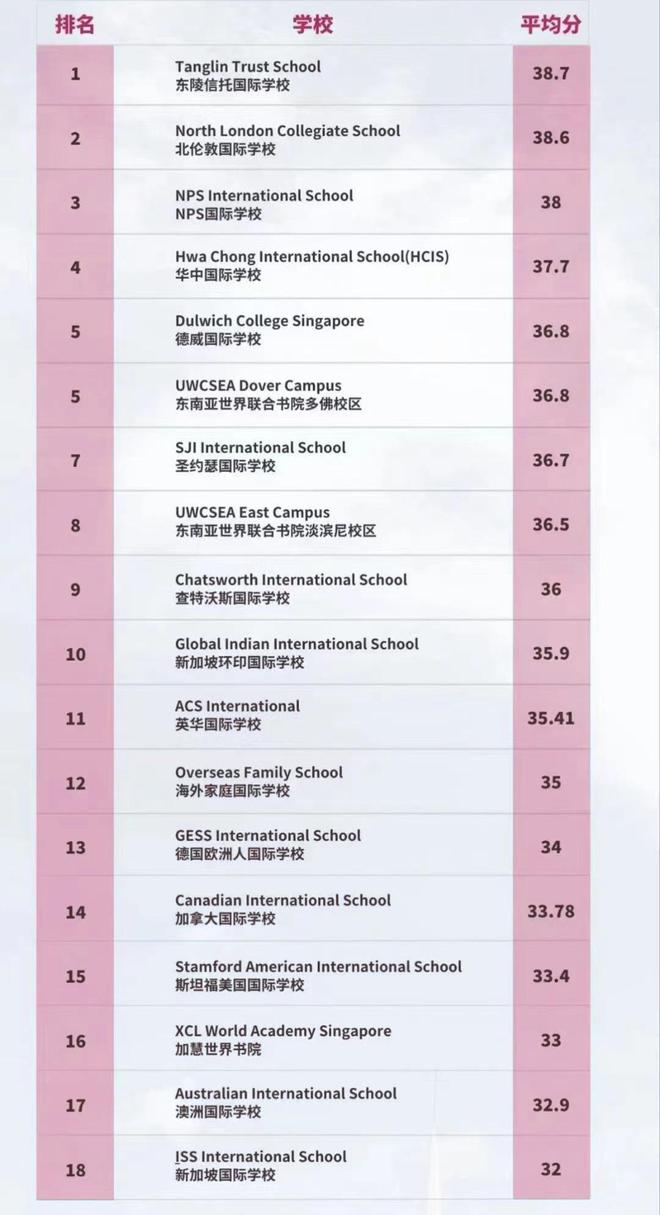
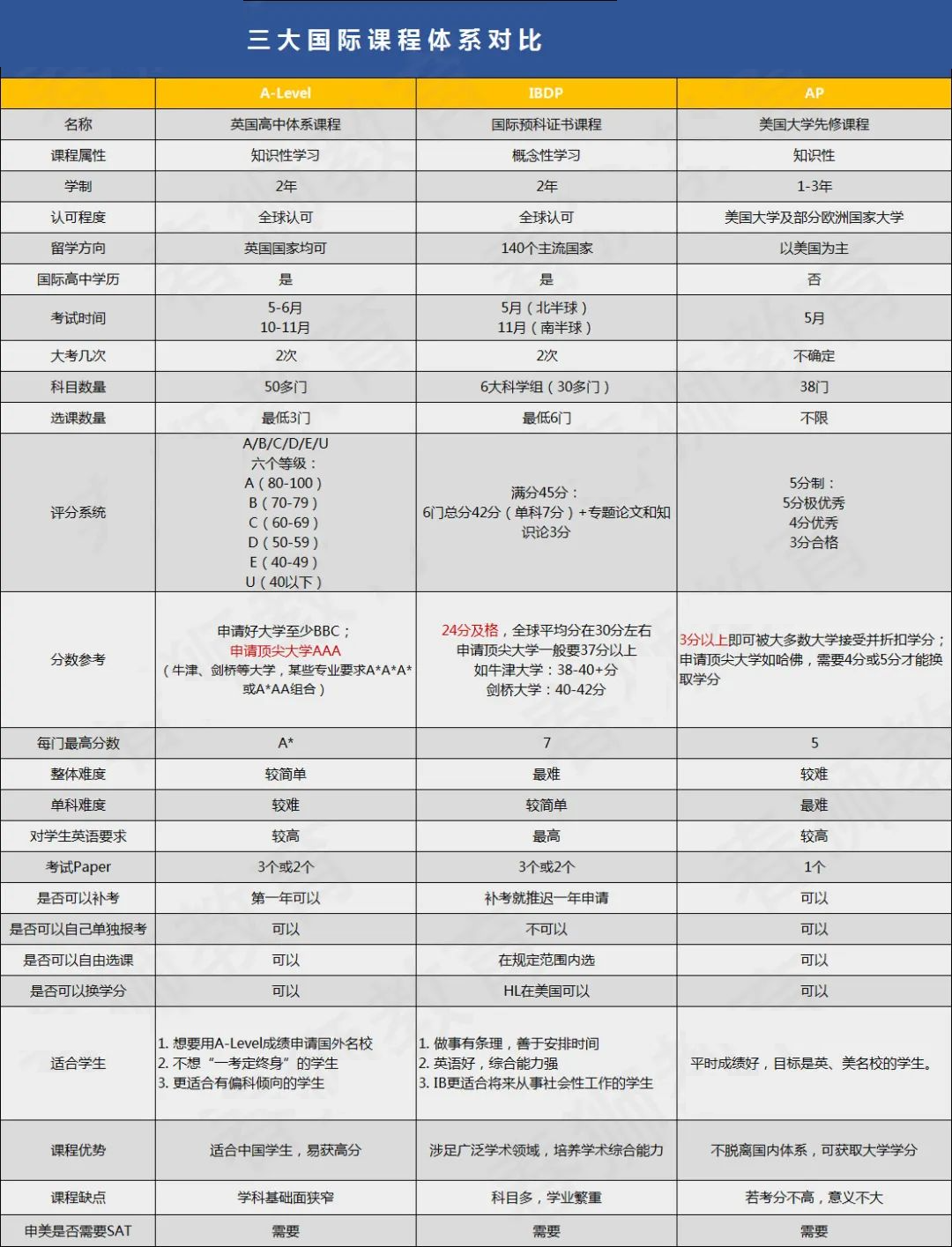
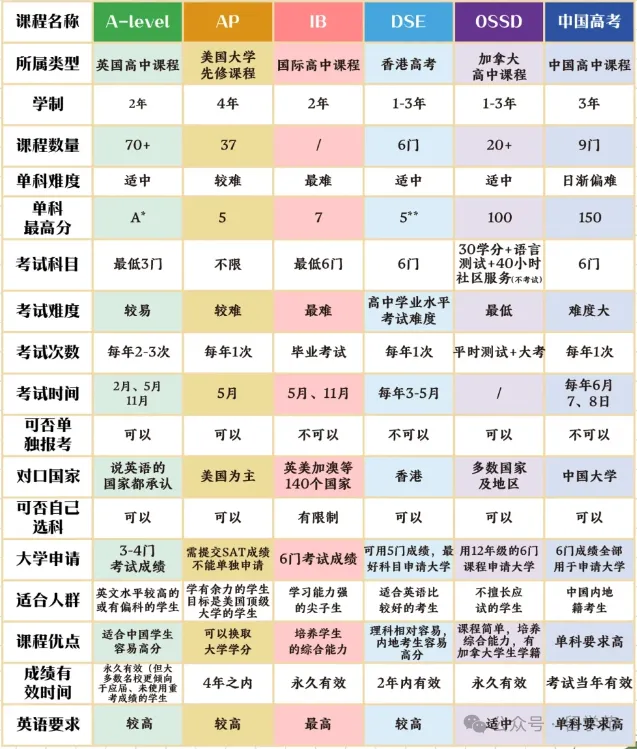
<?xml version="1.0" encoding="utf-8"?>
<feed xmlns="http://www.w3.org/2005/Atom">
  <title>HelloDog</title>
  
  <subtitle>Keep Calm and Carry On</subtitle>
  <link href="https://wsgzao.github.io/atom.xml" rel="self"/>
  
  <link href="https://wsgzao.github.io/"/>
  <updated>2025-04-03T09:51:56.313Z</updated>
  <id>https://wsgzao.github.io/</id>
  
  <author>
    <name>wsgzao</name>
    
  </author>
  
  <generator uri="https://hexo.io/">Hexo</generator>
  
  <entry>
    <title>字节跳动和TikTok内推</title>
    <link href="https://wsgzao.github.io/post/tiktok-referral/"/>
    <id>https://wsgzao.github.io/post/tiktok-referral/</id>
    <published>2026-03-12T04:12:12.000Z</published>
    <updated>2025-04-03T09:51:56.313Z</updated>
    
    <content type="html"><![CDATA[<h2 id="前言"><a href="#前言" class="headerlink" title="前言"></a>前言</h2><p>关于字节跳动网上有很多不同的声音，比如字节和心脏只有一个能跳动。伴随着字节跳动改名抖音集团，公司也在不断拥抱变化调整工作节奏，比如作息时间，OKR周期，福利持续改进等。每个人都拥有自由选择的权利，我们无法控制同事和领导都是善良的，可以逃离互联网选择外企、公务员、国企央企、读书出国甚至更换行业重新开始，也可以像围城一样选择在互联网行业深耕，实现自己的小目标。也许有人会担心35岁后的中年危机，也有人自信笃定，你可以孑然一身纵享人生丝滑，也可能面临上有老下有小的进退两难，无论是主动还是被动的选择生活总是需要继续，每迈出一步做出改变都需要勇气。</p><p>本文是基于发自内心的自愿为前提，和同事沟通不涉及敏感信息，与大家分享下字节跳动和TikTok招聘流程和内推的机会，以及我所在团队的氛围，如果各位对其中的职位感兴趣欢迎投递简历成为同事。</p><h2 id="更新历史"><a href="#更新历史" class="headerlink" title="更新历史"></a>更新历史</h2><p>2023年03月12日 - 初稿</p><p>阅读原文 - <a href="https://wsgzao.github.io/post/tiktok-referral/">https://wsgzao.github.io/post/tiktok-referral/</a></p><hr><h2 id="字节跳动和TikTok招聘的区别"><a href="#字节跳动和TikTok招聘的区别" class="headerlink" title="字节跳动和TikTok招聘的区别"></a>字节跳动和TikTok招聘的区别</h2><blockquote><p>字节跳动和TikTok官方招聘网站的区别主要体现在Location和前端入口细分</p></blockquote><p>字节跳动校园招聘，主要是应届生和实习生</p><p><a href="https://jobs.bytedance.com/campus">https://jobs.bytedance.com/campus</a></p><p>字节跳动中国区的社招职位，职位描述大部分显示中文</p><p><a href="https://jobs.bytedance.com/experienced/position">https://jobs.bytedance.com/experienced/position</a></p><p>字节跳动海外招聘，Job Type可以筛选Experienced&#x2F;Campus&#x2F;Intern，显示英文</p><p><a href="https://jobs.bytedance.com/en/position">https://jobs.bytedance.com/en/position</a></p><p>TikTok海外招聘，Job Type可以筛选Experienced&#x2F;Campus&#x2F;Intern，Location基本都是全球各地的海外国家，显示英文</p><p><a href="https://careers.tiktok.com/position">https://careers.tiktok.com/position</a></p><blockquote><p>内推&#x2F;直接投递&#x2F;猎头推荐&#x2F;简历池捞人</p></blockquote><p>无论上述哪种方式最终候选人的简历都会进入到公司内部的简历池中，HR会定期从简历池捞人发起面试邀请，一般会安排3-5轮面试</p><p>大部分公司会鼓励员工内推，除了众所周知的内推奖金作为正向激励，更重要的是成年人之间的信任和效率</p><h2 id="基础架构职位内部推荐"><a href="#基础架构职位内部推荐" class="headerlink" title="基础架构职位内部推荐"></a>基础架构职位内部推荐</h2><h3 id="SG"><a href="#SG" class="headerlink" title="SG"></a>SG</h3><table><thead><tr><th>ROLES &#x2F; POSITIONS</th><th>JOB ID</th><th>Job Detail</th></tr></thead><tbody><tr><td>SOFTWARE ENGINEER, CLOUD NATIVE</td><td>D2909</td><td><a href="https://careers.tiktok.com/position/7200631875395045669/detail">https://careers.tiktok.com/position/7200631875395045669/detail</a></td></tr><tr><td>SOFTWARE ENGINEER, MIDDLEWARE</td><td>U6798</td><td><a href="https://careers.tiktok.com/position/7200633018326665531/detail">https://careers.tiktok.com/position/7200633018326665531/detail</a></td></tr><tr><td>SOFTWARE ENGINEER, DEVOPS</td><td>J4745</td><td><a href="https://careers.tiktok.com/position/7200636052595231034/detail">https://careers.tiktok.com/position/7200636052595231034/detail</a></td></tr><tr><td>SOFTWARE ENGINEER, R&amp;D SYSTEM</td><td>SQAV</td><td><a href="https://careers.tiktok.com/position/7059250273450313992/detail">https://careers.tiktok.com/position/7059250273450313992/detail</a></td></tr><tr><td>SOFTWARE ENGINEER, CLOUD PLATFORM</td><td>U4269</td><td><a href="https://careers.tiktok.com/position/7202142775449241893/detail">https://careers.tiktok.com/position/7202142775449241893/detail</a></td></tr><tr><td>SOFTWARE ENGINEER, DBA</td><td>B6333</td><td><a href="https://careers.tiktok.com/position/7203271607413066042/detail">https://careers.tiktok.com/position/7203271607413066042/detail</a></td></tr><tr><td>SOFTWARE ENGINEER, SRE</td><td>E5747</td><td><a href="https://careers.tiktok.com/position/7203603759233304889/detail">https://careers.tiktok.com/position/7203603759233304889/detail</a></td></tr><tr><td>TECH LEAD, DBA</td><td>FB1V</td><td><a href="https://careers.tiktok.com/position/7064400706110900494/detail">https://careers.tiktok.com/position/7064400706110900494/detail</a></td></tr><tr><td>TECH LEAD, SRE</td><td>JRCMP</td><td><a href="https://careers.tiktok.com/position/7064408255376820511/detail">https://careers.tiktok.com/position/7064408255376820511/detail</a></td></tr></tbody></table><h3 id="CN"><a href="#CN" class="headerlink" title="CN"></a>CN</h3><table><thead><tr><th>角色 &#x2F; 职位</th><th>职位ID</th><th>职位详情</th></tr></thead><tbody><tr><td>云基架平台研发高级工程师</td><td>U1953</td><td><a href="https://jobs.bytedance.com/experienced/position/7121618800360933639/detail">https://jobs.bytedance.com/experienced/position/7121618800360933639/detail</a></td></tr><tr><td>云基架平台云原生高级研发工程师&#x2F;架构师</td><td>M3509</td><td><a href="https://jobs.bytedance.com/experienced/position/7197317575860439353/detail">https://jobs.bytedance.com/experienced/position/7197317575860439353/detail</a></td></tr><tr><td>存储中间件研发高级工程师</td><td>C5736</td><td><a href="https://jobs.bytedance.com/experienced/position/7121619956118948133/detail">https://jobs.bytedance.com/experienced/position/7121619956118948133/detail</a></td></tr><tr><td>业务架构高级研发工程师&#x2F;架构师</td><td>M0063</td><td><a href="https://jobs.bytedance.com/experienced/position/7197317521489381690/detail">https://jobs.bytedance.com/experienced/position/7197317521489381690/detail</a></td></tr><tr><td>存储研发工程师-广告架构</td><td>2XK2</td><td><a href="https://jobs.bytedance.com/experienced/position/7013558889002830110/detail">https://jobs.bytedance.com/experienced/position/7013558889002830110/detail</a></td></tr></tbody></table><h3 id="团队氛围"><a href="#团队氛围" class="headerlink" title="团队氛围"></a>团队氛围</h3><blockquote><p>Linus Torvalds Quote: “Talk is cheap. Show me the code.”</p></blockquote><ol><li>团队项目有阶段成果产出，受过公司级嘉奖，中长期目标清晰且重要，主要面向全球混合云+云原生的技术栈</li><li>团队负责人懂技术也懂管理，亲自参与具体架构规划，愿意倾听不同的声音灵活调整策略，充分授权</li><li>团队成员主要分布在新加坡和北京，没有PUA和向上管理，团队氛围和谐大家以德服人</li><li>尊重团队成员的作息习惯，一起做有挑战能获得成就感的事情 Always Day 1</li></ol><h3 id="如何内推"><a href="#如何内推" class="headerlink" title="如何内推"></a>如何内推</h3><p>如果对上述职位或者全球其他职位感兴趣，觉得我分享的文章信息有价值，可以点击以下链接或者扫描二维码，搜索Job ID后上传简历即可完成内推，保护简历隐私，没有中间商赚差价</p><p><a href="https://job.toutiao.com/s/SbyavxV">https://job.toutiao.com/s/SbyavxV</a></p><p><img src="https://raw.githubusercontent.com/wsgzao/storage-public/master/img/202303141408339.png"></p><p>如果你希望与我在线沟通或者想了解新加坡的生活，可以访问以下链接</p><p><a href="https://www.linkedin.com/in/aowang">https://www.linkedin.com/in/aowang</a></p><p><a href="https://wsgzao.github.io/index/">https://wsgzao.github.io/index/</a></p>]]></content>
    
    
    <summary type="html">字节跳动和TikTok内推</summary>


    <category term="学习 | Study" scheme="https://wsgzao.github.io/categories/%E5%AD%A6%E4%B9%A0-Study/"/>
    
    
  </entry>
  
  <entry>
    <title>nftables代替iptables的新一代防火墙配置指南</title>
    <link href="https://wsgzao.github.io/post/nftables/"/>
    <id>https://wsgzao.github.io/post/nftables/</id>
    <published>2025-11-23T06:59:49.000Z</published>
    <updated>2025-12-18T06:28:52.412Z</updated>
    
    <content type="html"><![CDATA[<h2 id="前言"><a href="#前言" class="headerlink" title="前言"></a>前言</h2><p>nftables 是 Linux 防火墙子系统的框架（从 Linux 3.13 开始引入），它用于替代旧的 iptables&#x2F;ip6tables&#x2F;arptables&#x2F;ebtables 等工具，提供更统一、更灵活、更高效的防火墙规则管理方式。</p><p>nftables 提供了强大的防火墙管理能力，同时简化了配置。对于初学者，掌握常用的 “增删改查” 命令、表链规则逻辑和持久化操作基本就能满足日常需求。在实际生产环境中，你可以根据需求编写更复杂的规则脚本来实现流量控制、NAT 转发、端口映射等功能。</p><p>相比于传统的 iptables：</p><ul><li>规则更简洁：nftables 用一条规则可以处理多个协议字段，而 iptables 往往需要多条规则。</li><li>可读性更好：nftables 使用类似编程语言的写法，支持批量编辑。</li><li>性能更佳：规则的执行更高效，占用更少的系统资源。</li></ul><p>更多信息也可以直接访问nftables官方wiki<br><a href="http://wiki.nftables.org/">http://wiki.nftables.org/</a></p><h2 id="更新历史"><a href="#更新历史" class="headerlink" title="更新历史"></a>更新历史</h2><p>2025年11月23日 - 初稿</p><p>阅读原文 - <a href="https://wsgzao.github.io/post/nftables/">https://wsgzao.github.io/post/nftables/</a></p><h2 id="nftables安装"><a href="#nftables安装" class="headerlink" title="nftables安装"></a>nftables安装</h2><p>不同发行版安装方式略有差异</p><figure class="highlight plaintext"><table><tr><td class="gutter"><pre><span class="line">1</span><br><span class="line">2</span><br><span class="line">3</span><br><span class="line">4</span><br><span class="line">5</span><br><span class="line">6</span><br><span class="line">7</span><br><span class="line">8</span><br><span class="line">9</span><br><span class="line">10</span><br><span class="line">11</span><br></pre></td><td class="code"><pre><span class="line"># Debian / Ubuntu 系列：</span><br><span class="line">sudo apt-get update</span><br><span class="line">sudo apt-get install nftables</span><br><span class="line"></span><br><span class="line"># CentOS / RHEL 系列：</span><br><span class="line">sudo yum install nftables</span><br><span class="line"></span><br><span class="line"># Fedora：</span><br><span class="line">sudo dnf install nftables</span><br><span class="line"></span><br><span class="line"></span><br></pre></td></tr></table></figure><p>安装完成后，可以启用服务并设置开机启动</p><figure class="highlight plaintext"><table><tr><td class="gutter"><pre><span class="line">1</span><br><span class="line">2</span><br><span class="line">3</span><br><span class="line">4</span><br><span class="line">5</span><br><span class="line">6</span><br><span class="line">7</span><br><span class="line">8</span><br><span class="line">9</span><br></pre></td><td class="code"><pre><span class="line"># 启动服务</span><br><span class="line">sudo systemctl start nftables</span><br><span class="line"></span><br><span class="line"># 查看 nftables 状态</span><br><span class="line">sudo systemctl status nftables</span><br><span class="line"></span><br><span class="line"># 设置开机启动</span><br><span class="line">sudo systemctl enable nftables</span><br><span class="line"></span><br></pre></td></tr></table></figure><h2 id="nftables基础概念"><a href="#nftables基础概念" class="headerlink" title="nftables基础概念"></a>nftables基础概念</h2><p>Netfilter &amp; nftables</p><ul><li>Netfilter 是 Linux 内核中的网络数据包处理子系统，nftables 则是其新一代的用户态工具，用来管理防火墙和 NAT 规则。</li><li>它替代了传统的 iptables、ip6tables、arptables、ebtables，提供统一的配置方式和更灵活的语法。</li></ul><p>要想理解 nftables，需要了解三个核心概念：表（table）、链（chain） 和 规则（rule）。</p><p>Table（表）</p><p>用于逻辑分组规则。类似 iptables 中的 filter、nat 表。<br>nftables 中可以自己命名表，比如 inet filter、ip nat 等。</p><p>Chain（链）</p><p>每个表里可以包含多个链。链中定义了处理数据包的流程（例如 input, forward, output 等）。<br>也可以自定义用户链，用来按需编排复杂逻辑。</p><p>Rule（规则）</p><p>具体的防火墙匹配逻辑和处理动作都写在规则中，挂载在某个表的某条链里。<br>动作可以是：accept, drop, reject, log, redirect, masquerade 等。</p><p>常见命令行</p><ul><li>sudo nft add table <family> <tablename>：创建表</li><li>sudo nft add chain <family> <tablename> <chainname> { … }：创建链，指定类型、hook、priority、policy 等</li><li>sudo nft add rule <family> <tablename> <chainname> <match> <action>：添加规则</li><li>sudo nft list ruleset：查看当前完整配置</li><li>sudo nft delete rule&#x2F;chain&#x2F;table …：删除对应对象</li><li>sudo nft flush ruleset：清空所有规则（谨慎操作）</li></ul><p>协议族 (family)</p><ul><li>ip（仅 IPv4），ip6（仅 IPv6），inet（同时管理 IPv4&#x2F;IPv6），arp，bridge 等。</li><li>一般推荐使用 inet 统一管理 IPv4&#x2F;IPv6 防火墙规则（但NAT 通常只能使用 ip 或 ip6）。</li></ul><p>常见 hook</p><ul><li>prerouting：数据包刚进来，还没决定路由</li><li>input：发往本机的数据包</li><li>forward：要转发给其他目的地的数据包</li><li>output：本机发出的数据包</li><li>postrouting：数据包即将离开本机，常用于 SNAT</li><li>ingress：更早阶段的过滤，在协议栈处理之前</li></ul><p>默认策略 (policy)</p><ul><li>accept：默认放行</li><li>drop：默认丢弃</li><li>常用做法：在关键链（如 input、forward 等）上设置 policy drop，然后再加特定的放行规则（白名单式）</li></ul><p>优先级 (priority)</p><ul><li>每个 hook 可以设置 priority，以决定规则生效的先后顺序。</li><li>常见做法：</li><li>prerouting（DNAT）常用 priority -100</li><li>filter（如 input、forward）常用 priority 0</li><li>postrouting（SNAT）常用 priority 100</li></ul><h3 id="nftables-的基本操作示例"><a href="#nftables-的基本操作示例" class="headerlink" title="nftables 的基本操作示例"></a>nftables 的基本操作示例</h3><p>下面是一些常见的 nftables 命令操作示例，帮助快速上手。</p><figure class="highlight plaintext"><table><tr><td class="gutter"><pre><span class="line">1</span><br><span class="line">2</span><br><span class="line">3</span><br><span class="line">4</span><br><span class="line">5</span><br><span class="line">6</span><br><span class="line">7</span><br><span class="line">8</span><br><span class="line">9</span><br><span class="line">10</span><br><span class="line">11</span><br><span class="line">12</span><br><span class="line">13</span><br></pre></td><td class="code"><pre><span class="line"># 查看当前配置</span><br><span class="line">sudo nft list ruleset</span><br><span class="line"></span><br><span class="line"># 该命令会列出当前系统已生效的所有 nftables 规则集，包括表、链、规则等内容。</span><br><span class="line"></span><br><span class="line"># 新建表</span><br><span class="line">sudo nft add table inet mytable</span><br><span class="line"></span><br><span class="line"># 这里示例了在 “inet” 协议簇中新建一个名为 mytable 的表。</span><br><span class="line"># “inet” 协议簇表示同时支持 IPv4 和 IPv6，你也可以使用 ip, ip6, arp, bridge 等协议簇。</span><br><span class="line"></span><br><span class="line"># 新建链</span><br><span class="line">sudo nft add chain inet mytable mychain &#123; type filter hook input priority 0\; &#125;</span><br></pre></td></tr></table></figure><p>该命令含义：<br>type filter：表明这是一个过滤链。<br>hook input：该链挂载在 “input” 钩子上，处理进来（进入本机）数据包。<br>priority 0：优先级，数值越小，越先处理。</p><p>常见的 hook：<br>input：处理发往本机的数据包。<br>forward：处理转发数据包（主机作为路由器或转发流量时）。<br>output：处理本机发送的数据包。<br>prerouting &#x2F; postrouting：常用于 NAT 场景。</p><p>添加规则<br>在链中添加规则，语法一般类似：</p><figure class="highlight plaintext"><table><tr><td class="gutter"><pre><span class="line">1</span><br><span class="line">2</span><br><span class="line">3</span><br><span class="line">4</span><br><span class="line">5</span><br><span class="line">6</span><br><span class="line">7</span><br><span class="line">8</span><br><span class="line">9</span><br><span class="line">10</span><br></pre></td><td class="code"><pre><span class="line">sudo nft add rule &lt;协议簇&gt; &lt;表名&gt; &lt;链名&gt; &lt;匹配条件&gt; &lt;动作&gt;</span><br><span class="line"></span><br><span class="line">示例：允许 SSH 连接</span><br><span class="line">sudo nft add rule inet mytable mychain tcp dport ssh accept</span><br><span class="line"></span><br><span class="line">允许 TCP 端口为 22（ssh） 的连接通过。</span><br><span class="line"></span><br><span class="line">示例：丢弃某个 IP 地址的访问</span><br><span class="line">sudo nft add rule inet mytable mychain ip saddr 192.168.1.100 drop</span><br><span class="line">匹配源 IP 为 192.168.1.100 的数据包，直接丢弃（drop）。</span><br></pre></td></tr></table></figure><p>修改 &#x2F; 删除 规则</p><p>修改规则 一般先删除再添加。nftables 也支持一些原子操作，比如直接替换，但对小白而言，删除+添加更简单。</p><figure class="highlight plaintext"><table><tr><td class="gutter"><pre><span class="line">1</span><br><span class="line">2</span><br><span class="line">3</span><br><span class="line">4</span><br><span class="line">5</span><br><span class="line">6</span><br><span class="line">7</span><br><span class="line">8</span><br><span class="line">9</span><br><span class="line">10</span><br><span class="line">11</span><br></pre></td><td class="code"><pre><span class="line">列出规则行号</span><br><span class="line">sudo nft list chain inet mytable mychain -a</span><br><span class="line"></span><br><span class="line">-a 参数用于显示规则的句柄（handle），帮助我们精确定位规则。</span><br><span class="line">删除规则</span><br><span class="line"></span><br><span class="line">通过句柄删除</span><br><span class="line">sudo nft delete rule inet mytable mychain handle &lt;句柄号&gt;</span><br><span class="line"></span><br><span class="line">先通过列出规则的句柄，然后再用该句柄删除想要的规则。</span><br><span class="line"></span><br></pre></td></tr></table></figure><p>持久化</p><p>编辑完规则后，如果你想让它们在系统重启后仍然生效，需要持久化配置。</p><figure class="highlight plaintext"><table><tr><td class="gutter"><pre><span class="line">1</span><br><span class="line">2</span><br><span class="line">3</span><br><span class="line">4</span><br><span class="line">5</span><br></pre></td><td class="code"><pre><span class="line">有些发行版会在启动时自动加载 /etc/nftables.conf 中的内容。可以将规则直接写进这个文件。</span><br><span class="line">也可通过命令行导出当前规则到 nftables.conf：</span><br><span class="line">sudo nft list ruleset &gt; /etc/nftables.conf</span><br><span class="line"></span><br><span class="line">重启后，系统会自动读取并应用其中的规则。</span><br></pre></td></tr></table></figure><h3 id="nft-命令行实例小结"><a href="#nft-命令行实例小结" class="headerlink" title="nft 命令行实例小结"></a>nft 命令行实例小结</h3><p>下面汇总一下常见的命令及含义：</p><table><thead><tr><th>命令</th><th>作用</th></tr></thead><tbody><tr><td><code>sudo nft list ruleset</code></td><td>列出当前 nftables 的全部配置</td></tr><tr><td><code>sudo nft add table inet mytable</code></td><td>创建名为 mytable 的表 (协议簇 inet)</td></tr><tr><td><code>sudo nft add chain inet mytable mychain &#123;...&#125;</code></td><td>在 mytable 中创建一条链 (指定 hook &amp; priority)</td></tr><tr><td><code>sudo nft add rule inet mytable mychain ...</code></td><td>在 mychain 中添加规则</td></tr><tr><td><code>sudo nft delete rule inet mytable mychain handle X</code></td><td>删除句柄为 X 的规则</td></tr><tr><td><code>sudo nft flush chain inet mytable mychain</code></td><td>清空 mychain 链中所有规则</td></tr><tr><td><code>sudo nft flush table inet mytable</code></td><td>清空 mytable 表中所有规则</td></tr><tr><td><code>sudo nft delete chain inet mytable mychain</code></td><td>删除 mychain 链</td></tr><tr><td><code>sudo nft delete table inet mytable</code></td><td>删除 mytable 表</td></tr></tbody></table><hr><h2 id="更多示例与技巧"><a href="#更多示例与技巧" class="headerlink" title="更多示例与技巧"></a>更多示例与技巧</h2><p>IPv4 NAT 示例</p><figure class="highlight plaintext"><table><tr><td class="gutter"><pre><span class="line">1</span><br><span class="line">2</span><br><span class="line">3</span><br><span class="line">4</span><br><span class="line">5</span><br><span class="line">6</span><br><span class="line">7</span><br><span class="line">8</span><br><span class="line">9</span><br></pre></td><td class="code"><pre><span class="line">sudo nft add table ip nat</span><br><span class="line">sudo nft add chain ip nat prerouting &#123; type nat hook prerouting priority 0\; &#125;</span><br><span class="line">sudo nft add chain ip nat postrouting &#123; type nat hook postrouting priority 100\; &#125;</span><br><span class="line"></span><br><span class="line"># 例如：将所有发往 192.168.0.100:80 的流量重定向到 8080</span><br><span class="line">sudo nft add rule ip nat prerouting tcp dport 80 redirect to 8080</span><br><span class="line"></span><br><span class="line"># 例如：源地址伪装</span><br><span class="line">sudo nft add rule ip nat postrouting ip saddr 192.168.0.0/24 oif &quot;eth0&quot; masquerade</span><br></pre></td></tr></table></figure><p>IPv6 NAT 示例</p><figure class="highlight plaintext"><table><tr><td class="gutter"><pre><span class="line">1</span><br><span class="line">2</span><br><span class="line">3</span><br><span class="line">4</span><br><span class="line">5</span><br><span class="line">6</span><br><span class="line">7</span><br><span class="line">8</span><br><span class="line">9</span><br></pre></td><td class="code"><pre><span class="line">nft add table inet nat</span><br><span class="line">nft add chain inet nat postrouting &#123; type nat hook postrouting priority 100 \; &#125;</span><br><span class="line">nft add rule inet nat postrouting oif eth0 masquerade</span><br><span class="line"></span><br><span class="line"># 将当前规则输出到配置文件</span><br><span class="line">nft list ruleset &gt; /etc/nftables.conf</span><br><span class="line"># 启用并立即启动nftables服务（重启后自动加载规则）</span><br><span class="line">systemctl enable nftables --now</span><br><span class="line"></span><br></pre></td></tr></table></figure><p>记录日志</p><p>有时需要排查防火墙是否匹配到某条规则，可使用 log 动作：</p><figure class="highlight plaintext"><table><tr><td class="gutter"><pre><span class="line">1</span><br><span class="line">2</span><br></pre></td><td class="code"><pre><span class="line">sudo nft add rule inet mytable mychain tcp dport 80 log prefix &quot;HTTP_PORT80: &quot; drop</span><br><span class="line"></span><br></pre></td></tr></table></figure><p>简要工作流程图</p><figure class="highlight plaintext"><table><tr><td class="gutter"><pre><span class="line">1</span><br><span class="line">2</span><br><span class="line">3</span><br><span class="line">4</span><br><span class="line">5</span><br><span class="line">6</span><br></pre></td><td class="code"><pre><span class="line">flowchart LR</span><br><span class="line">    A[网络数据包] --&gt; B[内核 netfilter]</span><br><span class="line">    B --&gt; C[匹配 nftables hook]</span><br><span class="line">    C --&gt; D[查找对应表 &amp; 链]</span><br><span class="line">    D --&gt; E[规则匹配 / 执行动作]</span><br><span class="line">    E --&gt; F[accept, drop, log等结果]</span><br></pre></td></tr></table></figure><p>当数据包到达内核后，会根据不同阶段（hook）进入相应的 nftables 链匹配规则，并执行对应的动作。</p><h2 id="常见问题"><a href="#常见问题" class="headerlink" title="常见问题"></a>常见问题</h2><blockquote><p>iptables 与 nftables 冲突吗？</p></blockquote><p>大多数发行版已经将 iptables 的后端替换成了 nftables，但仍保留 iptables-nft 兼容包。如果你使用了传统的 iptables 命令，实际上也在调用 nftables 后端。<br>建议统一使用 nftables 命令管理，以免混淆。</p><blockquote><p>如何调试规则？</p></blockquote><ul><li>使用 sudo nft list ruleset 确认最终规则</li><li>dmesg 或 journalctl -k 查看日志</li><li>同时注意网络接口名、IP 地址是否正确；经常出现 NAT 链类型不匹配、priority 值冲突、IPv4&#x2F;IPv6 混淆等问题</li></ul><blockquote><p>发行版文档</p></blockquote><p>部分发行版可能对 nftables 做了额外封装（如 Debian&#x2F;Ubuntu 的 nftables 服务、Red Hat 系的 nftables.conf 位置等），请查看对应发行版的官方指南。</p><blockquote><p>为什么规则不生效或重启后丢失？</p></blockquote><p>需要确认服务是否开启并在开机启动，以及是否将规则持久化保存到 &#x2F;etc&#x2F;nftables.conf 等对应文件里。</p><h2 id="总结"><a href="#总结" class="headerlink" title="总结"></a>总结</h2><ol><li>nftables 的基本结构始终是：表(table) → 链(chain) → 规则(rule)。</li><li>应用场景决定是做 过滤(type filter) 还是 NAT(type nat)，以及要挂载到哪个 hook（如 input、prerouting、postrouting、ingress 等）。</li><li>常见匹配包括源&#x2F;目的 IP、端口、协议、接口名、连接状态 (ct state)、MAC 地址等；动作可为 accept, drop, reject, snat, dnat, masquerade, log 等。</li><li>高级用法如 set（批量黑白名单）、map（值→动作映射）、log（记录日志）、limit&#x2F;meter（限速或计数）能够减少重复规则，提高可读性和性能。</li><li>注意发行版、内核版本、Docker&#x2F;k8s 等环境差异，以免默认配置或自动生成的规则与手动写的规则冲突。也要关注持久化方式和服务启动脚本的配置。</li></ol><h2 id="参考文档"><a href="#参考文档" class="headerlink" title="参考文档"></a>参考文档</h2><p><a href="http://wiki.nftables.org/">nftables官方wiki</a></p><p><a href="https://blog.csdn.net/i89211/article/details/146066955">nftables 入门：简洁高效的 Linux 防火墙管理</a></p><p><a href="https://blog.csdn.net/i89211/article/details/146089016">面向实战的 nftables 防火墙配置指南：从入门到高级</a></p>]]></content>
    
    
    <summary type="html">nftables代替iptables的新一代防火墙配置指南</summary>


    <category term="学习 | Study" scheme="https://wsgzao.github.io/categories/%E5%AD%A6%E4%B9%A0-Study/"/>
    
    
  </entry>
  
  <entry>
    <title>新加坡女佣申请中国签证</title>
    <link href="https://wsgzao.github.io/post/singapore-maid-china-visa/"/>
    <id>https://wsgzao.github.io/post/singapore-maid-china-visa/</id>
    <published>2025-06-14T04:59:49.000Z</published>
    <updated>2025-06-29T07:20:13.434Z</updated>
    
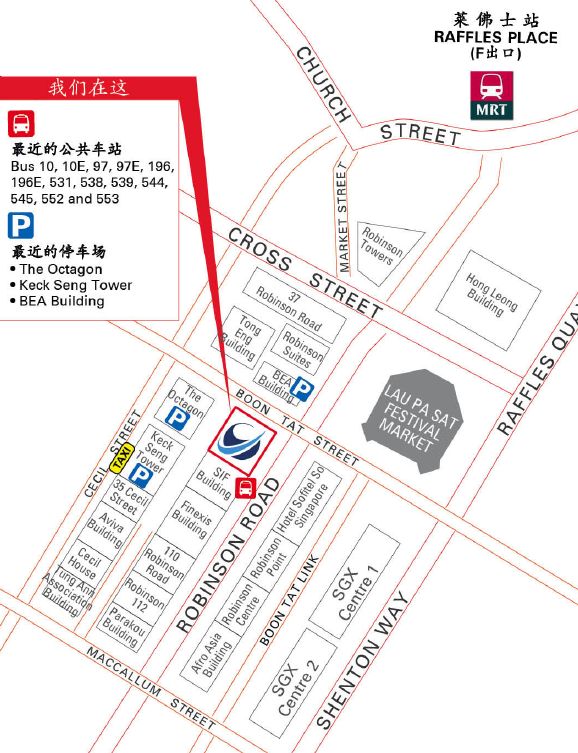
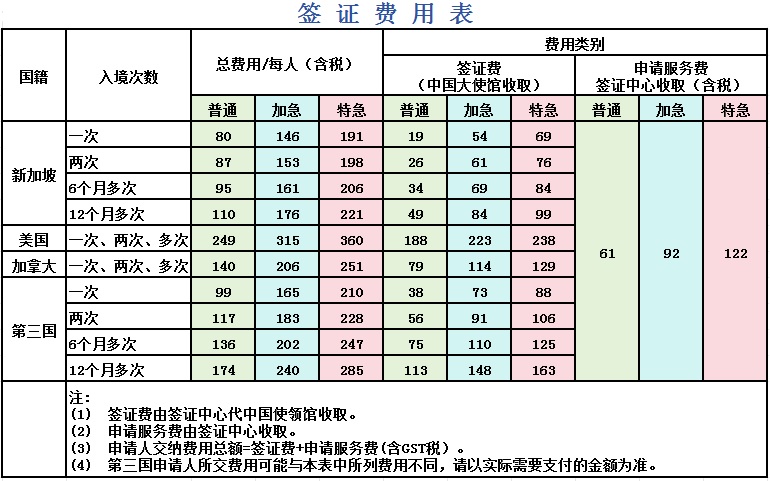
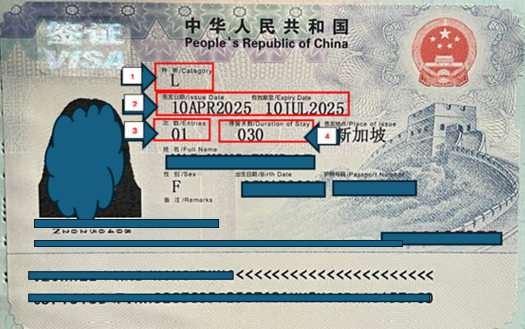
    <content type="html"><![CDATA[<h2 id="前言"><a href="#前言" class="headerlink" title="前言"></a>前言</h2><p>在新加坡请女佣算是很普遍的情况，但对中国家庭来说会有回国探亲的场景，那么就需要考虑安排女佣守家还是一起回中国，这篇文章主要分享如何帮助女佣申请中国S2签证</p><h2 id="更新历史"><a href="#更新历史" class="headerlink" title="更新历史"></a>更新历史</h2><p>2025年06月14日 - 初稿</p><p>阅读原文 - <a href="https://wsgzao.github.io/post/singapore-maid-china-visa/">https://wsgzao.github.io/post/singapore-maid-china-visa/</a></p><hr><h2 id="中国签证中心官方指引"><a href="#中国签证中心官方指引" class="headerlink" title="中国签证中心官方指引"></a>中国签证中心官方指引</h2><p><a href="https://bio.visaforchina.cn/SGP3_ZH/qianzhengyewu">https://bio.visaforchina.cn/SGP3_ZH/qianzhengyewu</a></p><p>根据中国驻新加坡使馆通知，自2024年9月21日起，申请人须通过<strong>新加坡</strong>签证申请中心网站<strong>创建&#x2F;登录账号</strong>，进入<strong>个人中心</strong>，完成在线填写《签证申请表》并上传申请材料。申请流程请点击<a href="https://bio.visaforchina.cn/SGP3_ZH/tongzhigonggao/309563813148102656.html">第一步</a>、<a href="https://bio.visaforchina.cn/SGP3_ZH/tongzhigonggao/309564424816037888.html">第二步</a>、<a href="https://bio.visaforchina.cn/SGP3_ZH/tongzhigonggao/309564841683718144.html">第三步</a>进行查看。<strong>请务必阅读！！！</strong></p><p><strong>特别提醒</strong>：请确认申请状态为线上审核完成，并收到确认邮件之后，再到签证中心递交护照和材料，无需预约。</p><p><strong>【防诈骗提示】！！！</strong></p><p>      近期电信诈骗频发，请注意以下内容：</p><p>      1. 我们绝不会通过电话或短信要求您提供任何个人敏感信息（如身份证号码、银行卡信息、密码等）。</p><p>      2. 签证中心<strong>只接受现场现金或Paynow交费</strong>，其他任何涉及转账、付款的要求，请立即提高警惕并与我们官方核实。</p><p>      3. <strong>如何防范</strong></p><p>      请通过官方渠道核实身份，例如拨打客服热线63420128。</p><p>      如遇可疑情况，建议立即报警！！保护您的财产安全，请保持警惕！</p><h3 id="申请第一步：线上递交申请"><a href="#申请第一步：线上递交申请" class="headerlink" title="申请第一步：线上递交申请"></a>申请第一步：线上递交申请</h3><p>该网站为在新加坡申请中国签证的申请人使用，请确保您选择了正确的地址。（注意查看页面右上方）</p><p>1.建立个人账号，登录进去。（注意查看页面右上方）</p><p>2.所有申请人（不含中国香港、中国澳门签证申请人）均须在线填写申请表：</p><p>2.1 在线填写签证申请表</p><p>2.2 上传所有支持性材料，包括护照、照片及其他申请材料</p><p>2.3 点击提交&#x2F;Submit按钮</p><p>注意：<br>a.须在确认费用页面再次点击**提交&#x2F;Submit按钮，否则状态为PENDING。</p><p>b.线上支付暂未开通，请在申请线上审核完成后，前往签证中心递交材料时交费。</p><p>3.等待线上审核完成（线上审核完成之后您可以到签证中心递交护照等申请材料）</p><p>3.1 您可能收到邮件要求您提供其他材料或做其他修改，此时申请状态为 “Rejected”或“驳回”。</p><p>3.2 您可能收到邮件表示申请已经完成线上审核，此时申请状态为 “Online review completed”，<strong>请打印邮件附件《签证申请凭证》</strong>并与其他材料（请看第二步材料要求）一起携带至签证中心。</p><p>3.3 您可以登录您的账号查询状态。</p><h3 id="申请第二步：线上审核完成后到签证中心递交申请及交费（无需预约）"><a href="#申请第二步：线上审核完成后到签证中心递交申请及交费（无需预约）" class="headerlink" title="申请第二步：线上审核完成后到签证中心递交申请及交费（无需预约）"></a>申请第二步：线上审核完成后到签证中心递交申请及交费（无需预约）</h3><p><strong>1.到签证中心提交如下材料（如有必要，您可能会被要求提供更多材料）：</strong></p><p>（1）签证申请凭证（通知审核完成邮件的附件）</p><p>（2）护照原件</p><p>（3）照片（如果上传照片被提示不符合要求）</p><p>（4）《签证申请表》第一页及第七页，并在第七页签字</p><p>（5）如需上传材料含有亲属关系证明、房产证明的，请携带原件</p><p>（6）如需上传材料含有带条形码的申请材料，请打印并携带</p><p>（7）申请两年多次签证的，请带打印完整的申请表及所有申请材料 </p><p>申请人需到签证申请中心采集十指指纹。以下签证申请人可免采指纹：</p><p>①　未满14周岁或超过70周岁人员；</p><p>②　持外交护照或符合外交、公务、礼遇签证审发条件人员；</p><p>③　五年内持同一本护照在中国驻新加坡使馆申办签证并留存过指纹的人员；</p><p>④　十指手指均残缺或十指指纹均无法留存人员；</p><p>⑤　自2024年9月2日起至2025年12月31日，驻新加坡使馆对符合条件的申请一次或两次入境的短期签证申请人（停留期180日以内）免采指纹。</p><p>郑重提醒，如使馆审核后认为仍需要采集指纹的，签证中心将通知申请人补采。</p><p>申请人须本人亲自前往留取指纹，如发现他人冒充申请人本人留取指纹情况，当事人将被拒绝进入中国境内，并承担由此引发的相应后果。</p><p><strong>2.交费</strong></p><p>在签证申请中心递交申请时交费，接受现金或Paynow支付。</p><h3 id="申请第三步：领取证件"><a href="#申请第三步：领取证件" class="headerlink" title="申请第三步：领取证件"></a>申请第三步：领取证件</h3><p>自在签证中心递交申请之日起计。</p><p><strong>普通申请：第4个工作日取证</strong></p><p><strong>加急申请：第3个工作日取证</strong></p><p>您须凭递交申请时获发的取证单，在工作时间到签证申请服务中心领取证件。</p><p>递交申请和交费: 9:00 -15:00</p><p>取证: 9:00 -16:00</p><h2 id="签证类型及材料清单"><a href="#签证类型及材料清单" class="headerlink" title="签证类型及材料清单"></a>签证类型及材料清单</h2><p>请您根据赴华的主要目的，选择相应的签证种类后，点击查看材料清单。</p><p><a href="https://www.visaforchina.cn/SGP3_ZH/qianzhengyewu/jichuzhishi/banliliucheng">https://www.visaforchina.cn/SGP3_ZH/qianzhengyewu/jichuzhishi/banliliucheng</a></p><table><thead><tr><th>赴华主要目的</th><th>签证种类</th><th>签证种类说明</th></tr></thead><tbody><tr><td>（L）旅游</td><td>L</td><td>( L ) 个人旅游;( L ) 团体旅游;</td></tr><tr><td>（F）交流、访问、考察等</td><td>F</td><td>(F)学术交流活动;(F)文化交流活动（如交流性演出）;(F)宗教交流活动;(F)非政府组织交流活动;(F)志愿者、义工（不超过90日）;(F)持《外国专家来华邀请函》的外国专家;(F)地理测绘活动;</td></tr><tr><td>（M）商业贸易活动</td><td>M</td><td>(M)贸易活动;(M)参加比赛;(M)其他商业活动;</td></tr><tr><td>（Q1）中国公民或具有中国永久居留资格的外国人的家庭成员或亲属（超过180日）</td><td>Q1</td><td>（Q1）因家庭团聚申请入境居留的中国公民的家庭成员,（Q1）因家庭团聚申请入境居留的具有中国永久居留资格的外国人的家庭成员,（Q1）因寄养等原因申请入境居留的人员;</td></tr><tr><td>（Q2）中国公民或具有中国永久居留资格的外国人的家庭成员或亲属（不超过180日）</td><td>Q2</td><td>（Q2）入境短期探亲（不超过180日）的居住在中国境内的中国公民的亲属,（Q2）入境短期探亲（不超过180日）的具有中国永久居留资格的外国人的亲属;</td></tr><tr><td>（S1）中国境内停留居留的外国人的家庭成员或因其他私人事务需要在中国境内停留的人员（超过180日）</td><td>S1</td><td>（S1）入境长期探亲（超过180日）的因工作、学习等事由在中国境内居留的外国人配偶、父母、未满18周岁的子女、配偶的父母,（S1）因其他私人事务需要在中国境内居留的人员;</td></tr><tr><td>（S2）中国境内停留居留的外国人的家庭成员或因其他私人事务需要在中国境内停留的人员（不超过180日）</td><td>S2</td><td>（S2）入境短期探亲（不超过180日）的因工作、学习等事由在中国境内停留居留的外国人的家庭成员,（S2）因其他私人事务（如处理诉讼、继承、医疗事务、打理在华房产等）需要在中国境内停留的人员;</td></tr><tr><td>（Z）工作</td><td>Z</td><td>（Z）入境工作的外国专家,（Z）营业性演出,（Z）外国企业常驻中国代表机构的首席代表、代表,（Z）海上石油作业,（Z）志愿者、义工（超过90日）,（Z）其他取得中国政府主管部门颁发的工作许可入境工作的人员;</td></tr><tr><td>（X1）长期学习（超过180日）</td><td>X1</td><td>（X1）长期学习（超过180日）</td></tr><tr><td>（X2）短期学习（不超过180日）</td><td>X2</td><td>（X2）短期学习（不超过180日）</td></tr><tr><td>（J1）外国常驻中国新闻机构的外国常驻记者</td><td>J1</td><td>（J1）外国常驻中国新闻机构的外国常驻记者;</td></tr><tr><td>（J2）入境进行短期采访报道的外国记者</td><td>J2</td><td>（J2）入境进行短期采访报道的外国记者;</td></tr><tr><td>（C）乘务</td><td>C</td><td>（C）国际列车乘务员,（C）国际航空器机组成员,（C）国际航行船舶的船员及船员随行家属,（C）从事国际道路运输的汽车驾驶员;</td></tr><tr><td>（G）过境</td><td>G</td><td>（G）经中国过境</td></tr><tr><td>（D）永久居留</td><td>D</td><td>（D）入境永久居留的人员</td></tr><tr><td>（R）人才</td><td>R</td><td>（R）国家需要的外国高层次人才和急需紧缺专门人才</td></tr></tbody></table><p><a href=""></a></p><h2 id="新加坡中国签证申请服务中心地址"><a href="#新加坡中国签证申请服务中心地址" class="headerlink" title="新加坡中国签证申请服务中心地址"></a>新加坡中国签证申请服务中心地址</h2><p><img src="https://bio.visaforchina.cn/SGP3_ZH/upload/20240222/b4192108265b424bb94b15a2d8fae324.jpg"></p><p>80 Robinson Road, #16-01&#x2F;02&#x2F;02A, Singapore 068898</p><p>办公时间及节假日安排</p><p>办公时间：星期一到星期五，周末及节假日休息</p><p>递交申请时间:9:00-15:00 (请在线上审核通过后前来递交申请）</p><p>缴费时间:9:00-15:00</p><p>取证时间:9:00-16:00</p><p>联系方式</p><p>电话：63420128 (9:00-14:00）</p><p>Email：<a href="mailto:&#x73;&#x69;&#x6e;&#x67;&#x61;&#x70;&#x6f;&#x72;&#101;&#x63;&#x65;&#x6e;&#x74;&#x72;&#x65;&#x40;&#x76;&#x69;&#115;&#97;&#102;&#x6f;&#114;&#x63;&#x68;&#105;&#x6e;&#x61;&#x2e;&#111;&#114;&#103;">&#x73;&#x69;&#x6e;&#x67;&#x61;&#x70;&#x6f;&#x72;&#101;&#x63;&#x65;&#x6e;&#x74;&#x72;&#x65;&#x40;&#x76;&#x69;&#115;&#97;&#102;&#x6f;&#114;&#x63;&#x68;&#105;&#x6e;&#x61;&#x2e;&#111;&#114;&#103;</a></p><h2 id="真实经验"><a href="#真实经验" class="headerlink" title="真实经验"></a>真实经验</h2><p>如果你完全跟随官方的指引，首次申请一定会遇到一些疑问，可以参考以下信息并提前规划好时间</p><ul><li>申请女佣签证前一定先要帮女佣和随行成员买好机票，建议是往返机票供填表时上传审核</li><li>申请女佣签证填表时有几个注意点<ul><li>大部分人选择帮女佣申请S2签证，一般提前1个月左右申请，单次入境停留时长不超过30天，其他情况以官方信息为准</li><li>女佣照片最好在线提交系统审核通过，不然需要携带照片去线下，多学学如何简单PS</li><li>缅甸女佣可能没有姓，填写的时候和买机票信息保持一致就行</li><li>工作单位就是填写家庭的住址和雇主的信息</li><li>邀请方建议写中国境内的家庭成员信息</li><li>上传附件的时候需要按照指定格式填写中国签证邀请函和雇主担保信，此外随行成员的护照和签证也要一并上传</li><li>审核人员发现问题会发邮件告知具体哪里需要修改提交补充材料，当然一次性通过最好节约时间</li></ul></li><li>审核通过后就是打印带齐材料去线下缴费<ul><li>打印以下材料，申请表的第一页和第七页，Approve邮件的附件确认函</li><li>女佣护照原件</li><li>如果是S2签证，即使首次办理也不需要雇主和女佣本人亲自前往，无需采集指纹</li><li>注意要去的地方是中国签证中心，不是中国大使馆，别跑错片场</li></ul></li><li>按照普通申请流程最快时间也需要2周，在线审批1-3个工作日，线下办理到拿证4个工作日，付费加急可能效果有限，极限情况不建议仅预留1周时间</li><li>个人办理现场现金或Paynow交费99新币，当然找人代办可能时间快一点点，但花费更高牺牲隐私</li></ul><p>请为随行的外籍佣工申请S2签证。如有需要，请向<a href="mailto:&#x73;&#105;&#110;&#x67;&#x61;&#x70;&#111;&#114;&#101;&#x63;&#101;&#x6e;&#x74;&#114;&#x65;&#x40;&#x76;&#x69;&#115;&#x61;&#x66;&#111;&#x72;&#x63;&#x68;&#105;&#x6e;&#x61;&#46;&#x6f;&#x72;&#x67;">&#x73;&#105;&#110;&#x67;&#x61;&#x70;&#111;&#114;&#101;&#x63;&#101;&#x6e;&#x74;&#114;&#x65;&#x40;&#x76;&#x69;&#115;&#x61;&#x66;&#111;&#x72;&#x63;&#x68;&#105;&#x6e;&#x61;&#46;&#x6f;&#x72;&#x67;</a>发送邮件索取雇主担保函，该函件须由雇主填写并随其它所需资料一起上传。</p><p>邀请函<br>Invitation letter<br>邀请人出具的邀请函件（原件、传真件、复印件等均可）。该邀请函须包含以下内容： ——被邀请人个人信息：姓名、性别、出生日期等； ——被邀请人访问信息：来华事由、抵离日期、访问地点、与邀请人关系、费用来源等； ——邀请人信息：姓名、联系电话、地址、邀请人签字等。</p><p>Invitation Letter issued by the foreigner who stays or resides in China for work or long-term study; (The invitation letter may be in the form of fax, photocopy or computer printout, but the consular officer may require the applicant to submit  the original of the invitation letter.) The invitation letter must contain the following information： – Information of the invitee: full name, gender, date of birth, etc.; – Information of the planned visit: purpose of visit, arrival and departure dates, place(s) to visit, relations between the applicant and the  inviting entity or individual, financial source for expenditures, etc. – Information of the inviting entity or individual: name, contact telephone number, address, official</p><p><a href="https://bio.visaforchina.cn/SGP3_ZH/upload/20240227/3a5a5269d2f344728bb0b51f452e1d20.pdf">中国签证邀请函 | Invitation Letter for China Visa</a></p><p><a href="https://www.globalsingapore.sg/wp-content/uploads/2020/06/chinese-sponsorship-explaination-letter-2025.pdf">雇主担保信 | Sponsorship &amp; Explain Letter</a></p><h2 id="常见问题"><a href="#常见问题" class="headerlink" title="常见问题"></a>常见问题</h2><p><a href="https://www.visaforchina.cn/SGP3_ZH/qianzhengyewu/jichuzhishi/changjianwenti/220367642341543936.html">费用表</a></p><p>本签证中心接受现金(新加坡元）、Paynow。</p><p>申请人在申请获得线上审批后前往签证中心递交申请时，需先缴纳费用，以新币结算。</p><p>不论签证审批结果如何，服务费恕不退还。</p><p><img src="https://bio.visaforchina.cn/SGP3_ZH/upload/external/20250414/90644c7462c748f488bbdfa25d13127d.jpg"></p><p><a href="https://www.visaforchina.cn/SGP3_ZH/qianzhengyewu/jichuzhishi/changjianwenti/220324111803617286.html">我可以免签过境 &#x2F; 入境中国吗？</a></p><p>看官方最新公告，自2025年6月12日起，印尼正式被纳入中国240小时过境免签政策适用国家名单，印尼公民可适用240小时过境免签政策便捷来华，中国免签政策适用国家增至55国</p><p><a href="https://www.visaforchina.cn/SGP3_ZH/qianzhengyewu/jichuzhishi/changjianwenti/220324111803617334.html">如何理解签证的入境有效期、入境次数和停留期限？</a></p><p><img src="https://bio.visaforchina.cn/SGP3_ZH/upload/20250603/63d50d327e3e4abf887778f83bf68bee.png"></p><p>图中1箭头所指是您所申请的签证种类。</p><p>图中2箭头所指是签证的入境有效期，是您所持签证入境的有效时间范围。非经签发机关注明，签证自签发之日起生效，于入境有效期满当日北京时间24:00失效。</p><p>以图为例：该签证的自2025年4月10日开始生效，截至2025年7月10日24:00失效。您最晚须于2025年7月10日24:00前入境中国内地。为避免飞机延误等意外情况影响您的行程，建议您最好提前安排入境事宜。</p><p>图中3箭头所指是签证的入境次数，是指您在签证有效期内可以入境的次数。</p><p>以图为例：您可以在2025年4月10至2025年7月10日期间，入境中国内地一次。如次数为2，表示您可以在签证有效期内入境中国两次，如次数显示为M（M为multiple首字母），表示您可以在签证有效期内多次入境中国。</p><p>图中4箭头所指是签证的停留期限，是指您每次入境后被准许停留的时限，自入境次日开始计算。</p><p>以图为例：如您在2025年4月10入境，您可以在中国停留的时间自4月11日起计，不超过30天。如您在2025年7月10入境，则自7月11日起计，不超过30天。</p><p>温馨提示您：只要入境次数仍有剩余，在入境有效期满前的任何时候（期满当日北京时间24：00前），您均可持此签证赴中国。您在中国停留的时间不得超过签证的停留期限。入境次数用完或签证有效期已过，签证即自动失效。</p><p><a href="https://www.visaforchina.cn/SGP3_ZH/qianzhengyewu/jichuzhishi/changjianwenti/220324111803617333.html">我应在启程前多久申请签证？&#x2F; 申请签证一般需要多长时间？</a></p><p>根据申请流程，您需要先在线填表并上传材料，提交申请之后等待线上审核通过，线上审核时间将由申请具体情况等多种因素决定，一搬需要2-4个工作日，或更长时间，目前无法确保具体时间。</p><p>线上审核通过之后，您可以携带相关材料到签证中心递交申请，从到签证中心递交申请当天起计，一般情况下您可以在第4个工作日领取护照和签证，签证中心同时提供加急（第3个工作日取证）和特急（第2个工作日取证）服务，您可以根据需要选择，并须支付相关费用。</p><p>温馨提示您：上述为一般情况下的申请时长，有可能根据实际情况有所增加，请您提前安排申请相关事宜，预留充足时间。</p><p>建议您提前1个月到签证中心递交签证申请，但请不要早于3个月。因为中国签证的入境有效期一般为3个月，如果过早申请，签证可能会在您出发之前就过期失效。例如，如果您准备在7月1日入境中国，最好在6月1日左右递交签证申请。请注意，某些种类签证的入境有效期只有1个月或少于1个月，您可能需要提前2周左右申请签证。</p><p><a href="https://www.visaforchina.cn/SGP3_ZH/qianzhengyewu/jichuzhishi/changjianwenti/220324111803617332.html">签证申请对护照有效期有要求吗？</a></p><p>一般情况下，自申请之日起，护照有效期应在6个月以上。</p><p><a href="https://www.visaforchina.cn/SGP3_ZH/qianzhengyewu/jichuzhishi/changjianwenti/220324111803617331.html">我可以在中国延长签证停留期限吗？</a></p><p>您可以在当地公安机关规定的期限内提出延期申请，但不一定会被批准。逾期滞留将违反中国法律并被处罚。</p><p>更多信息请浏览【中国签证申请服务中心 | Chinese Visa Application Service Center】<br><a href="https://www.visaforchina.cn/SGP3_ZH/qianzhengyewu/jichuzhishi/changjianwenti">https://www.visaforchina.cn/SGP3_ZH/qianzhengyewu/jichuzhishi/changjianwenti</a></p>]]></content>
    
    
    <summary type="html">新加坡女佣申请中国签证</summary>


    <category term="生活 | Life" scheme="https://wsgzao.github.io/categories/%E7%94%9F%E6%B4%BB-Life/"/>
    
    
  </entry>
  
  <entry>
    <title>新加坡信用卡cashback和miles的使用心得</title>
    <link href="https://wsgzao.github.io/post/singapore-creditcard/"/>
    <id>https://wsgzao.github.io/post/singapore-creditcard/</id>
    <published>2025-03-15T03:59:49.000Z</published>
    <updated>2025-03-17T06:32:12.265Z</updated>
    
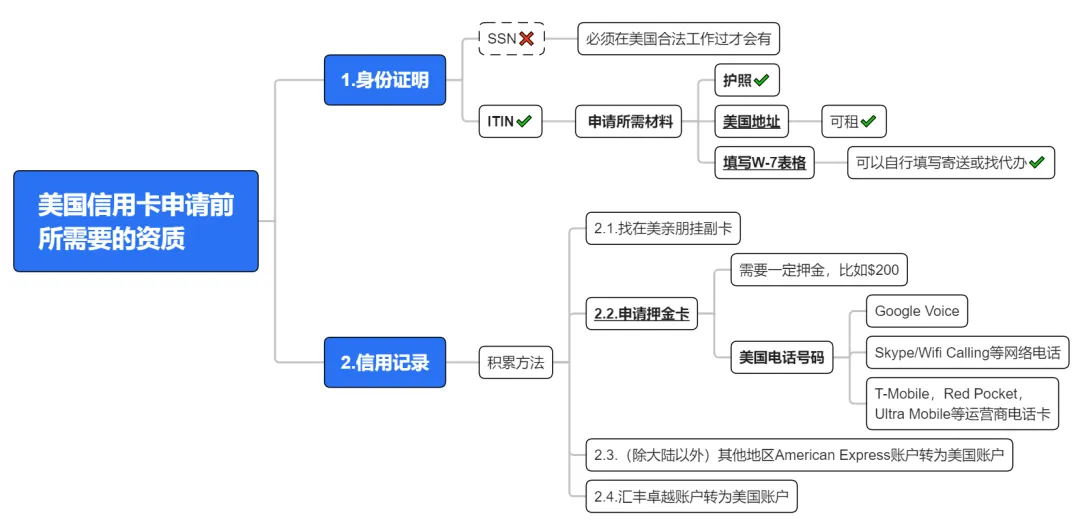
    <content type="html"><![CDATA[<h2 id="前言"><a href="#前言" class="headerlink" title="前言"></a>前言</h2><p>本文主要用于记录自己在新加坡使用信用卡的心得，以及分享为什么从cashback返现转变为miles里程。另外也建议大家根据实际情况量力而行，搞不明白也可以不去折腾信用卡没有损失，即便低成本集齐各大航司酒店会员也要投入超长的时间成本，头等舱和高星酒店本质终是提升旅行舒适度，对普通人来说我的建议是老老实实努力搬砖+学习理财投资，盲目追求极致的信用卡消费除非已经成为你人生的乐趣，不然还有大量可以只活一次的项目等待你解锁</p><h2 id="更新历史"><a href="#更新历史" class="headerlink" title="更新历史"></a>更新历史</h2><p>2025年03月15日 - 更新2025年新加坡和美国信用卡攻略<br>2025年01月01日 - 更新2024年信用卡使用心得<br>2023年12月16日 - 初稿</p><p>阅读原文 - <a href="https://wsgzao.github.io/post/singapore-creditcard/">https://wsgzao.github.io/post/singapore-creditcard/</a></p><hr><h2 id="我的信用卡之路"><a href="#我的信用卡之路" class="headerlink" title="我的信用卡之路"></a>我的信用卡之路</h2><p>2017年前：没认真了解过国内信用卡，只是为了开卡礼，已全部注销<br>2017年：浦发AE白（2021年注销，还剩80w积分不要了），浦发Mastercard无价世界卡<br>2018年：POSB Everyday Card<br>2019年：UOB One Card, Grab Card<br>2021年：UOB Absolute Cashback Card<br>2022年：Trust(Standard Chartered and FairPriceGroup)<br>2023年：UOB Lady’s Solitaire Card，Citi PremierMiles Card<br>2024年：HSBC EGA, HSBC Revolution, CIMB Visa Infinite, 浦发JCB白金梦卡标准版<br>2025年：Chocolate Visa Card, DBS Vantage, 申请美国信用卡入门攻略</p><p>感兴趣的待定事项</p><ul><li>Citi Rewards Mastercard + Instarem Amaze Card【不再考虑】</li><li>HSBC Everyday Global Account (EGA) Get 1% cashback on all eligible GIRO bill payments【已实现】</li><li>HSBC Premier 汇丰卓越理财账户，免3600年费获得【银联钻石+世界之极套卡】</li></ul><p>从上述经历中大概反应了几点</p><ol><li>我也是从信用卡小白开始一点点入门</li><li>经历浦发AE白后我开启了佛系玩转信用卡之路</li><li>新加坡办理的信用卡我已经比较克制（懒），不再单纯为了开卡礼而冲</li><li>上述信用卡基本是0年费，除非忘记Waive，满足基础申请门槛就可以零成本持有</li><li>我从2023年9月开始主力信用卡从cashback返现切换为miles里程，截止11月底已经有4w里程，转型还是慢了点</li><li>从2024年开始同时关注HSBC EGA活动，佛系兼顾cashback和miles信用卡消费场景，以下提到的信用卡均可免年费，别忘记申请waive annual fee就行</li></ol><p>对不同信用卡使用人群的建议</p><ul><li>刚毕业一般在本地三家银行DBS&#x2F;UOB&#x2F;OCBC选择1家作为工资卡，积极工作升职加薪，满足条件再办理信用卡</li><li>信用卡新手，有一定经济基础但不喜欢了解复杂的规则，那么你看完这篇文章大概就可以做到略懂一二</li><li>信用卡老手，可以跳过文章或者也可以留言分享自己的心得</li><li>如果各位有高频出差坐飞机需求，那么可以了解下高端信用卡，比如Citi Prestige</li><li>本文主要针对新加坡信用卡，港卡&#x2F;美卡玩家有自己对应的圈子，我也会简单一笔带过</li></ul><p>如果各位对新加坡信用卡很陌生，可以先浏览以下文章<br><a href="https://milelion.com/credit-cards/guide/">The MileLion’s Credit Card Guide</a></p><h2 id="返现-vs-里程"><a href="#返现-vs-里程" class="headerlink" title="返现 vs 里程"></a>返现 vs 里程</h2><p><a href="https://mp.weixin.qq.com/s/-dD7pCp_Rc4kwkuCK-wB2g">返现划算还是里程划算?</a></p><blockquote><p>上面的文章虽然是2022年，但大趋势没有变化，结合我自身的感受说下理解</p></blockquote><p>UOB One Card作为曾经的主力卡，目前即将入土【2024年开始满血复活重新作为主卡消费】</p><ol><li>我主要看中UOB One Account高利率，10w(最新15w)存款封顶，每月500消费达标比较容易</li><li>月消费稳定且无太多限制，作为cashback卡也还凑合</li><li>UOB Absolute Cashback Card原本是搭配Grab Card，现在已经入土</li></ol><p>DBS Yuu在2024年跻身成为里程神卡</p><ol><li>在合作商户购物，每月消费600享受18%返现，超出部分继续5%，Yuu Points可以兑换现金Voucher也可以换里程1:10</li><li>如果经常在Cold Storage超市购物，每月线下购买Voucher就非常灵活了</li></ol><p>Trust海外消费必备信用卡</p><ol><li>不想折腾里程复杂的计算，那么带上1张Trust，免全球货币转换费，还可以通过切换Debit模式免利息取现</li><li>DBS Yuu选择和DFI Retail Group合作，Trust则投靠FairPrice，只是活动没那么吸引人，不排除以后奋发图强</li></ol><p>UOB Lady’s Solitaire Card作为目前新晋主力卡，当然也可能走下神坛【2024年跌落神坛】</p><ol><li>2023年开放男同胞申请，且1:6消费里程，瞬间跻身为神卡【2024年变为1:4】</li><li>可以无缝代替UOB One Card继续享受One Account利息</li><li>类别7选2后注意避开合作商户(如Cold Storage&#x2F;Gaint&#x2F;BreadTalk等)，因为只能获得返现而不是里程</li></ol><p>Citi PremierMiles Card作为辅助里程卡，有几个原因</p><ol><li>几乎没有什么消费限制，里程永不过期，送2次贵宾厅，可以免年费</li><li>Payall作为新加坡最便宜的付费买里程渠道，促销期间可以做到1分钱1里程，用来缴税&#x2F;租房&#x2F;还房贷，不香么</li><li>Payall搭配HSBC EGA GIRO还款那简直就是大杀器，轻轻松松拿1% cashback</li><li>如果对里程有执念，那么选择诸如Citi Rewards + Amaze的组合，达到每月1k上限再换其他信用卡补充，就是比较折腾</li></ol><p>信用卡贵宾厅权益有3张卡可以作为0成本互补方案</p><ol><li>Citi PremierMiles Card，Priority Pass简称PP卡，每年2次，方便海外使用</li><li>CIMB Visa Infinite，Dragonpass龙腾出行，每年3次，方便国内使用</li><li>国内可以考虑持有JCB外币卡，作为东南亚和日本贵宾厅的权益补充</li><li>2025年新增加DBS Vantage获取8.5w里程开卡礼，低成本增加里程+可家庭共享的10次PP卡贵宾厅权益</li></ol><p>除了信用卡以外在2024年我也感受到了HSBC慈善家的温暖</p><ol><li>HSBC EGA Get 1% cashback on all eligible GIRO bill payments【每月用EGA来还各种GIRO额外1%现金返还，可获得 300&#x2F;500 SGD】</li><li>HSBC Everyday Global Account Bonus Interest Promotion Incremental ADB【隔月清空储蓄账户获取额外利息】</li><li>细节可以参考小红书博主【坡岛小白菜卷不起来】</li></ol><p>新加坡刚性年费信用卡候选名单</p><ol><li>Citi Prestige Card</li><li>UOB Visa Infinite Metal Card</li><li>AMEX Platinum Charge</li></ol><h3 id="返现信用卡"><a href="#返现信用卡" class="headerlink" title="返现信用卡"></a>返现信用卡</h3><p><a href="https://mp.weixin.qq.com/s/Wj1yhBuPZzu2GLy5dyUKgA">信用卡返现 终极攻略 (2023版)</a></p><p><a href="https://www.youtube.com/watch?v=8bv6GP8s3qw">My Top 4 Cashback Credit Cards for 2023</a></p><p>各位看上面的文章即可，我觉得已经总结的很到位了，拒绝被银行反撸</p><ul><li>每月最低消费要求</li><li>单笔最低消费</li><li>现金返还上限</li><li>MCC限制多样</li><li>返现规则复杂</li></ul><h3 id="里程信用卡"><a href="#里程信用卡" class="headerlink" title="里程信用卡"></a>里程信用卡</h3><p>截止2024-02-29前的新加坡里程卡推荐搭配阵容是</p><ol><li>UOB Lady’s (Solitaire) Card</li><li>Citi Rewards Mastercard</li><li>Instarem Amaze Card</li></ol><p><a href="https://docs.qq.com/doc/DU1prYlZaR0hCcUNX">新加坡里程卡最佳搭配</a></p><p><a href="https://www.youtube.com/watch?v=f8NqHMAb2Fw">My Top 5 Miles Credit Cards for 2023</a></p><p>大部分人会觉得里程计算公式有时候很复杂，是因为如果追求太极致会走火入魔，心累</p><ul><li>没做好银行的FAQ细则阅读理解，什么MCC&#x2F;Whitelist不管一把梭，使用信用卡姿势错误导致颗粒无收</li><li>利用Amaze将线下消费转化为线上</li><li>利用XNAP赚食阁积分</li><li>利用Kris+叠buff</li><li>各种Digital Wallet之间倒腾</li></ul><p>Heymax - <a href="https://heymax.ai/">https://heymax.ai/</a><br>用于查询MCC商户是否符合信用卡的返现或者里程条件</p><h3 id="境外消费"><a href="#境外消费" class="headerlink" title="境外消费"></a>境外消费</h3><p>不考虑里程积分转化等复杂公式，Trust Link Card已经成为最简单的方案，理由如下</p><ol><li>FCY外币交易费: 无 (所以非常适合旅行时使用)</li><li>汇率: 实时汇率</li><li>年费: 永久豁免</li><li>现金预支费: 无（海外取现前提前还款超过信用卡额度，可以免利息）</li><li>启用Dedit Card模式提现没有手续费</li></ol><p>除了Amaze或许还能和MasterCard里程卡挂钩，只是汇率差一些，而Revolut和YouTrip等用卡场景进一步被压缩</p><p>常用小知识：FCY(Foreign Currency Transaction Fee)</p><ul><li>当使用信用卡与海外银行交易外币时，会产生外币转换费FCY，费用在3%左右</li><li>与之对应的DCC(Dynamic Currency Conversion)动态货币转换费一般以当地货币结算可以避免</li></ul><h2 id="信用卡开卡礼"><a href="#信用卡开卡礼" class="headerlink" title="信用卡开卡礼"></a>信用卡开卡礼</h2><ol><li>如果追求信用卡开卡礼，一般首年免年费，注销后等待12月就又是新用户了，周而复始</li><li>一般信用卡要求500&#x2F;1000的消费额才能获得开卡礼，最快的合规方法就是超市购物券</li></ol><p>能用来给信用卡冲消费额的其它几种方法是：</p><ul><li>Cold Storage Voucher (纸本购物券）</li><li>NTUC Voucher (纸本购物券）</li><li>NTUC Gift Card（可以任意充值）</li><li>FPG E-Voucher (电子购物券）</li><li>晟菘超市购物券（纸本购物券）</li><li>Heymax买Voucher(电子购物券）</li></ul><p>ShengSiong或者ColdStorage买券1年有效，隔天post，小红书有人分享SUSHIRO最快当天post，供参考</p><p><a href="https://www.xiaohongshu.com/explore/653e4bf1000000000403b8c4">月尾冲信用卡消费额避坑！</a></p><h2 id="美国信用卡入门"><a href="#美国信用卡入门" class="headerlink" title="美国信用卡入门"></a>美国信用卡入门</h2><p>网上其实有不少教程教人怎么申请美卡，但是他们说得都太复杂了。其实办理美国信用卡主要就两类材料：身份证明+信用记录</p><p>Q: 办美卡需要什么材料？</p><p>A: 需要个人护照、美国电话卡、美国地址、美国银行账户等资料。美国电话卡、地址是用来作为银行预留信息的</p><p><a href="https://www.xiaohongshu.com/discovery/item/67caef99000000002900cbbb?source=webshare&xhsshare=pc_web&xsec_token=AB_15cVOkBixkDyTSPvFolNncZ2F96IlZnugvMbBt_av8=&xsec_source=pc_share">云居民的5张美卡配置思路 - 景大叔</a></p><p><a href="https://mp.weixin.qq.com/s?__biz=MzU4NDQ3MzM0NQ==&mid=2247486922&idx=1&sn=dbfa1532767f5290372f11902b20f153&chksm=fd9803a4caef8ab283ab762661b5f5ed8bf9c00c5138955c30ef45868f5e703f96825530da6c&token=925711464&lang=zh_CN#rd">美卡入门 | 人在国内怎么申请美国信用卡？ 从0开始，少走弯路，一文讲清楚！</a></p><p><img src="https://raw.githubusercontent.com/wsgzao/storage-public/master/img/20250317133618112.png"></p><h3 id="什么是ITIN？"><a href="#什么是ITIN？" class="headerlink" title="什么是ITIN？"></a>什么是ITIN？</h3><p><strong>ITIN</strong>（Individual Taxpayer Identification Number，<strong>个人纳税识别号码</strong>）是由美国国税局（IRS）发放的税务处理号码，主要适用于那些无法获得社会安全号码（SSN）但需要进行美国纳税申报的个人。</p><p>Social Security number (SSN) 美国的社会安全号码: 相当于国内的身份证，但隐私性更高，只有在美国合法工作生活过的人才有。所以这条难度很大，本文不赘述。</p><p>ITIN仅用于税务目的，不适用于税务系统之外的身份识别。联邦财政部国税局与司法部移民局不同，合法工作与否不是执法目的，合法缴税才是主要目的。国税局和移民局相互独立，不互通信息，因此，报税并<strong>不会对申请人今后的移民身份产生影响</strong>。</p><p><strong>主流大银行</strong>基本都支持ITIN持有者<strong>线上</strong>申请信用卡：</p><ul><li>American Express（Amex） | 美国运通</li><li>Bank Of America（BoA) | 美国银行</li><li>Barcaly | 巴克莱</li><li>Citi Bank  | 花旗银行</li><li>Capital One（C1）  | 第一资本银行</li><li>Chase | 大通银行</li><li>Wells Fargo | 富国银行</li><li>Apple Card</li><li>Alliant Credit Union | Alliant 信用合作社</li><li>Digital Federal Credit Union | 数码联邦信用合作社</li><li>Go2 Bank</li><li>PayPal Credit</li><li>Venmo Credit</li></ul><p>ITIN在三年内没有报税则会过期。因此，持有ITIN的个人需每三年报税一次以保持ITIN的有效性。ITIN过期可以续签，流程和首次申请类似。</p><h3 id="Amex-Global-Transfer"><a href="#Amex-Global-Transfer" class="headerlink" title="Amex Global Transfer"></a>Amex Global Transfer</h3><p>如果你有大陆地区以外的美国运通Amex的信用卡，可以申请Global Transfer，把所在国家的信用记录转到美国，可以直接向客服申请美国运通Amex的信用卡。不过请注意，国内的运通如招行百夫长<strong>并不是</strong>真正的运通发行的卡，无法使用这个方法。香港地区的运通可以。</p><p>这个方法甚至<strong>不需要办理ITIN</strong>，唯一的问题就是以后只能办Amex的卡，没有ITIN的话没办法办理其他银行如CHASE的卡。所以积累信用和办理ITIN可以同时进行，ITIN办好以后把信息添加进去就可以。</p><p>只考虑Amex GT不想折腾ITIN的话，申请Hilton Aspire和Marriott Bonvoy Brilliant两张神卡也足够了</p><h3 id="汇丰“曲线救国”"><a href="#汇丰“曲线救国”" class="headerlink" title="汇丰“曲线救国”"></a>汇丰“曲线救国”</h3><p>汇丰的方法相对稳健，适合有一定资金的客户。汇丰有一地卓越，全球卓越的政策，可以先办理汇丰中国的卓越premier账户，目前是资产50w门槛，然后再申请香港和美国的premier账户，开户成功后，通过美国汇丰的客户经理，办理美国汇丰的信用卡。</p><p>美国汇丰信用卡是支持海外地址申请的，也就是可以直接将申请的信用卡邮寄到中国。用这个方法积累信用也<strong>不需要办理ITIN</strong>，但由于你的地址不在美国，是没办法积累美国的信用记录的，也没办法申请其他银行的信用卡，只有添加上ITIN和美国地址之后才可以建立美国的信用记录，前面积累的时间也不会浪费。根据一些数据点，有部分用户改了美国地址之后会被关户，但似乎跟券商出入金关系比较大。</p><p>国内卓越达标可以免顶级信用卡3600的年费外，汇丰卓越理财账户的<strong>开户礼</strong>也是一大亮点</p><h2 id="信用卡申请和评测"><a href="#信用卡申请和评测" class="headerlink" title="信用卡申请和评测"></a>信用卡申请和评测</h2><h3 id="申请渠道"><a href="#申请渠道" class="headerlink" title="申请渠道"></a>申请渠道</h3><ol><li>不考虑通过官网或者偶遇线下信用卡roadshow的话可以定期关注SingSaver和MoneySmart</li><li>单纯为了开卡礼，买NTUC FairPrice&#x2F;Cold Storage Voucher或者充值Gift Card都可以快速达成消费500或1000的条件，有效期1年自用&#x2F;送人&#x2F;转卖都很弹性</li><li>信用卡里程兑换后，购买机票时可以关注下新航Spontaneous的促销活动</li></ol><p>有小伙伴可能会等12个月反复注销拿信用卡开卡礼，我最近正好在看自己的信用报告（Credit Bureau Report，简称 CBS Report），名下信用记录在调查报告上360无死角，虽然是1998 AA级，但好奇心使然顺手查了下小红书的失败案例，<a href="http://xhslink.com/a/hNewg2xyrH17">信用评级直接从 AA 掉到 FF</a><br>，如果各位是打算在新加坡贷款买房或者申请身份，最好还是不要为了薅羊毛的蝇头小利而影响自己的信用分</p><p>SingSaver - <a href="https://www.singsaver.com.sg/">https://www.singsaver.com.sg/</a></p><p>MoneySmart - <a href="https://www.moneysmart.sg/">https://www.moneysmart.sg/</a></p><p>KrisFlyer Spontaneous Escapes - <a href="https://www.singaporeair.com/en_UK/sg/plan-travel/promotions/global/kf/kf-promo/kfescapes/">https://www.singaporeair.com/en_UK/sg/plan-travel/promotions/global/kf/kf-promo/kfescapes/</a></p><p>KrisFlyer 自由而飞 – 里程兑换，即兴出发 - <a href="https://www.singaporeair.com/zh_CN/cn/plan-travel/promotions/global/kf/kf-promo/kfescapes/">https://www.singaporeair.com/zh_CN/cn/plan-travel/promotions/global/kf/kf-promo/kfescapes/</a></p><h3 id="信用卡评测"><a href="#信用卡评测" class="headerlink" title="信用卡评测"></a>信用卡评测</h3><p>Seedly - <a href="https://blog.seedly.sg/category/cards/">https://blog.seedly.sg/category/cards/</a></p><p>THE MILELION - <a href="https://milelion.com/">https://milelion.com/</a></p><p>我能知道HSBC中国的活动，是因为Google搜到美卡玩家的【新加坡薅卡小记】<br><a href="https://www.uscardforum.com/t/topic/179248">https://www.uscardforum.com/t/topic/179248</a><br><a href="https://www.uscreditcardguide.com/zh/">https://www.uscreditcardguide.com/zh/</a></p><p>微信公众号<br>狮城玩卡 - <a href="https://mp.weixin.qq.com/s/8FKJJHF9gMDi910BgAiwyg">信用卡竟然还能打怪升级？</a><br>帅帅说卡 - <a href="https://mp.weixin.qq.com/s/SoopXzTlEVxq7rcO_8adyQ">银联钻石+世界之极套卡，免年费！</a></p><p>小红书账号：新加坡信用卡相关<br>money89 - 八九不离线<br>117568348 - 小岛<br>182001168 - 坡岛小白菜卷不起来</p>]]></content>
    
    
    <summary type="html">新加坡信用卡cashback和miles的使用心得</summary>


    <category term="生活 | Life" scheme="https://wsgzao.github.io/categories/%E7%94%9F%E6%B4%BB-Life/"/>
    
    
  </entry>
  
  <entry>
    <title>关于AI的基础知识和第三方AI应用</title>
    <link href="https://wsgzao.github.io/post/ai/"/>
    <id>https://wsgzao.github.io/post/ai/</id>
    <published>2025-02-01T02:59:49.000Z</published>
    <updated>2025-03-11T09:27:42.063Z</updated>
    
    <content type="html"><![CDATA[<h2 id="前言"><a href="#前言" class="headerlink" title="前言"></a>前言</h2><p>当年无数人自愿或者调剂到计算机专业从而入行IT，如果说小时候的梦想是当科学家，那么IT行业最吸引人的莫过于人工智能Artificial Intelligence (AI)，只是发展过程比较缓慢，大家感知也不明显。当然2022年底OpenAI的ChatGPT横空出世，让我们意识到原来早年的图灵测试Turing Test已照进现实，机器学习和神经网络为后来者铺路，Google 2017年发布的Transformer模型成为关键转折点，ChaptGPT基于Transferomer模型经历了几轮迭代成功出圈，现如今各种大语言模型百花齐放，而2025年DeepSeek在工程优化上的开源成果让更多企业应用可以享受低成本带来的收益，我也很期待AI未来在其他行业如工业、农业、医疗等领域继续开枝散叶。</p><h2 id="更新历史"><a href="#更新历史" class="headerlink" title="更新历史"></a>更新历史</h2><p>2025年02月01日 - 初稿</p><p>阅读原文 - <a href="https://wsgzao.github.io/post/ai/">https://wsgzao.github.io/post/ai/</a></p><hr><h2 id="生成式-AI-究竟是个啥？"><a href="#生成式-AI-究竟是个啥？" class="headerlink" title="生成式 AI 究竟是个啥？"></a>生成式 AI 究竟是个啥？</h2><p><a href="https://www.ithome.com/0/773/985.htm">到底什么是“生成式 AI”？</a></p><p>随着 ChatGPT、DeepSeek等 AI 产品的火爆，生成式 AI 已经成为了大家茶余饭后热议的话题。</p><p>人工智能生成内容AIGC（Artificial Intelligence Generative Content）</p><p>可是，为什么要在 AI 前面加上“生成式”这三个字呢？</p><p>如果将人工智能按照用途进行简单分类的话，AI 其实要被划分为两类：决策式 AI 和生成式 AI。</p><p>决策式 AI：专注于分析情况并做出决策。它通过评估多种选项和可能的结果，帮助用户或系统选择最佳的行动方案。</p><p>例如，在自动驾驶车辆中，就是通过决策式 AI 系统决定何时加速、减速或变换车道。</p><p>生成式 AI：专注于创造全新内容。它可以根据学习到的数据自动生成文本、图像、音乐等内容。</p><p>例如，你可以将几篇论文发给生成式 AI，他可以生成一篇文献综述，囊括了这几篇论文的关键思想、重要结论。</p><p><strong>轻松搞懂“生成式 AI”原理</strong></p><p>在刚刚的介绍中，大家应该都对生成式 AI 有了一个表象的认知：学习知识 + 生成新知识。</p><p>但它是如何学习的呢？又是如何生成的呢？</p><p>这时候，我们就得来看看生成式 AI 更深层次的定义了：</p><p>以 ChatGPT 为代表的生成式 AI，是对已有的数据和知识进行向量化的归纳，总结出数据的联合概率。从而在生成内容时，根据用户需求，结合关联字词的概率，生成新的内容。</p><p>是不是一下子懵了？</p><p>不急，这就触及到生成式 AI 的原理了。</p><p>其实制作一个生成式 AI，就像把一个泥人变成天才，一共需要四步：捏泥人 → 装大脑 → 喂知识 → 有产出</p><p><strong>Step1：捏泥人 —— 硬件架构的搭建</strong></p><p>要打造一个生成式 AI 的“泥人”，首先要考虑的就是底层硬件。底层硬件构成了生成式 AI 的算力和存力。</p><p><strong>算力 —— 泥人的骨架</strong></p><p>生成式 AI 需要进行大量的计算，尤其是在处理如图像和视频时。大规模计算任务离不开下面这些关键硬件：</p><ul><li>GPU（Graphics Processing Unit，图形处理单元）：提供强大的并行计算能力。通过成千上万个小处理单元并行工作，大幅提高了计算效率。</li><li>TPU（Tensor Processing Unit，张量处理单元）：专门为加速人工智能学习而设计的硬件，能够显著加快计算速度，进一步增强了骨架的强度。</li></ul><p><strong>存力 —— 泥人的血液</strong></p><p>生成式 AI 需要处理和存储大量的数据。</p><p>以 GPT-3 为例，光是训练参数就达到了 1750 亿个，训练数据达到 45TB，每天会产生 45 亿字内容。</p><p>这些数据的存放离不开下面这些硬件设施：</p><ul><li>大容量 RAM：在训练生成式 AI 模型时，大量的中间计算结果和模型参数需要存储在内存中，大容量的 RAM 能够显著提高数据处理速度。</li><li>SSD（固态硬盘）：大容量的 SSD 具有高速读取和写入能力，可以快速加载和保存数据，使泥人能够高效地存储信息。</li></ul><p>泥人捏好了，但是现在只能是一个提线木偶，没有任何能力，所以我们就要给他装上大脑。</p><p><strong>Step2：装大脑 —— 软件架构构建</strong></p><p>软件架构是泥人的大脑，它决定了这个泥人将以什么样的方式对数据进行思考推理。</p><p>从仿生学的角度，人类希望 AI 能够模仿人脑的运行机制，对知识进行思考推理 —— 这就是通常所说的深度学习。</p><p>为了实现深度学习，学者们提出了大量的神经网络架构：</p><ul><li>深度神经网络（DNN）是最普遍的神经网络架构，但是随着数据对于网路架构的要求越来越复杂，这种方法逐渐有些吃力。</li><li>卷积神经网络（CNN）是一种专门为处理图像数据而设计的神经网络架构，能够有效地处理图像数据，但是需要对输入数据进行复杂的预处理。</li><li>随着任务复杂度的增加，循环神经网络（RNN）架构成为处理序列数据的常用方法。</li><li>由于 RNN 在处理长序列时容易遇到梯度消失和模型退化问题，著名的 Transformer 算法被提出。</li></ul><p>随着算力的发展，生成式 AI 的网络架构发展越来越成熟，也开始各有侧重：</p><ul><li>Transformer 架构：是目前文本生成领域的主流架构，GPT、llama2 等 LLM（大语言模型）都是基于 Transformer 实现了卓越的性能。</li><li>GANs 架构：在图像生成、视频生成等领域有广泛应用，能够生成高质量的图像和视频内容。</li><li>Diffusion 架构：在图像生成、音频生成等领域取得了很好的效果，能够生成高质量、多样化的内容。</li></ul><p><strong>Step3：喂知识 —— 数据训练</strong></p><p>目前有两种训练方式：预训练和 SFT（有监督微调）</p><p>预训练：是指将一个大型、通用的数据集作为知识喂给 AI 进行初步学习。</p><p>经过预训练的模型叫作“基础模型”，它对每个领域都有所了解，但是无法成为某个领域的专家。</p><p>SFT：SFT 是指在预训练之后，将一个特定任务的数据集喂给 AI，进一步训练模型。</p><p><strong>Step4：有产出 —— 内容生成</strong></p><p>在理解完大量词语、句子之后，AI 就可以生成内容了。它是如何生成内容的呢？</p><p>AI 提供了一个调节参数，叫温度，范围从 0 到 1。</p><ul><li>在温度为 0 时，说明匹配概率要选尽量大的，在以上例子中，AI 很可能选择“饭”；</li><li>在温度为 1 时，说明匹配概率要选尽量小的，在以上例子中，AI 很可能选择“饼”。</li></ul><p>数值越接近 1，得到的内容越天马行空。</p><p>但是，我们看到大多数 AI 产品，只有一个对话框，如何修改温度参数呢？</p><p>答案是“提示词”，也就是我们通常所说的 prompt。</p><ul><li>如果你输入是“你是一名某某领域的专家，请用严谨的口吻写一篇关于 xx 的文献综述。”这时 AI 的温度接近 0，就会选择匹配概率尽量高的词语生成句子。</li><li>如果你输入是“请你请畅想一下 xx 的未来。”这时 AI 的温度接近 1，就会选择匹配概率尽量低的词语组成句子，生成意想不到的内容。</li></ul><p>现在知道 prompt 的重要性了吧！</p><p>所以，我们可以认为，AI 生成的本质就是一场词语接龙：AI 根据当前字，联系它之前记录的下个字的出现概率以及你的期望，选择接下来的字。</p><h2 id="AI基础知识"><a href="#AI基础知识" class="headerlink" title="AI基础知识"></a>AI基础知识</h2><p>AI教育知识普及的先锋就必须得提到Andrew Ng</p><p><a href="https://www.coursera.org/instructor/andrewng">https://www.coursera.org/instructor/andrewng</a></p><p><a href="https://learn.deeplearning.ai/courses/ai-python-for-beginners/lesson/1/introduction">https://learn.deeplearning.ai/courses/ai-python-for-beginners/lesson/1/introduction</a></p><p>不习惯看纯英文也没关系，B站已经搬运和添加双语字幕<br><a href="https://space.bilibili.com/96499511">https://space.bilibili.com/96499511</a></p><p>不喜欢看文字的同学也可以回顾下小Lin说的视频<a href="https://www.bilibili.com/video/BV1rj41137cr">一口气搞清楚ChatGPT</a></p><p>没有赶早上车Nvidia英伟达并且成功套现的同学也不用叹息，每个时代都有不同的造富机会，关键是你想活出怎样的人生？</p><h2 id="AI相关产品"><a href="#AI相关产品" class="headerlink" title="AI相关产品"></a>AI相关产品</h2><p>我自己常用的AI产品链接</p><p>Perplexity - AI搜索产品，国内对应秘塔AI搜索<br><a href="https://www.perplexity.ai/">https://www.perplexity.ai/</a></p><p>Gemini - Google出品尚能饭否？<br><a href="https://gemini.google.com/">https://gemini.google.com/</a></p><p>DeepSeek - 2025年成功出圈全球App下载榜单，必须点赞<br><a href="https://chat.deepseek.com/">https://chat.deepseek.com/</a></p><p>豆包 - 普通人在国内国外都能用的移动App，腾讯元宝接入DeepSeek后和阿里通义一起再次呈现三足鼎立格局<br><a href="https://www.doubao.com/chat/">https://www.doubao.com/chat/</a></p><p>Cursor - 继承GitHub Copilot基于VSCode插件形式后的新融合形态，Agent形态的Windsurf也可能是另一种思路<br><a href="https://www.cursor.com/">https://www.cursor.com/</a></p><p>如果想在国内网络尝鲜体验AI编程，那么字节跳动旗下的MarsCode和Trae可以作为平替方案<br><a href="https://www.marscode.com/">https://www.marscode.com/</a><br><a href="https://www.trae.ai/">https://www.trae.ai/</a></p><p>The Generative AI Landscape - A Collection of Awesome Generative AI Applications<br><a href="https://www.thataicollection.com/">https://www.thataicollection.com/</a></p><p><a href="https://www.aicpb.com/">AI产品榜</a><br><a href="https://dnipkggqxh.feishu.cn/wiki/C5XGwG6ITiWxNmkEhNOcCtYbntd">https://dnipkggqxh.feishu.cn/wiki/C5XGwG6ITiWxNmkEhNOcCtYbntd</a></p><p>以下推荐引用自<a href="https://space.bilibili.com/4401694">林亦LYi</a>的视频，相信未来还会有更多有意思的第三方应用层出不穷</p><p><a href="https://www.bilibili.com/video/BV1MTiBYJE4w/">雷军模拟器？一键清日常？耗时3个月，我们体验了数百款AI工具……</a></p><p>最简单的代码编辑器：bolt.new<br><a href="https://bolt.new/">https://bolt.new/</a></p><p>最未来可期的AI项目： Claude Computer Use<br><a href="https://docs.anthropic.com/en/docs/build-with-claude/computer-use">https://docs.anthropic.com/en/docs/build-with-claude/computer-use</a></p><p>最好用的浏览器总结插件：Elmo Chat<br><a href="https://chromewebstore.google.com/detail/elmo-chat-your-ai-web-cop/ipnlcfhfdicbfbchfoihipknbaeenenm">https://chromewebstore.google.com/detail/elmo-chat-your-ai-web-cop/ipnlcfhfdicbfbchfoihipknbaeenenm</a></p><p>最轻量的多智能体开发框架：Swarm<br><a href="https://github.com/openai/swarm">https://github.com/openai/swarm</a></p><p>最保“真”的TTS工具：FishAudio<br><a href="https://fish.audio/zh-CN/">https://fish.audio/zh-CN/</a></p><p>最自然的播客生成工具：NotebookLM<br><a href="https://notebooklm.google/">https://notebooklm.google/</a></p><p>最高效的图像生成工具：ComfyUI<br><a href="https://www.comfy.org/">https://www.comfy.org/</a></p><p>最想要的机器人Pi0：可帮你做家务的机器人<br><a href="https://www.physicalintelligence.company/blog/pi0">https://www.physicalintelligence.company/blog/pi0</a></p><p>获得最高奖的AI：AlphaFold<br><a href="https://github.com/google-deepmind/alphafold3">https://github.com/google-deepmind/alphafold3</a><br><a href="https://deepmind.google/technologies/alphafold/">https://deepmind.google/technologies/alphafold/</a></p><p>最酷炫的AI算法实现方式：ai-by-hand-excel<br><a href="https://aibyhand.substack.com/">https://aibyhand.substack.com/</a></p><p>引用下微信公众号数字生命卡兹克写的一篇文章结尾<a href="https://mp.weixin.qq.com/s/oqAV5CkC5qx3ciL985J0XA">2025最好用的AI产品大全推荐，看这一篇就够了。</a></p><p>这一篇，看着简单，但写到最后，真的有点快写麻了。<br>工作量比我预期的还要大很多，看了一眼时间，又快凌晨6点了。<br>天亮了，该睡了。<br>在睡觉之前，我突然有鬼使神差的对比了一下我23年11月写的那篇盘点，那里面有一张表格。<br>图片<br>一晃眼，1年零3个月过去了。<br>几乎全变了。<br>那时候，甚至都没有AI编程这个概念，AI搜索也不咋地，AI绘图被全方位吊打，AI视频里Pika正如日中天，大语言模型屠遍国内。<br>那时候，国产AI，好像还是个笑话。<br>但是现在，我想说一句，大人，时代变了。<br>忽然想起前几天看哪吒的时候，里面的一句台词。<br>若前方无路，我便踏出一条路！<br>若天地不容，我便扭转这乾坤！<br>你看，多么真实的写照。<br>以上。</p>]]></content>
    
    
    <summary type="html">关于AI的基础知识和第三方AI应用</summary>


    <category term="学习 | Study" scheme="https://wsgzao.github.io/categories/%E5%AD%A6%E4%B9%A0-Study/"/>
    
    
  </entry>
  
  <entry>
    <title>新加坡政府小学报名和学区房义工的选择分析</title>
    <link href="https://wsgzao.github.io/post/singapore-primary-school/"/>
    <id>https://wsgzao.github.io/post/singapore-primary-school/</id>
    <published>2025-01-01T04:59:49.000Z</published>
    <updated>2025-05-18T09:41:42.456Z</updated>
    
    <content type="html"><![CDATA[<h2 id="前言"><a href="#前言" class="headerlink" title="前言"></a>前言</h2><p>前文<a href="https://wsgzao.github.io/post/singapore-school/">新加坡政府学校和国际学校的上学路径分析</a>已经详细描述了新加坡政府学校和国际学校的差异，本文重点来分析新加坡政府小学一年级报名阶段的注意事项，相信很多人对新加坡的学区房和义工都有所耳闻，这次就是一探究竟。</p><p>本文重点分析的是拥有新加坡SC&#x2F;PR身份在新加坡上政府小学的方案，小孩还未取得身份的话简单了解下既可，如果获取身份的时间节点与入学时间无法匹配，要么佛系报名Phase 3捡漏，要么顶着中产返贫三件套之一的风险冲国际学校。</p><h2 id="更新历史"><a href="#更新历史" class="headerlink" title="更新历史"></a>更新历史</h2><p>2025年01月01日 - 初稿</p><p>阅读原文 - <a href="https://wsgzao.github.io/post/singapore-primary-school/">https://wsgzao.github.io/post/singapore-primary-school/</a></p><hr><h2 id="新加坡小学教育体系"><a href="#新加坡小学教育体系" class="headerlink" title="新加坡小学教育体系"></a>新加坡小学教育体系</h2><p>新加坡目前采用的是“分流”教育体系，简单来说就是根据学生在小学六年级的PSLE考试成绩去分配不同的升学路线，因此小学教育对于孩子就显得十分重要！</p><blockquote><p>新加坡本地人也会经常调侃分流到工艺学校ITE表示It’s The End</p></blockquote><p><img src="https://raw.githubusercontent.com/wsgzao/storage-public/master/img/202302262242968.png"></p><p><img src="https://raw.githubusercontent.com/wsgzao/storage-public/master/img/20241206104745809.png"></p><p><img src="https://raw.githubusercontent.com/wsgzao/storage-public/master/img/20241205184649719.png"></p><p>自2024年起，学生们将不再以“快捷源流”（Express）、“普通学术源流”（Normal Academic）和普通工艺源流（Normal Technical）来分班。原有的“聪明学生”和“不那么聪明的学生”的身份标签也将从此划上时代的句号。</p><p>教育部早已在2008年废除小学分流制度，用科目编班计划取而代之，成效不错。现在又进一步将科目编班计划延伸至中学，逐步落实王乙康口中的“统一的中学教育，多元的科目编班”的目标。</p><blockquote><p>“我们的鱼儿今后不是在三条隔开的水道往前游，而是在一条宽阔的大河里一起游，但每一条鱼是以自身速度来展开各自的旅途。”</p></blockquote><p>学制时间上，新加坡小学开学时间为一月初，全年有四个学期，每个学期后都有长假。</p><ul><li>第一学期1-3月后，有一周假期；</li><li>第二学期4-5月后，有一个月假期；</li><li>第三学期7-8月后，有一周假期；</li><li>第四学期9-11月后，有一个半月假期。</li></ul><p>小学离校考试 Primary School Leaving Examination (PSLE) </p><p>成绩如何计算：与国内的百分制不同，新加坡的计算为Achievement Level (AL)，换算如下，即AL越低，成绩越好。</p><p>考试科目：英语、母语（华文）、英语、科学。每门1-8分，总分4-32分。</p><p>根据考试成绩的高低，会就读不同课程：</p><ul><li>直通车课程：6年制（无需中考），参加A-level 考试即可入读大学。这也是绝大部分留学家庭的目标。</li><li>2024年将取消过去的快捷&#x2F;普通课程，将成绩分为G1&#x2F;G2&#x2F;G3个级别，不同的班级会有不同比例的学生组成。</li></ul><p>直通车学校SAP SCHOOL，当PSLE小于等于14分，同等分数下，HCL高华（Higher Chinese Language高级华文）的分数高的优先录取。</p><p>高级华文的级别从高到低为：Distinction、Merit、Pass、NO HCL（即普通华文）。</p><p>PSLE考试是新加坡小学离校考试，也称为小六会考，是由新加坡教育部举办的一项国家统一考试。新加坡小学有四门必修课，分别是英语、数学、科学和母语，其他课程还包括艺术、音乐、体育、社会以及公民教育。小升初会考主要取决于这四门必修课考试的成绩，每门课成绩各分为1-8级，1为最好，8为最差。因此，学生在小六会考总成绩介于4至32分。</p><p><img src="https://raw.githubusercontent.com/wsgzao/storage-public/master/img/20241206105020494.png"></p><p>目前，新加坡小升初的分流体系也正在调整的过程中，从原来的根据PSLE考试成绩分流，变为PSLE成绩越好的学生仅在中学一年级时可以修读的G3课程(更深入的科目)越多，而PSLE没有发挥好的学生则更多修读G1或者G2(更基础的科目)的课程，后续随着每年成绩提升，也可以选择修读G3的课程。这样无疑是降低了PSLE对学生的影响与压力，尽量避免“一考定终生”。</p><p><img src="https://raw.githubusercontent.com/wsgzao/storage-public/master/img/20241206105554321.png"></p><h3 id="新加坡教育部2024年GEP改革"><a href="#新加坡教育部2024年GEP改革" class="headerlink" title="新加坡教育部2024年GEP改革"></a>新加坡教育部2024年GEP改革</h3><p>近日，新加坡教育部提出对高才班(GEP，全称Gifted Education Programme，也常被人称作“天才班”)的改革。目前，改革的内容主要包括：</p><ol><li>小三GEP考试仅保留第一阶段初选，取消第二轮筛选。对于未来哪些学生在中学阶段适合高才计划，将由教师在小四至小六期间，根据学生的学习表现来选拔。</li><li>通过第一轮初选的孩子，不需要在3年级时转学，而是留在原校接受教育。这意味着哪怕通过初选，孩子也不能去以往的9所顶尖小学校。</li><li>在新的GEP框架下，每所小学都应当发展自己的特色课程来迎合学生的长处和兴趣。有特殊学科需要的学生，还可以去附近学校参与课后学习加强项目。</li></ol><h3 id="新加坡本地学校还是国际学校"><a href="#新加坡本地学校还是国际学校" class="headerlink" title="新加坡本地学校还是国际学校"></a>新加坡本地学校还是国际学校</h3><p>很多人来新加坡可能不是为了自己，而是为孩子教育。四岁前低龄正合适，走国际教育路线的选一家一流的国际学校幼儿园，以后一路升班读上去。想读政府学校的可以幼儿园毕业直接申请政府小学，这是外国人唯一一次不用考试直接入学的机会。</p><p>小孩超过四岁错过幼儿园入学机会，那么就得通关AEIS (Admissions Exercise for International Students)，或者先送到国际学校适应语言，然后再尝试转到政府学校，具体可以参考下文的介绍。</p><h2 id="新加坡本地小学报名注册流程"><a href="#新加坡本地小学报名注册流程" class="headerlink" title="新加坡本地小学报名注册流程"></a>新加坡本地小学报名注册流程</h2><p>Ministry of Education<br><a href="https://www.moe.gov.sg/">https://www.moe.gov.sg/</a></p><p>Primary 1 (P1) registration is conducted centrally by MOE for parents to register their children in primary school.</p><p>For more details and information, visit <a href="https://www.moe.gov.sg/primary/p1-registration">https://www.moe.gov.sg/primary/p1-registration</a></p><p>以下时间线为2024年的真实用例，关于国际学生的入学方案MOE也做了补充说明<br><a href="https://www.moe.gov.sg/news/press-releases/20240516-2024-primary-one-registration-exercise-to-start-from-2-july-2024">https://www.moe.gov.sg/news/press-releases/20240516-2024-primary-one-registration-exercise-to-start-from-2-july-2024</a></p><p><img src="https://raw.githubusercontent.com/wsgzao/storage-public/master/img/202411271612023.png"></p><h3 id="Phase-1"><a href="#Phase-1" class="headerlink" title="Phase 1"></a>Phase 1</h3><p>2 Jul - 4 Jul</p><p>For a child who has a sibling studying in the primary school.</p><h3 id="Phase-2A"><a href="#Phase-2A" class="headerlink" title="Phase 2A"></a>Phase 2A</h3><p>11 Jul - 12 Jul</p><p>For a child:</p><ul><li><p>Whose parent or sibling is a former student of the primary school, including those who have joined the alumni association of the primary school as a member.</p></li><li><p>Whose parent is a member of the School Advisory or Management Committee.</p></li><li><p>Whose parent is a staff member of the primary school.</p></li><li><p>From the MOE Kindergarten under the purview of and located within the primary school.</p></li></ul><h3 id="Phase-2B"><a href="#Phase-2B" class="headerlink" title="Phase 2B"></a>Phase 2B</h3><p>22 Jul - 23 Jul</p><p>For a child:</p><ul><li><p>Whose parent has joined the primary school as a parent volunteer not later than 1 July of the year before P1 registration and has given at least 40 hours of voluntary service to the school by 30 June of the year of P1 registration.</p></li><li><p>Whose parent is a member endorsed by the church or clan directly connected with the primary school.</p></li><li><p>Whose parent is endorsed as an active community leader.</p></li></ul><h3 id="Phase-2C"><a href="#Phase-2C" class="headerlink" title="Phase 2C"></a>Phase 2C</h3><p>30 Jul - 1 Aug</p><p>For a child who is not yet registered in a primary school.</p><h3 id="Phase-2C-Supplementary"><a href="#Phase-2C-Supplementary" class="headerlink" title="Phase 2C Supplementary"></a>Phase 2C Supplementary</h3><p>15 Aug - 16 Aug</p><p>For a child who is not yet registered in a primary school after Phase 2C. </p><h3 id="Phase-3-Registration-for-International-Students"><a href="#Phase-3-Registration-for-International-Students" class="headerlink" title="Phase 3 Registration for International Students"></a>Phase 3 Registration for International Students</h3><p>As in previous years, International Students (IS) will register under Phase 3 of the 2024 P1 Registration Exercise, after the allocation of places to all SC and Permanent Residents (PR) under the earlier phases. IS who intend to participate in Phase 3 of the 2024 P1 Registration Exercise must undergo a two-step process:</p><ul><li>Step 1: Submit an online ‘indication of interest’ form at <a href="https://www.moe.gov.sg/primary/p1-registration/international-students">https://www.moe.gov.sg/primary/p1-registration/international-students</a>, between Tuesday, 28 May 2024, 9am and Monday, 3 June 2024, 4.30pm. Those who do not do so by 3 June 2024 will not be able to register during Phase 3 of the P1 Registration Exercise.</li><li>Step 2: MOE will notify IS applicants who have indicated their interest via email by October 2024, on whether their child can be offered a P1 place in a primary school. If a place is offered, the parent of the child will be informed of how to register with the designated school.</li></ul><p>School admission at Phase 3 is not guaranteed, as there may be limited vacancies after allocation of places to SC and PR children.</p><h2 id="新加坡小一流程解读"><a href="#新加坡小一流程解读" class="headerlink" title="新加坡小一流程解读"></a>新加坡小一流程解读</h2><p><img src="https://raw.githubusercontent.com/wsgzao/storage-public/master/img/202411271617566.png"></p><p><a href="https://www.yan.sg/xiaoyibaominghinan/">2025年新加坡小一报名指南（附国际学生免试直入报名流程）</a></p><p><a href="https://www.yan.sg/shengqingzhenghuxiasuiemq/">外国人可以申请新加坡政府小学吗？入学有什么条件？</a></p><p>新加坡的小学入学没有考试，满足年龄要求(6-7岁)就可以直接报名。而录取的结果会根据多种因素进行多个阶段的筛选，总的来一共有三个主要阶段：</p><p>如果信息不准确请以MOE官方网站为准<br><a href="https://www.moe.gov.sg/primary/p1-registration/registration-phases-key-dates">https://www.moe.gov.sg/primary/p1-registration/registration-phases-key-dates</a></p><p>Phase 1<br>针对身份为公民&#x2F;PR的儿童</p><p>Phase 2<br>针对身份为公民&#x2F;PR的儿童，又细分为以下阶段：</p><ul><li>Phase 2A</li><li>Phase 2B</li><li>Phase 2C</li><li>Phase 2C Supplementary</li></ul><p>Phase 3<br>针对国际学生</p><p>越靠前的阶段优先级越高，如果某一阶段没有被选中，可以继续参加下一阶段。值得注意的是，国际学生需要在Phase 1之前就提前申明意向学校，在Phase 3只会公布录取结果。具体各Phase阶段的筛选条件和报名时间如下：</p><p>Phase 1<br>报名时间：6月29日-6月30日<br>报名条件：有哥哥&#x2F;姐姐目前就读于该学校</p><p>结果查询网址：<br><a href="https://www.moe.gov.sg/primary/p1-registration/how-to-register?pt=1">https://www.moe.gov.sg/primary/p1-registration/how-to-register?pt=1</a></p><p>Phase 2A<br>报名时间：7月6日-7月8日<br>报名结果：7月18日<br>报名条件：</p><ol><li>父母曾是该校的学生，包括加入校友会的成员</li><li>父母是学校的咨询&#x2F;管理委员会的成员</li><li>父母是学校的工作人员</li><li>儿童毕业于隶属学校的MOE幼儿园</li></ol><p>结果查询网址：<br><a href="https://www.moe.gov.sg/primary/p1-registration/how-to-register?pt=2A">https://www.moe.gov.sg/primary/p1-registration/how-to-register?pt=2A</a></p><p>Phase 2B<br>报名时间：7月19日-7月20日<br>报名结果：7月26日<br>报名条件：</p><ol><li>家长在前一年的7月1日就加入成为家长志愿者，并当年的6月30日前为学校提供了40+小时的志愿服务</li><li>家长是该校所属教会&#x2F;会馆的成员 </li><li>家长为活跃的社区领袖</li></ol><p>结果查询网址：<br><a href="https://www.moe.gov.sg/primary/p1-registration/how-to-register?pt=2B">https://www.moe.gov.sg/primary/p1-registration/how-to-register?pt=2B</a></p><p>另外在此阶段，家长们还可以通过“学区房”的方式提高录取的概率。学区房根据房子与学校间的距离划分为三档：1公里内，2公里内和2公里外。越近越有优先权，而每一档内大家则机会均等，如果学额不够就通过抽签决定。</p><p>在新加坡，我们可以直接根据与所选学校之间的距离将所有住址分为三组：一公里内；一到两公里和两公里外。每个区间内的优先权是平等的，也就是说住在学校隔壁的并没有比住在离学校900米的优先获得学额。</p><p>具体划分是可以通过ONEMAP的网页查询 <a href="https://www.onemap.gov.sg/">https://www.onemap.gov.sg/</a></p><p><img src="https://raw.githubusercontent.com/wsgzao/storage-public/master/img/20241209161717578.png"></p><p>Phase 2C<br>报名时间：7月27日-7月29日<br>报名结果：8月10日<br>报名条件：仍没有成功报名入学的儿童</p><p>结果查询网址：<br><a href="https://www.moe.gov.sg/primary/p1-registration/how-to-register?pt=2C">https://www.moe.gov.sg/primary/p1-registration/how-to-register?pt=2C</a></p><p>Phase 2C Supplementary<br>报名时间：8月15日-8月16日<br>报名结果：8月25日<br>报名条件：Phase 2C后仍没有成功报名入学的儿童</p><p>结果查询网址：<br><a href="https://www.moe.gov.sg/primary/p1-registration/how-to-register?pt=2C%20Supplementary">https://www.moe.gov.sg/primary/p1-registration/how-to-register?pt=2C%20Supplementary</a></p><p>这一轮结束，基本所有的公民和PR儿童都能顺利入学，而学校的名额也所剩无几。如果仍然有未能成功报名入学的儿童，政府会调配其进入还有名额的学校。此后才轮到后面给国际学生的Phase 3。</p><p>Phase 3<br>报名时间：5月31日-6月6日<br>报名结果：10月<br>报名条件：国际学生</p><p>等Phase1和Phase2分配结束后，如果仍有空位会分配给Phase3。虽然机会渺茫，但还是可以一试，如果运气好的话说不定还能“捡漏”～这里需要注意的是，此阶段报名时间比较早，为5月31日-6月6日，而不是等Phase 2结束之后。</p><h2 id="新加坡小学非官方排名"><a href="#新加坡小学非官方排名" class="headerlink" title="新加坡小学非官方排名"></a>新加坡小学非官方排名</h2><p>在细看学校的创办历史、学习环境、办学特色之前，我们可以先根据学校有无以下特色教育计划，来分析该所学校是否可以列入拥有竞争力的重点小学行列。</p><p>通过邮编看附近有啥小学 <a href="https://elite.com.sg/">https://elite.com.sg/</a></p><h3 id="GEP"><a href="#GEP" class="headerlink" title="GEP"></a>GEP</h3><p>高才教育计划(GEP，全称Gifted Education Programme)是新加坡教育体系中为top1%优秀学生特别设置的选拔机制，能进入提供GEP计划的学校意味着孩子在学术上的卓越潜力。全新加坡近200所小学中，仅有9所学校开设GEP课程，这些学校被公认为新加坡最顶尖的小学之一。</p><figure class="highlight plaintext"><table><tr><td class="gutter"><pre><span class="line">1</span><br><span class="line">2</span><br><span class="line">3</span><br><span class="line">4</span><br><span class="line">5</span><br><span class="line">6</span><br><span class="line">7</span><br><span class="line">8</span><br><span class="line">9</span><br></pre></td><td class="code"><pre><span class="line">Nan Hua        | 南华小学</span><br><span class="line">Rosyth         | 乐赛学校</span><br><span class="line">St. Hilda&#x27;s    | 圣希尔达小学</span><br><span class="line">Tao Nan        | 道南学校</span><br><span class="line">Nanyang        | 南洋小学</span><br><span class="line">Henry Park     | 恒力小学</span><br><span class="line">Catholic High  | 公教中学(附小)</span><br><span class="line">Anglo-Chinese  | 英华学校(小学)</span><br><span class="line">Raffles Girls&#x27; | 莱佛士女子小学</span><br></pre></td></tr></table></figure><p><img src="https://raw.githubusercontent.com/wsgzao/storage-public/master/img/20241209161838946.png"></p><h3 id="SAP"><a href="#SAP" class="headerlink" title="SAP"></a>SAP</h3><p>特别辅助计划(SAP，全称Special Assistance Plan)是新加坡政府在优秀的华校推行的计划，在这些学校华文与英文都是学生的第一语言，在小学一年级就开始提供高等华文课程，为学生奠定坚实的双语基础。由于SAP学校具备历史悠久的文化背景和教学优势，通常受到华人家长的青睐，也意味着更激烈的竞争。</p><figure class="highlight plaintext"><table><tr><td class="gutter"><pre><span class="line">1</span><br><span class="line">2</span><br><span class="line">3</span><br><span class="line">4</span><br><span class="line">5</span><br><span class="line">6</span><br><span class="line">7</span><br><span class="line">8</span><br><span class="line">9</span><br><span class="line">10</span><br><span class="line">11</span><br><span class="line">12</span><br><span class="line">13</span><br><span class="line">14</span><br></pre></td><td class="code"><pre><span class="line">Nan Hua                  | 南华小学</span><br><span class="line">Holy Innocents&#x27;          | 圣婴小学</span><br><span class="line">Poi ching                | 培青学校</span><br><span class="line">Tao Nan                  | 道南学校</span><br><span class="line">Hong Wen                 | 宏文学校</span><br><span class="line">Red Swastika             | 卍慈学校</span><br><span class="line">CHIJ St. Nicholas Girls&#x27; | 圣尼各拉女校</span><br><span class="line">Pei Hwa Presbyterian     | 培华小学</span><br><span class="line">Ai Tong                  | 爱同学校</span><br><span class="line">Nanyang                  | 南洋小学</span><br><span class="line">Pei Chun Public          | 公立培群学校</span><br><span class="line">Kong Hwa                 | 光华学校</span><br><span class="line">Maris Stella High        | 海星中学(附小)</span><br><span class="line">Maha Bodhi               | 菩提学校</span><br></pre></td></tr></table></figure><p><img src="https://raw.githubusercontent.com/wsgzao/storage-public/master/img/20241209162330343.png"></p><h3 id="关联中学"><a href="#关联中学" class="headerlink" title="关联中学"></a>关联中学</h3><p>引用caoz在<a href="https://mp.weixin.qq.com/s/GNvZcLg2U7baHfU2DMy_pg">谈谈新加坡的教育和学区房</a>文章中提到的观点</p><p>青铜标准： 关联小学。</p><p>新加坡小学升中学是看成绩的，但如果某小学与某中学是关联学校，他们叫affliate school，那么这个小学的学生升入这个关联中学就会有一定的成绩照顾，如果这个中学又是成绩特别好的，那么这个小学往往就会被家长高看一样，毕竟可以更容易进入好中学对不对。</p><p>比如圣安德烈小学，既不是GEP小学，也不是特许华校，但它关联的圣安德烈中学排名相当不错，而圣安德烈中学又关联圣安德烈初级学院，很多家长觉得这样孩子12年下来风险很低，所以也是一种不错的选择。</p><p>这里有意思的是，这种关联不是一对一，在有些情况下，是多对多。比如英华小学有两所（其中一所是GEP小学），关联的英华中学也有两所，是二对二的关联。两两都有分数照顾。</p><p>关联关系主要来自于学校的董事会，规模最大的是会馆，和教会。所谓政府小学很多也是靠一些会馆和教会的资金支持的。在新加坡实力最强的是福建会馆，福建会馆旗下的小学，中学，都非常有实力，比如四强之一的道南小学就是福建会馆旗下。此外基督教圣公会教会旗下有很多小学和中学也非常不错。佛教协会的几所小学口碑都很好，中学就很一般。</p><p>教会学校不会强制灌输学生信教，佛教协会的学校校园餐厅也会有肉吃，只是校区会有很多教会信仰的标记，以及每天早课可能会有几分钟的祷告之类的。</p><p>[]Affiliated Primary Schools](<a href="https://sgschooling.com/affiliations">https://sgschooling.com/affiliations</a>)</p><p>Not all schools are the same. In Singapore, these 36 schools are special. They give <em>special discount</em> for <a href="https://sgschooling.com/secondary/cop/affiliated">secondary school admission</a>.</p><p>There are 33 affiliated primary schools, 21 girls-only primary schools, and 9 boys-only primary schools.</p><table><thead><tr><th align="left">Secondary School</th><th align="left">Affiliated Primary School</th></tr></thead><tbody><tr><td align="left">Anglo-Chinese School (Barker Road)</td><td align="left">Anglo-Chinese School (Junior)</td></tr><tr><td align="left"></td><td align="left">Anglo-Chinese School (Primary)</td></tr><tr><td align="left">Anglo-Chinese School (Independent)</td><td align="left">Anglo-Chinese School (Junior)</td></tr><tr><td align="left"></td><td align="left">Anglo Chinese School (Primary)</td></tr><tr><td align="left">Catholic High School</td><td align="left">Catholic High School (Primary Section)</td></tr><tr><td align="left">CHIJ Katong Convent</td><td align="left">CHIJ (Katong) Primary</td></tr><tr><td align="left">CHIJ Secondary (Toa Payoh)</td><td align="left">CHIJ Primary (Toa Payoh)</td></tr><tr><td align="left">CHIJ St. Joseph’s Convent</td><td align="left">CHIJ Our Lady of the Nativity</td></tr><tr><td align="left"></td><td align="left">CHIJ Our Lady of Good Counsel</td></tr><tr><td align="left">CHIJ St. Nicholas Girls’ School</td><td align="left">CHIJ St. Nicholas Girls’ School (Primary Section)</td></tr><tr><td align="left">CHIJ St. Theresa’s Convent</td><td align="left">CHIJ (Kellock)</td></tr><tr><td align="left"></td><td align="left">CHIJ Our Lady Queen of Peace</td></tr><tr><td align="left">Fairfield Methodist School (Secondary)</td><td align="left">Fairfield Methodist School (Primary)</td></tr><tr><td align="left">Geylang Methodist School (Secondary)</td><td align="left">Geylang Methodist School (Primary)</td></tr><tr><td align="left">Holy Innocents’ High School</td><td align="left">Holy Innocents’ Primary School</td></tr><tr><td align="left">Kuo Chuan Presbyterian Secondary School</td><td align="left">Kuo Chuan Presbyterian Primary School</td></tr><tr><td align="left">Manjusri Secondary School</td><td align="left">Maha Bodhi School</td></tr><tr><td align="left"></td><td align="left">Mee Toh School</td></tr><tr><td align="left">Maris Stella High School</td><td align="left">Maris Stella High School (Primary Section)</td></tr><tr><td align="left">Methodist Girls’ School</td><td align="left">Methodist Girls’ School (Primary Section)</td></tr><tr><td align="left">Montfort Secondary School</td><td align="left">Montfort Junior School</td></tr><tr><td align="left">Nanyang Girls’ High School</td><td align="left">Nanyang Primary School</td></tr><tr><td align="left">Ngee Ann Secondary School</td><td align="left">Ngee Ann Primary School</td></tr><tr><td align="left">Paya Lebar Methodist Girls’ School (Secondary)</td><td align="left">Paya Lebar Methodist Girls’ School (Primary)</td></tr><tr><td align="left">Singapore Chinese Girls’ School</td><td align="left">Singapore Chinese Girls’ School (Primary)</td></tr><tr><td align="left">St. Andrew’s Secondary School</td><td align="left">St. Andrew’s Junior School</td></tr><tr><td align="left">St. Anthony’s Canossian Secondary School</td><td align="left">Canossa Catholic Primary School</td></tr><tr><td align="left"></td><td align="left">St. Anthony’s Canossian Primary School</td></tr><tr><td align="left">St. Gabriel’s Secondary School</td><td align="left">St. Gabriel’s Primary School</td></tr><tr><td align="left">St. Hilda’s Secondary School</td><td align="left">St. Hilda’s Primary School</td></tr><tr><td align="left">St. Joseph’s Institution</td><td align="left">De La Salle School</td></tr><tr><td align="left"></td><td align="left">St. Anthony’s Primary School</td></tr><tr><td align="left"></td><td align="left">St. Joseph’s Institution Junior</td></tr><tr><td align="left"></td><td align="left">St. Stephen’s School</td></tr><tr><td align="left">St. Patrick’s School</td><td align="left">De La Salle School</td></tr><tr><td align="left"></td><td align="left">St. Anthony’s Primary School</td></tr><tr><td align="left"></td><td align="left">St. Joseph’s Institution Junior</td></tr><tr><td align="left"></td><td align="left">St. Stephen’s School</td></tr><tr><td align="left">St. Margaret’s Secondary School</td><td align="left">St. Margaret’s Primary School</td></tr></tbody></table><h3 id="DSA"><a href="#DSA" class="headerlink" title="DSA"></a>DSA</h3><p>直接招生计划(DSA，全称Direct School Admission)为具备特长的学生提供了直接进入名校的机会，尤其针对在数学、音乐、体育等领域有突出专长的学生，如果申请成功，学生则无需会考成绩，在会考成绩放榜前接到录取通知。</p><p>新加坡从小学二年级开始就推行课外活动，每个孩子必须选一样CCA，会一直持续到大学。CCA是Co-Curricular Activities的缩写，也就是“辅助课程”。本地学校CCA的地位不一般，有时甚至比核心文化课都要重要!每个学生都必须参加，而且是记录在成绩单的，从小学到初院，全部有成绩记录。不仅和升学挂钩，未来申请奖学金，甚至申请国外大学都有影响。</p><p>很多学校尤其是名校都有自己的传统特长项目，比如英华自主中学的游泳和橄榄球都达到了国家级别专业运动员水平，奥运游泳冠军、蝶王约瑟林就是英华校友；很多学校的艺术团体水准之高堪比专业人士，公演甚至一票难求，比如华中的黄城夜韵华剧、莱佛士钢琴乐队、德明华乐团等。如果孩子具有出色的相关才艺，就是进入名校的敲门砖。<br>CCA的辅导老师是在网上公开招聘的，某些老师可能是新加坡交响乐团的乐手、来自中国的体育教练和退役运动员，或者一些兼职的教师。所以出于经费等原因，普通小学和名校在所能提供的CCA课程水平还存在一定差距。</p><p>具有特长的学生可以参与DSA (Direct school admission)学校直接招生计划，报考前提通常是学生必须具有优秀的学习成绩（数学、科学、华文、英文）或者其他突出的才艺，譬如体育、书画、音乐等，要参照各个中学的CCA设置和要求。</p><h3 id="新加坡非官方小学分类"><a href="#新加坡非官方小学分类" class="headerlink" title="新加坡非官方小学分类"></a>新加坡非官方小学分类</h3><p>其他像福建会馆学校和邻里名校，大家心中自有一杆秤，感兴趣的就看以下文档了解吧</p><p><a href="https://mp.weixin.qq.com/s/SlVcK7ackxG-1JS5x0XYrA">吐血整理！新加坡小学梯队及分布，小一报名必备</a></p><figure class="highlight plaintext"><table><tr><td class="gutter"><pre><span class="line">1</span><br><span class="line">2</span><br><span class="line">3</span><br><span class="line">4</span><br><span class="line">5</span><br><span class="line">6</span><br><span class="line">7</span><br><span class="line">8</span><br><span class="line">9</span><br><span class="line">10</span><br><span class="line">11</span><br><span class="line">12</span><br><span class="line">13</span><br><span class="line">14</span><br><span class="line">15</span><br><span class="line">16</span><br><span class="line">17</span><br></pre></td><td class="code"><pre><span class="line">Princess Elizabeth       | 伊丽沙白公主小学</span><br><span class="line">Northland                | 新华小学</span><br><span class="line">South View               | 南山小学</span><br><span class="line">Rulang                   | 孺廊小学</span><br><span class="line">Gongshang                | 工商小学</span><br><span class="line">Temasek                  | 淡马锡小学</span><br><span class="line">Fairfield Methodist      | 花菲卫理小学</span><br><span class="line">Pasir Ris                | 思励小学</span><br><span class="line">Yangzheng                | 养正小学</span><br><span class="line">Radin Mas                | 拉丁马士小学</span><br><span class="line">Yu Neng                  | 育能小学</span><br><span class="line">Singapore Chinese Girls&#x27; | 新加坡女子学校</span><br><span class="line">Compassvale              | 康柏小学</span><br><span class="line">Mee Toh                  | 弥陀学校</span><br><span class="line">Anderson                 | 安德逊小学</span><br><span class="line">White Sands              | 白沙小学</span><br><span class="line">Qifa                     | 启发小学</span><br></pre></td></tr></table></figure><p><img src="https://raw.githubusercontent.com/wsgzao/storage-public/master/img/20241209170106441.png"></p><h2 id="小学阶段重要分流和进入名校的关键时间点"><a href="#小学阶段重要分流和进入名校的关键时间点" class="headerlink" title="小学阶段重要分流和进入名校的关键时间点"></a>小学阶段重要分流和进入名校的关键时间点</h2><p><img src="https://raw.githubusercontent.com/wsgzao/storage-public/master/img/20241230120900656.png"></p><p>大部分人可能比较熟悉3个阶段</p><ul><li>小学阶段P1 新生报名【普通人能够拼运气的学区房和义工】</li><li>小学阶段P3 GEP【2024年政策调整，以后小孩不会在P3通过考试后迁入9所GEP小学，知名小学和邻里学校差距将逐步缩小，践行每一所学校都是好学校】</li><li>小学阶段P6 PSLE【除了DSA直接招生计划以外，凭小六会考成绩选择重点中学】</li></ul><p>其他阶段也有极少数幸运儿可以有条件进入知名学校，但毕竟是少数，摸不清楚门道的话也不用抱有太高希望</p><h3 id="小学阶段P1"><a href="#小学阶段P1" class="headerlink" title="小学阶段P1"></a>小学阶段P1</h3><p>网上也有很多信息可能已经过时，我的文章未来不持续更新政策变化也一样会不准确，所以推荐大家优先以MOE官方的每年小学报名信息和流程为准<br><a href="https://www.moe.gov.sg/primary/p1-registration">https://www.moe.gov.sg/primary/p1-registration</a></p><p>综合而言，小一报名的优先级考虑要素如下：</p><ol><li>身份：公民&gt;PR&gt;外国人</li><li>家庭背景：校友子女、教师子女、兄姐已经入学的儿童</li><li>距离：1公里内&gt;1~2公里&gt;2公里以外</li><li>租售同权</li></ol><p>普通人制定小学目标，尽可能围绕以下几点思考</p><ul><li>身份【SC or PR，每个小学都有PR学额限制，且SC优先级高于PR，这也是为什么说身份是最先要考虑的问题】</li><li>小孩需要冲GEP名校，SAP华文特选，具有关联中学的名校，邻里名校还是普通邻里小学【K1&#x2F;K2报名隶属学校的MOE幼儿园在P1直接进入2A阶段】</li><li>是否考虑提前做义工【社区义工 or 学校义工 or 教会义工】</li><li>买的房子或者租的房子是否在目标小学1公里内，2B义工为2公里内</li><li>调查学校周边的配套是否完善，如交通，超市，补习，图书馆等</li></ul><p>P1 Registration Portal Guide for Parents<br><a href="https://www.moe.gov.sg/-/media/files/primary/p1-registration/2024-p1-registration-portal-guide-for-parents.pdf">https://www.moe.gov.sg/-/media/files/primary/p1-registration/2024-p1-registration-portal-guide-for-parents.pdf</a></p><p>Frequently asked questions (FAQ) - Primary One Registration Portal<br><a href="https://www.moe.gov.sg/faq?categoryid=F61369DB2D624A40ACA9C73104E3F213">https://www.moe.gov.sg/faq?categoryid=F61369DB2D624A40ACA9C73104E3F213</a></p><h3 id="学区房"><a href="#学区房" class="headerlink" title="学区房"></a>学区房</h3><p><a href="https://www.moe.gov.sg/primary/p1-registration/home-address">https://www.moe.gov.sg/primary/p1-registration/home-address</a></p><p>MOE官方网站做了详细的介绍，这里就说下重点</p><ol><li>租售同权，但需要满足从入学日开始住满30个月的要求，比如resale二手房在2024年6月前更新NRIC住址信息，小学报名成功后从2025年1月2号开始计算时间</li><li>新房子未建好，需要在小学报名成功后2年内入住，比如2024年报名，2025年1月入学，在2026年12月31号前要搬进去</li><li>对新加坡籍的配偶，如果双方全职工作，配偶的父母作为监护人可以使用爷爷奶奶或外公外婆住址报名2公里内的小学，跟随1-2公里的身份一同抽签，名校意义不大</li><li>MOE限制了Phase 1&#x2F;2&#x2F;3不同阶段只有一次报名抽签的机会，虽然没有明确写如果家庭购买2套房或租房，但根据很多人分享的经验，前一阶段使用地址A报名小学抽签失败，下一阶段可以更换地址B选择附近的小学，不知道这算是政策人性考虑还是政策漏洞</li></ol><p>How balloting works<br><a href="https://www.moe.gov.sg/primary/p1-registration/understand-balloting">https://www.moe.gov.sg/primary/p1-registration/understand-balloting</a></p><p>Priority admission to a school will be given to children in this order:</p><ol><li>Singapore Citizens (SC) living within 1km of the school.</li><li>SCs living between 1km and 2km of the school.</li><li>SCs living outside 2km of the school.</li><li>Permanent Residents (PR) living within 1km of the school.</li><li>PRs living between 1km and 2km of the school.</li><li>PRs living outside 2km of the school.</li></ol><p>在每年的小一报名，优先录取的顺序是这样子：</p><ol><li>居住在学校周围 1 公里范围内的新加坡公民（SC）</li><li>居住在学校 1 公里和 2 公里之间的新加坡公民（SC）</li><li>居住在学校 2 公里以外的新加坡人（SC）</li><li>居住在学校 1 公里范围内的永久居民（PR）</li><li>居住在学校 1 公里和 2 公里之间的永久居民（PR）</li><li>居住在学校 2 公里以外的永久居民（PR）</li></ol><p>从 2022 年起，教育部将修订小一报名制度，把住家与学校距离参照范围扩大。为了确保更多孩子能够就近入学，2C阶段的学额增加一倍至 40 个学额，好让更多与学校没有关系的孩童有机会在住家附近的学校就读。</p><p>常用的两个网站，是以住址为中心，查看1公里内和1-2公里的学校<br><a href="https://www.onemap.gov.sg/#/SchoolQueryInfo">https://www.onemap.gov.sg/#/SchoolQueryInfo</a><br><a href="https://elite.com.sg/">https://elite.com.sg/</a></p><p>eduguru既可以查新加坡小学抽签率，也可以告知每年的小学报名时间线<br><a href="https://eduguru.sg/">https://eduguru.sg/</a></p><p><img src="https://raw.githubusercontent.com/wsgzao/storage-public/master/img/20250518174118322.png"></p><p>同时也推荐【程序员奶爸】制作的以学校为中心查看周边公寓<br><a href="https://happychild.sg/">https://happychild.sg/</a></p><p><img src="https://raw.githubusercontent.com/wsgzao/storage-public/master/img/20241230181819186.png"></p><h3 id="义工"><a href="#义工" class="headerlink" title="义工"></a>义工</h3><p>在满足SC身份和1公里内的条件后，那么接下来要叠buff的就是义工</p><p>查看历年2B阶段小学报名人数和抽签率可以参考<br><a href="https://sgschooling.com/">https://sgschooling.com/</a></p><p>Phase 2B</p><ol><li>Whose parent has joined the primary school as a parent volunteer not later than 1 July of the year before P1 registration and has given at least 40 hours of voluntary service to the school by 30 June of the year of P1 registration.</li><li>Whose parent is a member endorsed by the church or clan directly connected with the primary school.</li><li>Whose parent is endorsed as an active community leader.</li></ol><p>Endorsed active community leaders are eligible to register their child only for schools within 2km of their residential address in Phase 2B.</p><p>For a child who gains admission under the “parent is an endorsed active community leader” eligibility to a school within 2km of the address used for registration, they must reside at that address (which shall continue to be your NRIC address) for at least 30 months from the start of the P1 Registration Exercise, which is 2 July 2024 for the 2024 P1 Registration Exercise.</p><p>If the 30-month stay requirement is not met, MOE has and will transfer the child to another school with vacancies, as the priority admission to the first school was based on the declared address used for registration.</p><p><a href="https://www.moe.gov.sg/primary/p1-registration/registration-phases-key-dates?pt=2B">https://www.moe.gov.sg/primary/p1-registration/registration-phases-key-dates?pt=2B</a></p><p>用大白话简单翻译下就是3种义工类型</p><ol><li>学校义工【知名学校都不一定给做义工的机会，但时间短只要做满40-80小时，比如<a href="https://www.nyps.moe.edu.sg/faq/">南洋小学</a>】</li><li>教会义工【传说中的<a href="https://www.shhk.com.sg/zh/faqs/">福建会馆</a>就是属于这个范畴】</li><li>社区义工【可能需要花费3年左右时间达成但通用性强，PR也可以提前参与，我们重点聊一下社区义工】</li></ol><p>What do People’s Association grassroots leaders do?<br><a href="https://www.gov.sg/article/what-do-peoples-association-grassroots-leaders-do">https://www.gov.sg/article/what-do-peoples-association-grassroots-leaders-do</a></p><p>Primary One Registration under Phase 2B </p><p>Eligible GRLs with two years of continuous and active service in GROs can apply for Primary One registration for their children under Phase 2B in schools within 2km of their residence. The rationale for this scheme is to promote greater collaboration between the schools and the community. The experience and expertise of GRLs can be tapped by the schools to start community activities in their areas.</p><p>About 1% of GRLs apply per year and the majority of successful applicants continue serving in the GROs for many more years. </p><p><a href="https://www.kuact.com/post/2020-08-07---%E9%A3%98%E8%BF%87%E6%96%B0%E5%8A%A0%E5%9D%A1%E7%9A%84%E6%97%A5%E5%AD%90---grass-root-leadergrl%E7%A4%BE%E5%8C%BA%E4%B9%89%E5%B7%A5executive-memberemobserver/">飘过新加坡的日子 - Grass Root Leader(GRL)，社区义工，Executive Member(EM)，Observer （2022）</a></p><p>上述文章虽然是2022年的，但依然是很不错的社区义工参考经验，我还是会简化聊下重点</p><p>社区义工的好处</p><ul><li>2公里内小学P1申请2B入学 （正式义工做满2年）</li><li>所在社区免费停车(Special Parking Label) （正式义工）</li><li>BTO &amp; EC 优先（正式义工做满3年）</li></ul><p>2B报名社区义工资格</p><ul><li>Residents’ Committee (RC) ：HDB组屋最小基层单位</li><li>Neighbourhood Committee (NC)：公寓最小基层单位</li><li>服务更久的社区基层领袖可以去CCC、CCMC、CDC等机构服务，同样可以获得2B阶段的报名资格</li></ul><p>Grassroots Volunteer报名网站<br><a href="https://www.pa.gov.sg/">https://www.pa.gov.sg/</a><br><a href="https://grl.pa.gov.sg/grlpa/grp/">https://grl.pa.gov.sg/grlpa/grp/</a></p><p>注1：只有新加坡公民和PR有资格加入社区义工<br>注2：你只能加入你当前居住地（IC上地址）的RC&#x2F;NC</p><p><strong>社区义工组织构架</strong></p><p>基层社区RC&#x2F;NC头衔分配如下</p><ul><li>Chairman</li><li>Vice Chairman</li><li>Vice Chairman</li><li>Secretary</li><li>Treasurer</li><li>Assistant Treasurer</li><li>Auditor</li><li>Executive Member x N</li><li>Associate Member x N</li><li>Observer x N</li><li>Constituency Manager</li></ul><p>其中Constituency Manager 是CC指派的，然后除了Observer，其他都算正式的Grass Root Leader（潜台词：2B报名资格）</p><p>其中Associate Member(AM)表示以前在这个社区做义工，后来搬走了；感情深似海，回来继续服务社会。</p><ul><li>注1：AM最多只能做两届（每年一次换届）</li><li>注2：AM也有名额限制，RC&#x2F;NC必须满15个正式义工，才可以安排AM</li><li>注3：PR也有名额限制，最多25%</li></ul><p><strong>社区义工时间点</strong></p><p>拿到PR后，马上去报名，时间点计算如下：</p><ul><li>交表报名（1-6个月）：CC一般会在9&#x2F;10月份开义工招募大会</li><li>做Observer（6-12个月）：人多的社区，试用期会拉的比较长，人少的社区，3个月小步快跑？另外PR因为名额限制，大概率要等更久时间</li><li>做Executive Member：每年1月正式转正Grass Root Leader，做满2年就可以去冲2B了</li></ul><p>算下来，你至少要预留4年时间来拼爹。</p><p><strong>社区义工时间安排</strong></p><ul><li>每个月一次例会（晚上8点到10点）</li><li>每个月一次&#x2F;两次周末活动（半天）</li></ul><p>算下你的工时，肯定比学校做义工要多很多；这就要看你的心态平衡了。另外一个关键是PR好歹能有机会进社区义工，而好学校的义工基本理都不理你。</p><p><strong>社区义工转正</strong></p><p>社区义工每年一次换届，每年1月出正式的RC&#x2F;NC名单；Constituency Manager会在转正前要你提供相应材料，正式转正会给你</p><ul><li>一张EM 证书</li><li>一张Passion Card（5年有效期）</li><li>可以通过Singpass 登录PA GRL 网站</li></ul><p><strong>社区义工2B拿信流程</strong></p><p>如果你正式义工做满两年，在5月初，PA的grassroots connect网站会启用P1报名申请（P1 Registration)。</p><p>用你的Singpass登录，按图索意，提交申请即可。</p><p>申请表有3个部分：</p><ul><li>社区贡献：把你过去一年参加的活动罗列总结一下就OK</li><li>地址：地址信息是直接从你的NRIC上拉过来的，所以必须要在5月前搬家并在NRIC上更新好新家地址</li><li>孩子信息</li></ul><p>社区例会的时候，Chairman也会提醒大家登录；按照要求把该填的都填了，Constituency Manager（PA工作人员）就会出信给你了。</p><p>注意事项</p><ul><li>注1：GRL不够2年，你是看不到P1 报名信申请选项的。因为小学2B报名是在7月，所以你必须满足在6月30日前做满2年GRL(Committee Member)</li><li>注2：如果你选择搬家，必须在申请开放前把NRIC地址改了；如果因为延期交房等不可抗力原因，请及时联系CM线下解决（无需在PA网站上提交申请），如果审批通过CM会给你发邮件出信</li><li>注3：如果P1报名的时候你的GRL不够两年（加上Observer超过2年），原则上Observer的时间是不算的，不过你可以尝试争取一下（比如你一个活跃的EM，或者挂个Voice Chairman的头衔）</li></ul><p>2022年最新政策</p><ul><li>截止时间6月5日</li><li>申请人必须是孩子父母</li><li>父母的NRIC地址必须一致</li><li>可以申请NRIC地址所在地2公里范围内的所有学校（OneMap）</li></ul><h2 id="其它值得关注的变化趋势"><a href="#其它值得关注的变化趋势" class="headerlink" title="其它值得关注的变化趋势"></a>其它值得关注的变化趋势</h2><p>新加坡政府在教育政策上倡导的是“每所学校都是好学校(Every School a Good School)”，这句话不是嘴上说说而已，而是真的有在潜移默化践行</p><ul><li>MOE教育部会尽可能统一教师的培训质量和每所学校的硬件设施</li><li>知名学校的校长、副校长、主任教师每隔5-7年左右轮换到不同的邻里学校，避免名校的“虹吸效应”，好的越好，差的越差</li><li>不再公布PSLE小六会考成绩排名，减少父母鸡娃的焦虑挤破头去冲高分学校</li><li>调整新加坡小升初的分流体系，不再以“快捷源流”（Express）、“普通学术源流”（Normal Academic）和普通工艺源流（Normal Technical）来分班</li><li>2024年“Update the GEP”，存在了近40年的GEP天才班走进历史，小三测试仅保留第一阶段，被选中的学生无需转校，让更多学生有机会发掘自己的潜能</li><li>2025年后还不会调整其它教育政策比如DSA，谁又能知道呢？</li></ul><p>教育对全球各个国家来说都是极为重要的民生工程，每个国家的教育理念不同，新加坡也有自己的特色</p><ul><li>让教育体系更加公平，希望减轻父母和孩子们的压力，但各种民间排名和路边社数据也拦不住家长们的好奇心</li><li>新加坡人自我调侃的“怕输”（kiasu）精神，随处可见的补习中心，也对应大家常说的内卷</li></ul><p>2024年新加坡的GEP改革等一系列措施是一个大的变化，作为普通人可以关心的几个方面是</p><ol><li>鸡娃不如鸡自己，既然身为父母要做到言传身教，那么也应该先从自己开始，而不是一味的望子成龙和望女成凤</li><li>新加坡是租售同权，GEP改革后不要着急学区房的选择，房票留着考虑清楚综合需求后再做决定</li><li>从2023年OpenAI掀起的划时代浪潮，教育行业也在悄然发生变化，AI将在教育中扮演极其重要的角色</li></ol><h2 id="新加坡小学实战参考"><a href="#新加坡小学实战参考" class="headerlink" title="新加坡小学实战参考"></a>新加坡小学实战参考</h2><p><a href="https://mp.weixin.qq.com/s/3TKNwtLewEdFMZGR3AmA1A">新加坡教育体系简介（小学、初中部分）</a></p><p><a href="https://run2sg.notion.site/2023-863ee1183f5f4b1daa5acccce3d4b342">2023 择校实战</a></p><p><a href="https://mp.weixin.qq.com/s/4dBPlDqWjN9Z2P_GSALp1A">新加坡工作和生活指北：教育篇</a></p><p><a href="https://www.kuact.com/post/2020-08-06---%E9%A3%98%E8%BF%87%E6%96%B0%E5%8A%A0%E5%9D%A1%E7%9A%84%E6%97%A5%E5%AD%90---%E5%B0%8F%E5%AD%A6%E6%8A%A5%E5%90%8D%E6%8A%BD%E7%AD%BE%E5%AD%A6%E6%A0%A1%E5%90%8D%E9%A2%9D%E4%BB%A5%E5%8F%8A%E6%8E%92%E5%90%8D/">飘过新加坡的日子 - 小学报名，抽签，学校名额以及排名</a></p><p><a href="https://mp.weixin.qq.com/s/KFP78VMWL0_SfLUqDYxPuA">干货科普 | 新加坡小学教育体系介绍</a></p><p><a href="https://zhuanlan.zhihu.com/p/46043323">谈新加坡教育的分流制度</a></p><p>caoz分享的新加坡教育系列</p><p><a href="https://mp.weixin.qq.com/s/GNvZcLg2U7baHfU2DMy_pg">谈谈新加坡的教育和学区房</a></p><p><a href="https://mp.weixin.qq.com/s/Z0a4gvhUXvjiMo5TpU8c1g">新加坡的教育是不是很变态</a></p><p><a href="https://mp.weixin.qq.com/s/BxkEMCkAYToP3-iMx3nzPw">说说海外的教育观</a></p><p><a href="https://mp.weixin.qq.com/s/8nrXO7LUo6eFnfrZmyiKsg">新加坡的家长会</a></p><p><a href="https://mp.weixin.qq.com/s/HGrPfTyK6uMy1CWG7iVtig">又到高考志愿填报时</a></p>]]></content>
    
    
    <summary type="html">新加坡政府小学报名和学区房义工的选择分析</summary>


    <category term="生活 | Life" scheme="https://wsgzao.github.io/categories/%E7%94%9F%E6%B4%BB-Life/"/>
    
    
  </entry>
  
  <entry>
    <title>新加坡幼儿园和托儿所的报名准备经验分享</title>
    <link href="https://wsgzao.github.io/post/singapore-preschool/"/>
    <id>https://wsgzao.github.io/post/singapore-preschool/</id>
    <published>2025-01-01T02:59:49.000Z</published>
    <updated>2025-01-01T06:46:56.827Z</updated>
    
    <content type="html"><![CDATA[<h2 id="前言"><a href="#前言" class="headerlink" title="前言"></a>前言</h2><p>之前已经分享过新加坡怀孕生小孩的准备经验，接下来就是小孩出生后怎么带的问题了，而新加坡小孩出生2个月就可以上Infant，那么大家主要考虑的就是幼儿园阶段前后上学问题。新加坡7岁上小学以前统称为Preschool，不过又会按年龄细分为若干阶段比如Infant&#x2F;Playgroup&#x2F;N1&#x2F;N2&#x2F;K1&#x2F;K2，什么是Infant Care&#x2F;Child Care我一开始也是听的一头雾水，不过研究过后发现其实对应国内常说的托儿所和幼儿园，了解清楚规则和入学报名政策也就明白提前开始准备是非常有必要的。本文主要分享新加坡幼儿园的报名准备阶段经验，希望对各位新手父母有帮助。</p><p>更多新加坡幼儿园的经历分享可以在小红书进行搜索</p><h2 id="更新历史"><a href="#更新历史" class="headerlink" title="更新历史"></a>更新历史</h2><p>2025年01月01日 - 更新2025年私立幼儿园和国际幼儿园讨论<br>2023年03月10日 - 增加 MindChamps PreSchool Fees For 2023<br>2023年02月26日 - 初稿</p><p>阅读原文 - <a href="https://wsgzao.github.io/post/singapore-preschool/">https://wsgzao.github.io/post/singapore-preschool/</a></p><hr><h2 id="新加坡Preschool介绍"><a href="#新加坡Preschool介绍" class="headerlink" title="新加坡Preschool介绍"></a>新加坡Preschool介绍</h2><p>网上搜索新加坡幼儿园会出现很多信息，我个人觉得重点看下新加坡政府官网ECDA(Early Childhood Development Agency)就好</p><p><a href="https://www.ecda.gov.sg/">https://www.ecda.gov.sg/</a></p><p>各位可以根据自身情况关注几个重点</p><ol><li>身份（EP&#x2F;PR&#x2F;SC），新加坡公民可以获得政府合作学校优先入学资格+补贴，私立或者国际学校一视同仁排队入学，贵也有贵的道理</li><li>位置，学校是离家近还是离公司近，夫妻一方全职带，父母带还是女佣带，提前规划好</li><li>成本，上学费用是一方面，报名排队等待能不能进才是核心问题，校园环境对人的潜移默化影响还是很大的，另外父母和家庭成员的爱也不能忽视</li><li>心态，小孩适不适应老师和同学，三天两头生病怎么办，家长时间投入怎么平衡，鸡娃内卷会不会又陷入军备竞赛，多想想我们自己和父母当年是怎么过来的</li></ol><h3 id="Choosing-a-preschool-for-your-child"><a href="#Choosing-a-preschool-for-your-child" class="headerlink" title="Choosing a preschool for your child"></a>Choosing a preschool for your child</h3><p>先理解新加坡preschool按年龄分阶段定义是怎样的，Full-day和Half-day的时间差异</p><p>新加坡的幼儿教育可以大体上分为托儿所阶段和幼儿园阶段，前者提供育婴服务，而后者则开设各式各样的启蒙课程。</p><p>而学制也和中国不太一样，根据孩子的年龄，可以具体分为6个阶段：</p><ol><li>Infant Care：2个月-18个月</li><li>Play Group（PG）：18个月-3岁</li><li>Nursery 1（N1）：3岁</li><li>Nursery 2（N2）：4岁</li><li>Kindergarten 1（K1）：5岁</li><li>Kindergarten 2（K2）：6岁</li></ol><p>如果和中国的学制对应的话，N2对应小班，K1对应中班，K2对应大班。Play Group也就是我们常说的“豆豆班”，以及再之前的育婴阶段，目前在中国的幼儿园体系里没有完全对应的部分。</p><p>中国的幼儿园是每年9月开学，招收满3岁的孩子，而班级里最大的孩子已经接近4岁。新加坡没有固定的入园年级，随时都可以入园。</p><p>中国的幼儿园一般是早上7点半到8点半之间入园，下午4点左右接回，时间相对固定。而新加坡的学前教育的在校时间主要分为两种。</p><ol><li>第一种就是全日制的托儿所，提供早上7点到晚上7点的看管服务，非常适合父母都要上班的家庭，等到下班时间再去接孩子也不迟。</li><li>第二种就是常规的幼儿园，提供半日的服务，需要在午饭前接回，而且在Nursery阶段还提供每周3天或者每周4天的班型，适合不同类型的孩子。</li></ol><p><a href="https://www.ecda.gov.sg/parents/choosing-a-preschool/choosing-a-preschool-for-your-child">https://www.ecda.gov.sg/parents/choosing-a-preschool/choosing-a-preschool-for-your-child</a></p><p>Types Of Preschool Services</p><p>ECDA-licensed preschools provide care and education for children between 2 months and below 7 years. Here is an overview of the types of services that may be offered in a preschool:</p><p>Infant Care Centre</p><ul><li>Caters to children aged 2 months to 18 months old</li><li>Full-day programme from 7 am to 7 pm; may also provide half day and&#x2F;or flexible options (at least 12 hours a week, and 3 hours per session)</li><li>Infant care services are available 5 or 5½ days a week, excluding Sundays and gazetted public holidays</li></ul><p>Child Care Centre</p><ul><li>Caters to children aged 18 months to below 7 years</li><li>Full-day programme from 7 am to 7 pm; may also provide half day and&#x2F;or flexible options (at least 12 hours a week, and 3 hours per session)</li><li>Child care services are available 5 or 5½ days a week excluding Sundays and gazetted public holidays</li></ul><p>Kindergarten</p><ul><li>Caters to children aged 18 months to below 7 years</li><li>Half-day programme</li><li>Kindergarten services are available 5 days a week, excluding Saturdays and Sundays, gazetted public holidays and school holidays (according to the Ministry of Education’s academic calendar). An exception are kindergartens that follow an international curriculum and academic year.</li></ul><p><img src="https://raw.githubusercontent.com/wsgzao/storage-public/master/img/202302250044833.png"></p><h3 id="Preschool-Search-Portal"><a href="#Preschool-Search-Portal" class="headerlink" title="Preschool Search Portal"></a>Preschool Search Portal</h3><p>善用preschool search搜索框根据居住地和公司来了解周围有哪些preschool，可以配合filter过滤自己关注的信息</p><ol><li>Vacancy，根据小孩年龄按不同Level筛选是否入学空位，大部分热门学校都要提前1年报名准备</li><li>Distance，根据所在地1Km&#x2F;2Km范围筛选，距离远了一般人也耗不起接送时间</li><li>Fees，对价格敏感可以配合Service比如Full Day&#x2F;Half Day来过滤</li></ol><p><img src="https://raw.githubusercontent.com/wsgzao/storage-public/master/img/202302250111479.png"></p><p><img src="https://raw.githubusercontent.com/wsgzao/storage-public/master/img/202302261724939.png"></p><p>Levels Offered</p><p>InfantInfant (2 to 18 mths)<br>PlaygroupPlaygroup (18 mths to 2 yrs old)<br>Pre NurseryPre-Nursery (3 yrs old)<br>NurseryNursery (4 yrs old)<br>K1Kindergarten 1 (5 yrs old)<br>K2Kindergarten 2 (6 yrs old)</p><p><a href="https://www.ecda.gov.sg/parents/preschool-search-portal">https://www.ecda.gov.sg/parents/preschool-search-portal</a></p><p><a href="https://www.ecda.gov.sg/docs/default-source/default-document-library/parents/guide-for-parents-with-children-in-child-care-centres.pdf">https://www.ecda.gov.sg/docs/default-source/default-document-library/parents/guide-for-parents-with-children-in-child-care-centres.pdf</a></p><h2 id="新加坡幼儿园和费用介绍"><a href="#新加坡幼儿园和费用介绍" class="headerlink" title="新加坡幼儿园和费用介绍"></a>新加坡幼儿园和费用介绍</h2><p>新加坡的幼儿园大体上可以分为四种不同的类型，分别是政府幼儿园、政府资助幼儿园、私立幼儿园以及国际幼儿园。</p><p>国际幼儿园我在<a href="https://wsgzao.github.io/post/singapore-school/">新加坡政府学校和国际学校的上学路径分析</a>已经做了描述，这里就不细说了，一般人要承担每年4w新币的开销，同样面临国内经常提到的中产返贫三件套风险</p><p>我偷懒只列举一部分，关于口碑评价好坏各位可以自行通过Google或者小红书搜索更多细节</p><p>能获得多少补贴看下面的链接自己算，按Full-Day价格中位数简单粗暴的分为2类，反正价格也在不断水涨船高</p><p>Subsidies &amp; Financial Assistance</p><p><a href="https://www.ecda.gov.sg/parents/subsidies-financial-assistance">https://www.ecda.gov.sg/parents/subsidies-financial-assistance</a></p><p>私立和国际幼儿园价格普遍2000新币以上，Infant Care阶段往往是最贵的，之后的Child Care阶段价格会降低一丢丢。</p><p><a href="https://www.xiaohongshu.com/explore/62d165e5000000002103584f?app_platform=android&app_version=7.75.0&share_from_user_hidden=true&type=normal&xhsshare=WeixinSession&appuid=5771ce9982ec394560a15c52&apptime=1677423749">新加坡的知名幼儿园哪家强？详细盘点来了</a></p><p><a href="https://www.xiaohongshu.com/explore/6316c150000000001103ef8b?app_platform=android&app_version=7.77.0&share_from_user_hidden=true&type=normal&xhsshare=WeixinSession&appuid=5771ce9982ec394560a15c52&apptime=1678461687">新加坡优质学前幼儿园学费总览</a></p><blockquote><p>MindChamps PreSchool Fees For 2023</p></blockquote><p><img src="https://raw.githubusercontent.com/wsgzao/storage-public/master/img/202303102345799.png"></p><p><img src="https://raw.githubusercontent.com/wsgzao/storage-public/master/img/202303102346359.png"></p><p>私立学校中新加坡本地人对The Schoolhouse【Pat’s Schoolhouse】的信赖程度较高，华人群体则对MindChamps的冠军思维比较认可，相对于政府资助幼儿园各有利弊，大家根据自己的教育理念量力而为吧</p><p><a href="https://forums.hardwarezone.com.sg/threads/mindchamps-vs-myfirstskool.6340131/">https://forums.hardwarezone.com.sg/threads/mindchamps-vs-myfirstskool.6340131/</a></p><ul><li>Eton House</li><li>Maple Bear</li><li>MindChamps</li><li>Mulberry Learning</li><li>Odyssey The Global Preschool</li><li>The Schoolhouse【Pat’s Schoolhouse】</li></ul><p>政府资助幼儿园价格分为2-18个月和18个月后两个阶段，价格有明显的区别，要是算上SC公民补贴自然很便宜。其中要注意2点</p><ol><li>如果非SC公民，一般政府资助幼儿园只保留10%的名额给PR或者外国身份，太难了</li><li>政府直属幼儿园(MOE Kindergarten)简称MK只支持K1&#x2F;K2，但享受直属小学优先入学权呀</li></ol><ul><li>E-Bridge by Eton house</li><li>My First Skool</li><li>MY World Preschool</li><li>PCF Sparkletots Preschool</li><li>Skool4Kidz</li></ul><p><img src="https://raw.githubusercontent.com/wsgzao/storage-public/master/img/20250101144103049.png"></p><p>Anchor Operator Scheme (AOP)</p><p>Keep to a monthly fee cap of $720, $1,275 and $160 (excluding GST) for full-day child care, full-day infant care and kindergarten respectively, and ensure any fee increases are kept affordablefor parents.</p><p><a href="https://www.ecda.gov.sg/parents/choosing-a-preschool/aop">https://www.ecda.gov.sg/parents/choosing-a-preschool/aop</a></p><p>另外新加坡本地人也会不约而同选择补习，这个话题未来再单独写一篇文章展开聊吧</p><p>The one my kids went in kindergarten</p><ol><li>Chinese - LingoAce and Berries</li><li>English - MyEnglishSchool and British Council</li><li>Take up arts or music or dance…</li><li>Swimming</li></ol><h3 id="教育部直属幼儿园-MOE-Kindergarten"><a href="#教育部直属幼儿园-MOE-Kindergarten" class="headerlink" title="教育部直属幼儿园(MOE Kindergarten)"></a>教育部直属幼儿园(MOE Kindergarten)</h3><p>这一类幼儿园就是由政府主办的幼儿园，一切由教育部监管。这类幼儿园是教育部从2014年才开始试点的项目，而从第一年招生开始，就受到了广大家长的追捧。因为在小一入学时，教育部直属幼儿园的学生有优先权！</p><p><a href="https://www.mindchamps.org/blog/moe-kindergarten-vs-private-kindergarten-singapore/">MOE Kindergarten vs Private Kindergarten in Singapore: Key Things to Take Note of Before You Enroll Your Kids</a></p><p>大家都知道，新加坡小一入学分阶段进行，其中竞争非常激烈的是2B阶段（家长做义工）以及2C阶段（1公里内报名的学生进行抽签）。但是如果孩子就读的是MK的话，那么就可以享受2A阶段的待遇，也就是与父母兄弟姐妹曾是这个学校的学生、父母是小学教职工等在同一个阶段报名。</p><p><a href="https://www.moe.gov.sg/primary/p1-registration/registration-phases-key-dates?pt=2A">https://www.moe.gov.sg/primary/p1-registration/registration-phases-key-dates?pt=2A</a></p><p><img src="https://raw.githubusercontent.com/wsgzao/storage-public/master/img/202302250235879.png"></p><h2 id="新加坡教育体系初探"><a href="#新加坡教育体系初探" class="headerlink" title="新加坡教育体系初探"></a>新加坡教育体系初探</h2><p>新加坡目前采用的是“分流”教育体系，简单来说就是根据学生在小学六年级的PSLE考试成绩去分配不同的升学路线。根据升学路线的不同，学生在之后会参加N-Level、O-Level和A-Level等考试，来决定自己就读的学校类别。</p><p>总体分为5个阶段：幼儿园3年、小学6年、中学4-5年(初中)、JC（初级学院）&#x2F;Poly（理工学院）2-3年(高中&#x2F;专科)、大学3-4年。</p><p>新加坡小学采取的是半天制教学，但大多数家长都会安排学生在课外参加各种补习班，这样才能从小六会考激烈的竞争中脱颖而出。小六会考(Primary School Leaving Examination， 简称PSLE)可以说是是新加坡学生最关键的考试，因为这场考试将决定学生的升学线路，对于相当一部分的学生而言，基本算是“一考定终身”。</p><p>需要注意的是，中学从2024年起不再分成快捷和普通源流班，但直通车依然保留</p><p>新加坡小学参考综合排名<br><a href="https://sgschooling.com/">https://sgschooling.com/</a><br><a href="https://schlah.com/">https://schlah.com/</a></p><p><a href="https://www.moe.gov.sg/-/media/files/secondary/secondary-school-education-booklet-2022.ashx">https://www.moe.gov.sg/-/media/files/secondary/secondary-school-education-booklet-2022.ashx</a></p><p><img src="https://raw.githubusercontent.com/wsgzao/storage-public/master/img/202302262242968.png"></p><p><a href="https://mp.weixin.qq.com/s/FQJo_atHGKE4onPe5Rhj0Q">新加坡的教育体系，你清楚么？</a></p><p><a href="https://zhuanlan.zhihu.com/p/46043323">谈新加坡教育的分流制度</a></p><p><a href="https://mp.weixin.qq.com/s/GNvZcLg2U7baHfU2DMy_pg">谈谈新加坡的教育和学区房</a></p><p><a href="https://mp.weixin.qq.com/s/Z0a4gvhUXvjiMo5TpU8c1g">新加坡的教育是不是很变态</a></p><p><a href="https://mp.weixin.qq.com/s/BxkEMCkAYToP3-iMx3nzPw">说说海外的教育观</a></p><h2 id="参考文章"><a href="#参考文章" class="headerlink" title="参考文章"></a>参考文章</h2><p><a href="https://blog.seedly.sg/infant-care-singapore/">Infant Care in Singapore: The Ultimate Guide To School Fees, Locations, Subsidies and More</a></p><p><a href="https://blog.moneysmart.sg/family/infant-care-babysitter-nanny-childcare/">Infant Care vs Babysitter vs Nanny – Cost of Childcare Options in Singapore</a></p><p><a href="https://www.sunnycitykids.com/blog/best-preschools-in-singapore">Best Preschools and Kindergartens in Singapore 2023</a></p><p><a href="https://zhuanlan.zhihu.com/p/447380259">2022新加坡幼儿园择校完全指南上</a></p><p><a href="https://zhuanlan.zhihu.com/p/447381329">2022新加坡幼儿园择校完全指南下</a></p>]]></content>
    
    
    <summary type="html">新加坡幼儿园和托儿所的报名准备经验分享</summary>


    <category term="生活 | Life" scheme="https://wsgzao.github.io/categories/%E7%94%9F%E6%B4%BB-Life/"/>
    
    
  </entry>
  
  <entry>
    <title>新加坡政府学校和国际学校的上学路径分析</title>
    <link href="https://wsgzao.github.io/post/singapore-school/"/>
    <id>https://wsgzao.github.io/post/singapore-school/</id>
    <published>2024-12-08T02:59:49.000Z</published>
    <updated>2025-01-02T10:41:36.989Z</updated>
    
    <content type="html"><![CDATA[<h2 id="前言"><a href="#前言" class="headerlink" title="前言"></a>前言</h2><p>新加坡政府学校的核心特色是它的分流制度，通过多次分流，根据学生的能力和兴趣，因材施教，为学生提供最合适的教育路径。很多中国家长觉得中国50%的中考分流很残忍，但殊不知，新加坡的分流从小学就开始了。这也是为什么很多人一开始不明白新加坡PLSE为什么对本地人来说这么重要，小学一考定终身，只有20%左右的学生能读高中。</p><p>相信很多人已经看到新加坡无数家长为了陪伴小孩参加PSLE小六会考 (Primary School Leaving Examination，简称PSLE)考试尽心尽力，比如冷门歌手孙燕姿。不了解新加坡教育体系为什么从小学就开始卷的朋友也可以通过看《I Not Stupid 小孩不笨》和《Born To Shine 孺子可教也》来感受新加坡的鸡娃方式。</p><p>新加坡政府对于教育的定位是“每所学校都是好学校(Every School a Good School)”，比如不再公开讨论小学排名，改变小三GEP天才班（Gifted Education Programme，简称GEP）选拔等多种教育改革方式。作为普通人我觉得最好的方式就是鸡娃不如鸡自己，先从内心接受普娃而非牛娃，用一颗平常心了解每个国家的教育体系，提前规划适合自己家庭的上学路线。</p><h2 id="更新历史"><a href="#更新历史" class="headerlink" title="更新历史"></a>更新历史</h2><p>2024年12月08日 - 初稿</p><p>阅读原文 - <a href="https://wsgzao.github.io/post/singapore-school/">https://wsgzao.github.io/post/singapore-school/</a></p><hr><h2 id="新加坡教育体系概述"><a href="#新加坡教育体系概述" class="headerlink" title="新加坡教育体系概述"></a>新加坡教育体系概述</h2><h3 id="新加坡学校等级划分"><a href="#新加坡学校等级划分" class="headerlink" title="新加坡学校等级划分"></a>新加坡学校等级划分</h3><p>新加坡拥有极其知名的教育资源和完备的升学体系。具有百年历史的新加坡国立大学，位列QS排名前500，亚洲QS排名第1，也是众多优秀学子理想中的学府。</p><p>新加坡教育以英语为基本教学语言，一般分为3-4个阶段：</p><ol><li>幼儿园阶段（4-6岁）</li><li>小学阶段（7-12岁）</li><li>13-17岁为中学阶段</li><li>16&#x2F;17以后属于中学后教育</li></ol><p><img src="https://raw.githubusercontent.com/wsgzao/storage-public/master/img/20241205145748011.png"></p><h3 id="新加坡三大主流考试"><a href="#新加坡三大主流考试" class="headerlink" title="新加坡三大主流考试"></a>新加坡三大主流考试</h3><p>(1) AEIS（Admission Exercise for International Students）</p><p>是由新加坡教育部推出的，针对国际学生进入新加坡政府中小学的统一插班入学考试。考试时间在每年的9月或者10月。12月份公布结果。通过的学生由新加坡教育部统一就近分配到新加坡政府中小学。通过考试的学生将在第二年的1月份入学。</p><p>如果国际学生没有顺利通过当年的AEIS考试，也可以报名参加第二年2月份的S-AEIS考试。通过的考试学生将在第二年的5月份入学。</p><p>考试科目：数学和英文。</p><p>考试年级：小学二年级至小学五年级；中学一年级至中学三年级</p><p>(2) 新加坡剑桥O水准考试，（英文名Singapore-Cambridge General Certificate of Education Ordinary Level Examinations，简称GCE ‘O’ Level）</p><p>是由新加坡教育部和英国剑桥大学考试局共同主办的一个统一考试。</p><p>此考试一年举办一次，考试成绩为英联邦各个国家所承认和接受。考生可以用获得的成绩为标准申请进入新加坡初级学院（高中）、理工学院或工艺教育学院，或者是海外英联邦国家和地区（英国，美国，澳大利亚，加拿大，新西兰，爱尔兰，香港，马来西亚等）的初级学院或是大学预备班。</p><p>相当于中国高二的“会考”（小高考）。</p><p>(3) 新加坡剑桥A水准考试，（英文名Singapore-Cambridge General Certificate of Education Advanced Level Examinations，简称GCE ‘A’ Level）</p><p>是由新加坡教育部和英国剑桥大学考试局共同主办的统一考试。</p><p>此考试一年举办一次，考试成绩为英国、加拿大、澳大利亚、新西兰、爱尔兰、马来西亚、香港等各个英联邦国家和地区及美国的大学承认和接受。</p><p>A水准考试时间一般为11月至12月，考卷将送至英国剑桥大学统一阅卷，次年3月出成绩。</p><p>相当于中国的“高考”。</p><h3 id="新加坡小学教育体系"><a href="#新加坡小学教育体系" class="headerlink" title="新加坡小学教育体系"></a>新加坡小学教育体系</h3><p>新加坡目前采用的是“分流”教育体系，简单来说就是根据学生在小学六年级的PSLE考试成绩去分配不同的升学路线，因此小学教育对于孩子就显得十分重要！</p><blockquote><p>新加坡本地人也会经常调侃分流到工艺学校ITE表示It’s The End</p></blockquote><p><img src="https://raw.githubusercontent.com/wsgzao/storage-public/master/img/202302262242968.png"></p><p><img src="https://raw.githubusercontent.com/wsgzao/storage-public/master/img/20241206104745809.png"></p><p><img src="https://raw.githubusercontent.com/wsgzao/storage-public/master/img/20241205184649719.png"></p><p>自2024年起，学生们将不再以“快捷源流”（Express）、“普通学术源流”（Normal Academic）和普通工艺源流（Normal Technical）来分班。原有的“聪明学生”和“不那么聪明的学生”的身份标签也将从此划上时代的句号。</p><p>教育部早已在2008年废除小学分流制度，用科目编班计划取而代之，成效不错。现在又进一步将科目编班计划延伸至中学，逐步落实王乙康口中的“统一的中学教育，多元的科目编班”的目标。</p><blockquote><p>“我们的鱼儿今后不是在三条隔开的水道往前游，而是在一条宽阔的大河里一起游，但每一条鱼是以自身速度来展开各自的旅途。”</p></blockquote><p>学制时间上，新加坡小学开学时间为一月初，全年有四个学期，每个学期后都有长假。</p><ul><li>第一学期1-3月后，有一周假期；</li><li>第二学期4-5月后，有一个月假期；</li><li>第三学期7-8月后，有一周假期；</li><li>第四学期9-11月后，有一个半月假期。</li></ul><p>PSLE考试是新加坡小学离校考试，也称为小六会考，是由新加坡教育部举办的一项国家统一考试。新加坡小学有四门必修课，分别是英语、数学、科学和母语，其他课程还包括艺术、音乐、体育、社会以及公民教育。小升初会考主要取决于这四门必修课考试的成绩，每门课成绩各分为1-8级，1为最好，8为最差。因此，学生在小六会考总成绩介于4至32分。</p><p><img src="https://raw.githubusercontent.com/wsgzao/storage-public/master/img/20241206105020494.png"></p><p>目前，新加坡小升初的分流体系也正在调整的过程中，从原来的根据PSLE考试成绩分流，变为PSLE成绩越好的学生仅在中学一年级时可以修读的G3课程(更深入的科目)越多，而PSLE没有发挥好的学生则更多修读G1或者G2(更基础的科目)的课程，后续随着每年成绩提升，也可以选择修读G3的课程。这样无疑是降低了PSLE对学生的影响与压力，尽量避免“一考定终生”。</p><p><img src="https://raw.githubusercontent.com/wsgzao/storage-public/master/img/20241206105554321.png"></p><h3 id="新加坡教育部2024年GEP改革"><a href="#新加坡教育部2024年GEP改革" class="headerlink" title="新加坡教育部2024年GEP改革"></a>新加坡教育部2024年GEP改革</h3><p>近日，新加坡教育部提出对高才班(GEP，全称Gifted Education Programme，也常被人称作“天才班”)的改革。目前，改革的内容主要包括：</p><ol><li>小三GEP考试仅保留第一阶段初选，取消第二轮筛选。对于未来哪些学生在中学阶段适合高才计划，将由教师在小四至小六期间，根据学生的学习表现来选拔。</li><li>通过第一轮初选的孩子，不需要在3年级时转学，而是留在原校接受教育。这意味着哪怕通过初选，孩子也不能去以往的9所顶尖小学校。</li><li>在新的GEP框架下，每所小学都应当发展自己的特色课程来迎合学生的长处和兴趣。有特殊学科需要的学生，还可以去附近学校参与课后学习加强项目。</li></ol><h3 id="新加坡本地学校还是国际学校"><a href="#新加坡本地学校还是国际学校" class="headerlink" title="新加坡本地学校还是国际学校"></a>新加坡本地学校还是国际学校</h3><p>很多人来新加坡可能不是为了自己，而是为孩子教育。四岁前低龄正合适，走国际教育路线的选一家一流的国际学校幼儿园，以后一路升班读上去。想读政府学校的可以幼儿园毕业直接申请政府小学，这是外国人唯一一次不用考试直接入学的机会。</p><p>小孩超过四岁错过幼儿园入学机会，那么就得通关AEIS (Admissions Exercise for International Students)，或者先送到国际学校适应语言，然后再尝试转到政府学校，具体可以参考下文的介绍。</p><h2 id="新加坡本地小学报名注册流程"><a href="#新加坡本地小学报名注册流程" class="headerlink" title="新加坡本地小学报名注册流程"></a>新加坡本地小学报名注册流程</h2><p>Ministry of Education<br><a href="https://www.moe.gov.sg/">https://www.moe.gov.sg/</a></p><p>Primary 1 (P1) registration is conducted centrally by MOE for parents to register their children in primary school.</p><p>For more details and information, visit <a href="https://www.moe.gov.sg/primary/p1-registration">https://www.moe.gov.sg/primary/p1-registration</a></p><p>以下时间线为2024年的真实用例，关于国际学生的入学方案MOE也做了补充说明<br><a href="https://www.moe.gov.sg/news/press-releases/20240516-2024-primary-one-registration-exercise-to-start-from-2-july-2024">https://www.moe.gov.sg/news/press-releases/20240516-2024-primary-one-registration-exercise-to-start-from-2-july-2024</a></p><p><img src="https://raw.githubusercontent.com/wsgzao/storage-public/master/img/202411271612023.png"></p><h3 id="Phase-1"><a href="#Phase-1" class="headerlink" title="Phase 1"></a>Phase 1</h3><p>2 Jul - 4 Jul</p><p>For a child who has a sibling studying in the primary school.</p><h3 id="Phase-2A"><a href="#Phase-2A" class="headerlink" title="Phase 2A"></a>Phase 2A</h3><p>11 Jul - 12 Jul</p><p>For a child:</p><ul><li><p>Whose parent or sibling is a former student of the primary school, including those who have joined the alumni association of the primary school as a member.</p></li><li><p>Whose parent is a member of the School Advisory or Management Committee.</p></li><li><p>Whose parent is a staff member of the primary school.</p></li><li><p>From the MOE Kindergarten under the purview of and located within the primary school.</p></li></ul><h3 id="Phase-2B"><a href="#Phase-2B" class="headerlink" title="Phase 2B"></a>Phase 2B</h3><p>22 Jul - 23 Jul</p><p>For a child:</p><ul><li><p>Whose parent has joined the primary school as a parent volunteer not later than 1 July of the year before P1 registration and has given at least 40 hours of voluntary service to the school by 30 June of the year of P1 registration.</p></li><li><p>Whose parent is a member endorsed by the church or clan directly connected with the primary school.</p></li><li><p>Whose parent is endorsed as an active community leader.</p></li></ul><h3 id="Phase-2C"><a href="#Phase-2C" class="headerlink" title="Phase 2C"></a>Phase 2C</h3><p>30 Jul - 1 Aug</p><p>For a child who is not yet registered in a primary school.</p><h3 id="Phase-2C-Supplementary"><a href="#Phase-2C-Supplementary" class="headerlink" title="Phase 2C Supplementary"></a>Phase 2C Supplementary</h3><p>15 Aug - 16 Aug</p><p>For a child who is not yet registered in a primary school after Phase 2C. </p><h3 id="Phase-3-Registration-for-International-Students"><a href="#Phase-3-Registration-for-International-Students" class="headerlink" title="Phase 3 Registration for International Students"></a>Phase 3 Registration for International Students</h3><p>As in previous years, International Students (IS) will register under Phase 3 of the 2024 P1 Registration Exercise, after the allocation of places to all SC and Permanent Residents (PR) under the earlier phases. IS who intend to participate in Phase 3 of the 2024 P1 Registration Exercise must undergo a two-step process:</p><ul><li>Step 1: Submit an online ‘indication of interest’ form at <a href="https://www.moe.gov.sg/primary/p1-registration/international-students">https://www.moe.gov.sg/primary/p1-registration/international-students</a>, between Tuesday, 28 May 2024, 9am and Monday, 3 June 2024, 4.30pm. Those who do not do so by 3 June 2024 will not be able to register during Phase 3 of the P1 Registration Exercise.</li><li>Step 2: MOE will notify IS applicants who have indicated their interest via email by October 2024, on whether their child can be offered a P1 place in a primary school. If a place is offered, the parent of the child will be informed of how to register with the designated school.</li></ul><p>School admission at Phase 3 is not guaranteed, as there may be limited vacancies after allocation of places to SC and PR children.</p><h2 id="新加坡小一流程解读"><a href="#新加坡小一流程解读" class="headerlink" title="新加坡小一流程解读"></a>新加坡小一流程解读</h2><p><img src="https://raw.githubusercontent.com/wsgzao/storage-public/master/img/202411271617566.png"></p><p><a href="https://www.yan.sg/xiaoyibaominghinan/">2025年新加坡小一报名指南（附国际学生免试直入报名流程）</a></p><p><a href="https://www.yan.sg/shengqingzhenghuxiasuiemq/">外国人可以申请新加坡政府小学吗？入学有什么条件？</a></p><p>新加坡的小学入学没有考试，满足年龄要求(6-7岁)就可以直接报名。而录取的结果会根据多种因素进行多个阶段的筛选，总的来一共有三个主要阶段：</p><p>Phase 1<br>针对身份为公民&#x2F;PR的儿童</p><p>Phase 2<br>针对身份为公民&#x2F;PR的儿童，又细分为以下阶段：</p><ul><li>Phase 2A</li><li>Phase 2B</li><li>Phase 2C</li><li>Phase 2C Supplementary</li></ul><p>Phase 3<br>针对国际学生</p><p>越靠前的阶段优先级越高，如果某一阶段没有被选中，可以继续参加下一阶段。值得注意的是，国际学生需要在Phase 1之前就提前申明意向学校，在Phase 3只会公布录取结果。具体各Phase阶段的筛选条件和报名时间如下：</p><p>Phase 1<br>报名时间：6月29日-6月30日<br>报名条件：有哥哥&#x2F;姐姐目前就读于该学校</p><p>Phase 2A<br>报名时间：7月6日-7月8日<br>报名结果：7月18日<br>报名条件：</p><ol><li>父母曾是该校的学生，包括加入校友会的成员</li><li>父母是学校的咨询&#x2F;管理委员会的成员</li><li>父母是学校的工作人员</li><li>儿童毕业于隶属学校的MOE幼儿园</li></ol><p>Phase 2B<br>报名时间：7月19日-7月20日<br>报名结果：7月26日<br>报名条件：</p><ol><li>家长在前一年的7月1日就加入成为家长志愿者，并当年的6月30日前为学校提供了40+小时的志愿服务</li><li>家长是该校所属教会&#x2F;会馆的成员 </li><li>家长为活跃的社区领袖</li></ol><p>另外在此阶段，家长们还可以通过“学区房”的方式提高录取的概率。学区房根据房子与学校间的距离划分为三档：1公里内，2公里内和2公里外。越近越有优先权，而每一档内大家则机会均等，如果学额不够就通过抽签决定。</p><p>在新加坡，我们可以直接根据与所选学校之间的距离将所有住址分为三组：一公里内；一到两公里和两公里外。每个区间内的优先权是平等的，也就是说住在学校隔壁的并没有比住在离学校900米的优先获得学额。</p><p>具体划分是可以通过ONEMAP的网页查询 <a href="https://www.onemap.gov.sg/">https://www.onemap.gov.sg/</a></p><p><img src="https://raw.githubusercontent.com/wsgzao/storage-public/master/img/20241209161717578.png"></p><p>Phase 2C<br>报名时间：7月27日-7月29日<br>报名结果：8月10日<br>报名条件：仍没有成功报名入学的儿童</p><p>Phase 2C Supplementary<br>报名时间：8月15日-8月16日<br>报名结果：8月25日<br>报名条件：Phase 2C后仍没有成功报名入学的儿童</p><p>这一轮结束，基本所有的公民和PR儿童都能顺利入学，而学校的名额也所剩无几。如果仍然有未能成功报名入学的儿童，政府会调配其进入还有名额的学校。此后才轮到后面给国际学生的Phase 3。</p><p>Phase 3<br>报名时间：5月31日-6月6日<br>报名结果：10月<br>报名条件：国际学生</p><p>等Phase1和Phase2分配结束后，如果仍有空位会分配给Phase3。虽然机会渺茫，但还是可以一试，如果运气好的话说不定还能“捡漏”～这里需要注意的是，此阶段报名时间比较早，为5月31日-6月6日，而不是等Phase 2结束之后。</p><h2 id="新加坡小学非官方排名"><a href="#新加坡小学非官方排名" class="headerlink" title="新加坡小学非官方排名"></a>新加坡小学非官方排名</h2><p>在细看学校的创办历史、学习环境、办学特色之前，我们可以先根据学校有无以下特色教育计划，来分析该所学校是否可以列入拥有竞争力的重点小学行列。</p><p>通过邮编看附近有啥小学 <a href="https://elite.com.sg/">https://elite.com.sg/</a></p><h3 id="GEP"><a href="#GEP" class="headerlink" title="GEP"></a>GEP</h3><p>高才教育计划(GEP，全称Gifted Education Programme)是新加坡教育体系中为top1%优秀学生特别设置的选拔机制，能进入提供GEP计划的学校意味着孩子在学术上的卓越潜力。全新加坡近200所小学中，仅有9所学校开设GEP课程，这些学校被公认为新加坡最顶尖的小学之一。</p><figure class="highlight plaintext"><table><tr><td class="gutter"><pre><span class="line">1</span><br><span class="line">2</span><br><span class="line">3</span><br><span class="line">4</span><br><span class="line">5</span><br><span class="line">6</span><br><span class="line">7</span><br><span class="line">8</span><br><span class="line">9</span><br></pre></td><td class="code"><pre><span class="line">Nan Hua        | 南华小学</span><br><span class="line">Rosyth         | 乐赛学校</span><br><span class="line">St. Hilda&#x27;s    | 圣希尔达小学</span><br><span class="line">Tao Nan        | 道南学校</span><br><span class="line">Nanyang        | 南洋小学</span><br><span class="line">Henry Park     | 恒力小学</span><br><span class="line">Catholic High  | 公教中学(附小)</span><br><span class="line">Anglo-Chinese  | 英华学校(小学)</span><br><span class="line">Raffles Girls&#x27; | 莱佛士女子小学</span><br></pre></td></tr></table></figure><p><img src="https://raw.githubusercontent.com/wsgzao/storage-public/master/img/20241209161838946.png"></p><h3 id="SAP"><a href="#SAP" class="headerlink" title="SAP"></a>SAP</h3><p>特别辅助计划(SAP，全称Special Assistance Plan)是新加坡政府在优秀的华校推行的计划，在这些学校华文与英文都是学生的第一语言，在小学一年级就开始提供高等华文课程，为学生奠定坚实的双语基础。由于SAP学校具备历史悠久的文化背景和教学优势，通常受到华人家长的青睐，也意味着更激烈的竞争。</p><figure class="highlight plaintext"><table><tr><td class="gutter"><pre><span class="line">1</span><br><span class="line">2</span><br><span class="line">3</span><br><span class="line">4</span><br><span class="line">5</span><br><span class="line">6</span><br><span class="line">7</span><br><span class="line">8</span><br><span class="line">9</span><br><span class="line">10</span><br><span class="line">11</span><br><span class="line">12</span><br><span class="line">13</span><br><span class="line">14</span><br></pre></td><td class="code"><pre><span class="line">Nan Hua                  | 南华小学</span><br><span class="line">Holy Innocents&#x27;          | 圣婴小学</span><br><span class="line">Poi ching                | 培青学校</span><br><span class="line">Tao Nan                  | 道南学校</span><br><span class="line">Hong Wen                 | 宏文学校</span><br><span class="line">Red Swastika             | 卍慈学校</span><br><span class="line">CHIJ St. Nicholas Girls&#x27; | 圣尼各拉女校</span><br><span class="line">Pei Hwa Presbyterian     | 培华小学</span><br><span class="line">Ai Tong                  | 爱同学校</span><br><span class="line">Nanyang                  | 南洋小学</span><br><span class="line">Pei Chun Public          | 公立培群学校</span><br><span class="line">Kong Hwa                 | 光华学校</span><br><span class="line">Maris Stella High        | 海星中学(附小)</span><br><span class="line">Maha Bodhi               | 菩提学校</span><br></pre></td></tr></table></figure><p><img src="https://raw.githubusercontent.com/wsgzao/storage-public/master/img/20241209162330343.png"></p><h3 id="DSA"><a href="#DSA" class="headerlink" title="DSA"></a>DSA</h3><p>直接招生计划(DSA，全称Direct School Admission)为具备特长的学生提供了直接进入名校的机会，尤其针对在数学、音乐、体育等领域有突出专长的学生，如果申请成功，学生则无需会考成绩，在会考成绩放榜前接到录取通知。</p><p>新加坡从小学二年级开始就推行课外活动，每个孩子必须选一样CCA，会一直持续到大学。CCA是Co-Curricular Activities的缩写，也就是“辅助课程”。本地学校CCA的地位不一般，有时甚至比核心文化课都要重要!每个学生都必须参加，而且是记录在成绩单的，从小学到初院，全部有成绩记录。不仅和升学挂钩，未来申请奖学金，甚至申请国外大学都有影响。</p><p>很多学校尤其是名校都有自己的传统特长项目，比如英华自主中学的游泳和橄榄球都达到了国家级别专业运动员水平，奥运游泳冠军、蝶王约瑟林就是英华校友；很多学校的艺术团体水准之高堪比专业人士，公演甚至一票难求，比如华中的黄城夜韵华剧、莱佛士钢琴乐队、德明华乐团等。如果孩子具有出色的相关才艺，就是进入名校的敲门砖。<br>CCA的辅导老师是在网上公开招聘的，某些老师可能是新加坡交响乐团的乐手、来自中国的体育教练和退役运动员，或者一些兼职的教师。所以出于经费等原因，普通小学和名校在所能提供的CCA课程水平还存在一定差距。</p><p>具有特长的学生可以参与DSA (Direct school admission)学校直接招生计划，报考前提通常是学生必须具有优秀的学习成绩（数学、科学、华文、英文）或者其他突出的才艺，譬如体育、书画、音乐等，要参照各个中学的CCA设置和要求。</p><h3 id="新加坡非官方小学分类"><a href="#新加坡非官方小学分类" class="headerlink" title="新加坡非官方小学分类"></a>新加坡非官方小学分类</h3><p>其他像福建会馆学校和邻里名校，大家心中自有一杆秤，感兴趣的就看以下文档了解吧</p><p><a href="https://mp.weixin.qq.com/s/SlVcK7ackxG-1JS5x0XYrA">吐血整理！新加坡小学梯队及分布，小一报名必备</a></p><figure class="highlight plaintext"><table><tr><td class="gutter"><pre><span class="line">1</span><br><span class="line">2</span><br><span class="line">3</span><br><span class="line">4</span><br><span class="line">5</span><br><span class="line">6</span><br><span class="line">7</span><br><span class="line">8</span><br><span class="line">9</span><br><span class="line">10</span><br><span class="line">11</span><br><span class="line">12</span><br><span class="line">13</span><br><span class="line">14</span><br><span class="line">15</span><br><span class="line">16</span><br><span class="line">17</span><br></pre></td><td class="code"><pre><span class="line">Princess Elizabeth       | 伊丽沙白公主小学</span><br><span class="line">Northland                | 新华小学</span><br><span class="line">South View               | 南山小学</span><br><span class="line">Rulang                   | 孺廊小学</span><br><span class="line">Gongshang                | 工商小学</span><br><span class="line">Temasek                  | 淡马锡小学</span><br><span class="line">Fairfield Methodist      | 花菲卫理小学</span><br><span class="line">Pasir Ris                | 思励小学</span><br><span class="line">Yangzheng                | 养正小学</span><br><span class="line">Radin Mas                | 拉丁马士小学</span><br><span class="line">Yu Neng                  | 育能小学</span><br><span class="line">Singapore Chinese Girls&#x27; | 新加坡女子学校</span><br><span class="line">Compassvale              | 康柏小学</span><br><span class="line">Mee Toh                  | 弥陀学校</span><br><span class="line">Anderson                 | 安德逊小学</span><br><span class="line">White Sands              | 白沙小学</span><br><span class="line">Qifa                     | 启发小学</span><br></pre></td></tr></table></figure><p><img src="https://raw.githubusercontent.com/wsgzao/storage-public/master/img/20241209170106441.png"></p><h2 id="新加坡国际学校"><a href="#新加坡国际学校" class="headerlink" title="新加坡国际学校"></a>新加坡国际学校</h2><p>对于刚开始探索新加坡留学的家长和学生来说，面对IB、AP、A-Level等多种课程选择可能会感到头疼。在当今国际学校中，课程种类繁多，选择前务必要清楚这些名词背后的含义。</p><p>IB、AP、A-Level是国际学校中常见的三种课程体系，各自具有特点和优势。选择合适的课程需要根据学生的兴趣、能力以及未来的留学和职业规划来综合考虑。清晰了解这些课程的背后含义和全球认可情况将有助于家长和学生在留学选择中做出明智决策。无论是追求国际化的IB，还是挑战性十足的AP，亦或是备受认可的A-Level，每个选择都为学生的未来发展奠定了坚实的基础。</p><h3 id="IB（International-Baccalaureate）"><a href="#IB（International-Baccalaureate）" class="headerlink" title="IB（International Baccalaureate）"></a>IB（International Baccalaureate）</h3><p>首先是IB课程，国际预科证书课程（IB，International Baccalaureate）是由国际文凭组织（IBO）设计的全球范围内的教育体系，旨在培养具有国际化视野的全面发展人才。通常我们说的IB主要指IB高中文凭课程（IBDP），为16-19岁的学生设计，为期两年。</p><p>IB课程分为四个级别：</p><ol><li>IB PYP（Primary Years Program）：小学项目，相当于中国的1—5年级课程。</li><li>IB MYP（Middle Years Program）：中学项目，相当于中国的小学6年级到高一的课程。</li><li>IB DP（Diploma Program）：高级课程，为IB国际高年级的学生设计，是大学预科课程。</li><li>IB CP（职业课程项目）：以职业技能为导向的职业课程项目。</li></ol><p>IB课程的重要性：</p><ul><li>学生可以自由转学至另一个国家的IB学校，学习相同的课程，学业不受影响，考试成绩受到国际认可。</li><li>IB文凭得到全球近1000所大学承认，包括哈佛大学、剑桥大学、牛津大学等世界一流大学，近年来认可度逐渐扩大。</li><li>在新加坡，大多数国际学校采用IB课程，其成绩表现也相当出色，IBDP考试新加坡平均成绩高于全球平均水平。</li></ul><p>全球各地对IB的认可情况：</p><ul><li>澳洲： 几乎所有大学和专业学院都承认IB为出色的入学资格，有些院校还可减免IB学生在大学一年级所需修读的部分科目。</li><li>美国、加拿大： 大多数学校都高度认可IB文凭，甚至像哈佛、耶鲁、普林斯顿等藤校允许成绩优异的IB学生直接进校修读大学二年级的对应课程。</li><li>英国： 几乎所有大学都接受IB文凭。</li></ul><p>因此，在选择国际学校课程时，了解清楚IB的特点和全球认可情况，将有助于为学生的留学之路打下坚实的基础。</p><h3 id="AP（Advanced-Placement）"><a href="#AP（Advanced-Placement）" class="headerlink" title="AP（Advanced Placement）"></a>AP（Advanced Placement）</h3><p>AP是Advanced Placement的缩写，是一种属于“美系大学”先修课程。该课程的难度相当于大学水平的课程，其中一些理科科目的难度达到美国大学大一水平，而一些语言课程的难度则延伸至大三水平，是三大国际课程中最具挑战性的之一。AP课程主要适用于美国和加拿大的大学，而在其他英语国家的适用度相对较低。</p><p>AP课程相对灵活，基本没有限制，学生可以根据自己的能力在22个专业和37门课程中自由选修。通过AP考试后，学生可以获得相应的大学学分，从而节省大学学习时间和学费。</p><p>与其他两个国际课程不同，AP课程并不颁发证书，只有成绩单。通过AP考试的学生能够间接证明自己有能力完成大学水平的课程，因此在大学申请时具有明显的优势。</p><p>在新加坡，由于本地教育体系采用英制，大多数国际学校选择IB课程，而政府学校则采用A-level课程。提供AP课程的学校主要是美国学校，例如美国斯坦福国际学校和新加坡美国国际学校等。</p><p>AP课程的特点和优势：</p><ul><li>课程灵活度：学生可以根据兴趣和能力自由选择课程，共有37门课程可供选择。</li><li>大学学分认可：通过AP考试可获得大学学分，有助于提前完成部分大学课程。</li><li>提升申请竞争力：虽然没有证书，但通过AP考试的学生在大学申请中有更大的竞争优势。</li></ul><h3 id="A-Level（Advanced-Level）"><a href="#A-Level（Advanced-Level）" class="headerlink" title="A-Level（Advanced Level）"></a>A-Level（Advanced Level）</h3><p>A-Level，全名为General Certificate of Education Advanced Level，被视为英国官方的“高考”。A-Level课程证书几乎被所有英语授课的大学作为招收新生的入学标准，因此具有很强的权威性和国际认可度，在全球160多个国家受到承认和接受。A-Level成绩可以用于申请英国所有大学、美国常春藤联盟的多所名校，以及英联邦国家的名牌大学。</p><p>相较于高考成绩，A-Level的认可度更广泛，基本上获得AAA成绩就有机会进入非常好的学校和专业。</p><p>A-Level课程通常需要两年的时间：</p><ul><li>第一年（AS）：学生可以自主选择三至四门感兴趣的学科进行学习。</li><li>第二年（A2）：在第一年所学的基础上，学生需要选择三门课程进行深入学习。</li></ul><p>在新加坡，公立教育体系采用的A-Level课程是新加坡政府大学入学的资格考试，相当于国内的高考，但具有极高的含金量。该考试由英国剑桥大学国际考试委员会、新加坡教育部和新加坡考试与评鉴局联合主办。</p><p>一些国际学校如米德尔顿国际学校、东陵信托学校提供A-Level课程。东陵信托学校同时提供IB和A-Level课程，是新加坡顶尖的国际学校，IB平均分41.4，A-Level超过一半的学生成绩达到A*。</p><h3 id="新加坡国际学校非官方排名"><a href="#新加坡国际学校非官方排名" class="headerlink" title="新加坡国际学校非官方排名"></a>新加坡国际学校非官方排名</h3><p>特别提醒：IBO官方是不会公布有关IB成绩最佳学校排名，基本都是各大教育机构内部推测，数据仅供参考。</p><figure class="highlight plaintext"><table><tr><td class="gutter"><pre><span class="line">1</span><br><span class="line">2</span><br><span class="line">3</span><br><span class="line">4</span><br><span class="line">5</span><br><span class="line">6</span><br><span class="line">7</span><br><span class="line">8</span><br><span class="line">9</span><br><span class="line">10</span><br></pre></td><td class="code"><pre><span class="line">Tanglin Trust School                 | 东陵信托国际学校</span><br><span class="line">North London Collegiate School       | 北伦敦国际学校</span><br><span class="line">NPS International School             | NPS国际学校</span><br><span class="line">Hwa Chong International School(HCIS) | 华中国际学校</span><br><span class="line">Dulwich College singapore            | 德威国际学校</span><br><span class="line">UWCSEA Dover campus                  | 东南亚世界联合书院多佛校区</span><br><span class="line">SJl International School             | 圣约瑟国际学校</span><br><span class="line">UWCSEA East Campus                   | 东南亚世界联合书院淡滨尼校区</span><br><span class="line">Chatsworth International School      | 查特沃斯国际学校</span><br><span class="line">Global Indian International School   | 新加坡环印国际学校</span><br></pre></td></tr></table></figure><p>总分最高分为45分。6大基础课程占比42分，3类核心课程占比3分。</p><p>6大类基础课程里有3门为高级课程HL，3门为标准课程SL。至少要拿到3个HL成绩才能毕业。学生必须在这之中获得24分综合成绩，高级课程占比12分，标准课程占比9分。3核心课程中每个课程各1分，只有3分都拿到，才能获得IB diploma。</p><p>IB查分网站: <a href="https://candidates.ibo.org/#/Login">https://candidates.ibo.org/#/Login</a></p><p>45分为最高分满分，40分以上算高分。拿到36至38左右即有资格申请剑桥(一般需要40-41)，申请常春藤大学的学生一般分数在40或以上，牛津要求42+的成绩。以下是新加坡拥有IB文凭资格的高校IB成绩情况</p><p><img src="https://raw.githubusercontent.com/wsgzao/storage-public/master/img/20241209154116971.png"></p><p>新加坡在此次排名中表现尤为突出，前十名中新加坡的学校占了三所。</p><p>分别是均分为41.8，排名第二的英华自主中学；</p><p>均分为41.3，排名第四的圣约瑟书院；</p><p>均分39.7，排名第十名的新加坡艺术学院；</p><p>但是这三所学校都不是国际学校，而是新加坡的公立学校。</p><p>新加坡其他表现较好的国际学校还有排名十三的圣约瑟国际学校，排名十九的东陵信托学校，排名二十名的华中国际学校。</p><p><img src="https://raw.githubusercontent.com/wsgzao/storage-public/master/img/20241209155542735.png"></p><h3 id="IB、AP、A-Level三大国际课程体系的区别"><a href="#IB、AP、A-Level三大国际课程体系的区别" class="headerlink" title="IB、AP、A-Level三大国际课程体系的区别"></a>IB、AP、A-Level三大国际课程体系的区别</h3><p><img src="https://raw.githubusercontent.com/wsgzao/storage-public/master/img/20241210142334770.png"></p><p>以上就是三种国际课程体系的区别，对比来看</p><ul><li>IB的难度最大，更适合做事有条理，英语好和综合能力较强的学生；</li><li>AP难度适中比较适合平时成绩好，目标为英美名校的学生学习；</li><li>而A-Level相较于其他两个难度较低，比较适合申请国外名校和有偏科倾向的学生学习。</li></ul><h3 id="5大国际课程体系对比表，与高考哪个容易？"><a href="#5大国际课程体系对比表，与高考哪个容易？" class="headerlink" title="5大国际课程体系对比表，与高考哪个容易？"></a>5大国际课程体系对比表，与高考哪个容易？</h3><p>以下是一张详细的对比表，涵盖了A-Level、AP、IB、OSSD和DSE五个主要的国际课程体系及高考。这张表从课程设置、难度、认可度、适合对象等方面进行了对比分析。</p><p><img src="https://raw.githubusercontent.com/wsgzao/storage-public/master/img/20241210142631893.png"></p><p>国际课程体系与高考详细说明</p><p>A-Level</p><ul><li>课程设置：A-Level课程是英国的高中课程体系，学生可以从70多门科目中选择3-4门进行学习。课程设置灵活，允许学生根据自己的兴趣和优势选择科目。</li><li>难度：中等。A-Level课程的难度适中，适合有明确专业方向的学生。</li><li>认可度：A-Level课程在全球125多个国家和地区被广泛认可，特别是在英国、澳大利亚、新加坡等国家。</li><li>适合对象：适合有明确专业方向的学生，希望通过扬长避短提高申请竞争力的学生，以及计划申请英国、澳大利亚等国家大学的学生。</li></ul><p>AP</p><ul><li>课程设置：AP课程是美国大学先修课程，提供36门学科供学生选择。学生可以根据自己的兴趣和能力选择课程。</li><li>难度：较高。AP课程的单科难度较大，适合学有余力的学生。</li><li>认可度：AP课程在北美地区广泛认可，部分欧洲国家也接受AP成绩。美国和加拿大的大学普遍接受AP成绩，可用于换取大学学分。</li><li>适合对象：适合学有余力的学生，希望通过提前修读大学课程提高申请竞争力的学生，以及计划申请美国、加拿大等国家大学的学生。</li></ul><p>IB</p><ul><li>课程设置：IB课程是国际预科证书课程，涵盖6个学科组，每个学科组选择一门课程。此外，学生还需要完成TOK（知识理论课）、EE（扩展论文）和CAS（创造、行动与社区服务活动）。</li><li>难度：最高。IB课程的综合难度较高，要求学生具备较强的学术能力和综合素质。</li><li>认可度：IB课程在全球范围内广泛认可，特别在顶尖大学中享有较高声誉。</li><li>适合对象：适合学术能力强的学生，希望通过全面教育提高综合素质的学生，以及计划申请顶尖大学的学生。</li></ul><p>OSSD</p><ul><li>课程设置：OSSD是加拿大安大略省高中课程，学生需要完成10门必修课和28门选修课。课程评估以平时成绩为主，无需参加统一考试。</li><li>难度：低。OSSD课程的难度较低，适合学习压力较小的学生。</li><li>认可度：OSSD课程在全球范围内广泛认可，特别是在加拿大、美国、英国、澳大利亚等国家。</li><li>适合对象：适合希望快速获得国际文凭的学生，学习压力较小的学生，以及计划申请加拿大、美国等国家大学的学生。</li></ul><p>DSE</p><ul><li>课程设置：DSE是香港中学文凭考试，学生需要完成4门核心科目（中文、英文、数学、通识教育）和2-3门选修科目。</li><li>难度：中等。DSE课程的难度适中，适合适应香港教育体系的学生。</li><li>认可度：DSE课程在香港本地及部分海外大学广泛认可，特别是在英国、澳大利亚等国家。</li><li>适合对象：适合计划申请香港本地大学的学生，以及适应香港教育体系的学生。</li></ul><p>高考</p><ul><li>课程设置：高考主要涵盖语文、数学、外语（英语为主）、理科综合（物理、化学、生物）或文科综合（政治、历史、地理）。</li><li>课程内容：知识点密集，题型多样，强调基础知识的掌握和应试技巧。</li><li>课程选择：学生通常没有选择权，必须按照规定的科目组合进行学习。</li></ul><p>选择适合的国际课程体系需要综合考虑学生的学术背景、兴趣爱好、职业规划以及目标国家的大学录取要求。希望这张对比表能帮助您更好地了解不同国际课程体系的特点，从而做出明智的选择。</p><h2 id="新加坡政府小学还是国际小学"><a href="#新加坡政府小学还是国际小学" class="headerlink" title="新加坡政府小学还是国际小学"></a>新加坡政府小学还是国际小学</h2><h3 id="外国人申请新加坡政府小学的入学条件"><a href="#外国人申请新加坡政府小学的入学条件" class="headerlink" title="外国人申请新加坡政府小学的入学条件"></a>外国人申请新加坡政府小学的入学条件</h3><p>非公民非PR的外国人的孩子想要免试进入新加坡政府小学只有幼升小一次机会。</p><p>除了小学一年级直接入学外，从二年级开始，外国人想要进入政府学校，就需要参加AEIS考试，小学阶段从二年级到五年级可以参加，六年级不设插班考试。通过AEIS考试的学生将由新加坡教育部分配至有名额空缺的政府学校里。 </p><p>新加坡的政府学校由教育部统一监管，政府学校采用精英教育，学校的课程是由剑桥课程改编而来，以华语和英语作为教学语言。新加坡政府学校，也被称为主流学校。沿袭的是英式教育体系，奉行精英教育，且双语教育成就卓著，吸引了众多国内二三线城市中产家庭（疫情期间也有很多来自北上深的一线城市）趋之若鹜，渴望自己子女通过就读拿到新加坡身份实现人生逆袭的目标。</p><p>外国人就读政府学校，现在只有两种途径。要么在小一前一年的6月开始申请，10月能被新加坡教育部幸运地录取（概率非常小，一年级的名额极其有限）；要么就是通过每年9月的AEIS (Admissions Exercise for International Students)或次年2月的S-AEIS (Supplementary Admissions Exercise for International Students)考试，但录取率通常也不高，大概5%-10%。考试科目是英文和数学。小二至小五的孩子，需要先通过剑桥的CEQ英文考试后，才有资格报名政府学校的入学考试。中学阶段（中一至中三）的孩子，数学和英文在同一天考试。</p><p>即使通过的概率很低，但因为新加坡政府规定，只要在新加坡居住2年以上，且通过了任何一个国考（如PLSE、O&#x2F;N-level、A-level，类似国内的小升初、中考、高考），或者是进入IP计划【即Integrated Programme，允许中学表现优异的学生跳过O-Level 考试，直接进入JC(2年预科)学习O-level课程的计划】，就可以申请PR（永久居民）；PR满1年以后，就可以申请公民，享受本国公民的待遇，学费减或免，升学优先考虑，以后毕业找工作乃至买房等便利多多。所以很多国内来的陪读家庭，终极目标就是孩子考上政府学校一路PR直到公民。</p><h3 id="新加坡人读国际学校"><a href="#新加坡人读国际学校" class="headerlink" title="新加坡人读国际学校"></a>新加坡人读国际学校</h3><p>3-5岁的新加坡公民，可以直接入读国际幼儿园，6岁及以上，除非有正当理由并获得批准，在小学、初中阶段，必须进入新加坡政府基础教育体系完成学业，“O”水准之后才可以选择进入国际学校学习，具有双重国籍的孩子，同样需要遵守这项规定。</p><p>重点来了，这些“正当理由”，包括且不限于以下情况：</p><ul><li>能提供证明确认孩子无法跟上MOE的教学大纲</li><li>公司出具证明，证实家长长期外派出差</li><li>孩子之前已经在海外学习了很长时间<br>……</li></ul><p>家长需要直接向学校提出申请，并提供所有证明文件，如果通过了学校的筛选，学校会转发申请到教育部。教育部根据具体情况评估和考虑之后，做出最终的决定</p><h3 id="新加坡政府学校和国际学校价格"><a href="#新加坡政府学校和国际学校价格" class="headerlink" title="新加坡政府学校和国际学校价格"></a>新加坡政府学校和国际学校价格</h3><p>新加坡政府学习对于不同身份的学费是不一样的，新加坡公民就读小学是免费的，而非公民的外籍学生则不是免费的。</p><p>如果已经拿到了永久居民身份（即 PR）的话，也有优惠。而对于刚过来新加坡以及还没拿到 RP 身份的学生来说，学费则是最贵的了。</p><p>未来三年，就读政府学校和政府辅助学校的外籍学生，学费将逐年调高，新加坡公民学生的学费保持不变。</p><p><img src="https://raw.githubusercontent.com/wsgzao/storage-public/master/img/20241205162144514.png"></p><p>新加坡国际学校的价格可以查看官网</p><ul><li>贵一点的4w新币&#x2F;年，比如东陵信托（Tanglin Trust School，简称 TTS）</li><li>性价比高的也要2w新币&#x2F;年，比如环球印度国际学校（简称GIIS）</li></ul><p>学费方面，国际学校相比政府学校就贵很多了，而且不只是学费，还会有申请费、注册费以及其他费用。而且好的学校还需要面试才能拿到 offer，且通常还需要等名额等很久。下面主要介绍新加坡顶级的几所国际学校：东陵信托、德威、UWC、北伦敦。</p><p>东陵信托（Tanglin Trust School，简称 TTS） 建校于1925年，是一间英式教育为主的国际学校，也是新加坡公认最好的国际学校之一，多数学生斩获牛津大学、剑桥大学、哥伦比亚大学等名校 offer。其课程体系为：</p><p>幼儿园：英国早教基础课程<br>小学：英国国家课程<br>中学：IGCSE 课程<br>高中：IB DP 或 A-Level 课程<br>另外，东陵信托是新加坡唯一一所同时提供高中 A-level 和 IB DP 课程的国际学校。</p><p>费用方面，以 2023-2024 年度的为例，申请费 1000 新币，注册费 3500 新币，还有个资本税 4500 新币。申请费需在提交入学申请时就支付的，而且不管有没有被录取都是不给退款的。注册费和资本税则是录取后支付，也是不可退的。下表则是这学年各年级的学费：</p><p><img src="https://raw.githubusercontent.com/wsgzao/storage-public/master/img/20241205162746018.png"></p><h3 id="IB和A-Level两大课程体系差异"><a href="#IB和A-Level两大课程体系差异" class="headerlink" title="IB和A Level两大课程体系差异"></a>IB和A Level两大课程体系差异</h3><p>看到大家关注IB 和 A Level 两大课程体系。就我所了解的，和大家说几点。</p><ol><li><p>这两大体系，无论选择哪一种，都可以申请世界各国大学。有人可能认为 A Level 是英国的体系，IB对于申请美国更为有利。其实不是的。我女儿所在的RJC， 属于A Level体系，毕业生每年很多毕业生去英美读大学。华中JC也是如此。很多毕业生都是英美双申请。因此大家不用担心这个问题，更需要考虑的孩子到底适合哪个体系。</p></li><li><p>新加坡大部分政府中学采用的是A Level 体系，只有少数几所政府中学采用IB体系。比如ACS,  SJI, STOA 等。A Level 体系比较注重对知识的深度探索，在纵深方向拓展；而IB 体系强调全面发展，是横向拓展。</p></li><li><p>A Level体系在选课上比较灵活，虽然也必须是文理搭配，但是有一定自由度，可以选择自己比较喜欢或者擅长的科目。A Level 通常考6门课， 除去GP (General Paper)和PW（Project Work）必须要考， 其他科目可以自由组合选择。比如，我女儿在RJC，大多数同学都选择了PCME 组合，即物理、化学、数学和经济。经济可以作为理科，也可以作为文科。我女儿没有选择经济，她喜欢历史，于是就选择了历史。</p></li></ol><p>A Level 课程的难度级别分为H1， H2和H3。H3这个级别相当难，相当于大学研究水准。</p><ol start="4"><li><p>IB课程的选择灵活性和A Level 相比，灵活性相对要低一些。IB 的课程分为6大类，包括语言、外语、人文、科学、数学和艺术。学生要求必须修6门课程，而且要分别来自至少5个不同的领域。因此，IB体系要求学生全面发展，多面手。偏科的孩子不太适合IB 体系。</p></li><li><p>新加坡政府中学A Level 考试的难度要比国际学校的 A Level 难。几所政府中学 IB成绩非常好。</p></li></ol><p>——来自小灰尘&#x2F;安娜妈妈的小结与分享</p><h2 id="新加坡小学实战参考"><a href="#新加坡小学实战参考" class="headerlink" title="新加坡小学实战参考"></a>新加坡小学实战参考</h2><p><a href="https://run2sg.notion.site/2023-863ee1183f5f4b1daa5acccce3d4b342">2023 择校实战</a></p><p><a href="https://mp.weixin.qq.com/s/4dBPlDqWjN9Z2P_GSALp1A">新加坡工作和生活指北：教育篇</a></p><p><a href="https://www.kuact.com/post/2020-08-06---%E9%A3%98%E8%BF%87%E6%96%B0%E5%8A%A0%E5%9D%A1%E7%9A%84%E6%97%A5%E5%AD%90---%E5%B0%8F%E5%AD%A6%E6%8A%A5%E5%90%8D%E6%8A%BD%E7%AD%BE%E5%AD%A6%E6%A0%A1%E5%90%8D%E9%A2%9D%E4%BB%A5%E5%8F%8A%E6%8E%92%E5%90%8D/">飘过新加坡的日子 - 小学报名，抽签，学校名额以及排名</a></p><p><a href="https://mp.weixin.qq.com/s/KFP78VMWL0_SfLUqDYxPuA">干货科普 | 新加坡小学教育体系介绍</a></p><p><a href="https://zhuanlan.zhihu.com/p/46043323">谈新加坡教育的分流制度</a></p><p>caoz分享的新加坡教育系列</p><p><a href="https://mp.weixin.qq.com/s/GNvZcLg2U7baHfU2DMy_pg">谈谈新加坡的教育和学区房</a></p><p><a href="https://mp.weixin.qq.com/s/Z0a4gvhUXvjiMo5TpU8c1g">新加坡的教育是不是很变态</a></p><p><a href="https://mp.weixin.qq.com/s/BxkEMCkAYToP3-iMx3nzPw">说说海外的教育观</a></p><p><a href="https://mp.weixin.qq.com/s/8nrXO7LUo6eFnfrZmyiKsg">新加坡的家长会</a></p><p><a href="https://mp.weixin.qq.com/s/HGrPfTyK6uMy1CWG7iVtig">又到高考志愿填报时</a></p>]]></content>
    
    
    <summary type="html">新加坡政府学校和国际学校的上学路径分析</summary>


    <category term="生活 | Life" scheme="https://wsgzao.github.io/categories/%E7%94%9F%E6%B4%BB-Life/"/>
    
    
  </entry>
  
  <entry>
    <title>新加坡聘请女佣的流程和注意事项</title>
    <link href="https://wsgzao.github.io/post/singapore-maid/"/>
    <id>https://wsgzao.github.io/post/singapore-maid/</id>
    <published>2024-11-24T04:59:49.000Z</published>
    <updated>2025-06-27T08:17:51.092Z</updated>
    
    <content type="html"><![CDATA[<h2 id="前言"><a href="#前言" class="headerlink" title="前言"></a>前言</h2><p>在新加坡请女佣做家务协助带娃是一个比较常见的方法，相比国内双方父母带娃是不一样的选择，本文主要用于提前学习和记录一下请女佣FDW（Foreign Domestic Worker）的流程和注意事项。</p><p>新加坡有着十分完善的生态制度来帮助大家招到女佣。首先，政府会有专门的准证Work Permit给女佣等外国人，其次市面上大多的女佣中介是受监管的，同时作为新加坡很成熟的行业，也会有专门的保险保障女佣在新加坡的生病情况。新加坡政府还从一定程度上支持大家雇佣女佣，具体的方式就是支付女佣Levy人头税，可以用于个人所得税的减扣。</p><h2 id="更新历史"><a href="#更新历史" class="headerlink" title="更新历史"></a>更新历史</h2><p>2024年11月24日 - 分享自用可打印的新加坡女佣日程表<br>2024年03月08日 - 完善细节<br>2024年03月03日 - 初稿</p><p>阅读原文 - <a href="https://wsgzao.github.io/post/singapore-maid/">https://wsgzao.github.io/post/singapore-maid/</a></p><hr><h2 id="聘请女佣之前的注意事项"><a href="#聘请女佣之前的注意事项" class="headerlink" title="聘请女佣之前的注意事项"></a>聘请女佣之前的注意事项</h2><p>参加EOP考试</p><p>作为首次聘请女佣的雇主，必须在人力部完成一份约2小时的雇主培训课程（Employer Orientation Programme，简称EOP），可以选择线下课堂培训，也可以进行在线教学，具体可登录人力部网站查询相关课程。一般推荐在线学习支持中文，支付35新币，极速浏览模式大概30min内完成学习。</p><p><a href="https://www.mom.gov.sg/passes-and-permits/work-permit-for-foreign-domestic-worker/eligibility-and-requirements/employers-orientation-programme-eop">https://www.mom.gov.sg/passes-and-permits/work-permit-for-foreign-domestic-worker/eligibility-and-requirements/employers-orientation-programme-eop</a></p><p><a href="https://www.mom.gov.sg/-/media/mom/documents/work-passes-and-permits/checklist-hiring-fdw-english.pdf">https://www.mom.gov.sg/-/media/mom/documents/work-passes-and-permits/checklist-hiring-fdw-english.pdf</a></p><p><a href="https://www.mom.gov.sg/-/media/mom/documents/work-passes-and-permits/checklist-hiring-fdw-mandarin.pdf">https://www.mom.gov.sg/-/media/mom/documents/work-passes-and-permits/checklist-hiring-fdw-mandarin.pdf</a></p><p><a href="https://www.mom.gov.sg/passes-and-permits/work-permit-for-foreign-domestic-worker">https://www.mom.gov.sg/passes-and-permits/work-permit-for-foreign-domestic-worker</a></p><p><img src="https://raw.githubusercontent.com/wsgzao/storage-public/master/img/202403050920968.png"></p><h2 id="聘请女佣的方法"><a href="#聘请女佣的方法" class="headerlink" title="聘请女佣的方法"></a>聘请女佣的方法</h2><h3 id="中介"><a href="#中介" class="headerlink" title="中介"></a>中介</h3><p><strong>挑选中介公司</strong></p><p>中介公司会为女佣提供统一的培训，并且熟悉签证办理的手续，因此建议大家通过中介公司找女佣。小伙伴们可以通过MOM官网搜索过去一年内女佣申请量大(Placement Volume)的中介公司，理论上讲申请数量与服务质量正相关。</p><p><a href="https://service2.mom.gov.sg/eadirectory/">https://service2.mom.gov.sg/eadirectory/</a></p><p><img src="https://raw.githubusercontent.com/wsgzao/storage-public/master/img/202403091230184.png"></p><p>以下几个叫法都跟女佣和中介有关：</p><ul><li>maid agency: 简单直白的女佣中介</li><li>employment agency: 翻译为职业代理？</li><li>foreign domestic worker: 女佣专业说法？</li><li>migrant domestic worker: 同上</li><li>domestic helper: 同上</li></ul><p>默认落在foreign domestic work上，啥都不用输入，直接点“Search”，得到所有在册的中介列表，MOM返回的结果信息量非常大，包括：</p><ul><li>retention rate: 起码工作6个月才跑的比例</li><li>transfer rate: 转了3个或以上雇主的比例</li><li>placement volume: 申到的劳工证(WP)数</li><li>experience: 中介从业年限</li></ul><p>也可以点击Download List自己离线分析对比数据</p><p><img src="https://raw.githubusercontent.com/wsgzao/storage-public/master/img/202403091246390.png"></p><p><a href="https://www.xiaohongshu.com/explore/6506b8ad000000001e030862?app_platform=ios&app_version=8.16&share_from_user_hidden=true&type=normal&author_share=1&xhsshare=WeixinSession&appuid=5c2b5248000000000700b6ad&apptime=1709877365&wechatWid=89077a55c081df84ee61d1f5d1eb7381&wechatOrigin=menu">女佣中介研究报告(请女佣事宜2)</a></p><p><a href="https://www.xiaohongshu.com/explore/6582df620000000009018135?app_platform=ios&app_version=8.16&author_share=1&share_from_user_hidden=true&type=normal&xhsshare=WeixinSession&appuid=5c2b5248000000000700b6ad&apptime=1709533755&wechatWid=89077a55c081df84ee61d1f5d1eb7381&wechatOrigin=menu">利用数据选择女佣</a></p><p><strong>中介集中的商场</strong></p><p>Far East Shopping Centre<br>545 Orchard Rd, Singapore 238882</p><p>Hougang Green Shopping Mall<br>21 Hougang St 51, Singapore 538719</p><p>Bukit Timah Shopping Centre<br>170 Upper Bukit Timah Rd, Singapore 588179</p><p>Katong Shopping Centre<br>865 Mountbatten Rd, Singapore 437844</p><p><strong>挑选女佣</strong></p><p>挑选好合适的中介公司后，就可以在其网站上浏览女佣简历进行筛选啦。当然，你也可以去到中介公司的线下门店，找一名靠谱的中介进行咨询。初步挑选好女佣后，可以让中介安排见面，以进一步确认女佣的详细情况。</p><p><strong>签署合同</strong></p><p>选好女佣后，小伙伴们可以去人力部官网查询她的雇佣历史(Employment history)，靠谱的女佣一般拥有至少一年及以上的工龄，确认无误后就可以签署合同。一共有两份合同，一份基于雇主和中介公司的，主要内容是收费明细；另一份则是基于雇主和女佣的，主要内容是女佣工资与休息时间。</p><p><a href="https://www.mom.gov.sg/faq/work-permit-for-fdw/how-do-i-check-an-fdws-employment-history">https://www.mom.gov.sg/faq/work-permit-for-fdw/how-do-i-check-an-fdws-employment-history</a></p><p><strong>办理手续</strong></p><p>合同签署完成后，中介公司会帮你处理后续的相关手续，比如女佣的签证申请、体检安排、保险购买等。</p><p>女佣具体开销明细参考如下</p><p><img src="https://raw.githubusercontent.com/wsgzao/storage-public/master/img/202403041654551.png"><br><img src="https://raw.githubusercontent.com/wsgzao/storage-public/master/img/202403042021948.png"></p><p>其中每年或每月需要支出的费用包括：女佣的工资、人头税、及保险费用(保证金、医保、体检等)。总共约10,000新币每年，约800余新币每月。</p><p>其中一次性的支出费用包括：签证申请费、机票、入职体检、培训费和中介费。总共约1700新币左右，如果按照常见的两年期合约，平摊至每月大约70新币。也就是说小伙伴们如果考虑聘请一位女佣，每月将会有约900新币的现金流支出，大家可以作为参考。</p><p><strong>中介费</strong></p><p>每家中介公司的<strong>收费&#x2F;含括</strong>内容都有所不同，一般收费在**SGD 1,000-2,000 **左右，一定要问清楚中介费所包含的内容，例如：</p><ol><li>女佣来新加坡的<strong>机票费用</strong></li><li>女佣在新加坡做规定的<strong>医疗体检等费用</strong></li><li>申请工作准证，文书等产生的费用</li><li>女佣在新加坡上政府课程和人力部相关测试的费用</li><li>保险和保证金「女佣在新加坡看医生产生的费用由雇主承担，所以<strong>保险十分重要</strong>，另外按柜保险金是<strong>SGD 5,000 <strong>可以用保险支付，当女佣逃跑，做兼职, 或怀孕了而雇主及时</strong>遣返</strong>女佣的时候，<strong>5000新币</strong>的保险按柜金将会被新加坡人力部没收」</li></ol><p><strong>税务</strong></p><p>新加坡人力部对女佣雇主收取<strong>SGD 265</strong> 每月</p><p>若家里有需要照顾的成员，例如<strong>18岁</strong>以下的孩子或<strong>60岁</strong>以上的老人，则只需要支付<strong>优惠价 SGD 60每月</strong></p><p><strong>额外支出</strong></p><p>作为女佣的雇主，需要有心理准备来面对可能发生的<strong>额外支出</strong>，例如<strong>生病，怀孕等突然发生的问题</strong></p><p>送女佣回国则需要<strong>提供机票</strong></p><p><strong>更换女佣</strong></p><p>有的一些中介提供了更换女佣的服务，例如如果一些女佣无法和雇主一起生活，则可以在规定时间内<strong>免费&#x2F;打折</strong>更换女佣，但是雇主往往还是需要支付文书&#x2F;保险等杂费，具体情况需要参考合约，遇到纠纷就看中介的售后服务是否良心了</p><h3 id="无中介"><a href="#无中介" class="headerlink" title="无中介"></a>无中介</h3><p>不通过中介公司请女佣大多是因为女佣到期续约。如果女佣做的不错，人家又愿意继续干下去，你完全可以自助向MOM申请女佣续约签证。况且和原来的女佣续约实际上为你解决了女佣的沟通和信任的问题，同时也为女佣自身省下大笔的中介费（是的，女佣工作签证到期回国下次再来，又得向中介公司举债）。如果你想两手空空自己去找女佣，那么你的机会成本会远高于中介费，到头来往往得不偿失。</p><p>以下为简要流程：</p><ul><li>在保险公司网站给女佣买医疗，意外保险（26个月）和保证金保险</li><li>在MOM上申请签证；签证申请成功后，MOM会给入境签证（IPA)</li><li>给女佣买机票，凭签证来到住家</li><li>如果女佣第一次来新加坡，到达新加坡3天内，需要参加SIP岗前培训</li><li>带女佣去做体检</li><li>去MOM办理Work 签证</li><li>网上银行申请GIRO给CPF支付每月的人头税（Levy）</li></ul><p><a href="https://www.xiaohongshu.com/explore/65af5889000000002c011f37?app_platform=android&app_version=8.25.1&author_share=1&ignoreEngage=true&share_from_user_hidden=true&type=normal&xhsshare=WeixinSession&appuid=5771ce9982ec394560a15c52&apptime=1709568130&wechatWid=89077a55c081df84ee61d1f5d1eb7381&wechatOrigin=menu">省大钱，纯干货，1周时间无中介请女佣</a></p><p><a href="https://www.xiaohongshu.com/explore/64e36805000000000a01b3ad?app_platform=android&app_version=8.25.1&author_share=1&ignoreEngage=true&share_from_user_hidden=true&type=normal&xhsshare=WeixinSession&appuid=5771ce9982ec394560a15c52&apptime=1709570215&wechatWid=89077a55c081df84ee61d1f5d1eb7381&wechatOrigin=menu">新加坡女佣攻略手把手！省几千中介费不是梦</a></p><h2 id="新加坡女佣日程表"><a href="#新加坡女佣日程表" class="headerlink" title="新加坡女佣日程表"></a>新加坡女佣日程表</h2><p><img src="https://raw.githubusercontent.com/wsgzao/storage-public/master/img/202411271443778.png"></p><p><img src="https://raw.githubusercontent.com/wsgzao/storage-public/master/img/202411271443938.png"></p><p><a href="https://docs.google.com/spreadsheets/d/1fOPGkknzIWe-bfzvxZ5NTLhtFlwTAwe5NUIZVgyIZv8/edit?usp=sharing">https://docs.google.com/spreadsheets/d/1fOPGkknzIWe-bfzvxZ5NTLhtFlwTAwe5NUIZVgyIZv8/edit?usp=sharing</a></p><h2 id="新加坡聘请女佣的经验"><a href="#新加坡聘请女佣的经验" class="headerlink" title="新加坡聘请女佣的经验"></a>新加坡聘请女佣的经验</h2><p>目前市场是缅甸全新女佣底薪500（不含四个周日工作的补贴），每个周日加班额外补20一天，一般每月休一个周日，拿到手560。<br>印尼全新女佣底薪550（不含四个周日工作的补贴），每个周日加班额外补22一天，一般每月休一个周日，拿到手，620。<br>菲律宾全新女佣底薪650（不含四个周日工作的补贴），每个周日加班额外补25一天，一般每月休一个周日，拿到手725。<br>此外雇主还需要支付给人力部每月女佣税，孩子是16岁以下新加坡人每月60，别的每月300。需要一并记入你每月的女佣开销成本。<br>女佣在雇主家衣食住行，洗漱用品都是雇主承担，每月实际花费也在100-300不等</p><p>各位可以自行根据Rate排名或者朋友推荐筛选，我感兴趣的中介列表如下</p><ul><li>红黑榜中提到的Alex Chen，CENTER FAIR STAFFING PTE. LTD. (18C9469)</li><li>红黑榜中提到的上岛女佣，NUYONG AGENCY PTE. LTD. (22C1345)</li><li>小而美的顺安女佣，SHUN AN EMPLOYMENT AGENCY (22C1395)</li><li>WE ARE CARING PTE. LTD. (15C7788)</li><li>ISLAND MAIDS (GROUP) PTE. LTD. (16C8413)</li><li>MAID HUB EMPLOYMENT PTE. LTD. (19C9586)</li><li>IHELPER PTE. LTD. (19C9881)</li><li>其他女佣中介可以参考最上面(Placement Volume)截图查看排名前10的联系方式和口碑</li></ul><p><a href="https://www.xiaohongshu.com/explore/65367f96000000002500baee?app_platform=android&app_version=8.25.1&author_share=1&ignoreEngage=true&share_from_user_hidden=true&type=normal&xhsshare=WeixinSession&appuid=5771ce9982ec394560a15c52&apptime=1709479131&wechatWid=89077a55c081df84ee61d1f5d1eb7381&wechatOrigin=menu">女佣中介红黑榜</a></p><p><a href="https://www.sassymamasg.com/best-maid-agencies-singapore-hire-helper/">2024 Guide to Maid Agencies in Singapore</a></p><p>女佣中介一般都会询问你的需求，我觉得有3家中介提供的资料清晰，单独点赞</p><ol><li>Alex Chen提供3种颜色高亮区分的中文PDF，流程和价格清晰透明，会提供女佣标准面试问题协助面试，售后口碑极佳，中文</li><li><a href="https://www.wearecaring.com/sg/pricing">WE ARE CARING</a>的标价和服务体系透明，移动APP无纸化丝滑体验，服务标准高但价格也水涨船高，英文</li><li><a href="https://www.ihelper.sg/get-helper">ihelper</a>网站做得非常小清新，联合创始人大厂出身，表单问卷可以作为范例，英文</li></ol><ul><li>Timelines by which Helper is required<ul><li>E.g. By mid Feb</li></ul></li><li>Preferred Nationality<ul><li>Filipino 菲律宾</li><li>Indonesian 印尼</li><li>Myanmar 缅甸</li><li>No Preference 无所谓</li></ul></li><li>Preferred Religion<ul><li>Buddhist 佛教</li><li>Catholic 天主教</li><li>Christian 基督</li><li>Hindu 印度教</li><li>Muslim 穆斯林</li><li>No Preference 无所谓</li></ul></li><li>Preferred Language Ability<ul><li>English 英语</li><li>Chinese 中文</li><li>Malay 马来语</li><li>Others 其它</li></ul></li><li>Preferred Education Level<ul><li>Primary</li><li>Secondary &#x2F; High School</li><li>College&#x2F;University</li><li>No Preference</li></ul></li><li>Preferred Age Range<ul><li>E.g. 35-40</li></ul></li><li>Preferred Cooking Skills<ul><li>E.g. Good cook; able to cook Chinese food; simple cooking only; willing to learn cooking; no cooking required</li></ul></li><li>Domestic Duties<ul><li>General household</li><li>Cooking</li><li>Infant &#x2F; Child care</li><li>Elder care</li><li>Care of disabled</li><li>Pets</li><li>Gardening</li><li>Washing Car</li><li>Grocery Shopping</li><li>Others</li></ul></li><li>Type of House<ul><li>Landed house</li><li>Condo</li><li>HDB</li></ul></li><li>Members in Your Household<ul><li>E.g. 2 adults, 2 children (infant and 3 years old), 2 elderly (healthy and mobile), 2 dogs</li></ul></li><li>Basic Salary Range Preference<ul><li>$480-$620 (Fresh Helpers)</li><li>$620-$750 (Somewhere in between)</li><li>$750-$900 (Experienced &#x2F; Skilled Helpers)</li></ul></li><li>Rest Day Preference<ul><li>E.g. Every Sunday off, 2 Sundays off, religious PH off, negotiable, flexible etc</li></ul></li><li>Handphone usage and wifi preference<ul><li>E.g. Helper can use handphone and wifi during meal and rest times</li></ul></li><li>Would helper have her own room?<ul><li>E.g. Yes, own room with toilet. No, helper has to share room with baby &#x2F; ah ma</li></ul></li><li>Any other special benefits<ul><li>E.g. Annual leave, annual bonus, training, subsidised upgrading courses, opportunity to travel with employers, etc</li></ul></li></ul><p><a href="https://www.xiaohongshu.com/explore/61ec0971000000002103e434?app_platform=android&app_version=8.25.1&author_share=1&ignoreEngage=true&share_from_user_hidden=true&type=normal&xhsshare=WeixinSession&appuid=5771ce9982ec394560a15c52&apptime=1709569813&wechatWid=89077a55c081df84ee61d1f5d1eb7381&wechatOrigin=menu">在新加坡如何请到理想的女佣？看这篇就够了</a></p><p><a href="https://www.xiaohongshu.com/explore/64d08914000000000a01959b?app_platform=ios&app_version=8.16&author_share=1&share_from_user_hidden=true&type=normal&xhsshare=WeixinSession&appuid=5c2b5248000000000700b6ad&apptime=1709532912&wechatWid=89077a55c081df84ee61d1f5d1eb7381&wechatOrigin=menu">新加坡如何选女佣？中介靠谱吗？</a></p><p><a href="https://www.xiaohongshu.com/explore/6571d3b20000000038034161?app_platform=ios&app_version=8.16&author_share=1&share_from_user_hidden=true&type=normal&xhsshare=WeixinSession&appuid=5c2b5248000000000700b6ad&apptime=1709547460&wechatWid=89077a55c081df84ee61d1f5d1eb7381&wechatOrigin=menu">分享一下第一次请神仙女佣的经验</a></p><p><a href="https://www.xiaohongshu.com/explore/64e4217f000000000103d0a8?app_platform=android&app_version=8.25.1&author_share=1&ignoreEngage=true&share_from_user_hidden=true&type=normal&xhsshare=WeixinSession&appuid=5771ce9982ec394560a15c52&apptime=1709570579&wechatWid=89077a55c081df84ee61d1f5d1eb7381&wechatOrigin=menu">如何找一个好女佣(新加坡)</a></p><h2 id="参考文章"><a href="#参考文章" class="headerlink" title="参考文章"></a>参考文章</h2><p><a href="https://mp.weixin.qq.com/s/Wn5vcIGxpuZZ0dkBSFy4dA">干货攻略｜在新加坡如何聘请女佣？</a></p><p><a href="https://mp.weixin.qq.com/s/G1vBmIGkvBzlECXPFPbwzw">新加坡请女佣全攻略！建议收藏</a></p><p><a href="https://www.kuact.com/post/2015-08-16-%E9%A3%98%E8%BF%87%E6%96%B0%E5%8A%A0%E5%9D%A1%E7%9A%84%E6%97%A5%E5%AD%90-%E8%AF%B7%E5%A5%B3%E4%BD%A3/">飘过新加坡的日子 — 请女佣</a></p><p><a href="https://blog.seedly.sg/cost-of-hiring-maid-domestic-helper-singapore/">Singaporean’s Ultimate Guide: How Much Does It Cost To Hire A Maid&#x2F; Domestic Helper?</a></p>]]></content>
    
    
    <summary type="html">新加坡聘请女佣的流程和注意事项</summary>


    <category term="生活 | Life" scheme="https://wsgzao.github.io/categories/%E7%94%9F%E6%B4%BB-Life/"/>
    
    
  </entry>
  
  <entry>
    <title>AdGuard过滤规则分享</title>
    <link href="https://wsgzao.github.io/post/adguard/"/>
    <id>https://wsgzao.github.io/post/adguard/</id>
    <published>2024-11-17T06:59:49.000Z</published>
    <updated>2024-11-18T08:32:09.858Z</updated>
    
    <content type="html"><![CDATA[<p><img src="https://raw.githubusercontent.com/wsgzao/storage-public/master/img/20200122122954.png"></p><h2 id="前言"><a href="#前言" class="headerlink" title="前言"></a>前言</h2><p>我和很多人一样一开始用Maxthon傲游浏览器，然后见证了国内第三方浏览器的群雄逐鹿到只剩下360和腾讯，现在也基本回归Google Chrome，广告过滤我也是一路从AdBlock Plus到uBlock Origin然后是现在的AdGuard，无论选择哪种广告过滤方案，持续更新的过滤规则始终是核心。</p><blockquote><p>AdGuard过滤规则分享</p></blockquote><h2 id="更新历史"><a href="#更新历史" class="headerlink" title="更新历史"></a>更新历史</h2><p>2024年11月17日 - 增加AdBlock DNS Filters<br>2022年08月08日 - 增加AdGuardHome和anti-AD<br>2021年08月15日 - 移除无效规则，增加halflife维护的abp规则地址指向<br>2020年03月01日 - 移除广告净化器规则，增加乘风广告过滤规则+视频过滤规则<br>2020年01月21日 - 初稿</p><p>阅读原文 - <a href="https://wsgzao.github.io/post/adguard/">https://wsgzao.github.io/post/adguard/</a></p><p><strong>扩展阅读</strong></p><p><a href="https://adguard.com/zh_cn/welcome.html">AdGuard</a></p><hr><h2 id="为什么要买AdGuard"><a href="#为什么要买AdGuard" class="headerlink" title="为什么要买AdGuard"></a>为什么要买AdGuard</h2><ol><li>AdBlock Plus(ABP)大牌免费不香吗？</li><li>uBlock Origin免费性能好，占用内存低不香吗？</li><li>国内各种APP和浏览器扩展横行劫持，无脑安装不也很香吗？</li></ol><blockquote><p>名声在外，全平台支持，懒得折腾，我买AdGuard</p></blockquote><h2 id="AdGuard购买记录"><a href="#AdGuard购买记录" class="headerlink" title="AdGuard购买记录"></a>AdGuard购买记录</h2><p>2019年黑色星期五的时候¥187.96价格购买了AdGuard终生9设备，貌似买多了</p><p><a href="https://adguard.com/zh_cn/license.html">https://adguard.com/zh_cn/license.html</a></p><h2 id="广告过滤规则推荐"><a href="#广告过滤规则推荐" class="headerlink" title="广告过滤规则推荐"></a>广告过滤规则推荐</h2><blockquote><p>以下第三方规则可以适用于AdGuard，AdBlock Plus，uBlock Origin等</p></blockquote><p>AdGuard默认的内置规则里很多选择，可以点击订阅自行加载，例如以下几个推荐的：</p><ol><li>EasyList China : 国内网站广告过滤的主规则。<br>链接：<a href="https://easylist-downloads.adblockplus.org/easylistchina.txt">https://easylist-downloads.adblockplus.org/easylistchina.txt</a></li><li>EasyPrivacy : EasyPrivacy 是隐私保护，不被跟踪。<br>链接：<a href="https://easylist-downloads.adblockplus.org/easyprivacy.txt">https://easylist-downloads.adblockplus.org/easyprivacy.txt</a></li><li>CJX’s Annoyance List : 过滤烦人的自我推广，并补充 EasyPrivacy 隐私规则。<br>链接：<a href="https://raw.githubusercontent.com/cjx82630/cjxlist/master/cjx-annoyance.txt">https://raw.githubusercontent.com/cjx82630/cjxlist/master/cjx-annoyance.txt</a></li><li>I don’t care about cookies : 我不关心 Cookie 的问题，屏蔽网站的 cookies 相关的警告。<br>链接：<a href="https://www.i-dont-care-about-cookies.eu/abp/">https://www.i-dont-care-about-cookies.eu/abp/</a></li></ol><blockquote><p>广告过滤器规则推荐（打开Adguard -&gt; 设置 -&gt; 内容拦截 -&gt; User rules）</p></blockquote><p><img src="https://raw.githubusercontent.com/wsgzao/storage-public/master/img/20200122122936.png"></p><h2 id="AdGuard激活和管理"><a href="#AdGuard激活和管理" class="headerlink" title="AdGuard激活和管理"></a>AdGuard激活和管理</h2><p>不要忘记在您的设备上激活此授权码！转到 “许可” 页面，输入此处的授权码并点击 “激活”。如果您需要帮助，可参阅此<a href="https://kb.adguard.com/en/general/license-key?utm_source=email&utm_campaign=license_purchased_key&utm_medium=transact&utm_content=body#activation">手册</a></p><p>When you enter the <a href="https://adguard.com/zh_cn/account/main.html">AdGuard personal account</a> you will see the list of your license keys and their current status</p><h2 id="ABP-x2F-ublock订阅规则"><a href="#ABP-x2F-ublock订阅规则" class="headerlink" title="ABP&#x2F;ublock订阅规则"></a>ABP&#x2F;ublock订阅规则</h2><p>下列各规则、各规则的不同源不要同时订阅，因为重复了，也就是所有地址<strong>选择一个</strong>订阅就可以了<br>反馈请到<a href="https://tieba.baidu.com/p/6536115684">https://tieba.baidu.com/p/6536115684</a></p><ul><li>ad-pc.txt：[推荐桌面端]</li><li>ad.txt：[推荐移动端]</li></ul><ol><li>ad-pc.txt：[推荐桌面端]合并自乘风视频广告过滤规则、Easylist、EasylistChina、EasyPrivacy、CJX’sAnnoyance，以及补充的一些规则；</li><li>ad-mo.txt：合并自Easylist、EasylistChina、EasyPrivacy、CJX’sAnnoyance；</li><li>ad.txt：[推荐移动端]合并自乘风视频广告过滤规则、EasylistChina、EasylistLite、CJX’sAnnoyance，以及补充的一些规则；</li><li>ad2.txt：合并自乘风视频广告过滤规则、EasylistChina、EasylistLite、CJX’sAnnoyance；</li><li>ad3.txt：合并自乘风视频广告过滤规则、EasylistChina、EasylistLite、CJX’sAnnoyance、EasyPrivacy；</li><li>ad-edentw.txt：合并自Adblock Warning Removal List、ABP filters、anti-adblock-killer-filters。</li></ol><p>1.ad-pc.txt：[推荐桌面端]合并自乘风视频广告过滤规则、Easylist、EasylistChina、EasyPrivacy、CJX’sAnnoyance，以及补充的一些规则；</p><p>国内源1：<a href="https://halflife.coding.net/p/list/d/list/git/raw/master/ad-pc.txt">coding</a><br>国内源2：<a href="https://gitee.com/halflife/list/raw/master/ad-pc.txt">gitee</a><br>国外源1：<a href="https://cdn.jsdelivr.net/gh/o0HalfLife0o/list@master/ad-pc.txt">jsdelivr</a><br>国外源2：<a href="https://raw.githubusercontent.com/o0HalfLife0o/list/master/ad-pc.txt">github</a></p><p>2.ad-mo.txt：合并自Easylist、EasylistChina、EasyPrivacy、CJX’sAnnoyance；</p><p>国内源1：<a href="https://halflife.coding.net/p/list/d/list/git/raw/master/ad-mo.txt">coding</a><br>国内源2：<a href="https://gitee.com/halflife/list/raw/master/ad-mo.txt">gitee</a><br>国外源1：<a href="https://cdn.jsdelivr.net/gh/o0HalfLife0o/list@master/ad-mo.txt">jsdelivr</a><br>国外源2：<a href="https://raw.githubusercontent.com/o0HalfLife0o/list/master/ad-mo.txt">github</a></p><p>3.ad.txt：【推荐】合并自乘风视频广告过滤规则、EasylistChina、EasylistLite、CJX’sAnnoyance，以及补充的一些规则；</p><p>国内源1：<a href="https://halflife.coding.net/p/list/d/list/git/raw/master/ad.txt">coding</a><br>国内源2：<a href="https://gitee.com/halflife/list/raw/master/ad.txt">gitee</a><br>国外源1：<a href="https://cdn.jsdelivr.net/gh/o0HalfLife0o/list@master/ad.txt">jsdelivr</a><br>国外源2：<a href="https://raw.githubusercontent.com/o0HalfLife0o/list/master/ad.txt">github</a></p><p>4.ad2.txt：合并自乘风视频广告过滤规则、EasylistChina、EasylistLite、CJX’sAnnoyance；</p><p>国内源1：<a href="https://halflife.coding.net/p/list/d/list/git/raw/master/ad2.txt">coding</a><br>国内源2：<a href="https://gitee.com/halflife/list/raw/master/ad2.txt">gitee</a><br>国外源1：<a href="https://cdn.jsdelivr.net/gh/o0HalfLife0o/list@master/ad2.txt">jsdelivr</a><br>国外源2：<a href="https://raw.githubusercontent.com/o0HalfLife0o/list/master/ad2.txt">github</a></p><p>5.ad3.txt：合并自乘风视频广告过滤规则、EasylistChina、EasylistLite、CJX’sAnnoyance、EasyPrivacy；</p><p>国内源1：<a href="https://halflife.coding.net/p/list/d/list/git/raw/master/ad3.txt">coding</a><br>国内源2：<a href="https://gitee.com/halflife/list/raw/master/ad3.txt">gitee</a><br>国外源1：<a href="https://cdn.jsdelivr.net/gh/o0HalfLife0o/list@master/ad3.txt">jsdelivr</a><br>国外源2：<a href="https://raw.githubusercontent.com/o0HalfLife0o/list/master/ad3.txt">github</a></p><p>6.ad-edentw.txt：合并自Adblock Warning Removal List、ABP filters、anti-adblock-killer-filters。</p><p>国内源1：<a href="https://halflife.coding.net/p/list/d/list/git/raw/master/ad-edentw.txt">coding</a><br>国内源2：<a href="https://gitee.com/halflife/list/raw/master/ad-edentw.txt">gitee</a><br>国外源1：<a href="https://cdn.jsdelivr.net/gh/o0HalfLife0o/list@master/ad-edentw.txt">jsdelivr</a><br>国外源2：<a href="https://raw.githubusercontent.com/o0HalfLife0o/list/master/ad-edentw.txt">github</a></p><h2 id="anti-AD"><a href="#anti-AD" class="headerlink" title="anti-AD"></a>anti-AD</h2><p>anti-AD致力于成为中文区命中率最高的广告过滤列表，实现精确的广告屏蔽和隐私保护。现已支持AdGuardHome，dnsmasq，Surge，Pi-Hole，Clash，smartdns，sing-box等网络组件。</p><p>使用anti-AD能够屏蔽广告域名，能屏蔽电视盒子广告，屏蔽app内置广告，同时屏蔽了一些日志收集、大数据统计等涉及个人隐私信息的站点，能够保护个人隐私不被偷偷上传。</p><p>本工具是通过域名解析层（DNS服务）来屏蔽广告和保护隐私的，其将各大著名的hosts，ad filter lists，adblock list等的列表进行合并去重，再进行一系列的抽象化，例如主动剔除失效域名、easylist优化模糊匹配、增强的黑白名单机制等措施，最终生成期望的高命中率列表。</p><p>不同格式的<strong>过滤列表文件</strong>会定期自动更新，其分别用于不同服务中的广告过滤规则:</p><ul><li><a href="https://anti-ad.net/anti-ad-for-dnsmasq.conf">https://anti-ad.net/anti-ad-for-dnsmasq.conf</a></li><li><a href="https://anti-ad.net/easylist.txt">https://anti-ad.net/easylist.txt</a>（AdGuardHome）</li><li><a href="https://anti-ad.net/adguard.txt">https://anti-ad.net/adguard.txt</a>（AdGuard专用规则）</li><li><a href="https://anti-ad.net/domains.txt">https://anti-ad.net/domains.txt</a></li><li><a href="https://anti-ad.net/surge.txt">https://anti-ad.net/surge.txt</a></li><li><a href="https://anti-ad.net/surge2.txt">https://anti-ad.net/surge2.txt</a>（据说更节省内存）</li><li><a href="https://anti-ad.net/clash.yaml">https://anti-ad.net/clash.yaml</a></li><li><a href="https://anti-ad.net/anti-ad-for-smartdns.conf">https://anti-ad.net/anti-ad-for-smartdns.conf</a></li><li><a href="https://anti-ad.net/anti-ad-sing-box.srs">https://anti-ad.net/anti-ad-sing-box.srs</a></li></ul><table><thead><tr><th>文件名</th><th>说明</th><th>适用范围</th></tr></thead><tbody><tr><td><code>anti-ad-for-dnsmasq.conf</code></td><td>1. 下载过滤列表文件后, 保存到你的dnsmasq配置的正确目录下； 2. 重启dnsmasq服务； 3. 已经生效了，enjoy it</td><td>dnsmasq及其衍生版本</td></tr><tr><td><code>easylist.txt</code></td><td>1. 进入AdGuardHome过滤器页面； 2. 选择添加过滤器输入名称 anti-AD，填入url地址； 3. 确认后即生效</td><td>AdGuardHome</td></tr><tr><td><code>adguard.txt</code></td><td>1. 下载adguard； 2. 加载规则； 3. 保存</td><td>adguard专用，解决easylist误杀的问题</td></tr><tr><td><code>domains.txt</code></td><td>以Pi-Hole为例： 1. 进入pi-hole设置界面 2. 添加本domains列表链接到pi-hole的过滤器列表中 3. 点击save &amp; update 4. 更新成功后即可生效</td><td>Pi-Hole或兼容服务</td></tr><tr><td><code>surge.txt</code> &#x2F; <code>surge2.txt</code></td><td>直接订阅本条链接，保存后生效</td><td>Surge或兼容服务</td></tr><tr><td><code>clash.yaml</code></td><td>需修改配置文件，请参考软件文档</td><td>Clash Premium或兼容服务</td></tr><tr><td><code>anti-ad-for-smartdns.conf</code></td><td>下载链接后保存到合适位置</td><td>SmartDNS</td></tr><tr><td><code>anti-ad-sing-box.srs</code></td><td>1. 此为二进制文件，由<code>adguard.txt</code>编译而成，有所局限，请参考<a href="https://sing-box.sagernet.org/configuration/rule-set/adguard/">sing-box文档</a>； 2. 需修改配置文件，请参考软件文档</td><td>sing-box（需1.10.0-alpha.25及以上版本）</td></tr></tbody></table><p>生成这些文件的脚本项目也已在**<a href="https://github.com/privacy-protection-tools/anti-AD">GitHub</a>中开源**，欢迎star！欢迎fork！也欢迎issue！</p><h2 id="AdBlock-DNS-Filters"><a href="#AdBlock-DNS-Filters" class="headerlink" title="AdBlock DNS Filters"></a>AdBlock DNS Filters</h2><p>适用于AdGuard的去广告合并规则，每8个小时更新一次。<br>个人收藏了不少广告过滤规则，但是每次往新设备添加的时候很是头疼，于是写了这个项目，定时自动获取各规则源更新，生成合并规则库。</p><p>说明</p><ol><li>定时从上游各规则源获取更新，合并去重。</li><li>使用国内、国外各 3 组 DNS 服务，分别对上游各规则源拦截的域名进行解析，去除已无法解析的域名。（上游各规则源中存在大量已无法解析的域名，无需加入拦截规则）</li><li>本项目仅对上游规则进行合并、去重、去除无效域名，不做任何修改。如发现误拦截情况，可临时添加放行规则（如 <code>@@||www.example.com^$important</code>），并向上游规则反馈。</li></ol><p>订阅链接</p><ol><li>AdGuard Home 等 DNS 拦截服务使用规则1</li><li>AdGuard 等浏览器插件使用规则1 + 规则2</li><li>规则1’、规则2’为相应的 Lite 版，仅针对国内域名拦截</li></ol><table><thead><tr><th align="left">规则</th><th align="left">原始链接</th><th align="left">加速链接</th></tr></thead><tbody><tr><td align="left">规则1：DNS 拦截</td><td align="left"><a href="https://raw.githubusercontent.com/217heidai/adblockfilters/main/rules/adblockdns.txt">原始链接</a></td><td align="left"><a href="https://mirror.ghproxy.com/https://raw.githubusercontent.com/217heidai/adblockfilters/main/rules/adblockdns.txt">加速链接</a></td></tr><tr><td align="left">规则1’：DNS 拦截 Lite</td><td align="left"><a href="https://raw.githubusercontent.com/217heidai/adblockfilters/main/rules/adblockdnslite.txt">原始链接</a></td><td align="left"><a href="https://mirror.ghproxy.com/https://raw.githubusercontent.com/217heidai/adblockfilters/main/rules/adblockdnslite.txt">加速链接</a></td></tr><tr><td align="left">规则2：插件拦截</td><td align="left"><a href="https://raw.githubusercontent.com/217heidai/adblockfilters/main/rules/adblockfilters.txt">原始链接</a></td><td align="left"><a href="https://mirror.ghproxy.com/https://raw.githubusercontent.com/217heidai/adblockfilters/main/rules/adblockfilters.txt">加速链接</a></td></tr><tr><td align="left">规则2’：插件拦截 Lite</td><td align="left"><a href="https://raw.githubusercontent.com/217heidai/adblockfilters/main/rules/adblockfilterslite.txt">原始链接</a></td><td align="left"><a href="https://mirror.ghproxy.com/https://raw.githubusercontent.com/217heidai/adblockfilters/main/rules/adblockfilterslite.txt">加速链接</a></td></tr></tbody></table><p>上游规则源</p><ol><li>感谢各位广告过滤规则维护大佬们的辛苦付出。</li><li>不再引用<a href="https://anti-ad.net/adguard.txt">anti-AD</a>、<a href="https://raw.githubusercontent.com/VeleSila/yhosts/master/hosts.txt">yhosts</a>，具体原因见<a href="https://github.com/Mosney/anti-anti-AD">Mosney&#x2F;anti-anti-AD</a>。</li><li>移除<a href="https://raw.githubusercontent.com/notracking/hosts-blocklists/master/adblock/adblock.txt">Notracking blocklist</a>，原项目<a href="https://github.com/notracking/hosts-blocklists/issues/900">已停止维护</a>。</li><li>移除<a href="https://raw.githubusercontent.com/banbendalao/ADgk/master/ADgk.txt">ADgk</a>，项目超过 1 年未更新。</li><li>不再引用<a href="https://github.com/neodevpro/neodevhost/blob/master/lite_adblocker">NEO DEV HOST</a>，原因见<a href="https://github.com/217heidai/adblockfilters/issues/85">Issues 85</a>。</li></ol><table><thead><tr><th align="left">规则</th><th align="left">类型</th><th align="left">原始链接</th><th align="left">加速链接</th><th align="left">更新日期</th></tr></thead><tbody><tr><td align="left">AdGuard Base filter</td><td align="left">filter</td><td align="left"><a href="https://raw.githubusercontent.com/AdguardTeam/FiltersRegistry/master/filters/filter_2_Base/filter.txt">原始链接</a></td><td align="left"><a href="https://mirror.ghproxy.com/https://raw.githubusercontent.com/217heidai/adblockfilters/main/rules/AdGuard_Base_filter.txt">加速链接</a></td><td align="left">2024&#x2F;11&#x2F;17</td></tr><tr><td align="left">AdGuard Chinese filter</td><td align="left">filter</td><td align="left"><a href="https://raw.githubusercontent.com/AdguardTeam/FiltersRegistry/master/filters/filter_224_Chinese/filter.txt">原始链接</a></td><td align="left"><a href="https://mirror.ghproxy.com/https://raw.githubusercontent.com/217heidai/adblockfilters/main/rules/AdGuard_Chinese_filter.txt">加速链接</a></td><td align="left">2024&#x2F;11&#x2F;17</td></tr><tr><td align="left">AdGuard Mobile Ads filter</td><td align="left">filter</td><td align="left"><a href="https://raw.githubusercontent.com/AdguardTeam/AdguardFilters/master/MobileFilter/sections/adservers.txt">原始链接</a></td><td align="left"><a href="https://mirror.ghproxy.com/https://raw.githubusercontent.com/217heidai/adblockfilters/main/rules/AdGuard_Mobile_Ads_filter.txt">加速链接</a></td><td align="left">2024&#x2F;11&#x2F;14</td></tr><tr><td align="left">AdGuard DNS filter</td><td align="left">filter</td><td align="left"><a href="https://adguardteam.github.io/AdGuardSDNSFilter/Filters/filter.txt">原始链接</a></td><td align="left"><a href="https://mirror.ghproxy.com/https://raw.githubusercontent.com/217heidai/adblockfilters/main/rules/AdGuard_DNS_filter.txt">加速链接</a></td><td align="left">2024&#x2F;11&#x2F;17</td></tr><tr><td align="left">AdRules DNS List</td><td align="left">filter</td><td align="left"><a href="https://raw.githubusercontent.com/Cats-Team/AdRules/main/dns.txt">原始链接</a></td><td align="left"><a href="https://mirror.ghproxy.com/https://raw.githubusercontent.com/217heidai/adblockfilters/main/rules/AdRules_DNS_List.txt">加速链接</a></td><td align="left">2024&#x2F;11&#x2F;17</td></tr><tr><td align="left">CJX’s Annoyance List</td><td align="left">filter</td><td align="left"><a href="https://raw.githubusercontent.com/cjx82630/cjxlist/master/cjx-annoyance.txt">原始链接</a></td><td align="left"><a href="https://mirror.ghproxy.com/https://raw.githubusercontent.com/217heidai/adblockfilters/main/rules/CJX's_Annoyance_List.txt">加速链接</a></td><td align="left">2024&#x2F;09&#x2F;26</td></tr><tr><td align="left">EasyList</td><td align="left">filter</td><td align="left"><a href="https://easylist-downloads.adblockplus.org/easylist.txt">原始链接</a></td><td align="left"><a href="https://mirror.ghproxy.com/https://raw.githubusercontent.com/217heidai/adblockfilters/main/rules/EasyList.txt">加速链接</a></td><td align="left">2024&#x2F;11&#x2F;17</td></tr><tr><td align="left">EasyList China</td><td align="left">filter</td><td align="left"><a href="https://easylist-downloads.adblockplus.org/easylistchina.txt">原始链接</a></td><td align="left"><a href="https://mirror.ghproxy.com/https://raw.githubusercontent.com/217heidai/adblockfilters/main/rules/EasyList_China.txt">加速链接</a></td><td align="left">2024&#x2F;11&#x2F;17</td></tr><tr><td align="left">EasyPrivacy</td><td align="left">filter</td><td align="left"><a href="https://easylist-downloads.adblockplus.org/easyprivacy.txt">原始链接</a></td><td align="left"><a href="https://mirror.ghproxy.com/https://raw.githubusercontent.com/217heidai/adblockfilters/main/rules/EasyPrivacy.txt">加速链接</a></td><td align="left">2024&#x2F;11&#x2F;17</td></tr><tr><td align="left">xinggsf mv</td><td align="left">filter</td><td align="left"><a href="https://raw.githubusercontent.com/xinggsf/Adblock-Plus-Rule/master/mv.txt">原始链接</a></td><td align="left"><a href="https://mirror.ghproxy.com/https://raw.githubusercontent.com/217heidai/adblockfilters/main/rules/xinggsf_mv.txt">加速链接</a></td><td align="left">2024&#x2F;11&#x2F;14</td></tr><tr><td align="left">xinggsf rule</td><td align="left">filter</td><td align="left"><a href="https://raw.githubusercontent.com/xinggsf/Adblock-Plus-Rule/master/rule.txt">原始链接</a></td><td align="left"><a href="https://mirror.ghproxy.com/https://raw.githubusercontent.com/217heidai/adblockfilters/main/rules/xinggsf_rule.txt">加速链接</a></td><td align="left">2024&#x2F;11&#x2F;17</td></tr><tr><td align="left">jiekouAD</td><td align="left">filter</td><td align="left"><a href="https://raw.githubusercontent.com/damengzhu/banad/main/jiekouAD.txt">原始链接</a></td><td align="left"><a href="https://mirror.ghproxy.com/https://raw.githubusercontent.com/217heidai/adblockfilters/main/rules/jiekouAD.txt">加速链接</a></td><td align="left">2024&#x2F;11&#x2F;17</td></tr><tr><td align="left">1Hosts (Lite)</td><td align="left">dns</td><td align="left"><a href="https://raw.githubusercontent.com/badmojr/1Hosts/master/Lite/adblock.txt">原始链接</a></td><td align="left"><a href="https://mirror.ghproxy.com/https://raw.githubusercontent.com/217heidai/adblockfilters/main/rules/1Hosts_(Lite).txt">加速链接</a></td><td align="left">2024&#x2F;11&#x2F;12</td></tr><tr><td align="left">AWAvenue Ads Rule</td><td align="left">dns</td><td align="left"><a href="https://raw.githubusercontent.com/TG-Twilight/AWAvenue-Ads-Rule/main/AWAvenue-Ads-Rule.txt">原始链接</a></td><td align="left"><a href="https://mirror.ghproxy.com/https://raw.githubusercontent.com/217heidai/adblockfilters/main/rules/AWAvenue_Ads_Rule.txt">加速链接</a></td><td align="left">2024&#x2F;11&#x2F;15</td></tr><tr><td align="left">Hblock</td><td align="left">dns</td><td align="left"><a href="https://hblock.molinero.dev/hosts_adblock.txt">原始链接</a></td><td align="left"><a href="https://mirror.ghproxy.com/https://raw.githubusercontent.com/217heidai/adblockfilters/main/rules/Hblock.txt">加速链接</a></td><td align="left">2024&#x2F;11&#x2F;16</td></tr><tr><td align="left">OISD Basic</td><td align="left">dns</td><td align="left"><a href="https://abp.oisd.nl/basic/">原始链接</a></td><td align="left"><a href="https://mirror.ghproxy.com/https://raw.githubusercontent.com/217heidai/adblockfilters/main/rules/OISD_Basic.txt">加速链接</a></td><td align="left">2024&#x2F;11&#x2F;17</td></tr><tr><td align="left">SmartTV Blocklist</td><td align="left">dns</td><td align="left"><a href="https://raw.githubusercontent.com/Perflyst/PiHoleBlocklist/master/SmartTV-AGH.txt">原始链接</a></td><td align="left"><a href="https://mirror.ghproxy.com/https://raw.githubusercontent.com/217heidai/adblockfilters/main/rules/SmartTV_Blocklist.txt">加速链接</a></td><td align="left">2023&#x2F;10&#x2F;11</td></tr><tr><td align="left">1024 hosts</td><td align="left">host</td><td align="left"><a href="https://raw.githubusercontent.com/Goooler/1024_hosts/master/hosts">原始链接</a></td><td align="left"><a href="https://mirror.ghproxy.com/https://raw.githubusercontent.com/217heidai/adblockfilters/main/rules/1024_hosts.txt">加速链接</a></td><td align="left">2023&#x2F;08&#x2F;31</td></tr><tr><td align="left">ad-wars hosts</td><td align="left">host</td><td align="left"><a href="https://raw.githubusercontent.com/jdlingyu/ad-wars/master/hosts">原始链接</a></td><td align="left"><a href="https://mirror.ghproxy.com/https://raw.githubusercontent.com/217heidai/adblockfilters/main/rules/ad-wars_hosts.txt">加速链接</a></td><td align="left">2023&#x2F;11&#x2F;17</td></tr><tr><td align="left">StevenBlack hosts</td><td align="left">host</td><td align="left"><a href="https://raw.githubusercontent.com/StevenBlack/hosts/master/hosts">原始链接</a></td><td align="left"><a href="https://mirror.ghproxy.com/https://raw.githubusercontent.com/217heidai/adblockfilters/main/rules/StevenBlack_hosts.txt">加速链接</a></td><td align="left">2024&#x2F;11&#x2F;15</td></tr></tbody></table><h2 id="AdGuardHome"><a href="#AdGuardHome" class="headerlink" title="AdGuardHome"></a>AdGuardHome</h2><blockquote><p>如果你动手能力比较强，可以考虑自己搭建开源免费的AdGuardHome</p></blockquote><p>AdGuard Home is a network-wide software for blocking ads &amp; tracking. After you set it up, it’ll cover ALL your home devices, and you don’t need any client-side software for that.</p><p>It operates as a DNS server that re-routes tracking domains to a “black hole”, thus preventing your devices from connecting to those servers. It’s based on software we use for our public <a href="https://adguard-dns.io/">AdGuard DNS</a> servers, and both share a lot of code.</p><p><a href="https://adguard.com/adguard-home.html">https://adguard.com/adguard-home.html</a></p><p><a href="https://github.com/AdguardTeam/AdGuardHome">https://github.com/AdguardTeam/AdGuardHome</a></p><p><a href="https://camo.githubusercontent.com/c6223645832b66d312f31eecbf833e23f95e363198d83de29438db55d01c8eca/68747470733a2f2f63646e2e6164746964792e6f72672f7075626c69632f416467756172642f436f6d6d6f6e2f616467756172645f686f6d652e676966"></a></p><p>AdGuard评测：可以说是mac上最好用的广告拦截器？iOS上也是<br><a href="https://blog.zhheo.com/p/75ac3fd2.html">https://blog.zhheo.com/p/75ac3fd2.html</a></p><p>Mac搭建DNS服务器，电脑手机iOS去广告，AdGuardHome本地搭建教程<br><a href="https://blog.zhheo.com/p/8e295a09.html">https://blog.zhheo.com/p/8e295a09.html</a></p><h2 id="参考文章"><a href="#参考文章" class="headerlink" title="参考文章"></a>参考文章</h2><p><a href="https://sspai.com/post/56617">想获得「干净」的网页浏览体验？你需要这份全平台去广告指南</a></p><p><a href="https://wsgzao.github.io/post/chrome-extensions/">Google Chrome 浏览器插件和油猴脚本推荐</a></p><p><a href="https://filterlists.com/">FilterLists</a></p>]]></content>
    
    
    <summary type="html">AdGuard过滤规则分享</summary>


    <category term="学习 | Study" scheme="https://wsgzao.github.io/categories/%E5%AD%A6%E4%B9%A0-Study/"/>
    
    
  </entry>
  
  <entry>
    <title>新加坡宽带套餐选择推荐和路由器配置经验分享</title>
    <link href="https://wsgzao.github.io/post/singapore-broadband/"/>
    <id>https://wsgzao.github.io/post/singapore-broadband/</id>
    <published>2024-10-06T02:59:49.000Z</published>
    <updated>2024-10-12T03:12:54.494Z</updated>
    
    <content type="html"><![CDATA[<h2 id="前言"><a href="#前言" class="headerlink" title="前言"></a>前言</h2><p>原本没有计划写新加坡个人宽带，但是在经历过Singtel合约转让以及续费并且手动debug登录光猫修改路由器配置后，我决定把自己了解到的信息和大家做下分享，而且由于新加坡疫情从2020年初到现在对所有人最重要的影响改变就是习惯WFH，除了房子以外宽带的可靠性其实决定了大家在家办公的舒适程度。这篇文章想和大家分享的不单纯是新加坡宽带套餐选择，更重要的是分享下在新加坡上网的经验之谈。</p><h2 id="更新历史"><a href="#更新历史" class="headerlink" title="更新历史"></a>更新历史</h2><p>2024年10月06日 - 更新新加坡宽带10Gbps购买建议<br>2021年09月07日 - 初稿</p><p>阅读原文 - <a href="https://wsgzao.github.io/post/singapore-broadband/">https://wsgzao.github.io/post/singapore-broadband/</a></p><hr><h2 id="2024年新加坡宽带购买建议"><a href="#2024年新加坡宽带购买建议" class="headerlink" title="2024年新加坡宽带购买建议"></a>2024年新加坡宽带购买建议</h2><blockquote><p>Singtel已经下线1Gbps宽带，新用户压根没有选择的权利，调研了下现阶段各个运营商的套餐后，我还是续约2年留在Singtel</p></blockquote><p>威胁不给保留1Gbps就换运营商后Singtel同意39.89价格续费，续约理由如下</p><ol><li>Singtel价格偏贵，但延迟较低，运行一直很稳定从没出过问题，稳定对经常WFH的用户来说很重要</li><li>更换运营商还要单独支付Netlink Trust (NLT)和Optical Network Terminal (ONT)，如果质量不靠谱会浪费较多时间成本</li><li>按新加坡政府的宽带提升规划是10Gbps，那么目前的2Gbps、2.5Gbps、5Gbps在我看来也是过渡形态，WiFi 6升级WiFi 7也需要时间普及硬件设备</li><li>如果我是新用户那么StarHub 25新币5Gbps，Simba 29.99新币10Gbps或许价格上对我会有吸引力，但作为老用户我有自己的需求还是选择耐心等等，让子弹再飞一会</li></ol><p>新加坡宽带没有那么复杂，像我用着Singtel送的老款光猫+WiFi 5&#x2F;6路由器使用有线Mesh组网依然老当益壮，全屋信号覆盖</p><ol><li>对办公&#x2F;游戏&#x2F;Netflix有高标准稳定性要求，首先就是要选择有口皆碑靠谱的运营商，不要贪图便宜</li><li>其次是带宽比如至少1Gbps起步，对Cloudflare家庭建站或者NAS上传下载有追求至可以升级至最新的10Gbps，搭配万兆家用交换机，减少短板，好马配好鞍</li><li>最后才是布线+路由器，先考虑配电间到各个房间的布线至少6类千兆网线+有线Mesh组网，老房子可能还是百兆网线，折中方案是无线Mesh组网，比如主流Mesh WiFi 6&#x2F;7 </li><li>大神可以继续刷固件或者旁路由网关控制家庭网络，软件层面玩法多样就不展开了</li></ol><p>然后新加坡手机网络+家用带宽成本其实也不高</p><ul><li>移动运营商我从来新加坡选择的是Zero1，背后Singtel，每月7新币无限流量限速，除了没有eSIM稳定使用至今，海外Roaming免费接收短信都正常</li><li>新加坡三大运营商Singtel&#x2F;StarHub&#x2F;M1旗下的虚拟运营商选择已经很多了，中国移动CMLink(Singtel)和中国联通CUniqSG(StarHub)也都可以考虑</li><li>宽带选择Singtel，从一开始租房到买房搬家relocation，每月40新币1Gbps，用送的路由器合理搭配，从来没有稳定性问题，够用了</li><li>如果大家选择其他运营商单纯买宽带就好，从国内买个小米Mesh傻瓜式无线组网，成本可能都不要500人民币</li></ul><p>远程访问的方案</p><ol><li>远程访问理想的方案：公网IP（IPv4&#x2F;IPv6）+ Wireguard + DDNS</li><li>没公网第三方中转方案：CloudFlare Zero Trust、Tailscale、NetBird</li><li>低延迟远程串流控制推荐试下Parsec、网易GameViewer</li></ol><p><a href="https://k1r.in/posts/ddns-tailscale-cloudflared/">DDNS v Tailscale v Cloudflared</a></p><p><a href="https://blog.seedly.sg/best-broadband-singapore-plans/">Best Broadband in Singapore For Your Household Needs: Singtel vs M1 vs StarHub vs MyRepublic &amp; More</a></p><p><a href="https://blog.seedly.sg/best-sim-only-mobile-plans-in-singapore-with-singtel-gomo-vs-circles-life/">Best SIM-Only Plans in Singapore (July 2024): Singtel, M1, Starhub, GOMO and More</a></p><p><img src="https://cdn-blog.seedly.sg/wp-content/uploads/2024/02/13160418/Ping-Test.png"></p><h2 id="新加坡宽带选择结论"><a href="#新加坡宽带选择结论" class="headerlink" title="新加坡宽带选择结论"></a>新加坡宽带选择结论</h2><blockquote><p>我选择Singtel宽带</p></blockquote><p>原因很简单</p><ol><li>稳定压倒一切</li><li>一分价钱一分货，Singtel就是新加坡的中国电信</li><li>和其他宽带供应商比较已经算是优质的售后服务体验</li></ol><p>如果大家在国内生活过，我举<code>中国电信</code>宽带对比<code>联通/移动/有线通/鹏博士/长城宽带</code>，相信各位就能明白在新加坡<code>Singtel</code>对比<code>M1/StarHub/MyRepublic/ViewQwest/WhizComms</code>的区别。被上述友商深深伤害过的朋友一定明白谁才真正掌握宽带核心科技</p><h2 id="新加坡宽带套餐对比"><a href="#新加坡宽带套餐对比" class="headerlink" title="新加坡宽带套餐对比"></a>新加坡宽带套餐对比</h2><p>关于新加坡宽带套餐对比网上已经有比较详细的分析，我这边主要强调3点，希望对大家有参考价值</p><ol><li>合约时间一般分为1年和2年，宽带速率一般为1Gbps，当然也可以选择500Mbps或者2Gbps以上</li><li>性价比来说我个人觉得差价不大，建议优先考虑长期在家办公的稳定性</li><li>注意产品背后涉及合约转让，搬家迁移，提前解约等隐形成本，售后服务优先</li></ol><div class="table-wrapper">    <table id="tablepress-3753" class="tablepress tablepress-id-3753">        <thead>            <tr class="row-1 odd">                <th class="column-1">Home Fibre Broadband Provider</th>                <th class="column-2">No Contract Plan</th>                <th class="column-3">12-Months Plan</th>                <th class="column-4">24-Months Plan</th>                <th class="column-5">Sign-Up and Installation Fees</th>            </tr>        </thead>        <tbody class="row-hover">            <tr class="row-2 even">                <td class="column-1">M1</td>                <td class="column-2">None</td>                <td class="column-3">500Mbps: $39.90<br>                    <br>                    1Gbps with Router: $49.90                </td>                <td class="column-4">500Mbps: $29.90<br>                    <br>                    <b>1Gbps with Router: $39.90</b><br>                    <br>                    1Gbps (GamePRO): $52                </td>                <td class="column-5">Registration: $58.85 (waived for new sign-ups with promo code 'FREEREG' for 24-months 1 Gbps plan)<br>                    <br>                    ONT Activation: $90.00 (waived for Mon to Fri, 9am to 6pm)<br>                    <br>                    Optical Fibre Termination Point Installation: $160.50 (Condo &amp; HDB) or $288.90 (landed)                </td>            </tr>            <tr class="row-3 odd">                <td class="column-1">MyRepublic</td>                <td class="column-2">1Gbps: $59.99</td>                <td class="column-3">1Gbps: $50.99</td>                <td class="column-4">200Mbps: $27.99<br>                    <br>                    1Gbps: $38.99<br>                    <br>                    <b>1Gbps with Router or WiFi Mesh: $41.99</b><br>                    <br>                    1Gbps (Gamer): $49.99<br>                    <br>                    2 x 1Gbps: $51.99<br>                    <br>                    2 x 1Gbps (Gamer): $56.99                </td>                <td class="column-5">Service installation fee: $53.50 (one-time)<br>                    <br>                    ONT Activation: $56.71<br>                    <br>                    Optical Fibre Termination Point Installation: $160.50 (Condo &amp; HDB) or $288.90 (landed)                </td>            </tr>            <tr class="row-4 even">                <td class="column-1">Singtel</td>                <td class="column-2">None</td>                <td class="column-3">None</td>                <td class="column-4"><b>1Gbps with Router: $44.90</b><br>                    <br>                    1Gbps with WiFi Mesh: $49.90<br>                    <br>                    2Gbps with WiFi Mesh: $64.90<br>                    <br>                    1+1 Gbps Gamer Bundle: $64.90<br>                    <br>                    10Gbps with WiFi Mesh: $169                </td>                <td class="column-5">Registration: $53.50 (one time, free for online sign ups)<br>                    <br>                    ONT Activation: $56.71<br>                    <br>                    Optical Fibre Termination Point Installation: $160.50 (Condo &amp; HDB) or $288.90 (landed)                </td>            </tr>            <tr class="row-5 odd">                <td class="column-1">StarHub</td>                <td class="column-2">None</td>                <td class="column-3">1Gbps with Router: $49.90</td>                <td class="column-4">500Mbps: $29.90<br>                    <br>                    <b>1Gbps with Router: $45.90</b><br>                    <br>                    2Gbps with Router: $54.90                </td>                <td class="column-5">Registration: None<br>                    <br>                    ONT Activation: $56.71<br>                    <br>                    Optical Fibre Termination Point Installation: $160.50 (Condo &amp; HDB) or $288.90 (landed)                </td>            </tr>            <tr class="row-6 even">                <td class="column-1">ViewQwest</td>                <td class="column-2">1Gbps: $62.50</td>                <td class="column-3">None</td>                <td class="column-4">500Mbps: $29.90<br>                    <br>                    <b>1Gbps with Router: $42.90</b><br>                    <br>                    1Gbps with WiFi Mesh: $53.90<br>                    <br>                    1Gbps (Gamer): $52.90<br>                    <br>                    2 Gbps: $48.90<br>                    <br>                    2Gbps (Gamer): $64.90<br>                    <br>                    2Gbps with WiFi Mesh: $65.90                </td>                <td class="column-5">Registration: $53.50 (one-time)<br>                    <br>                    ONT Activation: $56.71<br>                    <br>                    Optical Fibre Termination Point Installation: $160.50 (Condo &amp; HDB) or $288.90 (landed)                </td>            </tr>            <tr class="row-7 odd">                <td class="column-1">WhizComms</td>                <td class="column-2">None</td>                <td class="column-3">300Mbps: $32<br>                    <br>                    1Gbps: $40<br>                    <br>                    1Gbps with Router: $47                </td>                <td class="column-4">300Mbps: $28.90<br>                    <br>                    1Gbps: $34.90<br>                    <br>                    <b>1Gbps with Router: $39.90</b><br>                    <br>                    1Gbps with WiFi Mesh: $49.90                </td>                <td class="column-5">Service activation fee: $53.50 (one-time)<br>                    <br>                    ONT Activation: $56.71<br>                    <br>                    Optical Fibre Termination Point Installation: $160.50 (Condo &amp; HDB) or $288.90 (landed)                </td>            </tr>        </tbody>    </table></div><p>Note: Prices listed are regular prices correct as at the time of writing; there are usually promos which give free installation, registration fee waivers and etc.</p><p><img src="https://raw.githubusercontent.com/wsgzao/storage-public/master/img/20210907235058.png"></p><p><img src="https://raw.githubusercontent.com/wsgzao/storage-public/master/img/20210907235125.png"></p><p>Best Home Fibre Broadband Plan in Singapore: Which Is the Cheapest Home Fibre Broadband Plan?<br><a href="https://blog.seedly.sg/best-broadband-plan/">https://blog.seedly.sg/best-broadband-plan/</a></p><p>新加坡宽带套餐，哪家速度快？又实惠？<br><a href="https://www.xiaohongshu.com/discovery/item/5fb9bfaf0000000001009143">https://www.xiaohongshu.com/discovery/item/5fb9bfaf0000000001009143</a></p><h2 id="新加坡宽带测速"><a href="#新加坡宽带测速" class="headerlink" title="新加坡宽带测速"></a>新加坡宽带测速</h2><p><img src="https://raw.githubusercontent.com/wsgzao/storage-public/master/img/20210908135656.png"></p><p>Netflix出品的FAST<br><a href="https://fast.com/">https://fast.com/</a></p><p><img src="https://raw.githubusercontent.com/wsgzao/storage-public/master/img/20210908135740.png"></p><p>老牌的SPEEDTEST<br><a href="https://www.speedtest.net/">https://www.speedtest.net/</a></p><p><img src="https://raw.githubusercontent.com/wsgzao/storage-public/master/img/20210908135931.png"></p><p>Singapore Speedtest Server<br><a href="http://speed-portal.singnet.com.sg/">http://speed-portal.singnet.com.sg/</a></p><h2 id="Singtel使用体验"><a href="#Singtel使用体验" class="headerlink" title="Singtel使用体验"></a>Singtel使用体验</h2><p>因为我自己使用的是Singtel，所以会和大家分享下Singtel宽带使用体验。</p><p>新加坡的宽带和手机套餐是完全分开的，这个和法律政策有关，大家就不要考虑类似中国电信乐享家无限流量宽带融合套餐了。</p><h3 id="购买经历"><a href="#购买经历" class="headerlink" title="购买经历"></a>购买经历</h3><p>我购买的是别人转让给我的Singtel宽带套餐1Gbps<br>原价$49.90&#x2F;mth，24-month contract，Add-ons是</p><ul><li>Broadband Monthly Bill Rebate - $7&#x2F;mth (24 mths)</li></ul><p>所以每月实际付费为$42.91</p><p>如果你是首次购买可以通过Singtel官网查看优惠活动<br><a href="https://www.singtel.com/personal/products-services/broadband/fibre-broadband-plans">https://www.singtel.com/personal/products-services/broadband/fibre-broadband-plans</a></p><p>因为我的套餐2021年12月底到期，9月份就可以开始提前续约，所以也了解清楚Recontracting续约的优惠方案，主要有3种</p><ol><li>每月直减优惠，一般是5新币左右，每月就是45.9</li><li>免费送3个月左右，实际消费按合同24-3&#x3D;21个月，平均每月也差不多43.66</li><li>绑定合约套餐，如路由器，戴森等数码产品，给一个很低的数字如39.9吸引你，然后你会发现分期价格更坑爹，不推荐办理</li></ol><p>Singtel服务热线主要分两种<br>1609 销售<br>1688 技术支持</p><h3 id="合约转让或者提前解约"><a href="#合约转让或者提前解约" class="headerlink" title="合约转让或者提前解约"></a>合约转让或者提前解约</h3><p>转让一般分两种情况</p><ol><li>你转让给别人或者别人转让给你，流程基本类似</li><li>relocate搬家</li></ol><p>Transfer of account and service ownership<br><a href="https://www.singtel.com/personal/support/account/transfer-of-account-and-service-ownership">https://www.singtel.com/personal/support/account/transfer-of-account-and-service-ownership</a></p><p>合约转让注意2点</p><ol><li>被人转让给你，建议提前打电话给Singtel评估家里是否可以安装Singtel</li><li>转让Singtel一定需要双方携带证件前往指定的Singtel实体店面签，比如我去的是乌节路313后面的Singtel总部</li></ol><p>relocate搬家注意的是</p><ol><li>预约Singtel宽带迁移时间，评估新地址是否可用</li><li>安装费用分为2笔Singtel服务费(可免)和NLT，费用会根据工作日和非工作日收取不同费用，NetLink Trust (NLT)通常免不了</li></ol><p>提前解约违约成本较高，建议通过合约转让的形式避免，承担1笔40新币左右转让费用就完事了</p><p>其他问题可以浏览官方或者拨打1688咨询，支持中文客服<br><a href="https://www.singtel.com/personal/support">https://www.singtel.com/personal/support</a></p><h3 id="Singtel路由器设置方法"><a href="#Singtel路由器设置方法" class="headerlink" title="Singtel路由器设置方法"></a>Singtel路由器设置方法</h3><p>Singtel路由器简介</p><ol><li>Huawei HG8240T5 Optical Network Router (ONR) ，就是文章里feiyang提到的Singtel光纤+路由硬件<br><a href="https://www.singtel.com/personal/support/broadband/routers-ont">https://www.singtel.com/personal/support/broadband/routers-ont</a></li><li>Singtel-issued AC Plus router，这个大家伙算是路由器，但真的登录上去又会发现有很多阉割限制<br><a href="https://www.singtel.com/personal/support/broadband/routers-ont/arcadyan-ac-plus-guide">https://www.singtel.com/personal/support/broadband/routers-ont/arcadyan-ac-plus-guide</a></li><li>一般首次安装Singtel工作人员会上门配置，如果涉及resale转让或者搬家建议和Singtel官方客服确认清楚细节流程，这样可以有效减少不必要的麻烦</li></ol><p>Singtel路由器常见问题</p><ol><li>路由器到底怎么登录进去？官网留了个坑就是feiyang提到的需要移除网线断电重启才能真正进入路由器后台，无需密码，<a href="http://192.168.1.254/">http://192.168.1.254/</a><br><a href="https://www.singtel.com/personal/support/broadband/routers-ont/arcadyan-ac-plus-guide/change-wireless-settings">https://www.singtel.com/personal/support/broadband/routers-ont/arcadyan-ac-plus-guide/change-wireless-settings</a></li><li>Band Steering自动频段切换要不要禁用，禁用的好处是可以分别独立开启2.4G和5G并重新命名不同名字的SSID，但我还没有详细的评测数据，目前体验下来暂未发现问题，欢迎补充</li><li>如果是游戏用户或者对网速要求较高，老老实实用有线网络会比较合适，充分榨干1Gbps</li></ol><p>Singtel路由器配置过程小结</p><ol><li>我最初的需求是计划修改SSID，默认密码，独立设置2.4G和5G，交换机和路由器192.168.1.1&#x2F;24网段分离避免192.168.1.254地址冲突导致无法进入路由器后台的尴尬</li><li>最后不做任何配置修改，感觉也没必要折腾，但如果我未来觉得有其它问题还是会再回来调优的</li></ol><p>singtel 路由器踩坑经历<br><a href="https://feiyang233.club/post/singtel/">https://feiyang233.club/post/singtel/</a></p><p>新电信 Singtel vs 星和 StarHub 宽带对比<br><a href="https://www.pupboss.com/singtel-fibre-vs-starhub-fibre/">https://www.pupboss.com/singtel-fibre-vs-starhub-fibre/</a></p><h2 id="新加坡网络的特点"><a href="#新加坡网络的特点" class="headerlink" title="新加坡网络的特点"></a>新加坡网络的特点</h2><ol><li>新加坡号称全球网速最快的国家之一，Singtel 1Gbps用有线测速上行和下行基本对等，而你只需要搭配一个更加强大的路由器或者Mesh路由器组网来覆盖更大的面积</li><li>宽带供应商公网IP逐步像国内一样不再开放，动手能力强的话依然可以debug下光猫</li><li>如果你发现某些网站不能正常访问比如P站，可以试着修改主DNS为8.8.8.8，然后见证奇迹的时刻</li><li>新加坡可以非常自由的观看Netflix&#x2F;Disney+&#x2F;YouTube Premium等流媒体，可以通过合租降低成本，比如Netflix合租后3个月仅45人民币</li><li>新加坡的网络对国内的产品出海也都比较友好，像微信读书，腾讯视频，QQ音乐，爱奇艺，B站，小红书在新加坡都可以流畅使用，部分受到海外版权播放限制，不过都有办法解除，想追的电影&#x2F;电视剧&#x2F;综艺基本都可以和国内或者国际保持同步</li><li>我手机使用的是zero1.sg虚拟运营商无限流量套餐9.9新币每月，背后实际运营依然是Singtel，达量限速对大部分不看高清视频的用户绝对够用而且不用担心流量超出问题，从来新加坡使用至今几乎没有让我失望过。因为新加坡携号转网很方便，我也是在用爱发电推荐zero1.sg给周围的朋友</li></ol>]]></content>
    
    
    <summary type="html">新加坡宽带套餐选择推荐和路由器配置经验分享</summary>


    <category term="生活 | Life" scheme="https://wsgzao.github.io/categories/%E7%94%9F%E6%B4%BB-Life/"/>
    
    
  </entry>
  
  <entry>
    <title>MacBook从mac intel升级到apple silicon</title>
    <link href="https://wsgzao.github.io/post/macbook-from-mac-intel-to-apple-silicon/"/>
    <id>https://wsgzao.github.io/post/macbook-from-mac-intel-to-apple-silicon/</id>
    <published>2024-10-03T11:59:49.000Z</published>
    <updated>2024-10-03T10:20:01.044Z</updated>
    
    <content type="html"><![CDATA[<h2 id="前言"><a href="#前言" class="headerlink" title="前言"></a>前言</h2><p>本文主机记录从MacBook 从 mac intel 升级到 apple silicon M1 M2 M3 芯片的通用经验</p><h2 id="更新历史"><a href="#更新历史" class="headerlink" title="更新历史"></a>更新历史</h2><p>2024年10月03日 - 初稿</p><p>阅读原文 - <a href="https://wsgzao.github.io/post/macbook-from-mac-intel-to-apple-silicon/">https://wsgzao.github.io/post/macbook-from-mac-intel-to-apple-silicon/</a></p><h2 id="时间线备注"><a href="#时间线备注" class="headerlink" title="时间线备注"></a>时间线备注</h2><h3 id="系统升级建议"><a href="#系统升级建议" class="headerlink" title="系统升级建议"></a>系统升级建议</h3><p>拿到MacBook Pro M3的时候OS版本为Sonoma 14.6.1 (23G93)，此时系统升级有2个选择</p><ol><li>升级小版本至macOS Sonoma 14.7</li><li>升级大版本至macOS Sequoia 15.0</li></ol><p>个人建议是这样</p><ol><li>如果是生产力工具，小版本升级问题不大，刚发布的大版本一般等迭代N个小版本猴观察稳定性口碑再升级，避免成为小白鼠影响日常办公体验，通常没有遇到重大安全漏洞公司很少强制要求立即升级</li><li>自用电脑随意吧</li></ol><h3 id="数据备份迁移"><a href="#数据备份迁移" class="headerlink" title="数据备份迁移"></a>数据备份迁移</h3><p>尽管苹果 Mac 自带迁移助理，但升级跨度较大且很多App也无法直接从Intel平滑迁移到M系列芯片，为了降低不可控风险顺便重温下macOS生产力工具初始化流程，还是选择手动迁移</p><p>有实力的同学付费走iCloud或者NAS私有化，不想特别折腾可以参考以下方案</p><ul><li>Dropbox，文件实时同步备份，免费用户18G空间足够了，国内类似产品有坚果云，百度网盘同步空间等</li><li>LocalSend，免费、开源、跨平台的局域网文件传输工具，大文件迁移的首选方案</li><li>Notion，代替Evernote作为新一代的笔记同步工具</li><li>Enpass，简单易用的跨平台密码管理器，买断性价比高于LastPass、1Password等订阅制吧</li><li>Google Chrome，浏览器用户习惯和扩展同步，某种程度上也可以代替密码管理器了</li><li>Google Authenticator，双因素动态口令身份验证器，自从学习微软Microsoft Authenticator允许在线同步数据后，担心隐私泄露风险的同学可能也都转投阵营了</li></ul><h3 id="常用软件"><a href="#常用软件" class="headerlink" title="常用软件"></a>常用软件</h3><p>搜狗输入法Mac版 - <a href="https://pinyin.sogou.com/mac/">https://pinyin.sogou.com/mac/</a></p><p>LocalSend - <a href="https://localsend.org/">https://localsend.org/</a></p><p>iTerm2 - <a href="https://iterm2.com/">https://iterm2.com/</a></p><p>Tabby - <a href="https://tabby.sh/">https://tabby.sh/</a></p><p>Rectangle - <a href="https://rectangleapp.com/">https://rectangleapp.com/</a></p><p>PDF Expert - <a href="https://pdfexpert.com/">https://pdfexpert.com/</a></p><p>OmniPlayer - <a href="https://okaapps.com/product/1470926410">https://okaapps.com/product/1470926410</a></p><p>MacZip - <a href="https://ezip.awehunt.com/">https://ezip.awehunt.com/</a></p><p>qBittorrent-Enhanced-Edition - <a href="https://github.com/c0re100/qBittorrent-Enhanced-Edition">https://github.com/c0re100/qBittorrent-Enhanced-Edition</a></p><p>国光的 macOS Ventura 13 软件清单</p><p><a href="https://www.sqlsec.com/2023/09/softmac.html">https://www.sqlsec.com/2023/09/softmac.html</a></p><p><a href="https://www.sqlsec.com/macsoft.html">https://www.sqlsec.com/macsoft.html</a></p><h2 id="独立配置"><a href="#独立配置" class="headerlink" title="独立配置"></a>独立配置</h2><p>国光的 macOS Ventura 13 优化配置（基于 ARM 平台）</p><p><a href="https://www.sqlsec.com/2023/07/ventura.html">https://www.sqlsec.com/2023/07/ventura.html</a></p><h3 id="Homebrew"><a href="#Homebrew" class="headerlink" title="Homebrew"></a>Homebrew</h3><p>Homebrew - <a href="https://brew.sh/">https://brew.sh/</a></p><p>Install Homebrew - <a href="https://mac.install.guide/homebrew/3">https://mac.install.guide/homebrew/3</a></p><p>Homebrew国内源 - <a href="https://gitee.com/cunkai/HomebrewCN">https://gitee.com/cunkai/HomebrewCN</a></p><figure class="highlight bash"><table><tr><td class="gutter"><pre><span class="line">1</span><br><span class="line">2</span><br><span class="line">3</span><br><span class="line">4</span><br><span class="line">5</span><br><span class="line">6</span><br><span class="line">7</span><br><span class="line">8</span><br><span class="line">9</span><br><span class="line">10</span><br><span class="line">11</span><br><span class="line">12</span><br><span class="line">13</span><br><span class="line">14</span><br><span class="line">15</span><br><span class="line">16</span><br><span class="line">17</span><br><span class="line">18</span><br><span class="line">19</span><br><span class="line">20</span><br><span class="line">21</span><br><span class="line">22</span><br><span class="line">23</span><br><span class="line">24</span><br><span class="line">25</span><br><span class="line">26</span><br><span class="line">27</span><br><span class="line">28</span><br><span class="line">29</span><br><span class="line">30</span><br></pre></td><td class="code"><pre><span class="line"><span class="comment"># Homebrew原版直接安装</span></span><br><span class="line">/bin/bash -c <span class="string">&quot;<span class="subst">$(curl -fsSL https://raw.githubusercontent.com/Homebrew/install/HEAD/install.sh)</span>&quot;</span></span><br><span class="line"></span><br><span class="line"><span class="comment"># 修改环境变量</span></span><br><span class="line">==&gt; Next steps:</span><br><span class="line">- Run these two commands <span class="keyword">in</span> your terminal to add Homebrew to your `<span class="variable">$PATH</span>`:</span><br><span class="line">    (<span class="built_in">echo</span>; <span class="built_in">echo</span> <span class="string">&#x27;eval &quot;$(/opt/homebrew/bin/brew shellenv)&quot;&#x27;</span>) &gt;&gt; ~/.zprofile</span><br><span class="line">    <span class="built_in">eval</span> <span class="string">&quot;<span class="subst">$(/opt/homebrew/bin/brew shellenv)</span>&quot;</span></span><br><span class="line"></span><br><span class="line"><span class="comment"># Homebrew国内源安装</span></span><br><span class="line">/bin/zsh -c <span class="string">&quot;<span class="subst">$(curl -fsSL https://gitee.com/cunkai/HomebrewCN/raw/master/Homebrew.sh)</span>&quot;</span></span><br><span class="line"></span><br><span class="line"><span class="comment"># Homebrew国内源卸载</span></span><br><span class="line">/bin/zsh -c <span class="string">&quot;<span class="subst">$(curl -fsSL https://gitee.com/cunkai/HomebrewCN/raw/master/HomebrewUninstall.sh)</span>&quot;</span></span><br><span class="line"></span><br><span class="line"><span class="comment"># brew install 常用包</span></span><br><span class="line">brew install iterm2 wget git</span><br><span class="line"></span><br><span class="line"><span class="comment"># 安装 brew-cask</span></span><br><span class="line">brew install cask</span><br><span class="line"></span><br><span class="line"><span class="comment"># 空格预览 markdown</span></span><br><span class="line">brew install qlmarkdown</span><br><span class="line"></span><br><span class="line"><span class="comment"># 空格高亮预览代码文件</span></span><br><span class="line">brew install syntax-highlight</span><br><span class="line"></span><br><span class="line"><span class="comment"># 目录切换神器</span></span><br><span class="line">brew install autojump</span><br><span class="line"></span><br></pre></td></tr></table></figure><h3 id="Oh-My-ZSH"><a href="#Oh-My-ZSH" class="headerlink" title="Oh My ZSH"></a>Oh My ZSH</h3><p>Oh My Zsh 是基于 zsh 命令行的一个扩展工具集，提供了丰富的扩展功能。</p><ul><li>iTerm2: 代替默认的 Terminal,提供了很多高级设置,例如自动补全、高亮等</li><li>oh-my-zsh: 可以自定义主题、Git 显示、Tab 补全等</li></ul><p><a href="http://ohmyz.sh/">http://ohmyz.sh/</a></p><p><a href="https://www.haoyep.com/posts/zsh-config-oh-my-zsh/">https://www.haoyep.com/posts/zsh-config-oh-my-zsh/</a></p><figure class="highlight bash"><table><tr><td class="gutter"><pre><span class="line">1</span><br><span class="line">2</span><br><span class="line">3</span><br><span class="line">4</span><br><span class="line">5</span><br><span class="line">6</span><br><span class="line">7</span><br><span class="line">8</span><br><span class="line">9</span><br><span class="line">10</span><br><span class="line">11</span><br><span class="line">12</span><br><span class="line">13</span><br><span class="line">14</span><br><span class="line">15</span><br><span class="line">16</span><br><span class="line">17</span><br><span class="line">18</span><br><span class="line">19</span><br><span class="line">20</span><br><span class="line">21</span><br><span class="line">22</span><br><span class="line">23</span><br></pre></td><td class="code"><pre><span class="line"><span class="comment"># 安装Oh My Zsh官网命令</span></span><br><span class="line">sh -c <span class="string">&quot;<span class="subst">$(curl -fsSL https://raw.github.com/ohmyzsh/ohmyzsh/master/tools/install.sh)</span>&quot;</span></span><br><span class="line"></span><br><span class="line"><span class="comment"># 自动建议提示接下来可能要输入的命令</span></span><br><span class="line">git <span class="built_in">clone</span> https://github.com/zsh-users/zsh-autosuggestions <span class="variable">$ZSH_CUSTOM</span>/plugins/zsh-autosuggestions</span><br><span class="line"></span><br><span class="line"><span class="comment"># 命令语法检测</span></span><br><span class="line">git <span class="built_in">clone</span> https://github.com/zsh-users/zsh-syntax-highlighting <span class="variable">$ZSH_CUSTOM</span>/plugins/zsh-syntax-highlighting</span><br><span class="line"></span><br><span class="line"><span class="comment"># 修改插件</span></span><br><span class="line">plugins=(git autojump zsh-autosuggestions zsh-syntax-highlighting)</span><br><span class="line"></span><br><span class="line"><span class="comment"># 关掉 URL 反斜杠转义</span></span><br><span class="line"><span class="built_in">echo</span> <span class="string">&quot;DISABLE_MAGIC_FUNCTIONS=true&quot;</span> &gt;&gt; ~/.zshrc</span><br><span class="line"></span><br><span class="line"><span class="comment"># 禁用 on my zsh 自动更新</span></span><br><span class="line"><span class="built_in">echo</span> <span class="string">&quot; zstyle &#x27;:omz:update&#x27; mode disabled&quot;</span> &gt;&gt; ~/.zshrc</span><br><span class="line"></span><br><span class="line"><span class="comment"># 通过环境变量控制代理</span></span><br><span class="line"><span class="function"><span class="title">with_proxy</span></span>()&#123;</span><br><span class="line">   HTTPS_PROXY=http://xxx:6666 HTTP_PROXY=http://xxx:6666 <span class="string">&quot;<span class="variable">$@</span>&quot;</span></span><br><span class="line">&#125;</span><br><span class="line"></span><br></pre></td></tr></table></figure><p>你可以在<a href="https://github.com/ohmyzsh/ohmyzsh/wiki/Themes">内置主题样式截图</a>中查看所有 zsh 内置的主题样式和对应的主题名。这些内置主题已经放在 ～&#x2F;.oh-my-zsh&#x2F;themes 目录下，不需要再下载。</p><figure class="highlight bash"><table><tr><td class="gutter"><pre><span class="line">1</span><br><span class="line">2</span><br><span class="line">3</span><br><span class="line">4</span><br><span class="line">5</span><br><span class="line">6</span><br><span class="line">7</span><br><span class="line">8</span><br></pre></td><td class="code"><pre><span class="line"><span class="built_in">cd</span> ~/.oh-my-zsh/themes &amp;&amp; <span class="built_in">ls</span></span><br><span class="line"></span><br><span class="line"><span class="comment"># 修改主题为agnoster</span></span><br><span class="line">vi ~/.zshrc</span><br><span class="line"><span class="comment"># 默认主题为robbyrussell，可选修改为其他如agnoster，代价就是修改字体，否则会导致显示乱码</span></span><br><span class="line">ZSH_THEME=<span class="string">&quot;robbyrussell&quot;</span></span><br><span class="line">ZSH_THEME=<span class="string">&quot;agnoster&quot;</span></span><br><span class="line">ZSH_THEME=<span class="string">&quot;dracula&quot;</span></span><br></pre></td></tr></table></figure><p>根据 <a href="https://www.slant.co/topics/7553/~theme-for-oh-my-zsh">What’s the best theme for Oh My Zsh?</a> 中的排名，以及自定义化、美观程度，强烈建议使用 <a href="https://github.com/romkatv/powerlevel10k">powerlevel10k</a> 主题。</p><p>Dracula Theme for Zsh - <a href="https://draculatheme.com/">https://draculatheme.com/</a></p><p>配合iTerm2主题系统自带主题Colors我推荐Smoooooth，或者其他主题如Dracula</p><p>Dracula Theme for iTerm - <a href="https://draculatheme.com/iterm">https://draculatheme.com/iterm</a></p><p><a href="https://iterm2colorschemes.com/">https://iterm2colorschemes.com/</a></p><h3 id="Shell"><a href="#Shell" class="headerlink" title="Shell"></a>Shell</h3><p>Bash<br>Bash是最常见的Linux Shell，如果你在Mac上打开终端（直到macOS Mojave为止）</p><p>Zsh<br>zsh相对于bash 高可配置、高扩展。目前是mac上的默认的shell工具。推荐它的主题网址：<a href="https://ohmyz.sh/">https://ohmyz.sh/</a></p><p>通过扩展可以获得如下功能：</p><ul><li>自动补全</li><li>语法高亮</li><li>插件系统（插件管理）</li><li>命令行提示（git仓库）</li><li>颜色主题</li></ul><p>Fish<br>官网：<a href="https://fishshell.com/">https://fishshell.com/</a></p><p>相比于zsh，fish会有很多自动化的配置，默认的安装即可。<br>特点：</p><ul><li>命令历史</li><li>自动补全、自动搜索</li><li>语法高亮</li><li>运算+逻辑</li><li>运行行颜色设置</li></ul><figure class="highlight bash"><table><tr><td class="gutter"><pre><span class="line">1</span><br><span class="line">2</span><br><span class="line">3</span><br><span class="line">4</span><br><span class="line">5</span><br><span class="line">6</span><br><span class="line">7</span><br><span class="line">8</span><br><span class="line">9</span><br><span class="line">10</span><br><span class="line">11</span><br><span class="line">12</span><br><span class="line">13</span><br><span class="line">14</span><br><span class="line">15</span><br><span class="line">16</span><br><span class="line">17</span><br><span class="line">18</span><br><span class="line">19</span><br><span class="line">20</span><br><span class="line">21</span><br><span class="line">22</span><br><span class="line">23</span><br><span class="line">24</span><br><span class="line">25</span><br><span class="line">26</span><br><span class="line">27</span><br></pre></td><td class="code"><pre><span class="line"><span class="comment"># 通过命令zsh --version查看本机zsh版本</span></span><br><span class="line">zsh --version</span><br><span class="line">zsh 5.9 (x86_64-apple-darwin23.0)</span><br><span class="line"></span><br><span class="line"><span class="comment"># 没有zsh可以单独安装</span></span><br><span class="line">brew install zsh</span><br><span class="line"></span><br><span class="line"><span class="built_in">cat</span> /etc/shells</span><br><span class="line"></span><br><span class="line"><span class="comment"># List of acceptable shells for chpass(1).</span></span><br><span class="line"><span class="comment"># Ftpd will not allow users to connect who are not using</span></span><br><span class="line"><span class="comment"># one of these shells.</span></span><br><span class="line"></span><br><span class="line">/bin/bash</span><br><span class="line">/bin/csh</span><br><span class="line">/bin/dash</span><br><span class="line">/bin/ksh</span><br><span class="line">/bin/sh</span><br><span class="line">/bin/tcsh</span><br><span class="line">/bin/zsh</span><br><span class="line"></span><br><span class="line"><span class="comment"># 输入如下命令更改zsh为默认shell</span></span><br><span class="line">chsh -s /bin/zsh</span><br><span class="line"></span><br><span class="line"><span class="comment"># 查看是否切换成功, 返回 /bin/zsh 就对了</span></span><br><span class="line"><span class="built_in">echo</span> <span class="variable">$SHELL</span></span><br><span class="line"></span><br></pre></td></tr></table></figure><h3 id="Vim"><a href="#Vim" class="headerlink" title="Vim"></a>Vim</h3><p>macOS 自带的 vim 是没有任何配色的，以下是常用的配色方案，先在用户目录下新建一个 vim 的配置文件：</p><figure class="highlight bash"><table><tr><td class="gutter"><pre><span class="line">1</span><br><span class="line">2</span><br><span class="line">3</span><br><span class="line">4</span><br><span class="line">5</span><br></pre></td><td class="code"><pre><span class="line">vim ~/.vimrc</span><br><span class="line"></span><br><span class="line"><span class="built_in">set</span> nu                <span class="string">&quot; 显示行号</span></span><br><span class="line"><span class="string">colorscheme desert    &quot;</span> 颜色显示方案，其他方案查看：<span class="built_in">ls</span> /usr/share/vim/vim*/colors </span><br><span class="line">syntax on             <span class="string">&quot; 打开语法高亮</span></span><br></pre></td></tr></table></figure><p>VimConfig - <a href="https://vimconfig.com/">https://vimconfig.com/</a><br>My .vimrc - <a href="https://chrisyeh96.github.io/2017/12/18/vimrc.html">https://chrisyeh96.github.io/2017/12/18/vimrc.html</a></p><h3 id="Python"><a href="#Python" class="headerlink" title="Python"></a>Python</h3><p>pyenv 是一个强大 Python 包管理工具，可以灵活地切换各种 Python 版本，Linux 和 macOS 强烈建议使用 pyenv 来管理我们的 Python 版本，优雅高效且不会破坏掉系统自带的 Python 环境</p><p><a href="https://github.com/pyenv/pyenv">https://github.com/pyenv/pyenv</a></p><figure class="highlight bash"><table><tr><td class="gutter"><pre><span class="line">1</span><br><span class="line">2</span><br><span class="line">3</span><br><span class="line">4</span><br><span class="line">5</span><br><span class="line">6</span><br><span class="line">7</span><br><span class="line">8</span><br><span class="line">9</span><br><span class="line">10</span><br><span class="line">11</span><br><span class="line">12</span><br><span class="line">13</span><br><span class="line">14</span><br><span class="line">15</span><br><span class="line">16</span><br><span class="line">17</span><br><span class="line">18</span><br><span class="line">19</span><br><span class="line">20</span><br><span class="line">21</span><br><span class="line">22</span><br><span class="line">23</span><br><span class="line">24</span><br><span class="line">25</span><br><span class="line">26</span><br><span class="line">27</span><br><span class="line">28</span><br><span class="line">29</span><br><span class="line">30</span><br><span class="line">31</span><br><span class="line">32</span><br><span class="line">33</span><br></pre></td><td class="code"><pre><span class="line"><span class="comment"># 安装 pyenv</span></span><br><span class="line">brew install pyenv</span><br><span class="line"></span><br><span class="line"><span class="comment"># 接着为 pyenv 配置 shell 环境，提高工作效率，可自动联想 Tab 补全我们本地安装的 Python 版本：</span></span><br><span class="line"><span class="built_in">echo</span> <span class="string">&#x27;eval &quot;$(pyenv init -)&quot;&#x27;</span> &gt;&gt; ~/.zshrc</span><br><span class="line"></span><br><span class="line"><span class="comment"># 查看已经安装的Python版本</span></span><br><span class="line">pyenv versions</span><br><span class="line"></span><br><span class="line"><span class="comment"># 查看当前的 Python 版本</span></span><br><span class="line">pyenv version</span><br><span class="line"></span><br><span class="line"><span class="comment"># 查看可安装的版本</span></span><br><span class="line">pyenv install -l</span><br><span class="line"></span><br><span class="line"><span class="comment"># 安装与卸载 3.12</span></span><br><span class="line">pyenv install 3.12</span><br><span class="line">pyenv global 3.12.6</span><br><span class="line">pyenv uninstall 3.12</span><br><span class="line"></span><br><span class="line"><span class="comment"># 版本切换确实很方便，所安装的版本都在 ~/.pyenv/versions 目录下：</span></span><br><span class="line"></span><br><span class="line"><span class="comment"># global 全局设置 一般不建议改变全局设置</span></span><br><span class="line">pyenv global &lt;python版本&gt;</span><br><span class="line"></span><br><span class="line"><span class="comment"># shell 会话设置 只影响当前的shell会话</span></span><br><span class="line">pyenv shell &lt;python版本&gt;</span><br><span class="line"><span class="comment"># 取消 shell 会话的设置</span></span><br><span class="line">pyenv shell --<span class="built_in">unset</span></span><br><span class="line"></span><br><span class="line"><span class="comment"># local 本地设置 只影响所在文件夹</span></span><br><span class="line">pyenv <span class="built_in">local</span> &lt;python版本&gt;</span><br><span class="line"></span><br></pre></td></tr></table></figure><p>pyenv 的 global、local、shell 的优先级关系是：shell &gt; local &gt; global</p><h3 id="Java"><a href="#Java" class="headerlink" title="Java"></a>Java</h3><p>无论是 <a href="https://www.oracle.com/hk/java/technologies/downloads/">Oracle JDK</a> 还是近期比较流行的 <a href="https://www.azul.com/downloads/">Azul Zulu JDK</a>，我们都可以先自己安装一遍，默认都在安装在**&#x2F;Library&#x2F;Java&#x2F;JavaVirtualMachines** 目录下</p><p>这里推荐使用 jenv 来切换我们的 Java 版本，类似于 pyenv 一样很优雅</p><p><a href="https://www.jenv.be/">https://www.jenv.be/</a></p><figure class="highlight bash"><table><tr><td class="gutter"><pre><span class="line">1</span><br><span class="line">2</span><br><span class="line">3</span><br><span class="line">4</span><br><span class="line">5</span><br><span class="line">6</span><br><span class="line">7</span><br><span class="line">8</span><br><span class="line">9</span><br><span class="line">10</span><br><span class="line">11</span><br><span class="line">12</span><br><span class="line">13</span><br><span class="line">14</span><br><span class="line">15</span><br><span class="line">16</span><br><span class="line">17</span><br><span class="line">18</span><br><span class="line">19</span><br><span class="line">20</span><br><span class="line">21</span><br><span class="line">22</span><br><span class="line">23</span><br><span class="line">24</span><br><span class="line">25</span><br><span class="line">26</span><br><span class="line">27</span><br><span class="line">28</span><br><span class="line">29</span><br><span class="line">30</span><br></pre></td><td class="code"><pre><span class="line"><span class="comment"># 安装 jenv</span></span><br><span class="line">brew instal jenv</span><br><span class="line"></span><br><span class="line"><span class="comment"># brew 安装后我们得配置一下 zshrc 的环境：</span></span><br><span class="line"><span class="built_in">echo</span> <span class="string">&#x27;export PATH=&quot;$HOME/.jenv/bin:$PATH&quot;&#x27;</span> &gt;&gt; ~/.zshrc</span><br><span class="line"><span class="built_in">echo</span> <span class="string">&#x27;eval &quot;$(jenv init -)&quot;&#x27;</span> &gt;&gt; ~/.zshrc</span><br><span class="line"></span><br><span class="line"><span class="comment"># 查看当前的 Java 版本</span></span><br><span class="line">jenv version</span><br><span class="line"></span><br><span class="line"><span class="comment"># 手动添加本地的 Java Home 路径</span></span><br><span class="line">jenv add /Library/Java/JavaVirtualMachines/jdk-20.jdk/Contents/Home/</span><br><span class="line">jenv add /Library/Java/JavaVirtualMachines/jdk1.8.0_202.jdk/Contents/Home/</span><br><span class="line">jenv add /Library/Java/JavaVirtualMachines/jdk1.8.0_291.jdk/Contents/Home/</span><br><span class="line">jenv add /Library/Java/JavaVirtualMachines/zulu-17.jdk/Contents/Home/</span><br><span class="line"></span><br><span class="line"><span class="comment"># 列出目前 jenv 所有可切换管理的版本</span></span><br><span class="line">jenv versions</span><br><span class="line"></span><br><span class="line"><span class="comment"># global 全局设置 一般不建议改变全局设置</span></span><br><span class="line">jenv global &lt;java 版本&gt;</span><br><span class="line"></span><br><span class="line"><span class="comment"># shell 会话设置 只影响当前的shell会话</span></span><br><span class="line">jenv shell &lt;java 版本&gt;</span><br><span class="line"><span class="comment"># 取消 shell 会话的设置</span></span><br><span class="line">jenv shell --<span class="built_in">unset</span></span><br><span class="line"></span><br><span class="line"><span class="comment"># local 本地设置 只影响所在文件夹</span></span><br><span class="line">jenv <span class="built_in">local</span> &lt;java 版本&gt;</span><br><span class="line"></span><br></pre></td></tr></table></figure><h3 id="ssh用法技巧"><a href="#ssh用法技巧" class="headerlink" title="ssh用法技巧"></a>ssh用法技巧</h3><figure class="highlight bash"><table><tr><td class="gutter"><pre><span class="line">1</span><br><span class="line">2</span><br><span class="line">3</span><br><span class="line">4</span><br><span class="line">5</span><br><span class="line">6</span><br><span class="line">7</span><br><span class="line">8</span><br><span class="line">9</span><br><span class="line">10</span><br><span class="line">11</span><br><span class="line">12</span><br><span class="line">13</span><br><span class="line">14</span><br><span class="line">15</span><br><span class="line">16</span><br><span class="line">17</span><br><span class="line">18</span><br><span class="line">19</span><br><span class="line">20</span><br><span class="line">21</span><br><span class="line">22</span><br><span class="line">23</span><br><span class="line">24</span><br><span class="line">25</span><br><span class="line">26</span><br><span class="line">27</span><br><span class="line">28</span><br><span class="line">29</span><br><span class="line">30</span><br><span class="line">31</span><br><span class="line">32</span><br><span class="line">33</span><br><span class="line">34</span><br></pre></td><td class="code"><pre><span class="line">vim ~/.ssh/config</span><br><span class="line"></span><br><span class="line">Host *</span><br><span class="line">    GSSAPIAuthentication <span class="built_in">yes</span></span><br><span class="line">    GSSAPIDelegateCredentials <span class="built_in">yes</span></span><br><span class="line">    UserKnownHostsFile /dev/null</span><br><span class="line">    CheckHostIP no</span><br><span class="line">    StrictHostKeyChecking no</span><br><span class="line">    TCPKeepAlive <span class="built_in">yes</span></span><br><span class="line">    ForwardAgent <span class="built_in">yes</span></span><br><span class="line">    HostKeyAlgorithms +ssh-rsa</span><br><span class="line">    ServerAliveCountMax 3</span><br><span class="line">    ServerAliveInterval 15</span><br><span class="line">    SendEnv *VOLC*</span><br><span class="line"></span><br><span class="line">Host <span class="built_in">test</span></span><br><span class="line">    HostName xxx</span><br><span class="line">    User root</span><br><span class="line">    Port 2222</span><br><span class="line"></span><br><span class="line">Host test-jump</span><br><span class="line">    HostName xxx</span><br><span class="line">    User root</span><br><span class="line">    ProxyCommand ssh jumpserver nc -q0 %h %p 2&gt; /dev/null</span><br><span class="line"></span><br><span class="line"><span class="comment"># jump server</span></span><br><span class="line">Host jumpserver</span><br><span class="line">    HostName jumpserver.xxx.com</span><br><span class="line">    User xxx</span><br><span class="line"></span><br><span class="line"><span class="comment"># ansible中也可以传入跳板机的环境变量</span></span><br><span class="line">[all:vars]</span><br><span class="line">ansible_ssh_args=<span class="string">&quot;-A -J jumpserver&quot;</span></span><br><span class="line"></span><br></pre></td></tr></table></figure>]]></content>
    
    
    <summary type="html">MacBook从mac intel升级到apple silicon</summary>


    <category term="学习 | Study" scheme="https://wsgzao.github.io/categories/%E5%AD%A6%E4%B9%A0-Study/"/>
    
    
  </entry>
  
  <entry>
    <title>使用GitHub和Hexo搭建免费静态Blog</title>
    <link href="https://wsgzao.github.io/post/hexo/"/>
    <id>https://wsgzao.github.io/post/hexo/</id>
    <published>2024-10-03T09:40:07.000Z</published>
    <updated>2024-10-03T09:55:39.618Z</updated>
    
    <content type="html"><![CDATA[<p><img src="http://i.v2ex.co/5bb7J7NT.png"></p><h2 id="前言"><a href="#前言" class="headerlink" title="前言"></a>前言</h2><p>习惯自己写Blog的朋友一定不会陌生Wordpress，或许也曾在新浪博客和QQ空间留过脚印，但静心认真思考一下，似乎我们又总是向往更加简单自由的写作方式。GitHub给我们提供了一个无限的空间，我们需要珍惜使用，而Hexo的出现从某种意义上来说代替了Jekyll，让我们可以更专注于写作本身。本文主要介绍自己的实践心得并不断完善内容，衍生知识和原理推荐大家认真阅读官网的手册，其它推荐参考内容链接在文中也会标注出来。</p><blockquote><p><a href="http://www.ruanyifeng.com/blog/2012/08/blogging_with_jekyll.html">阮一峰 - 喜欢写Blog的人，会经历三个阶段</a></p></blockquote><p>第一阶段，刚接触Blog，觉得很新鲜，试着选择一个免费空间来写。<br>第二阶段，发现免费空间限制太多，就自己购买域名和空间，搭建独立博客。<br>第三阶段，觉得独立博客的管理太麻烦，最好在保留控制权的前提下，让别人来管，自己只负责写文章。</p><h2 id="更新历史"><a href="#更新历史" class="headerlink" title="更新历史"></a>更新历史</h2><p>2024年10月03日 - 更新macOS M系列芯片升级<a href="mailto:&#x68;&#x65;&#x78;&#x6f;&#64;&#x37;&#x2e;&#x33;&#46;&#x30;">&#x68;&#x65;&#x78;&#x6f;&#64;&#x37;&#x2e;&#x33;&#46;&#x30;</a>和node@22<br>2023年03月13日 - 升级<a href="mailto:&#104;&#101;&#x78;&#x6f;&#64;&#54;&#x2e;&#x33;&#46;&#48;">&#104;&#101;&#x78;&#x6f;&#64;&#54;&#x2e;&#x33;&#46;&#48;</a>和node@18<br>2021年10月17日 - 更新macOS Node.js从16&#x2F;14降级为12解决hexo g生成空文件问题<br>2020年09月06日 - 更新macOS下部署Hexo 5.0步骤，重构文章内容<br>2015年11月18日 - 推荐iissnan的主题，完善细节内容<br>2015年09月03日 - 完善Windows 10安装Hexo中的细节<br>2015年03月22日 - 更新Windows下Hexo 3.0安装和升级<br>2015年03月10日 - 增加Hexo 3.0降级 2.8<br>2014年12月19日 - 完善内容<br>2014年12月09日 - 更新Hexo配置修改部分<br>2014年06月19日 - 更新全部基础架构，待完善配置修改部分<br>2014年06月17日 - 更新部分Hexo建站过程，待完善<br>2014年05月29日 - 撰写初稿</p><p>阅读原文 - <a href="https://wsgzao.github.io/post/hexo/">https://wsgzao.github.io/post/hexo/</a></p><hr><h2 id="macOS-M系列芯片"><a href="#macOS-M系列芯片" class="headerlink" title="macOS M系列芯片"></a>macOS M系列芯片</h2><p>如何安装brew等基础环境请参考<br>MacBook从mac intel升级到apple silicon - <a href="https://wsgzao.github.io/post/macbook-from-mac-intel-to-apple-silicon/">https://wsgzao.github.io/post/macbook-from-mac-intel-to-apple-silicon/</a></p><p>升级Hexo前建议压缩打包备份下</p><figure class="highlight bash"><table><tr><td class="gutter"><pre><span class="line">1</span><br><span class="line">2</span><br><span class="line">3</span><br><span class="line">4</span><br><span class="line">5</span><br><span class="line">6</span><br><span class="line">7</span><br><span class="line">8</span><br><span class="line">9</span><br><span class="line">10</span><br><span class="line">11</span><br><span class="line">12</span><br><span class="line">13</span><br><span class="line">14</span><br><span class="line">15</span><br><span class="line">16</span><br><span class="line">17</span><br><span class="line">18</span><br><span class="line">19</span><br><span class="line">20</span><br><span class="line">21</span><br><span class="line">22</span><br><span class="line">23</span><br><span class="line">24</span><br><span class="line">25</span><br><span class="line">26</span><br><span class="line">27</span><br><span class="line">28</span><br><span class="line">29</span><br><span class="line">30</span><br><span class="line">31</span><br><span class="line">32</span><br><span class="line">33</span><br><span class="line">34</span><br><span class="line">35</span><br><span class="line">36</span><br><span class="line">37</span><br><span class="line">38</span><br><span class="line">39</span><br><span class="line">40</span><br></pre></td><td class="code"><pre><span class="line"><span class="comment"># 查看可安装的node</span></span><br><span class="line">brew search node</span><br><span class="line"></span><br><span class="line"><span class="comment"># 安装最新版node</span></span><br><span class="line">brew install node</span><br><span class="line"></span><br><span class="line"><span class="comment"># 安装其他版本node</span></span><br><span class="line">brew install node@18</span><br><span class="line"></span><br><span class="line"><span class="comment"># brew切换node版本</span></span><br><span class="line">brew <span class="built_in">unlink</span> node@22</span><br><span class="line">brew <span class="built_in">link</span> --overwrite --force node@18</span><br><span class="line"></span><br><span class="line"><span class="comment"># 查看node版本</span></span><br><span class="line">node -v</span><br><span class="line">v22.9.0</span><br><span class="line"></span><br><span class="line">npm -v</span><br><span class="line">10.8.3</span><br><span class="line"></span><br><span class="line"><span class="comment"># 安装Hexo</span></span><br><span class="line">npm install hexo-cli -g</span><br><span class="line"></span><br><span class="line"><span class="comment"># Hexo初始化配置，如果是迁移数据可以跳过init</span></span><br><span class="line"><span class="comment"># hexo init blog</span></span><br><span class="line"></span><br><span class="line"><span class="built_in">cd</span> blog</span><br><span class="line">npm install</span><br><span class="line">hexo npm audit fix</span><br><span class="line"></span><br><span class="line"><span class="comment"># 本地启用hexo预览</span></span><br><span class="line">hexo server</span><br><span class="line">INFO  Start processing</span><br><span class="line">INFO  Hexo is running at http://localhost:4000/ . Press Ctrl+C to stop.</span><br><span class="line"></span><br><span class="line"><span class="comment"># 安装插件解决报错依赖</span></span><br><span class="line">npm install hexo-generator-feed</span><br><span class="line">npm install hexo-generator-sitemap</span><br><span class="line"></span><br><span class="line"></span><br></pre></td></tr></table></figure><h2 id="准备工作"><a href="#准备工作" class="headerlink" title="准备工作"></a>准备工作</h2><p><strong>注意</strong> 本文主要介绍<code>Hexo</code>在<code>Windows</code>和<code>macOS</code>上的通用配置</p><h3 id="了解Hexo"><a href="#了解Hexo" class="headerlink" title="了解Hexo"></a>了解Hexo</h3><blockquote><p>A fast, simple &amp; powerful blog framework</p></blockquote><p>Hexo 是一个快速、简洁且高效的博客框架。Hexo 使用 Markdown（或其他渲染引擎）解析文章，在几秒内，即可利用靓丽的主题生成静态网页。</p><p><a href="https://hexo.io/">https://hexo.io/</a></p><h3 id="安装Git"><a href="#安装Git" class="headerlink" title="安装Git"></a>安装Git</h3><p><a href="https://desktop.github.com/">https://desktop.github.com/</a></p><p>简单可依赖，安装完成后依据提示操作即可，So Easy</p><h3 id="安装Node-JS"><a href="#安装Node-JS" class="headerlink" title="安装Node.JS"></a>安装Node.JS</h3><p><a href="https://nodejs.org/">https://nodejs.org/</a></p><p><strong>注意</strong> 安装完成后添加Path环境变量，使<code>npm</code>命令生效。新版已经会自动配置Path</p><figure class="highlight bash"><table><tr><td class="gutter"><pre><span class="line">1</span><br><span class="line">2</span><br><span class="line">3</span><br><span class="line">4</span><br><span class="line">5</span><br><span class="line">6</span><br></pre></td><td class="code"><pre><span class="line">;C:\Program Files\nodejs\node_modules\npm</span><br><span class="line"></span><br><span class="line"><span class="comment"># macOS</span></span><br><span class="line">brew install node@18</span><br><span class="line">brew <span class="built_in">link</span> --overwrite node@18</span><br><span class="line"></span><br></pre></td></tr></table></figure><h3 id="安装Hexo"><a href="#安装Hexo" class="headerlink" title="安装Hexo"></a>安装Hexo</h3><p>配置好<code>GitHub</code>家目录后，双击桌面上的<code>Git Shell</code>，输入<code>npm</code>命令即可安装</p><figure class="highlight bash"><table><tr><td class="gutter"><pre><span class="line">1</span><br><span class="line">2</span><br><span class="line">3</span><br><span class="line">4</span><br><span class="line">5</span><br><span class="line">6</span><br><span class="line">7</span><br><span class="line">8</span><br><span class="line">9</span><br><span class="line">10</span><br><span class="line">11</span><br><span class="line">12</span><br><span class="line">13</span><br><span class="line">14</span><br><span class="line">15</span><br><span class="line">16</span><br><span class="line">17</span><br><span class="line">18</span><br><span class="line">19</span><br><span class="line">20</span><br><span class="line">21</span><br><span class="line">22</span><br><span class="line">23</span><br><span class="line">24</span><br><span class="line">25</span><br><span class="line">26</span><br><span class="line">27</span><br><span class="line">28</span><br><span class="line">29</span><br><span class="line">30</span><br><span class="line">31</span><br><span class="line">32</span><br><span class="line">33</span><br><span class="line">34</span><br><span class="line">35</span><br><span class="line">36</span><br><span class="line">37</span><br><span class="line">38</span><br><span class="line">39</span><br><span class="line">40</span><br><span class="line">41</span><br><span class="line">42</span><br><span class="line">43</span><br><span class="line">44</span><br><span class="line">45</span><br><span class="line">46</span><br><span class="line">47</span><br><span class="line">48</span><br></pre></td><td class="code"><pre><span class="line">npm install hexo-cli -g</span><br><span class="line">npm install hexo --save</span><br><span class="line"></span><br><span class="line"><span class="comment"># 如果命令无法运行，可以尝试更换taobao的npm源</span></span><br><span class="line">npm install -g cnpm --registry=https://registry.npm.taobao.org</span><br><span class="line"></span><br><span class="line"><span class="comment"># macOS首次安装hexo-cli会出现权限报错</span></span><br><span class="line">npm install hexo-cli -g</span><br><span class="line"></span><br><span class="line">npm WARN checkPermissions Missing write access to /usr/local/lib/node_modules</span><br><span class="line">npm ERR! code EACCES</span><br><span class="line">npm ERR! syscall access</span><br><span class="line">npm ERR! path /usr/local/lib/node_modules</span><br><span class="line">npm ERR! errno -13</span><br><span class="line">npm ERR! Error: EACCES: permission denied, access <span class="string">&#x27;/usr/local/lib/node_modules&#x27;</span></span><br><span class="line">npm ERR!  [Error: EACCES: permission denied, access <span class="string">&#x27;/usr/local/lib/node_modules&#x27;</span>] &#123;</span><br><span class="line">npm ERR!   errno: -13,</span><br><span class="line">npm ERR!   code: <span class="string">&#x27;EACCES&#x27;</span>,</span><br><span class="line">npm ERR!   syscall: <span class="string">&#x27;access&#x27;</span>,</span><br><span class="line">npm ERR!   path: <span class="string">&#x27;/usr/local/lib/node_modules&#x27;</span></span><br><span class="line">npm ERR! &#125;</span><br><span class="line">npm ERR!</span><br><span class="line">npm ERR! The operation was rejected by your operating system.</span><br><span class="line">npm ERR! It is likely you <span class="keyword">do</span> not have the permissions to access this file as the current user</span><br><span class="line">npm ERR!</span><br><span class="line">npm ERR! If you believe this might be a permissions issue, please double-check the</span><br><span class="line">npm ERR! permissions of the file and its containing directories, or try running</span><br><span class="line">npm ERR! the <span class="built_in">command</span> again as root/Administrator.</span><br><span class="line"></span><br><span class="line">npm ERR! A complete <span class="built_in">log</span> of this run can be found <span class="keyword">in</span>:</span><br><span class="line">npm ERR!     /Users/wangao/.npm/_logs/2020-09-06T08_50_44_338Z-debug.log</span><br><span class="line"></span><br><span class="line"><span class="comment"># 使用以下命令修改权限解决</span></span><br><span class="line">sudo <span class="built_in">chown</span> -R `<span class="built_in">whoami</span>` ~/.npm</span><br><span class="line">sudo <span class="built_in">chown</span> -R `<span class="built_in">whoami</span>` /usr/local/lib/node_modules</span><br><span class="line"></span><br><span class="line"><span class="comment"># Node.js版本太高需要从18/16/14降级，否则hexo g生成的是空白文件</span></span><br><span class="line">https://github.com/hexojs/hexo/issues/4257</span><br><span class="line">https://nodejs.org/en/download/releases/</span><br><span class="line"></span><br><span class="line">npm uninstall hexo-cli -g</span><br><span class="line">brew uninstall node</span><br><span class="line">brew search node</span><br><span class="line">brew install node@14</span><br><span class="line">brew <span class="built_in">link</span> --overwrite node@14</span><br><span class="line"></span><br><span class="line">npm <span class="built_in">ls</span> --depth 0</span><br><span class="line"></span><br></pre></td></tr></table></figure><h2 id="Hexo初始化配置"><a href="#Hexo初始化配置" class="headerlink" title="Hexo初始化配置"></a>Hexo初始化配置</h2><h3 id="Hexo官方步骤"><a href="#Hexo官方步骤" class="headerlink" title="Hexo官方步骤"></a>Hexo官方步骤</h3><blockquote><p>简单几步就可以在本地执行，还有一些插件需要和第三方主题搭配使用</p></blockquote><figure class="highlight bash"><table><tr><td class="gutter"><pre><span class="line">1</span><br><span class="line">2</span><br><span class="line">3</span><br><span class="line">4</span><br><span class="line">5</span><br><span class="line">6</span><br><span class="line">7</span><br><span class="line">8</span><br></pre></td><td class="code"><pre><span class="line">npm install hexo-cli -g</span><br><span class="line">hexo init blog</span><br><span class="line"><span class="built_in">cd</span> blog</span><br><span class="line">npm install</span><br><span class="line">hexo server</span><br><span class="line"></span><br><span class="line">npm install hexo-generator-feed</span><br><span class="line">npm install hexo-generator-sitemap</span><br></pre></td></tr></table></figure><h3 id="创建Hexo文件夹"><a href="#创建Hexo文件夹" class="headerlink" title="创建Hexo文件夹"></a>创建Hexo文件夹</h3><p>安装完成后，根据自己喜好建立目录（如<code>E:\kuaipan\GitHub\hexo</code>），进入<code>Git Shell</code>切换到该路径下<code>E:\kuaipan\GitHub\hexo</code>执行以下指令</p><figure class="highlight bash"><table><tr><td class="gutter"><pre><span class="line">1</span><br><span class="line">2</span><br><span class="line">3</span><br><span class="line">4</span><br><span class="line">5</span><br><span class="line">6</span><br><span class="line">7</span><br><span class="line">8</span><br><span class="line">9</span><br><span class="line">10</span><br><span class="line">11</span><br><span class="line">12</span><br><span class="line">13</span><br><span class="line">14</span><br><span class="line">15</span><br><span class="line">16</span><br><span class="line">17</span><br></pre></td><td class="code"><pre><span class="line">hexo init</span><br><span class="line"></span><br><span class="line"><span class="comment">#安装 Hexo 完成后，请执行下列命令，Hexo 将会在指定文件夹中新建所需要的文件。</span></span><br><span class="line">$ hexo init &lt;folder&gt;</span><br><span class="line">$ <span class="built_in">cd</span> &lt;folder&gt;</span><br><span class="line">$ npm install</span><br><span class="line"></span><br><span class="line"><span class="comment">#新建完成后，指定文件夹的目录如下</span></span><br><span class="line">.</span><br><span class="line">├── _config.yml</span><br><span class="line">├── package.json</span><br><span class="line">├── scaffolds</span><br><span class="line">├── scripts</span><br><span class="line">├── <span class="built_in">source</span></span><br><span class="line">|      ├── _drafts</span><br><span class="line">|      └── _posts</span><br><span class="line">└── themes</span><br></pre></td></tr></table></figure><h3 id="安装Hexo指定版本和插件"><a href="#安装Hexo指定版本和插件" class="headerlink" title="安装Hexo指定版本和插件"></a>安装Hexo指定版本和插件</h3><figure class="highlight bash"><table><tr><td class="gutter"><pre><span class="line">1</span><br><span class="line">2</span><br><span class="line">3</span><br><span class="line">4</span><br><span class="line">5</span><br><span class="line">6</span><br><span class="line">7</span><br><span class="line">8</span><br><span class="line">9</span><br><span class="line">10</span><br><span class="line">11</span><br><span class="line">12</span><br><span class="line">13</span><br><span class="line">14</span><br><span class="line">15</span><br><span class="line">16</span><br><span class="line">17</span><br><span class="line">18</span><br><span class="line">19</span><br><span class="line">20</span><br></pre></td><td class="code"><pre><span class="line"></span><br><span class="line"><span class="comment"># Hexo插件和主题要遵循版本</span></span><br><span class="line">https://www.npmjs.com/package/hexo</span><br><span class="line"></span><br><span class="line"><span class="comment"># 版本</span></span><br><span class="line">npm <span class="built_in">ls</span> --depth 0</span><br><span class="line">hexo-site@0.0.0 /GitHub/hexo</span><br><span class="line">├── hexo-generator-archive@2.0.0</span><br><span class="line">├── hexo-generator-category@2.0.0</span><br><span class="line">├── hexo-generator-feed@3.0.0</span><br><span class="line">├── hexo-generator-index@3.0.0</span><br><span class="line">├── hexo-generator-sitemap@3.0.1</span><br><span class="line">├── hexo-generator-tag@2.0.0</span><br><span class="line">├── hexo-renderer-ejs@2.0.0</span><br><span class="line">├── hexo-renderer-marked@6.0.0</span><br><span class="line">├── hexo-renderer-stylus@2.1.0</span><br><span class="line">├── hexo-server@3.0.0</span><br><span class="line">├── hexo-theme-landscape@0.0.3</span><br><span class="line">└── hexo@6.3.0</span><br><span class="line"></span><br></pre></td></tr></table></figure><h3 id="本地查看效果"><a href="#本地查看效果" class="headerlink" title="本地查看效果"></a>本地查看效果</h3><p>继续执行以下命令，成功后可登录<code>localhost:4000</code>查看效果</p><figure class="highlight bash"><table><tr><td class="gutter"><pre><span class="line">1</span><br></pre></td><td class="code"><pre><span class="line">hexo server</span><br></pre></td></tr></table></figure><h3 id="Hexo简写命令"><a href="#Hexo简写命令" class="headerlink" title="Hexo简写命令"></a>Hexo简写命令</h3><figure class="highlight bash"><table><tr><td class="gutter"><pre><span class="line">1</span><br><span class="line">2</span><br><span class="line">3</span><br><span class="line">4</span><br></pre></td><td class="code"><pre><span class="line">hexo n <span class="comment">#生成文章，或者source\_posts手动编辑</span></span><br><span class="line">hexo s <span class="comment">#本地发布预览效果</span></span><br><span class="line">hexo g <span class="comment">#生成public静态文件</span></span><br><span class="line">最后我选择手动同步更新至GitHub</span><br></pre></td></tr></table></figure><h2 id="部署静态网页到GitHub"><a href="#部署静态网页到GitHub" class="headerlink" title="部署静态网页到GitHub"></a>部署静态网页到GitHub</h2><h3 id="注册设置GitHub"><a href="#注册设置GitHub" class="headerlink" title="注册设置GitHub"></a>注册设置GitHub</h3><ol><li>登录<a href="https://github.com/">GitHub</a>，注册自定义用户名如<code>wsgzao</code></li><li>在主页右下角创建<code>New repository</code>，name必须和用户名一致如<code>wsgzao.github.io</code></li><li>首次创建耐心等待10分钟左右审核，之后即可访问静态主页如<a href="https://wsgzao.github.io/">https://wsgzao.github.io</a></li></ol><h3 id="同步内容至GitHub"><a href="#同步内容至GitHub" class="headerlink" title="同步内容至GitHub"></a>同步内容至GitHub</h3><ol><li>下载<a href="https://windows.github.com/">GitHub Windows</a></li><li>设置<code>Local path</code>如<code>E:\快盘\GitHub\</code></li><li>运行<code>Git Shell</code>切换到如<code>E:\快盘\GitHub\hexo</code>路径下</li><li>执行<code>hexo g</code>命令生成<code>public</code>文件夹</li><li>把生成的内容全部拷贝到<code>Local path</code>或其子目录</li><li>运行<code>GitHub</code>确认修改信息后执行右上角的<code>Sync</code>同步</li><li>最后访问主页观察效果</li></ol><p><a href="https://pages.github.com/">https://pages.github.com/</a></p><h2 id="域名和DNS"><a href="#域名和DNS" class="headerlink" title="域名和DNS"></a>域名和DNS</h2><h3 id="域名购买"><a href="#域名购买" class="headerlink" title="域名购买"></a>域名购买</h3><p><a href="http://www.godaddy.com/">http://www.godaddy.com/</a></p><p><a href="https://www.namecheap.com/">https://www.namecheap.com/</a></p><p><a href="https://wanwang.aliyun.com/domain/">https://wanwang.aliyun.com/domain/</a></p><h3 id="DNS托管"><a href="#DNS托管" class="headerlink" title="DNS托管"></a>DNS托管</h3><p><a href="https://www.dnspod.com/">https://www.dnspod.com/</a></p><p><a href="https://www.cloudflare.com/">https://www.cloudflare.com/</a></p><h3 id="设置CNAME"><a href="#设置CNAME" class="headerlink" title="设置CNAME"></a>设置CNAME</h3><ol><li>在Github的网站目录下创建<code>CNAME</code>文件</li><li>填写自己的域名如<code>hellodog.com</code>，保存结束</li><li>登录DNSPod，先添加域名，然后添加记录，设置如下</li></ol><table><thead><tr><th>主机记录</th><th>记录类型</th><th>线路类型</th><th>记录值</th><th>MX优先级</th><th>TTL</th></tr></thead><tbody><tr><td>@</td><td>CNAME</td><td>默认</td><td>wsgzao.github.io.</td><td>-</td><td>10</td></tr><tr><td>www</td><td>CNAME</td><td>默认</td><td>wsgzao.github.io.</td><td>-</td><td>10</td></tr></tbody></table><h2 id="Hexo配置修改"><a href="#Hexo配置修改" class="headerlink" title="Hexo配置修改"></a>Hexo配置修改</h2><blockquote><p>告诉自己为什么要选择Hexo</p></blockquote><h3 id="知识储备"><a href="#知识储备" class="headerlink" title="知识储备"></a>知识储备</h3><p>1.勤学勤练Markdown</p><blockquote><p>本地+云端备份数据是一种习惯</p></blockquote><p>Markdown学习路径 - <a href="https://wsgzao.github.io/post/markdown/">https://wsgzao.github.io/post/markdown/</a></p><p>2.使用性感的文本编辑器</p><blockquote><p>工欲善其事必先利其器</p></blockquote><ul><li>Visual Studio Code</li><li><a href="https://github.dev/github/dev">https://github.dev/github/dev</a></li><li><a href="https://editor.mdnice.com/">https://editor.mdnice.com/</a></li><li><a href="https://markdown.com.cn/editor/">https://markdown.com.cn/editor/</a></li><li><a href="https://markdown.lovejade.cn/">https://markdown.lovejade.cn/</a></li><li><a href="https://editor.runjs.cool/create">https://editor.runjs.cool/create</a></li></ul><h3 id="Hexo主题"><a href="#Hexo主题" class="headerlink" title="Hexo主题"></a>Hexo主题</h3><blockquote><p>选择主题建议遵循<code>KISS</code>原则</p></blockquote><p><a href="https://hexo.io/zh-cn/docs/">Hexo Themes</a></p><p><a href="https://github.com/next-theme/hexo-theme-next">hexo-theme-next</a></p><p><a href="https://github.com/zchengsite/hexo-theme-oranges">hexo-theme-oranges</a></p><p><a href="https://github.com/XPoet/hexo-theme-keep">hexo-theme-keep</a></p><p><a href="https://github.com/fluid-dev/hexo-theme-fluid">hexo-theme-fluid</a></p><p><a href="https://github.com/jerryc127/hexo-theme-butterfly">hexo-theme-butterfly</a></p><p><a href="https://github.com/EvanNotFound/hexo-theme-redefine">hexo-theme-redefine</a></p><h3 id="免费图床"><a href="#免费图床" class="headerlink" title="免费图床"></a>免费图床</h3><p>PicGo + GitHub + jsDelivr</p><p><a href="https://github.com/Molunerfinn/PicGo">https://github.com/Molunerfinn/PicGo</a></p><p>jsdelivr加速github图片地址格式，目前中国访问jsdelivr不稳定或者不可用</p><figure class="highlight plaintext"><table><tr><td class="gutter"><pre><span class="line">1</span><br><span class="line">2</span><br><span class="line">3</span><br><span class="line">4</span><br><span class="line">5</span><br><span class="line">6</span><br><span class="line">7</span><br><span class="line">8</span><br><span class="line">9</span><br><span class="line">10</span><br><span class="line">11</span><br><span class="line">12</span><br></pre></td><td class="code"><pre><span class="line"># 如何把图片放到github repo不再赘述。图片路径格式如下：</span><br><span class="line">https://raw.githubusercontent.com/&#123;user&#125;/&#123;repo&#125;/master/&#123;folderpath&#125;/&#123;filename&#125;</span><br><span class="line"></span><br><span class="line"># 如果希望使用jsdelivr的CDN，需要将上面图片路径转换为：</span><br><span class="line">https://cdn.jsdelivr.net/gh/&#123;user&#125;/&#123;repo&#125;/&#123;folderpath&#125;/&#123;filename&#125;</span><br><span class="line"></span><br><span class="line"># 或者说可做前缀替换</span><br><span class="line">https://raw.githubusercontent.com/&#123;user&#125;/&#123;repo&#125;/master/</span><br><span class="line">https://cdn.jsdelivr.net/gh/&#123;user&#125;/&#123;repo&#125;/</span><br><span class="line"></span><br><span class="line">![](https://raw.githubusercontent.com/wsgzao/storage-public/master/img/202303141408339.png)</span><br><span class="line">![](https://cdn.jsdelivr.net/gh/wsgzao/storage-public/img/202303141408339.png)</span><br></pre></td></tr></table></figure><p>CDN加速github图床</p><p><a href="https://zhuanlan.zhihu.com/p/447408685">https://zhuanlan.zhihu.com/p/447408685</a></p><h3 id="常见问题"><a href="#常见问题" class="headerlink" title="常见问题"></a>常见问题</h3><ol><li>修改配置文件时注意<code>YAML</code>语法，参数<code>冒号:</code>后一定要留<code> 空格</code></li><li>中文乱码请修改文件编码格式为<code>UTF-8</code></li><li><a href="https://hexo.io/zh-cn/docs/migration.html">如何迁移至Hexo</a></li></ol><h2 id="参考文章"><a href="#参考文章" class="headerlink" title="参考文章"></a>参考文章</h2><p><a href="https://hexo.io/zh-cn/docs/">Hexo官方中文文档</a></p><p><a href="https://github.com/EasyHexo/Easy-Hexo">Easy Hexo</a></p>]]></content>
    
    
    <summary type="html">持续更新Hexo的摸索过程，记录生活的点滴</summary>


    <category term="Hexo" scheme="https://wsgzao.github.io/categories/Hexo/"/>
    
    
  </entry>
  
  <entry>
    <title>macOS使用iterm2启用rz与sz功能</title>
    <link href="https://wsgzao.github.io/post/lrzsz/"/>
    <id>https://wsgzao.github.io/post/lrzsz/</id>
    <published>2024-10-03T02:59:49.000Z</published>
    <updated>2024-10-03T10:20:47.097Z</updated>
    
    <content type="html"><![CDATA[<h2 id="前言"><a href="#前言" class="headerlink" title="前言"></a>前言</h2><p>本文主要介绍macOS环境下使用iterm2的rz(上传)和sz(下载)功能的安装流程，某些时候这些小命令可以方便的代替scp绕过安全限制执行简单的上传和下载任务，同理SecureCRT和Xshell也可以启用rz和sz功能。</p><h2 id="更新历史"><a href="#更新历史" class="headerlink" title="更新历史"></a>更新历史</h2><p>2024年10月03日 - 更新M芯片配置变化<br>2021年11月18日 - 完善macOS lrzsz安装配置<br>2020年11月02日 - 初稿</p><p>阅读原文 - <a href="https://wsgzao.github.io/post/lrzsz/">https://wsgzao.github.io/post/lrzsz/</a></p><hr><h2 id="lrzsz简介"><a href="#lrzsz简介" class="headerlink" title="lrzsz简介"></a>lrzsz简介</h2><blockquote><p>lrzsz: free x&#x2F;y&#x2F;zmodem implementation</p></blockquote><p><em>lrzsz</em> is a unix communication package providing the <a href="ftp://ftp.std.com/obi/Standards/FileTransfer/YMODEM8.DOC.1.Z">XMODEM, YMODEM</a> <a href="http://www.easysw.com/~mike/serial/zmodem.html">ZMODEM</a> file transfer protocols. lrzsz is a heavily rehacked version of the last public domain release of <a href="http://www.omen.com/">Omen Technologies</a> <em>rzsz</em> package, and is now <a href="http://www.gnu.ai.mit.edu/philosophy/free-sw.html">free software</a> and released under the <a href="http://www.gnu.ai.mit.edu/copyleft/gpl.html">GNU General Public Licence</a>.</p><blockquote><p>Features of lrzsz</p></blockquote><ul><li>very portable, automagically configured with GNU <em>autoconf</em>.</li><li>crash recovery.</li><li>up to 8KB block sizes (ZMODEM8K).</li><li>internationalized (using GNU <em>gettext</em>). German translation of the programs output exists.</li><li>far more secure than the original sources.</li><li>high performance. say `make vcheck-z’ and have a look at the BPS rate - i recently saw <em>1.4 MB per second</em> transfering a large file through pipes (on a I586&#x2F;133 system. Beat that!).</li><li>good blocksize calculation (tries to compute an optimal blocksize based on the number of errors occured).</li><li>It’s <a href="http://www.gnu.org/philosophy/free-sw.html">free software</a>.</li></ul><p><a href="https://www.ohse.de/uwe/software/lrzsz.html">https://www.ohse.de/uwe/software/lrzsz.html</a></p><h2 id="lrzsz原理"><a href="#lrzsz原理" class="headerlink" title="lrzsz原理"></a>lrzsz原理</h2><p>下载文件<br>在服务器上执行sz（Send by ZMODEM），先在终端上输出<code>**B00000000000000</code>，然后客户端在终端发送指令，表示拒绝，还是接收（接收的话，就在客户端运行rz指令与服务端交互）</p><p>上传文件<br>在服务器上执行rz（Receive by ZMODEM），先在终端上输出<code>rz waiting to receive.**B0100000023be50</code>，然后客户端发送指令，表示取消，还是上传（上传的话，在客户端运行sz命令与服务端交互）。</p><p>可以看到在上述流程中，对Terminal的要求就是，遇到特殊指令，触发对应的操作（执行本地命令）</p><p>由于macOS自带的Terminal.app不支持这个，所以网上大部分教程都是使用iTerm2</p><p>如果你已经升级到最新的apple silicon比如M1&#x2F;M2&#x2F;M3&#x2F;…<br>brew安装lrzsz的位置是在 &#x2F;opt&#x2F;homebrew&#x2F;</p><figure class="highlight bash"><table><tr><td class="gutter"><pre><span class="line">1</span><br><span class="line">2</span><br><span class="line">3</span><br><span class="line">4</span><br><span class="line">5</span><br><span class="line">6</span><br><span class="line">7</span><br><span class="line">8</span><br><span class="line">9</span><br><span class="line">10</span><br><span class="line">11</span><br><span class="line">12</span><br><span class="line">13</span><br><span class="line">14</span><br><span class="line">15</span><br><span class="line">16</span><br><span class="line">17</span><br><span class="line">18</span><br><span class="line">19</span><br><span class="line">20</span><br></pre></td><td class="code"><pre><span class="line">➜  ~ brew install lrzsz</span><br><span class="line">==&gt; Downloading https://formulae.brew.sh/api/formula.jws.json</span><br><span class="line"><span class="comment">##################################################################################################################### 100.0%</span></span><br><span class="line">==&gt; Downloading https://formulae.brew.sh/api/cask.jws.json</span><br><span class="line"><span class="comment">##################################################################################################################### 100.0%</span></span><br><span class="line">==&gt; Downloading https://ghcr.io/v2/homebrew/core/lrzsz/manifests/0.12.20_1</span><br><span class="line"><span class="comment">##################################################################################################################### 100.0%</span></span><br><span class="line">==&gt; Fetching lrzsz</span><br><span class="line">==&gt; Downloading https://ghcr.io/v2/homebrew/core/lrzsz/blobs/sha256:427b498d1c8853fdcd90bc96572f5f622c7c17b229101382fa235aad</span><br><span class="line"><span class="comment">##################################################################################################################### 100.0%</span></span><br><span class="line">==&gt; Pouring lrzsz--0.12.20_1.arm64_sonoma.bottle.tar.gz</span><br><span class="line">🍺  /opt/homebrew/Cellar/lrzsz/0.12.20_1: 19 files, 660.0KB</span><br><span class="line">==&gt; Running `brew cleanup lrzsz`...</span><br><span class="line">Disable this behaviour by setting HOMEBREW_NO_INSTALL_CLEANUP.</span><br><span class="line">Hide these hints with HOMEBREW_NO_ENV_HINTS (see `man brew`).</span><br><span class="line"></span><br><span class="line"><span class="comment"># 设置ln软连接修复问题</span></span><br><span class="line"><span class="built_in">ln</span> -s /opt/homebrew/Cellar/lrzsz/0.12.20_1/bin/rz /usr/local/bin/rz</span><br><span class="line"><span class="built_in">ln</span> -s /opt/homebrew/Cellar/lrzsz/0.12.20_1/bin/sz /usr/local/bin/sz</span><br><span class="line"></span><br></pre></td></tr></table></figure><h2 id="安装lrzsz"><a href="#安装lrzsz" class="headerlink" title="安装lrzsz"></a>安装lrzsz</h2><figure class="highlight plaintext"><table><tr><td class="gutter"><pre><span class="line">1</span><br><span class="line">2</span><br><span class="line">3</span><br><span class="line">4</span><br><span class="line">5</span><br><span class="line">6</span><br></pre></td><td class="code"><pre><span class="line">brew install lrzsz</span><br><span class="line"></span><br><span class="line">==&gt; Downloading https://homebrew.bintray.com/bottles/lrzsz-0.12.20_1.catalina.bottle.tar.gz</span><br><span class="line">######################################################################## 100.0%</span><br><span class="line">==&gt; Pouring lrzsz-0.12.20_1.catalina.bottle.tar.gz</span><br><span class="line">🍺  /usr/local/Cellar/lrzsz/0.12.20_1: 18 files, 473.9KB</span><br></pre></td></tr></table></figure><ol><li>Install lrzsz on OSX: <code>brew install lrzsz</code></li><li>Save the <code>iterm2-send-zmodem.sh</code> and <code>iterm2-recv-zmodem.sh</code> scripts in <code>/usr/local/bin/</code></li><li>Set up Triggers in iTerm 2 like so:<br><a href="https://www.iterm2.com/documentation-triggers.html">How to Create a Trigger</a></li></ol><figure class="highlight plaintext"><table><tr><td class="gutter"><pre><span class="line">1</span><br><span class="line">2</span><br><span class="line">3</span><br><span class="line">4</span><br><span class="line">5</span><br><span class="line">6</span><br><span class="line">7</span><br><span class="line">8</span><br><span class="line">9</span><br></pre></td><td class="code"><pre><span class="line">Regular expression: rz waiting to receive.\*\*B0100</span><br><span class="line">Action: Run Silent Coprocess</span><br><span class="line">Parameters: /usr/local/bin/iterm2-send-zmodem.sh</span><br><span class="line">Instant: checked</span><br><span class="line"></span><br><span class="line">Regular expression: \*\*B00000000000000</span><br><span class="line">Action: Run Silent Coprocess</span><br><span class="line">Parameters: /usr/local/bin/iterm2-recv-zmodem.sh</span><br><span class="line">Instant: checked</span><br></pre></td></tr></table></figure><p>To send a file to a remote machine:</p><ol><li>Type <code>rz</code> on the remote machine</li><li>Select the file(s) on the local machine to send</li><li>Wait for the coprocess indicator to disappear</li></ol><p>The receive a file from a remote machine</p><ol><li>Type <code>sz filename1 filename2 … filenameN</code> on the remote machine</li><li>Select the folder to receive to on the local machine</li><li>Wait for the coprocess indicator to disappear</li></ol><h2 id="安装执行脚本"><a href="#安装执行脚本" class="headerlink" title="安装执行脚本"></a>安装执行脚本</h2><p>将<code>iterm2-send-zmodem.sh</code>和<code>iterm2-recv-zmodem.sh</code>保存到<code>/usr/local/bin</code>目录下。</p><p><a href="https://raw.githubusercontent.com/RobberPhex/iterm2-zmodem/master/iterm2-send-zmodem.sh">iterm2-send-zmodem.sh</a></p><figure class="highlight bash"><table><tr><td class="gutter"><pre><span class="line">1</span><br><span class="line">2</span><br><span class="line">3</span><br><span class="line">4</span><br><span class="line">5</span><br><span class="line">6</span><br><span class="line">7</span><br><span class="line">8</span><br><span class="line">9</span><br><span class="line">10</span><br><span class="line">11</span><br><span class="line">12</span><br><span class="line">13</span><br><span class="line">14</span><br><span class="line">15</span><br><span class="line">16</span><br><span class="line">17</span><br><span class="line">18</span><br><span class="line">19</span><br><span class="line">20</span><br><span class="line">21</span><br><span class="line">22</span><br><span class="line">23</span><br><span class="line">24</span><br><span class="line">25</span><br></pre></td><td class="code"><pre><span class="line"><span class="meta">#!/bin/bash</span></span><br><span class="line"><span class="comment"># Author: Matt Mastracci (matthew@mastracci.com)</span></span><br><span class="line"><span class="comment"># AppleScript from http://stackoverflow.com/questions/4309087/cancel-button-on-osascript-in-a-bash-script</span></span><br><span class="line"><span class="comment"># licensed under cc-wiki with attribution required </span></span><br><span class="line"><span class="comment"># Remainder of script public domain</span></span><br><span class="line"></span><br><span class="line">osascript -e <span class="string">&#x27;tell application &quot;iTerm2&quot; to version&#x27;</span> &gt; /dev/null 2&gt;&amp;1 &amp;&amp; NAME=iTerm2 || NAME=iTerm</span><br><span class="line"><span class="keyword">if</span> [[ <span class="variable">$NAME</span> = <span class="string">&quot;iTerm&quot;</span> ]]; <span class="keyword">then</span></span><br><span class="line">FILE=$(osascript -e <span class="string">&#x27;tell application &quot;iTerm&quot; to activate&#x27;</span> -e <span class="string">&#x27;tell application &quot;iTerm&quot; to set thefile to choose file with prompt &quot;Choose a file to send&quot;&#x27;</span> -e <span class="string">&quot;do shell script (\&quot;echo \&quot;&amp;(quoted form of POSIX path of thefile as Unicode text)&amp;\&quot;\&quot;)&quot;</span>)</span><br><span class="line"><span class="keyword">else</span></span><br><span class="line">FILE=$(osascript -e <span class="string">&#x27;tell application &quot;iTerm2&quot; to activate&#x27;</span> -e <span class="string">&#x27;tell application &quot;iTerm2&quot; to set thefile to choose file with prompt &quot;Choose a file to send&quot;&#x27;</span> -e <span class="string">&quot;do shell script (\&quot;echo \&quot;&amp;(quoted form of POSIX path of thefile as Unicode text)&amp;\&quot;\&quot;)&quot;</span>)</span><br><span class="line"><span class="keyword">fi</span></span><br><span class="line"><span class="keyword">if</span> [[ <span class="variable">$FILE</span> = <span class="string">&quot;&quot;</span> ]]; <span class="keyword">then</span></span><br><span class="line"><span class="built_in">echo</span> Cancelled.</span><br><span class="line"><span class="comment"># Send ZModem cancel</span></span><br><span class="line"><span class="built_in">echo</span> -e \\x18\\x18\\x18\\x18\\x18</span><br><span class="line"><span class="built_in">sleep</span> 1</span><br><span class="line"><span class="built_in">echo</span></span><br><span class="line"><span class="built_in">echo</span> \<span class="comment"># Cancelled transfer</span></span><br><span class="line"><span class="keyword">else</span></span><br><span class="line">/usr/local/bin/sz <span class="string">&quot;<span class="variable">$FILE</span>&quot;</span> --escape --binary --bufsize 4096</span><br><span class="line"><span class="built_in">sleep</span> 1</span><br><span class="line"><span class="built_in">echo</span></span><br><span class="line"><span class="built_in">echo</span> \<span class="comment"># Received &quot;$FILE&quot;</span></span><br><span class="line"><span class="keyword">fi</span></span><br></pre></td></tr></table></figure><p><a href="https://raw.githubusercontent.com/RobberPhex/iterm2-zmodem/master/iterm2-recv-zmodem.sh">iterm2-recv-zmodem.sh</a></p><figure class="highlight bash"><table><tr><td class="gutter"><pre><span class="line">1</span><br><span class="line">2</span><br><span class="line">3</span><br><span class="line">4</span><br><span class="line">5</span><br><span class="line">6</span><br><span class="line">7</span><br><span class="line">8</span><br><span class="line">9</span><br><span class="line">10</span><br><span class="line">11</span><br><span class="line">12</span><br><span class="line">13</span><br><span class="line">14</span><br><span class="line">15</span><br><span class="line">16</span><br><span class="line">17</span><br><span class="line">18</span><br><span class="line">19</span><br><span class="line">20</span><br><span class="line">21</span><br><span class="line">22</span><br><span class="line">23</span><br><span class="line">24</span><br><span class="line">25</span><br><span class="line">26</span><br><span class="line">27</span><br><span class="line">28</span><br></pre></td><td class="code"><pre><span class="line"><span class="meta">#!/bin/bash</span></span><br><span class="line"><span class="comment"># Author: Matt Mastracci (matthew@mastracci.com)</span></span><br><span class="line"><span class="comment"># AppleScript from http://stackoverflow.com/questions/4309087/cancel-button-on-osascript-in-a-bash-script</span></span><br><span class="line"><span class="comment"># licensed under cc-wiki with attribution required </span></span><br><span class="line"><span class="comment"># Remainder of script public domain</span></span><br><span class="line"></span><br><span class="line">osascript -e <span class="string">&#x27;tell application &quot;iTerm2&quot; to version&#x27;</span> &gt; /dev/null 2&gt;&amp;1 &amp;&amp; NAME=iTerm2 || NAME=iTerm</span><br><span class="line"><span class="keyword">if</span> [[ <span class="variable">$NAME</span> = <span class="string">&quot;iTerm&quot;</span> ]]; <span class="keyword">then</span></span><br><span class="line">FILE=$(osascript -e <span class="string">&#x27;tell application &quot;iTerm&quot; to activate&#x27;</span> -e <span class="string">&#x27;tell application &quot;iTerm&quot; to set thefile to choose folder with prompt &quot;Choose a folder to place received files in&quot;&#x27;</span> -e <span class="string">&quot;do shell script (\&quot;echo \&quot;&amp;(quoted form of POSIX path of thefile as Unicode text)&amp;\&quot;\&quot;)&quot;</span>)</span><br><span class="line"><span class="keyword">else</span></span><br><span class="line">FILE=$(osascript -e <span class="string">&#x27;tell application &quot;iTerm2&quot; to activate&#x27;</span> -e <span class="string">&#x27;tell application &quot;iTerm2&quot; to set thefile to choose folder with prompt &quot;Choose a folder to place received files in&quot;&#x27;</span> -e <span class="string">&quot;do shell script (\&quot;echo \&quot;&amp;(quoted form of POSIX path of thefile as Unicode text)&amp;\&quot;\&quot;)&quot;</span>)</span><br><span class="line"><span class="keyword">fi</span></span><br><span class="line"></span><br><span class="line"><span class="keyword">if</span> [[ <span class="variable">$FILE</span> = <span class="string">&quot;&quot;</span> ]]; <span class="keyword">then</span></span><br><span class="line"><span class="built_in">echo</span> Cancelled.</span><br><span class="line"><span class="comment"># Send ZModem cancel</span></span><br><span class="line"><span class="built_in">echo</span> -e \\x18\\x18\\x18\\x18\\x18</span><br><span class="line"><span class="built_in">sleep</span> 1</span><br><span class="line"><span class="built_in">echo</span></span><br><span class="line"><span class="built_in">echo</span> \<span class="comment"># Cancelled transfer</span></span><br><span class="line"><span class="keyword">else</span></span><br><span class="line"><span class="built_in">cd</span> <span class="string">&quot;<span class="variable">$FILE</span>&quot;</span></span><br><span class="line">/usr/local/bin/rz --rename --escape --binary --bufsize 4096 </span><br><span class="line"><span class="built_in">sleep</span> 1</span><br><span class="line"><span class="built_in">echo</span></span><br><span class="line"><span class="built_in">echo</span></span><br><span class="line"><span class="built_in">echo</span> \<span class="comment"># Sent \-\&gt; $FILE</span></span><br><span class="line"><span class="keyword">fi</span></span><br></pre></td></tr></table></figure><figure class="highlight bash"><table><tr><td class="gutter"><pre><span class="line">1</span><br><span class="line">2</span><br><span class="line">3</span><br><span class="line">4</span><br><span class="line">5</span><br><span class="line">6</span><br><span class="line">7</span><br><span class="line">8</span><br></pre></td><td class="code"><pre><span class="line"><span class="comment"># 在/usr/loal/bin 目录下创建两个文件</span></span><br><span class="line"><span class="built_in">cd</span> /usr/local/bin</span><br><span class="line">wget https://raw.githubusercontent.com/RobberPhex/iterm2-zmodem/master/iterm2-recv-zmodem.sh</span><br><span class="line">wget https://raw.githubusercontent.com/RobberPhex/iterm2-zmodem/master/iterm2-send-zmodem.sh</span><br><span class="line"></span><br><span class="line"><span class="comment"># 赋予这两个文件可执行权限</span></span><br><span class="line"><span class="built_in">chmod</span> 777 /usr/local/bin/iterm2-*</span><br><span class="line"></span><br></pre></td></tr></table></figure><h2 id="设置Iterm2的Tirgger特性"><a href="#设置Iterm2的Tirgger特性" class="headerlink" title="设置Iterm2的Tirgger特性"></a>设置Iterm2的Tirgger特性</h2><p>配置好配置文件之后，开始对iTerm2进行配置</p><p>点击 iTerm2 的设置界面 Perference-&gt; Profiles -&gt; Default -&gt; Advanced -&gt; Triggers 的 Edit 按钮，加入以下配置</p><p>添加两条trigger，分别设置 Regular expression，Action，Parameters，Instant如下：</p><p><img src="https://raw.githubusercontent.com/wsgzao/storage-public/master/img/20201102111035.png"></p><figure class="highlight plaintext"><table><tr><td class="gutter"><pre><span class="line">1</span><br><span class="line">2</span><br><span class="line">3</span><br><span class="line">4</span><br><span class="line">5</span><br><span class="line">6</span><br><span class="line">7</span><br><span class="line">8</span><br><span class="line">9</span><br></pre></td><td class="code"><pre><span class="line">Regular expression: rz waiting to receive.\*\*B0100</span><br><span class="line">Action: Run Silent Coprocess</span><br><span class="line">Parameters: /usr/local/bin/iterm2-send-zmodem.sh</span><br><span class="line">Instant: checked</span><br><span class="line"></span><br><span class="line">Regular expression: \*\*B00000000000000</span><br><span class="line">Action: Run Silent Coprocess</span><br><span class="line">Parameters: /usr/local/bin/iterm2-recv-zmodem.sh</span><br><span class="line">Instant: checked</span><br></pre></td></tr></table></figure><h2 id="使用rz和sz"><a href="#使用rz和sz" class="headerlink" title="使用rz和sz"></a>使用rz和sz</h2><blockquote><p>前提是客户端也要安装lrzsz</p></blockquote><ul><li>rz 上传功能<ul><li>在bash中，也就是iTerm2终端输入rz 就会弹出文件选择框，选择文件 choose 就开始上传，会上传到当前目录</li><li>rz中的r意为received（接收），告诉客户端，我（服务器）要接收文件 received by cilent，就等同于客户端在上传。</li></ul></li><li>sz 下载功能<ul><li>sz fileName(你要下载的文件的名字) 回车，会弹出窗体 我们选择要保存的地方即可。</li><li>sz中的s意为send（发送），告诉客户端，我（服务器）要发送文件 send to cilent，就等同于客户端在下载。</li></ul></li></ul><figure class="highlight plaintext"><table><tr><td class="gutter"><pre><span class="line">1</span><br><span class="line">2</span><br><span class="line">3</span><br><span class="line">4</span><br><span class="line">5</span><br><span class="line">6</span><br><span class="line">7</span><br><span class="line">8</span><br><span class="line">9</span><br><span class="line">10</span><br><span class="line">11</span><br><span class="line">12</span><br><span class="line">13</span><br><span class="line">14</span><br><span class="line">15</span><br><span class="line">16</span><br><span class="line">17</span><br><span class="line">18</span><br><span class="line">19</span><br><span class="line">20</span><br><span class="line">21</span><br><span class="line">22</span><br><span class="line">23</span><br><span class="line">24</span><br></pre></td><td class="code"><pre><span class="line">sz用法：</span><br><span class="line"></span><br><span class="line">下载一个文件</span><br><span class="line">sz filename </span><br><span class="line"></span><br><span class="line">下载多个文件</span><br><span class="line">sz filename1 filename2</span><br><span class="line"></span><br><span class="line">下载dir目录下的所有文件，不包含dir下的文件夹</span><br><span class="line">sz dir/*</span><br><span class="line"></span><br><span class="line">rz用法：</span><br><span class="line"></span><br><span class="line">输入rz回车后，会出现文件选择对话框，选择需要上传文件，一次可以指定多个文件，上传到服务器的路径为当前执行rz命令的目录。</span><br><span class="line"></span><br><span class="line"></span><br><span class="line">-b 以二进制方式，默认为文本方式。（Binary （tell it like it is） file transfer override.）</span><br><span class="line"></span><br><span class="line">-e 对所有控制字符转义。（Force sender to escape all control characters; normally XON， XOFF， DLE， CR-@-CR， and Ctrl-X are escaped.）</span><br><span class="line"></span><br><span class="line">果要保证上传的文件内容在服务器端保存之后与原始文件一致，最好同时设置这两个标志，如下所示方式使用：</span><br><span class="line"></span><br><span class="line">rz -be</span><br><span class="line"></span><br></pre></td></tr></table></figure><blockquote><p>备注说明</p></blockquote><ol><li>rz与sz只适合小的文件传输，大文件还是使用Filezilla与xftp等工具进行传输；</li><li>只能传输文件，而不能传输文件夹；</li><li>不是所有工具都支持rz与sz，必须支持ZModem协议才行，例如putty不能使用rz与sz。</li></ol><h2 id="参考文章"><a href="#参考文章" class="headerlink" title="参考文章"></a>参考文章</h2><p><a href="https://robberphex.com/use-zmodem-at-macos/">macOS下使用ZMODEM协议上传&#x2F;下载文件</a></p><p><a href="https://github.com/RobberPhex/iterm2-zmodem/">ZModem integration for iTerm 2</a></p><p><a href="https://www.cnblogs.com/shoufeng/p/10575704.html">通过SecureCRT的rz、sz和sftp实现文件的上传和下载</a></p>]]></content>
    
    
    <summary type="html">macOS使用iterm2启用rz与sz功能</summary>


    <category term="学习 | Study" scheme="https://wsgzao.github.io/categories/%E5%AD%A6%E4%B9%A0-Study/"/>
    
    
  </entry>
  
  <entry>
    <title>Git常用命令和Git团队使用规范指南</title>
    <link href="https://wsgzao.github.io/post/git/"/>
    <id>https://wsgzao.github.io/post/git/</id>
    <published>2024-08-25T08:22:32.000Z</published>
    <updated>2024-08-28T02:33:35.000Z</updated>
    
    <content type="html"><![CDATA[<p><img src="//i.v2ex.co/fAhm82RJ.png"></p><h2 id="前言"><a href="#前言" class="headerlink" title="前言"></a>前言</h2><p>在2005年的某一天，Linux之父Linus Torvalds 发布了他的又一个里程碑作品——Git。它的出现改变了软件开发流程，大大地提高了开发流畅度，直到现在仍十分流行，完全没有衰退的迹象。其实一般情况下，只需要掌握git的几个常用命令即可，但是在使用的过程中难免会遇到各种复杂的需求，这时候经常需要搜索，非常麻烦，故总结了一下自己平常会用到的git操作。本文根据团队实践记录Git入门指南和Git常用命令，文章中不仅记录了Git的搭建和使用教程，还参考了大量Git团队使用规范上的经验，希望大家可以结合自己团队的实际应用场景让Git协作优雅的落地。</p><blockquote><p>Git是目前世界上最先进的分布式版本控制系统</p></blockquote><h2 id="更新记录"><a href="#更新记录" class="headerlink" title="更新记录"></a>更新记录</h2><p>2024年08月25日 - 更新Git视频教程和GitCheatSheet<br>2020年02月06日 - 更新Git命令学习<br>2016年04月22日 - 初稿</p><p>阅读原文 - <a href="https://wsgzao.github.io/post/git/">https://wsgzao.github.io/post/git/</a></p><h2 id="SVN与Git的最主要的区别"><a href="#SVN与Git的最主要的区别" class="headerlink" title="SVN与Git的最主要的区别"></a>SVN与Git的最主要的区别</h2><p>SVN是集中式版本控制系统，版本库是集中放在中央服务器的，而干活的时候，用的都是自己的电脑，所以首先要从中央服务器哪里得到最新的版本，然后干活，干完后，需要把自己做完的活推送到中央服务器。集中式版本控制系统是必须联网才能工作，如果在局域网还可以，带宽够大，速度够快，如果在互联网下，如果网速慢的话，就纳闷了。</p><p>Git是分布式版本控制系统，那么它就没有中央服务器的，每个人的电脑就是一个完整的版本库，这样，工作的时候就不需要联网了，因为版本都是在自己的电脑上。既然每个人的电脑都有一个完整的版本库，那多个人如何协作呢？比如说自己在电脑上改了文件A，其他人也在电脑上改了文件A，这时，你们两之间只需把各自的修改推送给对方，就可以互相看到对方的修改了。</p><h2 id="Git搭建和使用"><a href="#Git搭建和使用" class="headerlink" title="Git搭建和使用"></a>Git搭建和使用</h2><blockquote><p>Git上手并不难，深入学习还是建议多实践，可以参考扩展阅读中廖雪峰的Git教程</p></blockquote><h3 id="Git服务端"><a href="#Git服务端" class="headerlink" title="Git服务端"></a>Git服务端</h3><blockquote><p>服务端搭建Git很简单，有更多需求不妨试试Gogs和Gitlab</p></blockquote><p>使用Gogs轻松搭建可能比GitLab更好用的Git服务平台 - <a href="https://wsgzao.github.io/post/gogs/">https://wsgzao.github.io/post/gogs/</a></p><figure class="highlight bash"><table><tr><td class="gutter"><pre><span class="line">1</span><br><span class="line">2</span><br><span class="line">3</span><br><span class="line">4</span><br><span class="line">5</span><br><span class="line">6</span><br><span class="line">7</span><br><span class="line">8</span><br><span class="line">9</span><br><span class="line">10</span><br><span class="line">11</span><br><span class="line">12</span><br><span class="line">13</span><br><span class="line">14</span><br><span class="line">15</span><br><span class="line">16</span><br><span class="line">17</span><br><span class="line">18</span><br><span class="line">19</span><br><span class="line">20</span><br><span class="line">21</span><br><span class="line">22</span><br></pre></td><td class="code"><pre><span class="line"><span class="comment">#安装git</span></span><br><span class="line">sudo apt-get install git</span><br><span class="line">yum install git</span><br><span class="line"></span><br><span class="line"><span class="comment">#创建一个git用户，用来运行git服务</span></span><br><span class="line">sudo adduser git</span><br><span class="line"></span><br><span class="line"><span class="comment">#创建证书使用公钥免密码登录(可选)</span></span><br><span class="line">ssh-keygen -t rsa</span><br><span class="line">vi ~/.ssh/authorized_keys</span><br><span class="line"></span><br><span class="line"><span class="comment">#初始化Git仓库</span></span><br><span class="line">sudo git init --bare sample.git</span><br><span class="line">sudo <span class="built_in">chown</span> -R git:git sample.git</span><br><span class="line"></span><br><span class="line"><span class="comment">#禁用shell登录</span></span><br><span class="line">vi /etc/passwd</span><br><span class="line">git:x:1001:1001:,,,:/home/git:/usr/bin/git-shell</span><br><span class="line"></span><br><span class="line"><span class="comment">#在客户端上克隆远程仓库</span></span><br><span class="line">git <span class="built_in">clone</span> git@server:/srv/sample.git</span><br><span class="line"></span><br></pre></td></tr></table></figure><p>管理公钥推荐使用Gitosis<br>Gitosis - <a href="https://github.com/res0nat0r/gitosis">https://github.com/res0nat0r/gitosis</a><br>Gitosis配置手记 - <a href="http://debugo.com/gitosis/">http://debugo.com/gitosis/</a></p><p>管理权限推荐使用Gitolite<br>Gitolite - <a href="https://github.com/sitaramc/gitolite">https://github.com/sitaramc/gitolite</a></p><h3 id="Git客户端"><a href="#Git客户端" class="headerlink" title="Git客户端"></a>Git客户端</h3><blockquote><p>Git客户端可以按个人习惯来选择，遵守团队协作中的Git规范标准才是更重要的</p></blockquote><p>Git - <a href="https://git-scm.com/">https://git-scm.com/</a><br>TortoiseGit - <a href="https://tortoisegit.org/">https://tortoisegit.org/</a><br>SourceTree - <a href="https://www.sourcetreeapp.com/">https://www.sourcetreeapp.com/</a></p><figure class="highlight bash"><table><tr><td class="gutter"><pre><span class="line">1</span><br><span class="line">2</span><br><span class="line">3</span><br><span class="line">4</span><br><span class="line">5</span><br><span class="line">6</span><br><span class="line">7</span><br><span class="line">8</span><br><span class="line">9</span><br><span class="line">10</span><br><span class="line">11</span><br><span class="line">12</span><br><span class="line">13</span><br><span class="line">14</span><br><span class="line">15</span><br><span class="line">16</span><br><span class="line">17</span><br><span class="line">18</span><br><span class="line">19</span><br><span class="line">20</span><br><span class="line">21</span><br><span class="line">22</span><br><span class="line">23</span><br><span class="line">24</span><br><span class="line">25</span><br><span class="line">26</span><br><span class="line">27</span><br></pre></td><td class="code"><pre><span class="line"><span class="comment">#以最基本的Git命令行为例，先下载Git</span></span><br><span class="line">https://git-scm.com/download/</span><br><span class="line"></span><br><span class="line"><span class="comment">#配置git提交用户名和邮箱，定义别名方便区分</span></span><br><span class="line">git config --global user.name <span class="string">&quot;你的姓名&quot;</span></span><br><span class="line">git config --global user.email <span class="string">&quot;you@example.com&quot;</span></span><br><span class="line"></span><br><span class="line"><span class="comment">#克隆仓库</span></span><br><span class="line">git <span class="built_in">clone</span> <span class="built_in">cap</span>@172.28.70.243:/cap/cap.git</span><br><span class="line"></span><br><span class="line">$ git <span class="built_in">clone</span> <span class="built_in">cap</span>@172.28.70.243:/cap/cap.git</span><br><span class="line">Cloning into <span class="string">&#x27;cap&#x27;</span>...</span><br><span class="line">warning: You appear to have cloned an empty repository.</span><br><span class="line">Checking connectivity... <span class="keyword">done</span>.</span><br><span class="line"></span><br><span class="line"><span class="comment">#测试推送</span></span><br><span class="line"><span class="built_in">touch</span> README</span><br><span class="line">git add README</span><br><span class="line">git commit -m <span class="string">&quot;add readme&quot;</span></span><br><span class="line">git push origin master</span><br><span class="line"></span><br><span class="line">Counting objects: 3, <span class="keyword">done</span>.</span><br><span class="line">Writing objects: 100% (3/3), 199 bytes | 0 bytes/s, <span class="keyword">done</span>.</span><br><span class="line">Total 3 (delta 0), reused 0 (delta 0)</span><br><span class="line">To <span class="built_in">cap</span>@172.28.70.243:/cap/cap.git</span><br><span class="line"> * [new branch]      master -&gt; master</span><br><span class="line"></span><br></pre></td></tr></table></figure><h2 id="Git常用命令"><a href="#Git常用命令" class="headerlink" title="Git常用命令"></a>Git常用命令</h2><p><strong>符号约定</strong></p><ul><li><code>&lt;xxx&gt;</code> 自定义内容</li><li><code>[xxx]</code> 可选内容</li><li><code>[&lt;xxx&gt;]</code>自定义可选内容</li></ul><figure class="highlight bash"><table><tr><td class="gutter"><pre><span class="line">1</span><br><span class="line">2</span><br><span class="line">3</span><br><span class="line">4</span><br><span class="line">5</span><br><span class="line">6</span><br><span class="line">7</span><br><span class="line">8</span><br><span class="line">9</span><br><span class="line">10</span><br><span class="line">11</span><br><span class="line">12</span><br><span class="line">13</span><br><span class="line">14</span><br><span class="line">15</span><br><span class="line">16</span><br><span class="line">17</span><br><span class="line">18</span><br><span class="line">19</span><br><span class="line">20</span><br><span class="line">21</span><br><span class="line">22</span><br><span class="line">23</span><br><span class="line">24</span><br><span class="line">25</span><br><span class="line">26</span><br><span class="line">27</span><br><span class="line">28</span><br><span class="line">29</span><br><span class="line">30</span><br><span class="line">31</span><br></pre></td><td class="code"><pre><span class="line"><span class="comment">#初始设置</span></span><br><span class="line">git config --global user.name <span class="string">&quot;&lt;用户名&gt;&quot;</span> <span class="comment">#设置用户名</span></span><br><span class="line">git config --global user.email <span class="string">&quot;&lt;电子邮件&gt;&quot;</span> <span class="comment">#设置电子邮件</span></span><br><span class="line"></span><br><span class="line"><span class="comment">#本地操作</span></span><br><span class="line">git add [-i] <span class="comment">#保存更新，-i为逐个确认。</span></span><br><span class="line">git status <span class="comment">#检查更新。</span></span><br><span class="line">git commit [-a] -m <span class="string">&quot;&lt;更新说明&gt;&quot;</span> <span class="comment">#提交更新，-a为包含内容修改和增删，-m为说明信息，也可以使用 -am。</span></span><br><span class="line"></span><br><span class="line"><span class="comment">#远端操作</span></span><br><span class="line">git <span class="built_in">clone</span> &lt;git地址&gt; <span class="comment">#克隆到本地。</span></span><br><span class="line">git fetch <span class="comment">#远端抓取。</span></span><br><span class="line">git merge <span class="comment">#与本地当前分支合并。</span></span><br><span class="line">git pull [&lt;远端别名&gt;] [&lt;远端branch&gt;] <span class="comment">#抓取并合并,相当于第2、3步</span></span><br><span class="line">git push [-f] [&lt;远端别名&gt;] [&lt;远端branch&gt;] <span class="comment">#推送到远端，-f为强制覆盖</span></span><br><span class="line">git remote add &lt;别名&gt; &lt;git地址&gt; <span class="comment">#设置远端别名</span></span><br><span class="line">git remote [-v] <span class="comment">#列出远端，-v为详细信息</span></span><br><span class="line">git remote show &lt;远端别名&gt; <span class="comment">#查看远端信息</span></span><br><span class="line">git remote rename &lt;远端别名&gt; &lt;新远端别名&gt; <span class="comment">#重命名远端</span></span><br><span class="line">git remote <span class="built_in">rm</span> &lt;远端别名&gt; <span class="comment">#删除远端</span></span><br><span class="line">git remote update [&lt;远端别名&gt;] <span class="comment">#更新分支列表</span></span><br><span class="line"></span><br><span class="line"><span class="comment">#分支相关</span></span><br><span class="line">git branch [-r] [-a] <span class="comment">#列出分支，-r远端 ,-a全部</span></span><br><span class="line">git branch &lt;分支名&gt; <span class="comment">#新建分支</span></span><br><span class="line">git branch -b &lt;分支名&gt; <span class="comment">#新建并切换分支</span></span><br><span class="line">git branch -d &lt;分支名&gt; <span class="comment">#删除分支</span></span><br><span class="line">git checkout &lt;分支名&gt; <span class="comment">#切换到分支</span></span><br><span class="line">git checkout -b &lt;本地branch&gt; [-t &lt;远端别名&gt;/&lt;远端分支&gt;] <span class="comment">#-b新建本地分支并切换到分支, -t绑定远端分支</span></span><br><span class="line">git merge &lt;分支名&gt; <span class="comment">#合并某分支到当前分支</span></span><br><span class="line"></span><br></pre></td></tr></table></figure><p><a href="http://gityuan.com/2015/06/27/git-notes/">Git常用命令</a></p><p><img src="http://gityuan.com/images/git/1.png"></p><ul><li>workspace: 本地的工作目录。（记作A）</li><li>index：缓存区域，临时保存本地改动。（记作B）</li><li>local repository: 本地仓库，只想最后一次提交HEAD。（记作C）</li><li>remote repository：远程仓库。（记作D）</li></ul><blockquote><p>以下所有的命令的功能说明，都采用上述的标记的A、B、C、D的方式来阐述。</p></blockquote><figure class="highlight bash"><table><tr><td class="gutter"><pre><span class="line">1</span><br><span class="line">2</span><br><span class="line">3</span><br><span class="line">4</span><br><span class="line">5</span><br><span class="line">6</span><br><span class="line">7</span><br><span class="line">8</span><br><span class="line">9</span><br><span class="line">10</span><br><span class="line">11</span><br><span class="line">12</span><br><span class="line">13</span><br><span class="line">14</span><br><span class="line">15</span><br><span class="line">16</span><br><span class="line">17</span><br><span class="line">18</span><br><span class="line">19</span><br><span class="line">20</span><br><span class="line">21</span><br><span class="line">22</span><br><span class="line">23</span><br><span class="line">24</span><br><span class="line">25</span><br><span class="line">26</span><br><span class="line">27</span><br><span class="line">28</span><br><span class="line">29</span><br><span class="line">30</span><br><span class="line">31</span><br><span class="line">32</span><br><span class="line">33</span><br><span class="line">34</span><br><span class="line">35</span><br><span class="line">36</span><br><span class="line">37</span><br><span class="line">38</span><br><span class="line">39</span><br><span class="line">40</span><br><span class="line">41</span><br><span class="line">42</span><br><span class="line">43</span><br><span class="line">44</span><br><span class="line">45</span><br><span class="line">46</span><br><span class="line">47</span><br><span class="line">48</span><br><span class="line">49</span><br><span class="line">50</span><br></pre></td><td class="code"><pre><span class="line"><span class="comment">#初始化</span></span><br><span class="line">git init //创建</span><br><span class="line">git <span class="built_in">clone</span> /path/to/repository //检出</span><br><span class="line">git config --global user.email <span class="string">&quot;you@example.com&quot;</span> //配置email</span><br><span class="line">git config --global user.name <span class="string">&quot;Name&quot;</span> //配置用户名</span><br><span class="line"></span><br><span class="line"><span class="comment">#操作</span></span><br><span class="line">git add &lt;file&gt; // 文件添加，A → B</span><br><span class="line">git add . // 所有文件添加，A → B</span><br><span class="line"></span><br><span class="line">git commit -m <span class="string">&quot;代码提交信息&quot;</span> //文件提交，B → C</span><br><span class="line">git commit --amend //与上次commit合并, *B → C</span><br><span class="line"></span><br><span class="line">git push origin master //推送至master分支, C → D</span><br><span class="line">git pull //更新本地仓库至最新改动， D → A</span><br><span class="line">git fetch //抓取远程仓库更新， D → C</span><br><span class="line"></span><br><span class="line">git <span class="built_in">log</span> //查看提交记录</span><br><span class="line">git status //查看修改状态</span><br><span class="line">git diff//查看详细修改内容</span><br><span class="line">git show//显示某次提交的内容</span><br><span class="line"></span><br><span class="line"><span class="comment">#撤销操作</span></span><br><span class="line">git reset &lt;file&gt;//某个文件索引会回滚到最后一次提交， C → B</span><br><span class="line">git reset//索引会回滚到最后一次提交， C → B</span><br><span class="line">git reset --hard // 索引会回滚到最后一次提交， C → B → A</span><br><span class="line"></span><br><span class="line">git checkout // 从index复制到workspace， B → A</span><br><span class="line">git checkout -- files // 文件从index复制到workspace， B → A</span><br><span class="line">git checkout HEAD -- files // 文件从<span class="built_in">local</span> repository复制到workspace， C → A</span><br><span class="line"></span><br><span class="line"><span class="comment">#分支相关</span></span><br><span class="line">git checkout -b branch_name //创建名叫“branch_name”的分支，并切换过去</span><br><span class="line">git checkout master //切换回主分支</span><br><span class="line">git branch -d branch_name // 删除名叫“branch_name”的分支</span><br><span class="line">git push origin branch_name //推送分支到远端仓库</span><br><span class="line">git merge branch_name // 合并分支branch_name到当前分支(如master)</span><br><span class="line">git rebase //衍合，线性化的自动， D → A</span><br><span class="line"></span><br><span class="line"><span class="comment">#冲突处理</span></span><br><span class="line">git diff //对比workspace与index</span><br><span class="line">git diff HEAD //对于workspace与最后一次commit</span><br><span class="line">git diff &lt;source_branch&gt; &lt;target_branch&gt; //对比差异</span><br><span class="line">git add &lt;filename&gt; //修改完冲突，需要add以标记合并成功</span><br><span class="line"></span><br><span class="line"><span class="comment">#其他</span></span><br><span class="line">gitk //开灯图形化git</span><br><span class="line">git config color.ui <span class="literal">true</span> //彩色的 git 输出</span><br><span class="line">git config format.pretty oneline //显示历史记录时，每个提交的信息只显示一行</span><br><span class="line">git add -i //交互式添加文件到暂存区</span><br></pre></td></tr></table></figure><h2 id="git命令一览"><a href="#git命令一览" class="headerlink" title="git命令一览"></a>git命令一览</h2><p><a href="http://rogerdudler.github.io/git-guide/index.zh.html">Git 简明指南</a></p><p>GitCheatSheet文件的下载地址：<br>百度网盘：<br><a href="https://pan.baidu.com/s/1pL6ofStf6fOccQ5OVlQPbA?pwd=geek">https://pan.baidu.com/s/1pL6ofStf6fOccQ5OVlQPbA?pwd=geek</a> 提取码: geek</p><p>GoogleDrive:<br><a href="https://drive.google.com/drive/folders/1Nde7zcX36fWyFJpeBZDV94EQBRVSdghe?usp=share_link">https://drive.google.com/drive/folders/1Nde7zcX36fWyFJpeBZDV94EQBRVSdghe?usp=share_link</a></p><table><thead><tr><th>命令</th><th>解析</th></tr></thead><tbody><tr><td>git init</td><td>初始化本地 git 仓库（创建新仓库）</td></tr><tr><td>git config –global user.name “xxx”</td><td>配置用户名</td></tr><tr><td>git config –global user.email “<a href="mailto:xxx@xxx.com">xxx@xxx.com</a>“</td><td>配置邮件</td></tr><tr><td>git config –global color.ui true</td><td>git status 等命令自动着色</td></tr><tr><td>git config –global –unset http.proxy</td><td>remove proxy configuration on git</td></tr><tr><td>git clone git+ssh:&#x2F;&#x2F;<a href="mailto:&#103;&#105;&#x74;&#64;&#x31;&#57;&#x32;&#46;&#x31;&#x36;&#56;&#46;&#x35;&#x33;&#x2e;&#x31;&#x36;&#56;">&#103;&#105;&#x74;&#64;&#x31;&#57;&#x32;&#46;&#x31;&#x36;&#56;&#46;&#x35;&#x33;&#x2e;&#x31;&#x36;&#56;</a>&#x2F;VT.git</td><td>clone 远程仓库</td></tr><tr><td>git status</td><td>查看当前版本状态（是否修改）</td></tr><tr><td>git add xyz</td><td>添加 xyz 文件至 index</td></tr><tr><td>git add .</td><td>增加当前子目录下所有更改过的文件至 index</td></tr><tr><td>git commit -m ‘xxx’</td><td>提交</td></tr><tr><td>git commit –amend -m ‘xxx’</td><td>合并上一次提交（用于反复修改）</td></tr><tr><td>git commit -am ‘xxx’</td><td>将 add 和 commit 合为一步</td></tr><tr><td>git rm xxx</td><td>删除 index 中的文件</td></tr><tr><td>git rm -r *</td><td>递归删除</td></tr><tr><td>git log</td><td>显示提交日志</td></tr><tr><td>git log -1</td><td>显示 1 行日志 -n 为 n 行</td></tr><tr><td>git log –stat</td><td>显示提交日志及相关变动文件</td></tr><tr><td>git show dfb02e6xxxx</td><td>显示某个提交的详细内容</td></tr><tr><td>git show dfb02</td><td>可只用 commitid 的前几位</td></tr><tr><td>git show HEAD</td><td>显示 HEAD 提交日志</td></tr><tr><td>git show HEAD^</td><td>显示 HEAD 的父（上一个版本）的提交日志 为上两个版本 5 为上 5 个版本</td></tr><tr><td>git tag</td><td>显示已存在的 tag</td></tr><tr><td>git tag -a v2.0 -m ‘xxx’</td><td>增加 v2.0 的 tag</td></tr><tr><td>git show v2.0</td><td>显示 v2.0 的日志及详细内容</td></tr><tr><td>git log v2.0</td><td>显示 v2.0 的日志</td></tr><tr><td>git diff</td><td>显示所有未添加至 index 的变更</td></tr><tr><td>git diff –cached</td><td>显示所有已添加 index 但还未 commit 的变更</td></tr><tr><td>git diff HEAD^</td><td>比较与上一个版本的差异</td></tr><tr><td>git diff HEAD — .&#x2F;lib</td><td>比较与 HEAD 版本 lib 目录的差异</td></tr><tr><td>git diff origin&#x2F;master..master</td><td>比较远程分支 master 上有本地分支 master 上没有的</td></tr><tr><td>git diff origin&#x2F;master..master –stat</td><td>只显示差异的文件，不显示具体内容</td></tr><tr><td>git remote add origin git+ssh:&#x2F;&#x2F;<a href="mailto:&#x67;&#105;&#116;&#64;&#49;&#57;&#x32;&#46;&#49;&#x36;&#x38;&#46;&#x35;&#x33;&#x2e;&#49;&#x36;&#x38;">&#x67;&#105;&#116;&#64;&#49;&#57;&#x32;&#46;&#49;&#x36;&#x38;&#46;&#x35;&#x33;&#x2e;&#49;&#x36;&#x38;</a>&#x2F;VT.git</td><td>增加远程定义（用于 push&#x2F;pull&#x2F;fetch）</td></tr><tr><td>git branch</td><td>显示本地分支</td></tr><tr><td>git branch –contains 50089</td><td>显示包含提交 50089 的分支</td></tr><tr><td>git branch -a</td><td>显示所有分支</td></tr><tr><td>git branch -r</td><td>显示所有原创分支</td></tr><tr><td>git branch –merged</td><td>显示所有已合并到当前分支的分支</td></tr><tr><td>git branch –no-merged</td><td>显示所有未合并到当前分支的分支</td></tr><tr><td>git branch -m master master_copy</td><td>本地分支改名</td></tr><tr><td>git checkout -b master_copy</td><td>从当前分支创建新分支 master_copy 并检出</td></tr><tr><td>git checkout -b master master_copy</td><td>上面的完整版</td></tr><tr><td>git checkout features&#x2F;performance</td><td>检出已存在的 features&#x2F;performance 分支</td></tr><tr><td>git checkout –track hotfixes&#x2F;BJVEP933</td><td>检出远程分支 hotfixes&#x2F;BJVEP933 并创建本地跟踪分支</td></tr><tr><td>git checkout v2.0</td><td>检出版本 v2.0</td></tr><tr><td>git checkout -b devel origin&#x2F;develop</td><td>从远程分支 develop 创建新本地分支 devel 并检出</td></tr><tr><td>git checkout — README</td><td>检出 head 版本的 README 文件（可用于修改错误回退）</td></tr><tr><td>git merge origin&#x2F;master</td><td>合并远程 master 分支至当前分支</td></tr><tr><td>git cherry-pick ff44785404a8e</td><td>合并提交 ff44785404a8e 的修改</td></tr><tr><td>git push origin master</td><td>将当前分支 push 到远程 master 分支</td></tr><tr><td>git push origin :hotfixes&#x2F;BJVEP933</td><td>删除远程仓库的 hotfixes&#x2F;BJVEP933 分支</td></tr><tr><td>git push –tags</td><td>把所有 tag 推送到远程仓库</td></tr><tr><td>git fetch</td><td>获取所有远程分支（不更新本地分支，另需 merge）</td></tr><tr><td>git fetch –prune</td><td>获取所有原创分支并清除服务器上已删掉的分支</td></tr><tr><td>git pull origin master</td><td>获取远程分支 master 并 merge 到当前分支</td></tr><tr><td>git mv README README2</td><td>重命名文件 README 为 README2</td></tr><tr><td>git reset –hard HEAD</td><td>将当前版本重置为 HEAD（通常用于 merge 失败回退）</td></tr><tr><td>git branch -d hotfixes&#x2F;BJVEP933</td><td>删除分支 hotfixes&#x2F;BJVEP933（本分支修改已合并到其他分支）</td></tr><tr><td>git branch -D hotfixes&#x2F;BJVEP933</td><td>强制删除分支 hotfixes&#x2F;BJVEP933</td></tr><tr><td>git ls-files</td><td>列出 git index 包含的文件</td></tr><tr><td>git show-branch</td><td>图示当前分支历史</td></tr><tr><td>git show-branch –all</td><td>图示所有分支历史</td></tr><tr><td>git whatchanged</td><td>显示提交历史对应的文件修改</td></tr><tr><td>git revert dfb02e6e4f2f7b573337763e5c0013802e392818</td><td>撤销提交 dfb02e6e4f2f7b573337763e5c0013802e392818</td></tr><tr><td>git ls-tree HEAD</td><td>内部命令：显示某个 git 对象</td></tr><tr><td>git rev-parse v2.0</td><td>内部命令：显示某个 ref 对于的 SHA1 HASH</td></tr><tr><td>git reflog</td><td>显示所有提交，包括孤立节点</td></tr><tr><td>git show master@{yesterday}</td><td>显示 master 分支昨天的状态</td></tr><tr><td>git log –pretty&#x3D;format:’%h %s’ –graph</td><td>图示提交日志</td></tr><tr><td>git stash</td><td>暂存当前修改，将所有至为 HEAD 状态</td></tr><tr><td>git stash list</td><td>查看所有暂存</td></tr><tr><td>git stash show -p stash@{0}</td><td>参考第一次暂存</td></tr><tr><td>git stash apply stash@{0}</td><td>应用第一次暂存</td></tr><tr><td>git grep “delete from”</td><td>文件中搜索文本 “delete from”</td></tr></tbody></table><h2 id="gitignore"><a href="#gitignore" class="headerlink" title=".gitignore"></a>.gitignore</h2><blockquote><p>Some common .gitignore configurations</p></blockquote><p><a href="https://gist.github.com/octocat/9257657">https://gist.github.com/octocat/9257657</a></p><figure class="highlight plaintext"><table><tr><td class="gutter"><pre><span class="line">1</span><br><span class="line">2</span><br><span class="line">3</span><br><span class="line">4</span><br><span class="line">5</span><br><span class="line">6</span><br><span class="line">7</span><br><span class="line">8</span><br><span class="line">9</span><br><span class="line">10</span><br><span class="line">11</span><br><span class="line">12</span><br><span class="line">13</span><br><span class="line">14</span><br><span class="line">15</span><br><span class="line">16</span><br><span class="line">17</span><br><span class="line">18</span><br><span class="line">19</span><br><span class="line">20</span><br><span class="line">21</span><br><span class="line">22</span><br><span class="line">23</span><br><span class="line">24</span><br><span class="line">25</span><br><span class="line">26</span><br><span class="line">27</span><br><span class="line">28</span><br><span class="line">29</span><br><span class="line">30</span><br><span class="line">31</span><br><span class="line">32</span><br><span class="line">33</span><br><span class="line">34</span><br><span class="line">35</span><br><span class="line">36</span><br><span class="line">37</span><br></pre></td><td class="code"><pre><span class="line"># Compiled source #</span><br><span class="line">###################</span><br><span class="line">*.com</span><br><span class="line">*.class</span><br><span class="line">*.dll</span><br><span class="line">*.exe</span><br><span class="line">*.o</span><br><span class="line">*.so</span><br><span class="line"></span><br><span class="line"># Packages #</span><br><span class="line">############</span><br><span class="line"># it&#x27;s better to unpack these files and commit the raw source</span><br><span class="line"># git has its own built in compression methods</span><br><span class="line">*.7z</span><br><span class="line">*.dmg</span><br><span class="line">*.gz</span><br><span class="line">*.iso</span><br><span class="line">*.jar</span><br><span class="line">*.rar</span><br><span class="line">*.tar</span><br><span class="line">*.zip</span><br><span class="line"></span><br><span class="line"># Logs and databases #</span><br><span class="line">######################</span><br><span class="line">*.log</span><br><span class="line">*.sql</span><br><span class="line">*.sqlite</span><br><span class="line"></span><br><span class="line"># OS generated files #</span><br><span class="line">######################</span><br><span class="line">.DS_Store</span><br><span class="line">.DS_Store?</span><br><span class="line">._*</span><br><span class="line">.Spotlight-V100</span><br><span class="line">.Trashes</span><br><span class="line">ehthumbs.db</span><br><span class="line">Thumbs.db</span><br></pre></td></tr></table></figure><h2 id="如何提交PR"><a href="#如何提交PR" class="headerlink" title="如何提交PR"></a>如何提交PR</h2><blockquote><p>引用kubeasz的帮助文件为例</p></blockquote><p><a href="https://github.com/easzlab/kubeasz/blob/master/docs/mixes/HowToContribute.md">为项目kubeasz提交pull request</a></p><p>首先请核对下本地git config配置的用户名和邮箱与你github上的注册用户和邮箱一致，否则即使pull request被接受，贡献者列表中也看不到自己的名字，设置命令：</p><figure class="highlight bash"><table><tr><td class="gutter"><pre><span class="line">1</span><br><span class="line">2</span><br></pre></td><td class="code"><pre><span class="line">$ git config --global user.email <span class="string">&quot;you@example.com&quot;</span></span><br><span class="line">$ git config --global user.name <span class="string">&quot;Your Name&quot;</span></span><br></pre></td></tr></table></figure><ol><li>登陆github，在本项目页面点击fork到自己仓库</li><li>clone 自己的仓库到本地：git clone <a href="https://github.com/xxx/kubeasz.git">https://github.com/xxx/kubeasz.git</a></li><li>在 master 分支添加原始仓库为上游分支：git remote add upstream <a href="https://github.com/easzlab/kubeasz.git">https://github.com/easzlab/kubeasz.git</a></li><li>在本地新建开发分支：git checkout -b dev</li><li>在开发分支修改代码并提交：git add ., git commit -am ‘xx变更说明’</li><li>切换至 master 分支，同步原始仓库：git checkout master， git pull upstream master</li><li>切换至 dev 分支，合并本地 master 分支（已经和原始仓库同步），可能需要解冲突：git checkout dev, git merge master</li><li>提交本地 dev 分支到自己的远程 dev 仓库：git push origin dev</li><li>在github自己仓库页面，点击Compare &amp; pull request给原始仓库发 pull request 请求<br>a. 等待原作者回复（接受&#x2F;拒绝）</li></ol><h2 id="Git使用规范"><a href="#Git使用规范" class="headerlink" title="Git使用规范"></a>Git使用规范</h2><p>Git 使用规范流程 - <a href="http://www.ruanyifeng.com/blog/2015/08/git-use-process.html">http://www.ruanyifeng.com/blog/2015/08/git-use-process.html</a><br>团队中的 Git 实践 - <a href="https://ourai.ws/posts/working-with-git-in-team/">https://ourai.ws/posts/working-with-git-in-team/</a><br>构家网 git 团队协作使用规范 v2 - <a href="http://wenku.baidu.com/view/e1430d1b7f1922791788e81e">http://wenku.baidu.com/view/e1430d1b7f1922791788e81e</a></p><blockquote><p>Git使用规范提醒</p></blockquote><ul><li>使用Git过程中，必须通过创建分支进行开发，坚决禁止在主干分支上直接开发。review的同事有责任检查其他同事是否遵循分支规范。</li><li>在Git中，默认是不会提交空目录的，如果想提交某个空目录到版本库中，需要在该目录下新建一个 .gitignore 的空白文件，就可以提交了</li><li>把外部文件纳入到自己的 Git 分支来的时候一定要记得是先比对，确认所有修改都是自己修改的，然后再纳入。不然，容易出现代码回溯</li><li>多人协作时，不要各自在自己的 Git 分支开发，然后发文件合并。正确的方法应该是开一个远程分支，然后一起在远程分支里协作。不然，容易出现代码回溯（即别人的代码被覆盖的情况）</li><li>每个人提交代码是一定要 git diff 看提交的东西是不是都是自己修改的。如果有不是自己修改的内容，很可能就是代码回溯</li><li>review 代码的时候如果看到有被删除掉的代码，一定要确实是否是写代码的同事自己删除的。如果不是，很可能就是代码回溯</li></ul><h2 id="Git练习"><a href="#Git练习" class="headerlink" title="Git练习"></a>Git练习</h2><blockquote><p>如果线下环境做git练习不便，可以选择开源中国的在线Git命令学习</p></blockquote><p><a href="https://jvns.ca/blog/2019/08/30/git-exercises--navigate-a-repository/">git exercises: navigate a repository</a></p><p><a href="http://blog.lujun9972.win/blog/2019/09/12/git%E7%BB%83%E4%B9%A0/">git练习答案</a></p><p><a href="https://oschina.gitee.io/learn-git-branching/">开源中国在线 Git 命令学习</a></p><h2 id="参考文章"><a href="#参考文章" class="headerlink" title="参考文章"></a>参考文章</h2><p><a href="https://mp.weixin.qq.com/s/KD8UeunsBit4jOxPZ02yQQ">珍藏多年的 Git 问题和操作清单</a></p><p><a href="https://gitee.com/all-about-git">Git 大全</a></p><p><a href="http://rogerdudler.github.io/git-guide/index.zh.html">git - 简明指南</a></p><p><a href="https://backlog.com/git-tutorial/cn/">猴子都能懂的GIT入门</a></p><p><a href="https://juejin.im/post/6844904021296332813">想要学好Git，应该掌握哪些基础知识？</a></p><p><a href="https://liaoxuefeng.com/books/git/introduction/index.html">Git教程</a></p><p><a href="https://www.bilibili.com/video/BV1HM411377j/">【GeekHour】一小时Git教程</a></p>]]></content>
    
    
    <summary type="html">Git是目前世界上最先进的分布式版本控制系统</summary>


    <category term="学习 | Study" scheme="https://wsgzao.github.io/categories/%E5%AD%A6%E4%B9%A0-Study/"/>
    
    
  </entry>
  
  <entry>
    <title>新加坡保险和理财规划</title>
    <link href="https://wsgzao.github.io/post/singapore-insurance/"/>
    <id>https://wsgzao.github.io/post/singapore-insurance/</id>
    <published>2024-01-01T02:59:49.000Z</published>
    <updated>2024-01-01T05:56:37.000Z</updated>
    
    <content type="html"><![CDATA[<h2 id="前言"><a href="#前言" class="headerlink" title="前言"></a>前言</h2><p>本文主要用于记录自己在新加坡买过的保险，理财投资相关的理解，投资有风险入市需警慎。</p><h2 id="更新历史"><a href="#更新历史" class="headerlink" title="更新历史"></a>更新历史</h2><p>2024年01月01日 - 补充SRS投资渠道<br>2023年12月10日 - 初稿</p><p>阅读原文 - <a href="https://wsgzao.github.io/post/singapore-insurance/">https://wsgzao.github.io/post/singapore-insurance/</a></p><hr><h2 id="新加坡金融管理局（MAS）基本理财规划指南"><a href="#新加坡金融管理局（MAS）基本理财规划指南" class="headerlink" title="新加坡金融管理局（MAS）基本理财规划指南"></a>新加坡金融管理局（MAS）基本理财规划指南</h2><p>Emergency fund: 3-6个月的生活费<br>保险：人寿，9倍年收入，重疾4倍年收入。最多将收入的15%买保险。<br>投资：至少把收入的10%用于投资，为养老做准备<br>遗产：设立遗嘱和公积金提名人</p><p>Emergency Funds:</p><ul><li>Set aside at least three to six months’ worth of expenses</li></ul><p>Protection: Obtain insurance protection for:</p><ul><li>Death &amp; Total Permanent Disability: 9x annual income</li><li>Critical illness: 4x annual income</li><li>Spend at most 15% of income on insurance protection</li></ul><p>Investments:</p><ul><li>Invest at least 10% of income for retirement and other financial goals</li></ul><p>Make your will and CPF nomination, and appoint trusted persons</p><p>新加坡金融管理局与业界合作推出基本理财规划指南，通过更简单易懂的统一方式，从紧急资金、保险、投资和遗产规划四大方面，鼓励人们提早进行理财规划，为退休生活做好准备。</p><p>根据基本理财规划指南，个人应该预留至少三至六个月的开支，以作为紧急资金，以备不时之需。另外，金管局鼓励个人购买保险，包括相当于年收入九倍的死亡与完全永久性残障保险，以及相等于年收入四倍的重大疾病保险。不过，金管局也建议，最多只将收入的15%用于购买保险。</p><p>此外，指南也建议，个人可以将收入的至少10%用于投资，为退休生活铺路，或达成其他财务目标。在遗产规划方面，订立遗嘱和为公积金设提名人，可以指定信任的人，制作预先护理计划。</p><p>这是金管局首次与多家机构联合推出基本理财规划指南，包括新加坡银行公会、新加坡人寿保险协会与财务顾问协会等，并在“为生命做好准备（Ready for Life Festival）”嘉年华上发布这项指南，卫生部长王乙康是活动主宾。滨海湾金沙会展中心现场也有多家财务与保险公司设置摊位，为公众免费提供咨询服务。</p><p>金管局资本市场助理局长林端利说：“我们希望在公共和私营部门之间，传达一致的信息，让新加坡人可以采取非常简单和可行的方法，来掌控自己的财务，维持个人财务健康。”</p><p><a href="https://www.zaobao.com.sg/realtime/singapore/story20231007-1440539">https://www.zaobao.com.sg/realtime/singapore/story20231007-1440539</a></p><p><a href="https://www.moneysense.gov.sg/planning-your-finances-well/">https://www.moneysense.gov.sg/planning-your-finances-well/</a></p><p><img src="https://raw.githubusercontent.com/wsgzao/storage-public/master/img/202312121727993.png"></p><h2 id="新加坡保险"><a href="#新加坡保险" class="headerlink" title="新加坡保险"></a>新加坡保险</h2><p>个人推荐优先关注基础保障型，先保自己再保家庭</p><ul><li>住院</li><li>重疾</li><li>人寿</li></ul><p><a href="https://www.xiaohongshu.com/explore/62cdac1d000000000f00896a?app_platform=android&app_version=8.17.0&ignoreEngage=true&share_from_user_hidden=true&type=normal&xhsshare=WeixinSession&appuid=5771ce9982ec394560a15c52&apptime=1702729389&wechatWid=1885e17b1878ede9669fd8cf15a6a8ea&wechatOrigin=menu">新加坡保险怎么买？</a></p><p>新加坡保险三巨头</p><ul><li>AIA - 友邦保险</li><li>Prudential - 保诚保险</li><li>Great Eastern - 大东方保险</li></ul><p><img src="https://raw.githubusercontent.com/wsgzao/storage-public/master/img/202312121725667.png"></p><p>医协公布提供私人综合健保计划保险公司排名</p><p><a href="https://www.zaobao.com.sg/realtime/singapore/story20230616-1405053">https://www.zaobao.com.sg/realtime/singapore/story20230616-1405053</a></p><h3 id="父母的保险"><a href="#父母的保险" class="headerlink" title="父母的保险"></a>父母的保险</h3><ol><li>从中国出发优先买境外旅行有，比如支付宝上的安联</li><li>万一没买，可以再新加坡补充1个意外险</li></ol><p>旅游险测评来了！境内境外都有好产品，出游前必看<br><a href="https://mp.weixin.qq.com/s/5HOq1NVLfNZcsgLoihg9og">https://mp.weixin.qq.com/s/5HOq1NVLfNZcsgLoihg9og</a></p><h2 id="新加坡储蓄债券-vs-短期国库券-vs-货币市场基金"><a href="#新加坡储蓄债券-vs-短期国库券-vs-货币市场基金" class="headerlink" title="新加坡储蓄债券 vs 短期国库券 vs 货币市场基金"></a>新加坡储蓄债券 vs 短期国库券 vs 货币市场基金</h2><p>【理财必知】新手如何开始？新加坡储蓄债券 vs 短期国库券 vs 货币市场基金 哪个适合你？<br><a href="https://www.lobang4you.com/2022/12/beginner-low-risks-investment-tools-SSB-t-bill-and-Money-market-fund.html">https://www.lobang4you.com/2022/12/beginner-low-risks-investment-tools-SSB-t-bill-and-Money-market-fund.html</a></p><h3 id="新加坡储蓄债券-Singapore-Savings-Bond"><a href="#新加坡储蓄债券-Singapore-Savings-Bond" class="headerlink" title="新加坡储蓄债券 Singapore Savings Bond"></a>新加坡储蓄债券 Singapore Savings Bond</h3><p>新加坡储蓄债券（Singapore Savings Bond，简称SSB）:是新加坡政府发行的债券，属于一种低风险（基本上是零风险）的投资工具。 此债券只限18岁或以上的人可以购买。 </p><p>新加坡储蓄债券的最低认购额是S$500，顶限为S$200,000。也就是说你最多可以在新加坡储蓄债券投资S$200,000。投资期长达十年，所得利息会随时间增加，储蓄时间越长，回报越高。<br>您可在一个月内赎回全数本金，并获得应计利息, 而不会被罚款。 </p><p>由于这个储蓄债券是新加坡政府发行的，因此对于那些怕风险又想有长期回报的人来说，它是一种更安全的投资。利率也可能高于银行提供的利率。 </p><p>另外，有一点必须注意，如果新加坡储蓄债券被超额认购，投资者可能不会获得他们申请的全额。这时，您可以考虑接下来要介绍的，同样属于零风险的短期国库券T-bill。 </p><h3 id="短期国库券-Treasury-Bill"><a href="#短期国库券-Treasury-Bill" class="headerlink" title="短期国库券 Treasury Bill"></a>短期国库券 Treasury Bill</h3><p>短期国库券 （Treasury Bills，简称T-bill）: 是由发行日算起，1年以内到期的短期债券。到期天数分为六个月或一年。 </p><p>由于是新加坡政府发行的，并获得AAA信贷评级，因此，普遍被认为是零风险债券。 </p><p>不同于新加坡储蓄债券， 国库券不派息，而是以折扣价格出售。 举例来说，投资者以95元购入面值100元的国库券，期满后就可获得100元，投资者可从中赚取5元的差价。 </p><p>另外，就如上提到的个人持有新加坡储蓄债券有S$200,000上限，但是短期国库券没有这项个人投资限制。此外，购买短期国库券最低投资额为 S$1,000 。若能预留一年的资金，可考虑投资一年期国库券。与半年期国库券相比，它的期限较长，因而回报率较高。 </p><p>如果要资金灵活性高的话，或许您也可以考虑另一种投资工具，那就是货币市场基金 (MMF)。   </p><h3 id="货币市场基金-Money-Market-Fund"><a href="#货币市场基金-Money-Market-Fund" class="headerlink" title="货币市场基金 Money Market Fund"></a>货币市场基金 Money Market Fund</h3><p>货币市场基金（Money market funds，简称MMF）: 是指投资于货币市场上短期（一年以内，平均期限120天）的一种基金，通常投资于短期政府国库券和机构债券。资产的配置里完全没有股票的成分，所以波动不会太大，也不太会有机会亏钱，回酬表现稳定。 </p><p>与前两者不同，货币市场基金不是新加坡政府发行的，同时让您可以灵活地随时赎回资金而不会被罚款，通常1，2个工作日就会到账。不像T-bill 在到期前卖出会带来投资风险，SSB 的话虽然可以随时赎回，但是资金只能在申请赎回的下个月的第二个工作日领到款项。 </p><p>因此，对于熊市等待进场机会的老手投资者来说，货币市场基金可能更合适。 </p><p>在新加坡，您可以透过moomoo Cash Plus投資货币市场基金，为您的“闲置”现金创造潜在回报。利息是天天算的，投资者每天都会得到利息收入。虽然 Moomoo Cash Plus 资金没有保本，但投资标的非常稳健，例如其中的富顿新元货币基金是目前规模最大的新元货币基金，从2009年成立到现在，这个基金也从来没有过月度的负收益。当然，一切都取决于您个人的风险偏好。</p><h3 id="快速重点整理：SSB-vs-T-bill-vs-MMF-主要的差异"><a href="#快速重点整理：SSB-vs-T-bill-vs-MMF-主要的差异" class="headerlink" title="快速重点整理：SSB vs T-bill vs MMF 主要的差异"></a>快速重点整理：SSB vs T-bill vs MMF 主要的差异</h3><table><thead><tr><th></th><th>新加坡储蓄债券 (SSB)</th><th>短期国库券 (T-bill)</th><th>货币市场基金 （MMF）</th></tr></thead><tbody><tr><td>最低金额要求</td><td>S$500</td><td>S$1000</td><td>S$0.01</td></tr><tr><td>最高投资金额限制</td><td>S$200,000</td><td>无上限</td><td>无上限</td></tr><tr><td>期限</td><td>10年</td><td>6个月 或 12个月</td><td>无</td></tr><tr><td>流动性（资金可以提前赎回吗？）</td><td>可以随时赎回，但是资金 只能在申请赎回的下个月 的第二个工作日领到款项</td><td>在到期前卖出会带来投资风险</td><td>灵活地随时赎回资金 通常1，2个工作日就会到账</td></tr><tr><td>本金保证</td><td>有, 获新加坡政府担保</td><td>有, 获新加坡政府担保</td><td>无本金保证，但资金投资于 风险极低的理财工具</td></tr><tr><td>收益</td><td>固定收益，利息会随 储蓄时间越长，回报越高</td><td>固定收益，1年期国库券比 半年期国库券回报更高</td><td>收益不固定， 随着市场利率而变化</td></tr></tbody></table><h3 id="谁适合SSB-vs-T-bill-vs-MMF？"><a href="#谁适合SSB-vs-T-bill-vs-MMF？" class="headerlink" title="谁适合SSB vs T-bill vs MMF？"></a>谁适合SSB vs T-bill vs MMF？</h3><p>有几个主要人群适合使用这些工具，我将其分类如下： </p><p><em><strong>SSB</strong></em> </p><ul><li>刚踏入社会和开始储蓄的<strong>小资族</strong> </li><li>追求<strong>安全投资&#x2F;几乎零风险</strong>选择的保守人士 </li><li>寻找<strong>获新加坡政府支持</strong>的理财工具的投资者 </li><li>打算做<strong>长线投资</strong>的投资者</li></ul><p> </p><p><strong><em>T-bill</em></strong> </p><ul><li>对目前储蓄收益不满意的投资新手 </li><li>追求<strong>安全投资&#x2F;几乎零风险</strong>选择的保守人士 </li><li>寻找<strong>获新加坡政府支持</strong>的理财工具的投资者 </li><li><strong>未来 6 至 12 个月内不需要用到这笔资金</strong>的投资者</li></ul><p> </p><p><strong><em>MMF</em></strong> </p><ul><li>对目前储蓄收益不满意的投资新手 </li><li>想要不会像股票那样波动性高的<strong>低风险</strong>投资者 </li><li>寻找<strong>灵活性高</strong>随时可赎回的理财工具的投资者 </li><li>寻找熊市资金避风港，<strong>等待进场机会</strong>的老手投资者</li></ul><h2 id="SRS退休辅助账户的资产配置"><a href="#SRS退休辅助账户的资产配置" class="headerlink" title="SRS退休辅助账户的资产配置"></a>SRS退休辅助账户的资产配置</h2><p><a href="https://www.xiaohongshu.com/explore/658d251200000000120026bf">新加坡 投资 地产信托 reits</a></p><p><a href="https://www.xiaohongshu.com/explore/65901f53000000001d03556c">记录：2023 家庭净资产</a></p><p>上面两位小红书的帖子和我期望的投资理念差不多，我这边简单归纳下</p><ol><li>3家本地银行开通SRS账户，每年选择性存入15300，核心是减税</li><li>打算投资T-Bill&#x2F;SSB可以同步开通CDP账户</li><li>选择口碑不错的Broker，类似国内的券商开户绑定SRS，比如Endowus&#x2F;Fundsupermart</li><li>综合上述两篇帖子提供的建议思路，确认自己感兴趣的列表</li></ol><h3 id="Endowsus"><a href="#Endowsus" class="headerlink" title="Endowsus"></a>Endowsus</h3><p>如果你觉得我推荐的信息有价值，可以使用我的邀请码<br><a href="https://endowus.com/invite?code=DCX9E">https://endowus.com/invite?code=DCX9E</a></p><p>Amundi Prime USA Fund<br>LU2420246055<br>SGD Cash, CPF OA, SRS<br>0.05%</p><p>iShares US Index Fund (IE) S&amp;P 500<br>IE0000F26BG9<br>SGD Cash, SRS<br>0.08%</p><h3 id="Fundsupermarket"><a href="#Fundsupermarket" class="headerlink" title="Fundsupermarket"></a>Fundsupermarket</h3><p>如果你觉得我推荐的信息有价值，可以使用我的邀请码<br>P0512840<br><a href="https://secure.fundsupermart.com/fsm/new-to-fsm/about-fundsupermart">https://secure.fundsupermart.com/fsm/new-to-fsm/about-fundsupermart</a></p><p>[SGX:AU8U] CapLand China T<br><a href="https://secure.fundsupermart.com/fsmone/stocks/factsheet/SGX.AU8U">https://secure.fundsupermart.com/fsmone/stocks/factsheet/SGX.AU8U</a></p><p>[SGX:K71U] Keppel Reit<br><a href="https://secure.fundsupermart.com/fsmone/stocks/factsheet/SGX.K71U">https://secure.fundsupermart.com/fsmone/stocks/factsheet/SGX.K71U</a></p><p>[SGX:AJBU] Keppel DC Reit<br><a href="https://secure.fundsupermart.com/fsmone/stocks/factsheet/SGX.AJBU/Keppel-DC-Reit">https://secure.fundsupermart.com/fsmone/stocks/factsheet/SGX.AJBU/Keppel-DC-Reit</a></p><h2 id="新加坡理财规划"><a href="#新加坡理财规划" class="headerlink" title="新加坡理财规划"></a>新加坡理财规划</h2><h3 id="低风险"><a href="#低风险" class="headerlink" title="低风险"></a>低风险</h3><blockquote><p>主要跟随美元加息或者降息政策</p></blockquote><p>新加坡常见的</p><ul><li>银行定存</li><li>购买政府发行的T-Bill</li><li>实物类如黄金、房产</li></ul><p>弹性变化的</p><ul><li>银行利息，UOB One Account，存款上限10w，需要满足一定条件达到较高年化收益，相比其它银行复杂的条件门槛相对较低</li><li>货币基金，富途新加坡 Moomoo Cash Plus等，基本上就是余额宝的翻版，支持T+0</li></ul><h3 id="中等风险"><a href="#中等风险" class="headerlink" title="中等风险"></a>中等风险</h3><blockquote><p>一般判断趋势，长线持有即可，比如 S&amp;P 500 标普500指数ETF</p></blockquote><p>巴菲特建议自己儿子可以用90%现金购买ETF，voo和qqq，管理费低</p><p><a href="https://www.moomoo.com/hans/community/feed/investment-strategy-for-lazy-people-using-dividend-strategies-in-investment-111213253230601">懒人的投资策略：投资里运用股息策略</a></p><p>股市并不会只涨不跌。特别是在经济动荡和不确定性增加的时期，稳定的收益和风险较低的投资可以增加长期收益。<br>而且说实在话，天天日内总有累的时候，股息策略就应该占据部分持仓，至少求个心安。在我看来，可以长期持有的股息标的大致分为五种：</p><ol><li>股息个股，这里面分为传统股如pfe和ko，成长股如msft</li><li>利润传递股，bdc投资公司债，MLP投资能源，royalty trust投资矿产，reits投资房产</li><li>国债，分为短债和长债</li><li>货币基金和储蓄</li><li>期权策略etf</li></ol><h3 id="高风险"><a href="#高风险" class="headerlink" title="高风险"></a>高风险</h3><blockquote><p>数字货币是否会逐步取代黄金的地位，我们拭目以待</p></blockquote><ol><li>股票</li><li>数字货币</li></ol><p><a href="https://www.moomoo.com/sg/hans/learn">https://www.moomoo.com/sg/hans/learn</a></p><p><a href="https://academy.binance.com/zh/articles/a-complete-guide-to-cryptocurrency-trading-for-beginners">https://academy.binance.com/zh/articles/a-complete-guide-to-cryptocurrency-trading-for-beginners</a></p><p>最后推荐下视频博主，小Lin说</p>]]></content>
    
    
    <summary type="html">新加坡保险和理财规划</summary>


    <category term="生活 | Life" scheme="https://wsgzao.github.io/categories/%E7%94%9F%E6%B4%BB-Life/"/>
    
    
  </entry>
  
  <entry>
    <title>新加坡生娃和养娃的重要时间线记录</title>
    <link href="https://wsgzao.github.io/post/singapore-child/"/>
    <id>https://wsgzao.github.io/post/singapore-child/</id>
    <published>2023-11-26T02:59:49.000Z</published>
    <updated>2023-12-07T03:47:22.000Z</updated>
    
    <content type="html"><![CDATA[<h2 id="前言"><a href="#前言" class="headerlink" title="前言"></a>前言</h2><p>本文主要用于记录在新加坡自己面对生娃和养娃在部分重要时间线所做的选择，补充自己的理解，希望对大家有一丢丢帮助，我也会不定时更新Blog</p><h2 id="更新历史"><a href="#更新历史" class="headerlink" title="更新历史"></a>更新历史</h2><p>2023年11月26日 - 初稿</p><p>阅读原文 - <a href="https://wsgzao.github.io/post/singapore-child/">https://wsgzao.github.io/post/singapore-child/</a></p><hr><h2 id="Timeline时间线"><a href="#Timeline时间线" class="headerlink" title="Timeline时间线"></a>Timeline时间线</h2><p>2022年底，认为生娃时间相对合适，也没有做备孕顺其自然</p><p>2023年1月，老婆月经延迟，早孕试纸初筛判断怀孕</p><ul><li>通常会建议怀孕前开始吃叶酸，提前了解新加坡生娃流程</li></ul><p>2023年2月，开始物色医生，之前文章有分享网红医生，我选择的是Dr Khoo Chong Kiat</p><ul><li>首次问诊主要是了解医生是否适合自己，做基础检查</li><li>2-3个月左右需要决定和哪位医生签配套，我这边是8次1k出头</li><li>差不多4个月左右做完基因检测，可以选择是否提前知晓孩子性别</li><li>基因检测，维生素钙片，医院手术费用等都是单独计算，不包括在上述配套</li></ul><p>2023年5月，开始物色月子中心，之前文章已做过分享，我选择的是SunnyHeart心晴月子中心42天</p><ul><li>独立带娃&#x2F;父母带娃&#x2F;住家月嫂&#x2F;月子中心，这些方案大家根据需求来做决定</li><li>新加坡月子中心本身就不多且价格略贵，可以预约参观圣贝拉&#x2F;KAI&#x2F;Singjoy实际考察</li><li>选择理由是大厂跳出来做口碑和服务，价格适中月嫂基本固定，最多同时3-4组家庭，实际体验感受很靠谱</li></ul><p>2023年5月，开始物色幼儿园(托儿所)，我觉得这个和居住地点强相关就不说最后选择了，之前文章也已做过分享</p><ul><li>新加坡公民&#x2F;PR&#x2F;外国身份都可以通过ECDA根据居住地点了解附近的幼儿园</li><li>根据实际走访，除了公民其他身份要进入公立幼儿园可能得排队（看所在地区），私立贵一些但一视同仁，所以建议提前开始准备</li><li>我附近比较知名的是MindChamps和Mulberry，不过最后赶上末班车选择家门口的Preschool，退订Mulberry损失注册费</li></ul><p>2023年4月至8月，采购准备母婴用品，帮助双方父母办理LTVP签证，之前文章也写过了</p><ul><li>母婴用品选择比较多样，在新加坡本地买还是中美海淘，或者carousell二手都可以</li><li>如果父母愿意来新加坡协助带娃，也可以提前帮助他们申请LTVP，时间短可以申请STVP</li></ul><p>2023年9月，根据医生支持的医院和建议综合决定</p><ul><li>公立医院，主要是KKH</li><li>私立医院，主要是TMC&#x2F;MountE&#x2F;MountA</li><li>因为医生推荐Mount Alvernia新开的St Anne，4天3晚(羊水破了多住1晚)，最后顺产打无痛的总账单1w出头</li></ul><p>2023年10月，入住月子中心，办理护照，小孩黄疸检测等杂事</p><ul><li>月子中心休养生息，学习使用泵奶器和消毒柜，跟着月嫂学习如何照顾小宝宝</li><li>儿科医生是Dr Khoo Chong Kiat配套推荐的Dr Justin Tan Hung Tiong，他们诊所也在一起</li><li>通过中国领事APP办理新生儿护照唯一头疼的是上传合格照片，短时间自己搞不定付费PS精修可以兜底</li></ul><p>2023年11月，小孩回家后满2个月第一次出门打疫苗</p><ul><li>因为私立诊所比较远，我们选择Polyclinic，离家近服务体验也很好</li><li>搜索NCIS可以了解打疫苗时间线，副作用较大的疫苗可以多想想是否要追加</li></ul>]]></content>
    
    
    <summary type="html">新加坡生娃和养娃的重要时间线记录</summary>


    <category term="生活 | Life" scheme="https://wsgzao.github.io/categories/%E7%94%9F%E6%B4%BB-Life/"/>
    
    
  </entry>
  
  <entry>
    <title>新加坡申请LTVP的流程介绍</title>
    <link href="https://wsgzao.github.io/post/singapore-ltvp/"/>
    <id>https://wsgzao.github.io/post/singapore-ltvp/</id>
    <published>2023-06-04T04:59:49.000Z</published>
    <updated>2023-06-04T04:22:01.000Z</updated>
    
    <content type="html"><![CDATA[<h2 id="前言"><a href="#前言" class="headerlink" title="前言"></a>前言</h2><p>接着《新加坡申请PR永久居民和SC公民的流程介绍》，继续补充下如何帮助父母申请LTVP来新加坡</p><h2 id="更新历史"><a href="#更新历史" class="headerlink" title="更新历史"></a>更新历史</h2><p>2023年06月04日 - 完善细节描述<br>2023年05月01日 - 补充父母申请LTVP时间线总结<br>2023年03月10日 - 初稿</p><p>阅读原文 - <a href="https://wsgzao.github.io/post/singapore-ltvp/">https://wsgzao.github.io/post/singapore-ltvp/</a></p><hr><h2 id="新加坡常见的准证"><a href="#新加坡常见的准证" class="headerlink" title="新加坡常见的准证"></a>新加坡常见的准证</h2><p>工作准证：</p><ul><li>Employment Pass(EP)</li><li>S Pass(SP)</li></ul><p>家属准证：</p><ul><li>Dependant’s Pass(DP)</li><li>Long Term Visit Pass(LTVP&#x2F;长期探访签证)</li><li>Short Term Visit Pass(STVP&#x2F;短期探访签证)</li></ul><p>居民准证：</p><ul><li>Permanent Residence(永久居民&#x2F;PR)</li><li>Singapore Citizen(公民&#x2F;SC)</li></ul><p>申请准证成功后的批文，可用于新加坡入境凭证</p><ul><li>In-principle approval (IPA)</li></ul><h2 id="EP申请LTVP"><a href="#EP申请LTVP" class="headerlink" title="EP申请LTVP"></a>EP申请LTVP</h2><p><a href="https://www.mom.gov.sg/passes-and-permits/long-term-visit-pass">https://www.mom.gov.sg/passes-and-permits/long-term-visit-pass</a></p><ul><li>Common-law spouse.</li><li>Unmarried handicapped children aged 21 and above.</li><li>Unmarried step-children under 21 years old.</li><li>Parents – only for those earning a fixed monthly salary of at least $12,000.</li></ul><h2 id="PR申请LTVP"><a href="#PR申请LTVP" class="headerlink" title="PR申请LTVP"></a>PR申请LTVP</h2><p><a href="https://www.ica.gov.sg/reside/LTVP/apply">https://www.ica.gov.sg/reside/LTVP/apply</a></p><p><a href="mailto:&#73;&#67;&#x41;&#x5f;&#86;&#x69;&#x73;&#105;&#116;&#95;&#x50;&#97;&#x73;&#x73;&#x40;&#x69;&#99;&#x61;&#x2e;&#x67;&#111;&#x76;&#x2e;&#115;&#x67;">&#73;&#67;&#x41;&#x5f;&#86;&#x69;&#x73;&#105;&#116;&#95;&#x50;&#97;&#x73;&#x73;&#x40;&#x69;&#99;&#x61;&#x2e;&#x67;&#111;&#x76;&#x2e;&#115;&#x67;</a></p><p>Long Term Visit Pass即长期访问签证，是新加坡移民局为外国人颁发的可以在新加坡长期居住的准证，可以自由出入新加坡，期限从一年到五年不等。</p><p>如果申请者符合以下条件，则可以申请办理长期访问通行证：</p><ol><li>新加坡公民(SC)或新加坡永久居民(PR)的配偶；</li><li>新加坡公民(SC)或新加坡永久居民(PR)的父母；</li><li>新加坡公民(SC)或新加坡永久居民(PR)21岁以下的子女；</li><li>毕业于本地高等学府准备求职的学生；</li><li>凭学生签证在新加坡求学的学生的母亲或祖母；</li><li>寻求许可在新加坡分娩的外国访客。</li></ol><p>不允许工作，但申请Letter of Consent后可合法工作</p><p>如何给亲属申请新加坡的长期签证？<br><a href="https://mp.weixin.qq.com/s/l8e7mzk86RClTMIZz6rq8Q">https://mp.weixin.qq.com/s/l8e7mzk86RClTMIZz6rq8Q</a></p><h2 id="帮父母申请LTVP长期签证"><a href="#帮父母申请LTVP长期签证" class="headerlink" title="帮父母申请LTVP长期签证"></a>帮父母申请LTVP长期签证</h2><ol><li>部分同学EP工作签证但工资超过1.2w新币，可以走上面分享的MOM通道申请父母的LTVP</li><li>已经拥有PR&#x2F;SC身份，第一次申请LTVP不熟悉的话可以参考小红书的方案</li><li>从2023年2月27号月开始都是digital LTVP数字签证，又进步了吧。 With effect from 27 Feb 2023, a digital Long-Term Visit Pass (LTVP) will be issued in place of a physical LTVP card.</li></ol><p><a href="https://www.xiaohongshu.com/explore/63ca7b4d0000000022028a47?app_platform=ios&app_version=7.70.2&share_from_user_hidden=true&type=normal&xhsshare=WeixinSession&appuid=5c2b5248000000000700b6ad&apptime=1679882012">最新PR申请父母LTVP丝滑入境成功领卡完结篇</a></p><p><a href="https://www.xiaohongshu.com/explore/641913a0000000001203d928?app_platform=ios&app_version=7.70.2&share_from_user_hidden=true&type=normal&xhsshare=WeixinSession&appuid=5c2b5248000000000700b6ad&apptime=1679401649">PR给妈妈申请LTVP</a></p><p><a href="https://www.xiaohongshu.com/explore/63fdfe5f000000000703aebe?app_platform=android&app_version=7.77.0&share_from_user_hidden=true&type=normal&xhsshare=WeixinSession&appuid=5771ce9982ec394560a15c52&apptime=1678464144">新加坡PR给国内妈妈申请三年digital LTVP</a></p><p><a href="https://www.xiaohongshu.com/explore/63ac37240000000018011db2?app_platform=android&app_version=7.75.0&share_from_user_hidden=true&type=normal&xhsshare=WeixinSession&appuid=5771ce9982ec394560a15c52&apptime=1677680915">父母人在国内如何申请LTVP最新总结</a></p><p>提炼下申请LTVP的重点</p><ol><li>注意整个申请中，sponsor指的是身为PR或者SC的我们，而applicant则指的父母</li><li>第二阶段提交体检报告时terms_and_conditions中的Application No.填写VSC reference no</li><li>是否需要疫苗证书或其他补充材料以新加坡政府公告为准</li><li>入境前3天内提交SG Arrival Card with electronic Health Declaration</li></ol><p><a href="https://www.ica.gov.sg/enter-transit-depart/entering-singapore/sg-arrival-card">https://www.ica.gov.sg/enter-transit-depart/entering-singapore/sg-arrival-card</a></p><p>Notes for All:</p><ol><li>ThisMedicalExaminationReportistobecompletedbyaregistereddoctorandreturnedtotheexaminee.Theoriginal copy of the laboratory report for HIV and the X-ray report must be attached to this Medical Examination Report only if the medical examination and testing is carried out overseas.</li><li>The laboratory report for HIV and the X-ray report submitted to the Immigration &amp; Checkpoints Authority should be within THREE MONTHS from the date of the issue of the reports.</li></ol><p>方案A</p><ol><li>父母以旅游签证先入境新加坡，Entry Pass属于Short Term Visit Pass(短期探访签证)，可以通过新加坡公民或者PR的身份为亲戚、朋友等与自己有关系的人进行申请</li><li>申请LTVP选择applicant在新加坡</li><li>Approved in principle (pending documents)，选择新加坡本地诊所体验，上传报告</li><li>Approved in Principle，下载IPA（有效期三个月），预约现场完成LTVP时间，sponsor和applicant都需要到现场</li></ol><p>方案B</p><ol><li>申请LTVP选择applicant不在新加坡</li><li>Approved in principle (pending documents)，预约中国各省市的国际旅行卫生保健中心做体验，记得把ICA要求的表格打印让医生盖章签名，出具ica需要的艾滋病和胸部x光检测报告中+英文版，上传报告</li><li>Approved in Principle，下载IPA（有效期三个月），预约现场完成LTVP时间，<strong>父母购买机票</strong>，sponsor和applicant都需要到现场</li></ol><p>以上海市和四川省的特定体检机构为例<br>上海国际旅行卫生保健中心（上海海关口岸门诊部）<br>地址：上海市长宁区金浜路15号</p><p>四川国际旅行卫生保健中心（成都海关口岸门诊部）<br>地址：成都市武侯区桐梓林北路1号</p><p>方案C</p><ol><li>申请LTVP选择applicant不在新加坡</li><li>Approved in principle (pending documents)</li><li>父母以旅游签证先入境新加坡，选择新加坡本地诊所体验，上传报告</li><li>Approved in Principle，下载IPA（有效期三个月），预约现场完成LTVP时间，sponsor和applicant都需要到现场</li></ol><p>3个方案总结</p><ol><li>方案A一般比较快，且新加坡本地体检很方便，旅游签的停留时间自己要控制好</li><li>方案B一般需要6周左右时间，且在中国体检要准备的材料比较多，支持的体检机构较少，如果少了必须的体验报告那又得多跑几次</li><li>方案C可以理解为方案B的折中方法，如果担心父母在国内做体验不方便，那么索性以旅游签过来体检</li></ol><blockquote><p>到达新加坡后目前需要先同步疫苗注册记录至NIR，支持免费上传同步的JTVC为以下四家，以官方信息为准</p></blockquote><p>For ingestion of overseas vaccination records, individuals may walk in to JTVC Ang Mo Kio, JTVC Bukit Merah, JTVC Jurong West or JTVC Kaki Bukit from Mondays to Fridays, before 6.30pm.</p><p><a href="https://www.moh.gov.sg/covid-19/jtvc">https://www.moh.gov.sg/covid-19/jtvc</a></p><h2 id="帮父母申请STVP短期签证"><a href="#帮父母申请STVP短期签证" class="headerlink" title="帮父母申请STVP短期签证"></a>帮父母申请STVP短期签证</h2><p><a href="https://www.ica.gov.sg/enter-transit-depart/entering-singapore">https://www.ica.gov.sg/enter-transit-depart/entering-singapore</a></p><p>若父母LTVP申请被拒，除了申诉以外，可以考虑帮助申请STVP短期签证（类似旅游签最长2年多次）先进入新加坡，万一需要延期也可以Extend STVP</p><p>作为PR或者SC也可以通过担保签邀请朋友来新加坡，不同于旅游签和商务签，提交材料简单费用透明，但切记不要用来牟利</p><p><a href="https://www.shicheng.news/v/0xr2x">如何给亲属申请新加坡的短期签证</a></p><p><a href="https://www.xiaohongshu.com/explore/64105ecf00000000130095aa?app_platform=android&app_version=7.78.0&share_from_user_hidden=true&type=normal&xhsshare=WeixinSession&appuid=5771ce9982ec394560a15c52&apptime=1679294139">惊了4小时出签! 不敢相信ICA周日还加班</a></p><h2 id="父母第一次来新加坡的时间线总结"><a href="#父母第一次来新加坡的时间线总结" class="headerlink" title="父母第一次来新加坡的时间线总结"></a>父母第一次来新加坡的时间线总结</h2><blockquote><p>双方身份为PR，父母都在国内，以方案B为例</p></blockquote><ol><li>通过ICA申请LTVP，等待约3周完成第一阶段审批，此时获取体检表格打印材料</li><li>协助父母预约所在地省市的国际旅行卫生保健中心，根据ICA要求获取体检报告+艾滋病和胸部x光检测报告中英文版</li><li>协助父母上传体检报告，等待约3周完成第二阶段审批，此时获得IPA(需要3个月内来ICA现场办理LTVP)</li><li>协助父母预约LTVP现场办理日期，可以仅购买单程机票，无需提前锁定往返机票</li><li>入境新加坡前3天内完成SG Arrival Card健康申报电子信息登记，可以填写Sponsor手机号和邮箱</li><li>出发前可选购买全球旅行险(如支付宝和微信一站式保险服务)和境外上网服务(如华为天际通，小米全球上网等)</li><li>根据航班规定办理值机登记手续，检查护照，机票，IPA等相关必备材料</li><li>飞机顺利到达新加坡后父母凭借IPA走自助通道，提前安排好接机服务</li><li>安顿好父母后无需预约选择政府指定的4家JTVC同步海外疫苗注册记录或者联系就近诊所付费上传，若不满足疫苗要求(如第三针超过270天)记得及时追加第四针</li><li>按照预约LTVP formalities现场办理时间，带齐材料Sponsor需要陪同父母一起前往ICA</li><li>ICA现场办理LTVP通过后在邮件找到FileSG，等待1-2天左右协助父母注册Singpass，无需提前购买新加坡本地手机卡</li><li>完结撒花</li></ol><p>注册LTVP的最新流程请以新加坡ICA官网信息为准<br><a href="https://www.ica.gov.sg/reside/LTVP/apply">https://www.ica.gov.sg/reside/LTVP/apply</a></p><p>SG ARRIVAL CARD<br><a href="https://eservices.ica.gov.sg/sgarrivalcard">https://eservices.ica.gov.sg/sgarrivalcard</a></p><p>JOINT TESTING &amp; VACCINATION CENTRES (JTVC)<br><a href="https://www.moh.gov.sg/covid-19/jtvc">https://www.moh.gov.sg/covid-19/jtvc</a></p><p>如何注册Singpass<br><a href="https://www.singpass.gov.sg/home/ui/support">https://www.singpass.gov.sg/home/ui/support</a></p>]]></content>
    
    
    <summary type="html">新加坡申请LTVP的流程介绍</summary>


    <category term="生活 | Life" scheme="https://wsgzao.github.io/categories/%E7%94%9F%E6%B4%BB-Life/"/>
    
    
  </entry>
  
  <entry>
    <title>MySQL使用mysqldump导出和导入数据常用命令</title>
    <link href="https://wsgzao.github.io/post/mysql/"/>
    <id>https://wsgzao.github.io/post/mysql/</id>
    <published>2023-05-17T06:59:49.000Z</published>
    <updated>2023-05-17T06:10:36.000Z</updated>
    
    <content type="html"><![CDATA[<h2 id="前言"><a href="#前言" class="headerlink" title="前言"></a>前言</h2><p>每次有需求就需要搜索Google，重复的次数多了还是记录下自己实际要用的mysql和mysqldump常用命令留作参考，另外官方也宣布MySQL 5.7将于2023年10月21日结束生命周期，大家也要开始推动MySQL 8.0以上版本的升级。</p><h2 id="更新历史"><a href="#更新历史" class="headerlink" title="更新历史"></a>更新历史</h2><p>2023年05月17日 - 初稿</p><p>阅读原文 - <a href="https://wsgzao.github.io/post/mysql/">https://wsgzao.github.io/post/mysql/</a></p><hr><h2 id="mysql创建用户和登录授权"><a href="#mysql创建用户和登录授权" class="headerlink" title="mysql创建用户和登录授权"></a>mysql创建用户和登录授权</h2><ol><li>公有云需要设置数据安全ACL白名单策略</li><li>内网环境需要设置授权访问策略</li></ol><figure class="highlight plaintext"><table><tr><td class="gutter"><pre><span class="line">1</span><br><span class="line">2</span><br><span class="line">3</span><br><span class="line">4</span><br></pre></td><td class="code"><pre><span class="line"># 登录</span><br><span class="line">mysql -h连接地址 -P端口 -u用户名 -p密码</span><br><span class="line">mysql -h&lt;host&gt; -P3306 -u&lt;user&gt; -p</span><br><span class="line"></span><br></pre></td></tr></table></figure><p>登录参数说明</p><ul><li>大写字母P代表端口，小写字母p代表密码。</li><li>输入用户名和密码时，需要在-u和-p后面直接输入，不可以有空格。</li><li>-p后面也可以不用输入密码，执行命令后再输入，以防止密码明文显示。</li></ul><p>MySQL 8.0有新的安全要求，不能像之前的版本那样一次性创建用户并授权需要先创建用户，再进行授权操作</p><figure class="highlight plaintext"><table><tr><td class="gutter"><pre><span class="line">1</span><br><span class="line">2</span><br><span class="line">3</span><br><span class="line">4</span><br><span class="line">5</span><br><span class="line">6</span><br><span class="line">7</span><br><span class="line">8</span><br><span class="line">9</span><br><span class="line">10</span><br><span class="line">11</span><br><span class="line">12</span><br><span class="line">13</span><br><span class="line">14</span><br><span class="line">15</span><br><span class="line">16</span><br><span class="line">17</span><br><span class="line">18</span><br><span class="line">19</span><br><span class="line">20</span><br><span class="line">21</span><br><span class="line">22</span><br><span class="line">23</span><br><span class="line">24</span><br></pre></td><td class="code"><pre><span class="line"># 创建新用户</span><br><span class="line"># 其中username为自定义的用户名；host为登录域名，host为&#x27;%&#x27;时表示为 任意IP，为localhost时表示本机，或者填写指定的IP地址；paasword为密码</span><br><span class="line">create user &#x27;username&#x27;@&#x27;host&#x27; identified by &#x27;password&#x27;; </span><br><span class="line"></span><br><span class="line"># 为用户授权</span><br><span class="line"># 其中*.*第一个*表示所有数据库，第二个*表示所有数据表，如果不想授权全部那就把对应的*写成相应数据库或者数据表；username为指定的用户；%为该用户登录的域名</span><br><span class="line">grant all privileges on *.* to &#x27;username&#x27;@&#x27;%&#x27; with grant option;</span><br><span class="line"></span><br><span class="line"># 授权之后刷新权限</span><br><span class="line">flush privileges; </span><br><span class="line"></span><br><span class="line"># 撤销授权</span><br><span class="line"></span><br><span class="line">#收回权限(不包含赋权权限)</span><br><span class="line">REVOKE ALL PRIVILEGES ON *.* FROM user_name;</span><br><span class="line">REVOKE ALL PRIVILEGES ON user_name.* FROM user_name;</span><br><span class="line">#收回赋权权限</span><br><span class="line">REVOKE GRANT OPTION ON *.* FROM user_name;</span><br><span class="line"></span><br><span class="line">#操作完后重新刷新权限</span><br><span class="line">flush privileges;</span><br><span class="line"></span><br><span class="line"># 删除用户</span><br><span class="line">drop user 用户名@&#x27;登陆地址&#x27;；</span><br></pre></td></tr></table></figure><h2 id="mysql导出和导入常用命令"><a href="#mysql导出和导入常用命令" class="headerlink" title="mysql导出和导入常用命令"></a>mysql导出和导入常用命令</h2><figure class="highlight plaintext"><table><tr><td class="gutter"><pre><span class="line">1</span><br><span class="line">2</span><br><span class="line">3</span><br><span class="line">4</span><br><span class="line">5</span><br><span class="line">6</span><br><span class="line">7</span><br><span class="line">8</span><br><span class="line">9</span><br><span class="line">10</span><br><span class="line">11</span><br><span class="line">12</span><br><span class="line">13</span><br><span class="line">14</span><br><span class="line">15</span><br><span class="line">16</span><br><span class="line">17</span><br><span class="line">18</span><br><span class="line">19</span><br><span class="line">20</span><br><span class="line">21</span><br></pre></td><td class="code"><pre><span class="line"># 数据库导出</span><br><span class="line">mysqldump -uroot -h192.168.1.101 -p dbtest &gt; dbtest.sql</span><br><span class="line"># 数据库导入</span><br><span class="line">mysql -uroot -h192.168.1.101 -p dbtest &lt; /tmp/dbtest.sql --default-character-set=utf8mb4</span><br><span class="line"># 数据表复制</span><br><span class="line">CREATE TABLE new_table SELECT * FROM old_table;</span><br><span class="line"># 表格重命名</span><br><span class="line">RENAME TABLE old_table TO new_table;</span><br><span class="line"></span><br><span class="line"></span><br><span class="line"># 导出整个数据库</span><br><span class="line">mysqldump -u 用户名 -p 数据库名 &gt; 导出的文件名</span><br><span class="line"># 导出数据库中某个表</span><br><span class="line">mysqldump -u 用户名 -p 数据库名 表名 &gt; 导出的文件名</span><br><span class="line"># 导出一个数据库结构(-d 没有数据)</span><br><span class="line">mysqldump -u 用户名 -p -d 数据库名 &gt; 导出的文件名</span><br><span class="line"></span><br><span class="line">mysqldump -u root -p test &gt; test.sql</span><br><span class="line">mysqldump -u root -p test users &gt; test_users.sql</span><br><span class="line">mysqldump -u root -p -d test &gt; test.sql</span><br><span class="line"></span><br></pre></td></tr></table></figure><h2 id="参考文章"><a href="#参考文章" class="headerlink" title="参考文章"></a>参考文章</h2><p><a href="https://dev.mysql.com/doc/refman/8.0/en/mysql.html">mysql — The MySQL Command-Line Client</a></p><p><a href="https://dev.mysql.com/doc/refman/8.0/en/mysqldump.html">mysqldump — A Database Backup Program</a></p><p><a href="https://help.aliyun.com/document_detail/43185.html">通过客户端、命令行连接RDS MySQL实例</a></p>]]></content>
    
    
    <summary type="html">MySQL使用mysqldump导出和导入数据常用命令</summary>


    <category term="学习 | Study" scheme="https://wsgzao.github.io/categories/%E5%AD%A6%E4%B9%A0-Study/"/>
    
    
  </entry>
  
  <entry>
    <title>新加坡生小孩的医院和流程费用介绍</title>
    <link href="https://wsgzao.github.io/post/singapore-pregnancy/"/>
    <id>https://wsgzao.github.io/post/singapore-pregnancy/</id>
    <published>2023-05-01T02:59:49.000Z</published>
    <updated>2023-05-19T08:12:08.000Z</updated>
    
    <content type="html"><![CDATA[<h2 id="前言"><a href="#前言" class="headerlink" title="前言"></a>前言</h2><p>在新加坡，发现怀孕后首先应该去诊所（clinic）或者社区医院（polyclinic或者general hospital），医生会给孕妇一封推荐信，推荐到有妇产科的医院医生那里。如果有熟悉的或者朋友推荐的医生，也可以直接电话预约到妇产专科。</p><p>直接一句话概述就是公立选KK，私立根据医生配套或者新旧环境喜好通常在Mount Alvernia，Thomson，Gleneagles，Mount Elizabeth中选择，私立价格其实都差不多，按2w新币估算从怀孕到分娩结束整体费用。关于新加坡月子中心以后单独写文章补充吧，服务形式和价格还是有区别的。</p><p>更多新加坡怀孕前后的经历分享可以在小红书进行搜索。</p><h2 id="更新历史"><a href="#更新历史" class="headerlink" title="更新历史"></a>更新历史</h2><p>2023年05年01日 - 完善细节描述和第三方经验分享<br>2023年04月09日 - 增加新加坡母婴用品参考清单<br>2023年03月11日 - 增加新加坡月子中心和中国月子中心的对比<br>2023年02月25日 - 增加育儿资料<br>2022年10月30日 - 初稿</p><p>阅读原文 - <a href="https://wsgzao.github.io/post/singapore-pregnancy/">https://wsgzao.github.io/post/singapore-pregnancy/</a></p><hr><h2 id="新加坡能够接生的医院"><a href="#新加坡能够接生的医院" class="headerlink" title="新加坡能够接生的医院"></a>新加坡能够接生的医院</h2><p>不管选择哪个医院，医疗质量都有所保证。</p><p>公立医院一般会为新加坡公民和PR提供补助金，费用会便宜些。但是相对的，更长的等待时间和更严格的探视时间。</p><p>私立医院费用更高，优势是着重于更好的服务以及更短的等待时间，可以直接在生产后为新生儿注册出生证明并送产妇及新生儿回家。</p><h3 id="公立医院"><a href="#公立医院" class="headerlink" title="公立医院"></a>公立医院</h3><p>新加坡中央医院（Singapore General Hospital）</p><p>竹脚妇幼医院（KK Women’s and Children’s Hospital）</p><p>新加坡国立大学医院（National University Hospital）</p><h3 id="私立医院"><a href="#私立医院" class="headerlink" title="私立医院"></a>私立医院</h3><p>东海岸医院（Parkway East Hospital 简称PEH）</p><p>康生医院（Thomson Medical Center 简称TMC）</p><p>安微尼亚山医院（Mount Alvernia Hospital 简称MAH）</p><p>莱拂士医院（Raffles Hospital 简称RH）</p><p>鹰阁医院（Gleneagles Hospital 简称GEH）</p><p>乌节路伊丽莎白山医院（Mount Elizabeth Hospital 简称MEH）</p><p>诺维娜伊丽莎白山医院（Mount Elizabeth Novena Hospital 简称MENH）</p><h2 id="生小孩流程和费用"><a href="#生小孩流程和费用" class="headerlink" title="生小孩流程和费用"></a>生小孩流程和费用</h2><p>Cost of Pregnancy in Singapore: Baby Bonus, Maternity Packages, Cost of Delivery and More</p><p><a href="https://blog.seedly.sg/cost-giving-birth-singapore-baby-bonuses/">https://blog.seedly.sg/cost-giving-birth-singapore-baby-bonuses/</a></p><p><img src="https://raw.githubusercontent.com/wsgzao/storage-public/master/img/202303111521210.png"></p><p><img src="https://cdn-blog.seedly.sg/wp-content/uploads/2022/06/23205335/prenatal-tests.jpg"></p><h3 id="怀孕前3个月"><a href="#怀孕前3个月" class="headerlink" title="怀孕前3个月"></a>怀孕前3个月</h3><p>怀孕前3个月是高风险期，有发生流产的几率。要及时进行产检，看医生，注意自身健康和安全。根据怀孕日期，头三个月会进行1-2次检查。</p><p>就诊费用平均一次约150-250新元，不包括购买营养品和额外的费用。</p><h3 id="怀孕13周之后"><a href="#怀孕13周之后" class="headerlink" title="怀孕13周之后"></a>怀孕13周之后</h3><p>公立医院的费用会便宜一些，但问诊时等待时间较长。额外产前检测需要另外支付费用。大多数私立医院都会推出产前配套，一次性支付后续产检的所有费用，平均将会支付1,500至2,000新元。</p><p>以下是一位网友每次产检的费用，可以做个参考: </p><figure class="highlight plaintext"><table><tr><td class="gutter"><pre><span class="line">1</span><br><span class="line">2</span><br><span class="line">3</span><br><span class="line">4</span><br><span class="line">5</span><br><span class="line">6</span><br><span class="line">7</span><br><span class="line">8</span><br><span class="line">9</span><br><span class="line">10</span><br><span class="line">11</span><br><span class="line">12</span><br><span class="line">13</span><br><span class="line">14</span><br><span class="line">15</span><br><span class="line">16</span><br><span class="line">17</span><br></pre></td><td class="code"><pre><span class="line">医生是Dr. Irene Chua，诊所在Gleneagles Medical Ctr，首次预约可能要等一个月甚至更久。</span><br><span class="line"></span><br><span class="line">诊费是首次看诊150新元+首次B超120新元+消费税，后续费用是看诊90新元+B超60新元+尿检10新元+消费税，没有配套，尿检是三个月后每次都有，其他费用会因人而异。</span><br><span class="line"></span><br><span class="line">接生的费用可以问前台护士要，她们会给你个相关费用单。</span><br><span class="line"></span><br><span class="line">如果选择在公立医院进行检查，费用将会便宜的多，总费用约为500新元。这不包括一些额外的测试，例如唐氏综合症（Down Syndrome test）测试、婴儿畸形风险评估（OSCAR Testing）。</span><br><span class="line"></span><br><span class="line">公立医院最大的缺点就是每次问诊需要等待的时间太长了，很多知名的大夫要提前排好几个月才能约上。</span><br><span class="line"></span><br><span class="line">遗传病检测：600-1400新元</span><br><span class="line"></span><br><span class="line">婴儿畸形风险评估（OSCAR Testing）：300-400新元</span><br><span class="line"></span><br><span class="line">维他命/营养品：100新元/月</span><br><span class="line"></span><br><span class="line">产前问诊费用：平均30-250新元不等</span><br></pre></td></tr></table></figure><h3 id="根据生产方式会有不同的收费"><a href="#根据生产方式会有不同的收费" class="headerlink" title="根据生产方式会有不同的收费"></a>根据生产方式会有不同的收费</h3><p><strong>Normal Delivery 顺产：</strong></p><p>全靠妈妈自己，费用相对便宜。术后一般住院3天2夜。如果选择公立医院A级病房，预计平均费用将在4,799新元至5,141新元之间。如果选择私立医院，收费自然会更高，若选择单人房，平均费用则在7,754新元到10,495新元。</p><p><strong>Assistant Delivery 助理生产：</strong></p><p>给妈妈打麻药，然后医生用产钳把孩子吸出来。术后一般住院3天2夜。有助理手术费，麻药费。有很多妈妈都疼得受不了，所以采用这种生产方式。在公立医院，助理生产费用4500新元左右，私立医院8500新元左右。</p><p><strong>Caesarean Delivery剖腹产：</strong></p><p>一般在新加坡只有前两者生产方式行不通，或者难产才会进行刨腹。这个价格就贵了，有手术费，而且恢复期也比较久，在医院住院的时间也会长一点，增加了总预算。</p><p>如果选择在公立医院A级病房入住，则预计花费在6,296新元到10,719新元之间。私立医院，预算则在11,225新元到18,712新元之间，如果想要减少费用，还可以选择价格更实惠的2床或4床病房。</p><p>值得注意的是，在新加坡默认的生产方式是顺产，只有在发生特殊情况时，比如难产或者胎位异样，在医生的建议下才会采用刨腹的方式。</p><h2 id="生小孩医生推荐"><a href="#生小孩医生推荐" class="headerlink" title="生小孩医生推荐"></a>生小孩医生推荐</h2><blockquote><p>相比较而言跳槽至私立医院的知名医生更多一些，价格也自然水涨船高</p></blockquote><p>KKH: Prof John Tee</p><p>NUH: Prof Su Lin Lin</p><p>Gleneagles: Ang Hui Yan</p><p>Mt A: Chen Lin Han<br>Mt A: Jocelyn Wong<br>Mt A: Goh Shen Li</p><p>Mt E: Ann Tan<br>Mt E: Choo Wan Ling<br>Mt E: Khoo Chong Kiat<br>Mt E: Teo Shun Hui Wendy</p><p>TMC: Adrian Woodworth<br>TMC: Benjamin Tham<br>TMC: Liana Koe<br>TMC: Paul Tseng</p><p>Obstetrician &amp; Gynaecologist 妇科医生名单可以通过医院官网查询</p><p>Adrian Woodworth<br><a href="https://www.thomsonmedical.com/doctor/dr-adrian-woodworth/">https://www.thomsonmedical.com/doctor/dr-adrian-woodworth/</a></p><p>Khoo Chong Kiat<br><a href="https://www.mountelizabeth.com.sg/patient-services/specialists/profile/khoo-chong-kiat">https://www.mountelizabeth.com.sg/patient-services/specialists/profile/khoo-chong-kiat</a></p><p>以Khoo Chong Kiat医生签配套价格999新币为例，可以参考以下PDF<br><a href="https://singaporemotherhood.com/forum/attachments/image080621083315-pdf.729498/">https://singaporemotherhood.com/forum/attachments/image080621083315-pdf.729498/</a></p><h2 id="育儿相关资料"><a href="#育儿相关资料" class="headerlink" title="育儿相关资料"></a>育儿相关资料</h2><p>因为Thomson Medical和Mount Elizabeth上已经有很多专业的阶段准备建议和培训视频课程，我就不多介绍了</p><p>微信读书可以免费看《美国儿科学会育儿百科》，国内可以看《崔玉涛育儿百科》，Youtube视频可以看Sunny Huang</p><p><a href="https://www.youtube.com/@SunnyHuangIBCLC">https://www.youtube.com/@SunnyHuangIBCLC</a></p><p>YouTube和B站的长视频+抖音快手的短视频相比传统的图文来说已经很丰富了</p><p>以Thomson Medical官方的建议准备为例，觉得新加坡本地商品性价比不高，还可以淘宝海运嘛</p><p><a href="https://www.thomsonmedical.com/birth-at-thomson/admission-your-stay/hospital-bag-checklist/">https://www.thomsonmedical.com/birth-at-thomson/admission-your-stay/hospital-bag-checklist/</a></p><p><a href="https://www.mountelizabeth.com.sg/explore-maternity/birth-delivery">https://www.mountelizabeth.com.sg/explore-maternity/birth-delivery</a></p><p><a href="https://www.mountelizabeth.com.sg/docs/default-source/maternity/maternity-bag-checklist.pdf">https://www.mountelizabeth.com.sg/docs/default-source/maternity/maternity-bag-checklist.pdf</a></p><p>For mothers</p><ul><li>Identity card or passport</li><li>Pre-admission documents</li><li>Doctor assessment forms and test results</li><li>Antenatal visits receipts</li><li>Insurance document (including your Letter of Guarantee, if any)</li><li>Mobile phone and charger</li><li>Personal toiletries, make-up, hair accessories, glasses or contact lens</li><li>Nursing bra, breast pads, nipple cream</li><li>Going-home outfit</li></ul><p>For fathers</p><ul><li>Identity card or passport for birth registration</li><li>Change of clothes</li><li>Mobile phone and charger</li></ul><p>For baby</p><ul><li>Car seat</li><li>Swaddle, mittens, booties, beanie</li><li>Cord blood banking consent form and kit (if any)</li></ul><p>小红书新加坡瑜伽博主Vivi分享了自己的准备清单，写得非常认真详细，推荐各位参考</p><p><a href="https://docs.google.com/spreadsheets/d/1QVo_a6hLJ8OgNfpHCrLB-oX-oMs0FYk_vK3jQDy9A8E/edit?usp=sharing">https://docs.google.com/spreadsheets/d/1QVo_a6hLJ8OgNfpHCrLB-oX-oMs0FYk_vK3jQDy9A8E/edit?usp=sharing</a></p><p>三所热门医院的介绍和价格可以参考官网链接，方便和其它医院比较，其中Mount Alvernia算是性价比最高的</p><p><a href="https://www.mountelizabeth.com.sg/explore-maternity/maternity-packages">https://www.mountelizabeth.com.sg/explore-maternity/maternity-packages</a></p><p><a href="https://www.thomsonmedical.com/birth-at-thomson/pre-admission/room-rates-packages/">https://www.thomsonmedical.com/birth-at-thomson/pre-admission/room-rates-packages/</a></p><p><a href="https://mtalvernia.sg/maternity/maternity-packages/">https://mtalvernia.sg/maternity/maternity-packages/</a></p><h2 id="新加坡月子中心和月嫂服务"><a href="#新加坡月子中心和月嫂服务" class="headerlink" title="新加坡月子中心和月嫂服务"></a>新加坡月子中心和月嫂服务</h2><p>直接进入地狱模式自己在家坐月子带娃，respect</p><p><a href="https://www.yan.sg/balongbanshengmcire/">我在新加坡生娃独立坐月子，只有老公帮忙，没有老人没有月嫂没有女佣</a></p><p><a href="https://www.xiaohongshu.com/explore/63e075e70000000019022ba0?app_platform=android&app_version=7.77.0&share_from_user_hidden=true&type=normal&xhsshare=WeixinSession&appuid=5771ce9982ec394560a15c52&apptime=1678618470">为什么没人把在家坐月子讲清楚啊⁉️</a></p><p><strong>月嫂服务</strong></p><ul><li>PEM Confinement Nanny Agency</li><li>Singjoy 月嫂1+1到家服务</li></ul><p>月嫂的工作包括：<br>准备产妇的月子餐（一日三餐三点）以及饭后的厨房清洁。<br>产妇和宝宝的衣物清洗（宝宝的衣物手洗）<br>一周两次左右的简单家务打扫<br>宝宝的24小时照看（洗澡，哄睡，喂奶，黄疸观察，脐带护理等）<br>准备产妇的中药沐浴以及提供哺乳指导</p><p>优点是便宜，1个月大概4k-8k新币区间，可以住家1-2个月，但如果请的月嫂不专业且家不够大就比较被动了</p><p><strong>月子中心</strong></p><p>中国的月子中心选择比较多，中高端的价位也在10w-30w人民币范围，大概有3种分类</p><ul><li>酒店式月子中心</li><li>独栋式月子中心</li><li>私立医院附属月子中心或者称为产后修复中心</li></ul><p><a href="https://www.youtube.com/watch?v=gpZI68Rn5pA">上海6大月子中心PK，实地参观体验分享</a></p><p>04：52 - 巍格<br>13：55 - 圣贝拉<br>20：38 - 悦子阁<br>28：22 - 萌诺<br>33：23 - 优艾贝<br>37：23 - 和睦家</p><p>新加坡月子中心28天平均价格在1.5-3w新币区间，不提前预约晚了也没得挑选，一个字就是贵</p><table><thead><tr><th>Confinement Center</th><th>Price</th></tr></thead><tbody><tr><td>Sunny Heart 心晴母婴月子会所</td><td>1.4w</td></tr><tr><td>The Clover Suites 幸孕阁</td><td>1.6w</td></tr><tr><td>Momley Loft</td><td>1.8w</td></tr><tr><td>Newlife</td><td>2.3w</td></tr><tr><td>Singjoy</td><td>2.5w</td></tr><tr><td>Singapore Muying Service</td><td>2.5w</td></tr><tr><td>Kai</td><td>3-4w</td></tr></tbody></table><p><a href="https://mp.weixin.qq.com/s/MbIO6l6gLX0wUx2TQEgSRw">360度全景记录在新加坡生娃坐月子的经历，还有月子装备的清单呦！</a></p><p><a href="https://www.xiaohongshu.com/explore/626e57f2000000000102f6ee?app_platform=ios&app_version=7.70.2&share_from_user_hidden=true&type=normal&xhsshare=WeixinSession&appuid=5c2b5248000000000700b6ad&apptime=1678509723">新加坡💰20W月子中心怎么样？【下】文字版对比</a></p><p><a href="https://www.youtube.com/watch?v=SWFcO8FibiE">新加坡月子中心超全体验｜如何挑选｜新加坡月子中心完整名单｜Singapore confinement centers</a></p><p><a href="https://www.shicheng.news/v/mNeqg">网友推荐！新加坡10间月子中心、月嫂服务、产后修复机构统统给你找好啦</a></p><p><a href="https://www.theweddingvowsg.com/best-confinement-centres-singapore/">10 Best Confinement Centres in Singapore | Best of Mom 2023</a></p><h2 id="母婴用品参考清单"><a href="#母婴用品参考清单" class="headerlink" title="母婴用品参考清单"></a>母婴用品参考清单</h2><p>新加坡母婴线下实体店可以逛逛以下3家</p><ol><li>PramFox | The Baby Gear Boutique | 小而美且具有工程师思维的母婴店，预约制体验非常好</li><li>Motherswork | Leading Premium Retailer of Mother, Baby &amp; Kids | 新加坡2家店不过在中国也有分店</li><li>Mummys Market | 会在新加坡每年定期组织几次号称Biggest Baby Expo，人较多体验一般，Suntec有实体店</li></ol><blockquote><p>以下排序仅代表自己的感兴趣程度，建议大家综合YouTube&#x2F;B站+小红书+网易严选+天猫榜单+实体店体验，与自己实际需求相结合</p></blockquote><p>婴儿车，高景观-&gt;伞车</p><ol><li>Bugaboo Fox -&gt; Butterfly</li><li>UPPAbaby CRUZ V2，PramFox新加坡唯一代理商保修时间2+1</li><li>Nuna Triv</li><li>Joie，新加坡路上看到出镜率较高的品牌</li><li>qborn鲲鹏，小米生态链</li><li>好孩子，1989年诞生的中国品牌，2014年并购了Cybex，可以看看Melio</li></ol><p>婴儿床</p><ol><li>Stokke</li><li>Faroro</li><li>Boori</li><li>德蕴宝贝，网易严选或淘宝天猫</li><li>Valdera，中国非木床代表品牌</li></ol><p>婴儿餐桌</p><ol><li>Stokke成长椅</li><li>德蕴宝贝，网易严选或淘宝天猫</li></ol><p>尿布台</p><ol><li>honeyseed</li><li>babycare</li></ol><p>爬行垫</p><ol><li>Lunastory</li><li>网易严选</li></ol><p>婴儿洗澡盆</p><ol><li>Shnuggle</li><li>EMXEE嫚熙</li></ol><p>婴儿背带</p><ol><li>Ergobaby</li><li>BabyBjorn</li></ol><p>温奶器&#x2F;吸奶器&#x2F;烘干消毒</p><ol><li>speCtra贝瑞克</li><li>Tiger虎牌</li><li>新贝</li><li>小白熊</li></ol><p>婴儿用品杂类</p><ol><li>Pigeon</li><li>Hegen</li></ol><h2 id="总结"><a href="#总结" class="headerlink" title="总结"></a>总结</h2><p>总的来说，在新加坡生孩子保险起见还是准备2万新币比较保险，各种费用往往都不是在自己计算在内。生产前的各种产检都是不少开销。</p><p>在生产过程中会发生什么也都是未知，后期在医院住院病房的选择上也会对费用有很大的影响。</p><p>选择公立医院的好处在于价格上会稍有优势，尤其对于公民和永久居民来说，补贴会多一点。但私立医院的优势则体现在更贴心的服务和更短的就诊等待时间。</p><h2 id="参考文章"><a href="#参考文章" class="headerlink" title="参考文章"></a>参考文章</h2><p><a href="https://mp.weixin.qq.com/s/8mPZho7d-CXgF0DHmlsw2w">科普！在新加坡生孩子要花多少钱?</a></p><p><a href="https://mp.weixin.qq.com/s/buBZzR2oZiavV14lftr8tw">小天使来临 | 准备在新加坡生孩子的你，这些都了解吗？</a></p><p><a href="https://www.shicheng.news/v/Go5RE">新加坡生孩子的流程及费用</a></p><p><a href="https://www.kuact.com/post/2014-03-30-%E9%A3%98%E8%BF%87%E6%96%B0%E5%8A%A0%E5%9D%A1%E7%9A%84%E6%97%A5%E5%AD%90-tmc%E5%BA%B7%E7%94%9F%E5%8C%BB%E9%99%A2-%E7%94%9F%E4%BA%A7%E7%AF%87/">飘过新加坡的日子 – TMC(康生医院）生产篇</a></p><p><a href="https://www.163.com/dy/article/H3AFA8Q405526N0D.html">在新加坡生娃有多爽？360度全景体验公立医院生产过程~</a></p><p><a href="https://www.bestinsingapore.co/best-female-gynaes-singapore/">OUR 7 FAVOURITE FEMALE GYNAES IN SINGAPORE: THE TRUSTED LIST</a></p>]]></content>
    
    
    <summary type="html">新加坡生小孩的医院和流程费用介绍</summary>


    <category term="生活 | Life" scheme="https://wsgzao.github.io/categories/%E7%94%9F%E6%B4%BB-Life/"/>
    
    
  </entry>
  
</feed>