- Simulating the life of an Analytics Engineer in Airbnb
- Loading, Cleansing, Exposing data
- Writing test, automation and documentation
- Data source: Inside Airbnb: Berlin
Project data: https://insideairbnb.com/berlin/
- dbt
- snowflake
- preset
- Modeling changes are easy to follow and revert
- Explicit dependencies between models
- Explore dependencies between models
- Data quality tests
- Error reporting
- Incremental load of fact tables
- Track history of dimension tables
- Easy-to-access documentation
- Snowflake registration https://www.snowflake.com/
- Snowflake Documentation: https://docs.snowflake.com/en/
- Dataset import
- dbt installation
- dbt setup, Snowflake connection
- Snowflake initial setup
- Data and Analytics Architecture
- Data Engineering
- Analytics Engineering
- Learn more about dbt in the docs
- Check out Discourse for commonly asked questions and answers
- Join the chat on Slack for live discussions and support
- Find dbt events near you
- Check out the blog for the latest news on dbt's development and best practices
This section will introduce you to slowly changing dimensions, SCD.
Think of SCDs as particular data that changes rarely and unpredictably, requiring a specific approach to handle referential integrity.
When data is changed in the source database, how that change is reflected in the corresponding warehouse table decides what data is maintained for further accessibility by the business.
In some cases, storing history data might not be worthwhile, as it might have become obsolete or entirely useless. Therefore, it can be simply thrown away.
But for some businesses, historic facts might remain relevant in the future, for example for historical analysis.
Hence, simply erasing it would cause loss of valuable data.
There are a number of approaches to considering the data management and data warehousing of SCDs, called the SCD types.
Some SCD types are used more frequently than others, and there is a reason for that.
In the following videos, we will walk through SCD type 0 to 3 and look at some benefits and drawbacks they have.
Not updating the DWH table when a Dimension changes.
We want to implement it if some data may not become worthwhile to maintain anymore for the business.
In the case of SCD Type 0, the dimension change is only applied to the source table and is not transferred to the data warehouse table.
For Airbnb, think of a scenario when the property owner changes his fax number he once provided to Airbnb when he first joined the platform.
Back in 2008 when Airbnb launched businesses, they still used fax numbers to some extent. Hence Airbnb gathered these fax numbers of its clients. By 2010 faxing went entirely out of fashion. Hence there is no point for Airbnb to apply changes to fax data in its data warehouse anymore.
In this case Airbnb will use SCD type 0 and simply skip updating the fax data column in the data warehouse table.
Updating the DWH table when a Dimension changes, overwriting the original data.
In some cases, when a dimension changes, only the new value could be important.
The reason for the change could be that the original data has become obsolete.
In these cases, we want to make sure that the new value is transferred to the data warehouse, while there is no point in maintaining historical data.
In these scenarios, SCD type 1 will be our choice, which consists of applying the same dimension change to the corresponding record in the data warehouse as the change that was applied to the record in the source table.
When looking for recommendation on Airbnb, you can filter for recommendation with air air conditioning and property owners can provide whether they have air conditioning installed at their place. Now imagine a situation when a property owner started marketing his flat on Airbnb a while ago when his flat didn't have air conditioning. But since then he installed or decided to install air conditioning at his place to please his customers and therefore he updated you know his information of its listing to show that his place now has air conditioning installed.
For Airbnb it is no longer relevant that the property did not used to have air conditioning. It only matters that it does now.
And so Airbnb will use SCD type 1 and apply the same data change to the records in the source and the data warehouse table.
Keeping full history - Adding additional (historic data) rows for each dimension change.
There are also situations when both the current and the historic data might be important for our business.
Besides, the current value, historic data might also be used for reporting or could be necessary to maintain for future validation.
The first approach we will look at to tackling such a situation is SCD type 2. When a dimension change leads to an additional row being added to the data warehouse table for the new data. But the original or previous data is maintained, so we have a whole overview of what happened.
The benefit of SCD type 2 is that all historical data is saved after each change, so all historic data remains recoverable from the data warehouse.
Additional columns are added to each record in the data warehouse table to indicate the time range of validity of the data and to show whether the record contains the current data. Consider rental pricing data for Airbnb. Property owners may increase or decrease their rental prices whenever they wish.
Airbnb wants to perform detailed analysis on changes in, you know, the rental prices to understand the market, and so they must maintain all historical data on rental prices. If a property owner changes the rental price of their flat on Airbnb, Airbnb will store both the current and historic rental price. In this case, using SCD type 2 can be a good choice for Airbnb, as it will transfer the current data to the data warehouse, while also making sure historic data is maintained. From SCD type 2, it becomes less obvious which type to use, so we will have to dive deeper into understanding what serves best the purpose of what we are trying to achieve. The benefit of SCD type 2 is that all historic data is maintained, and that it remains easily accessible, but it also increases the amount of data stored. In cases where the number of records is very high to begin with, using SCD type 2 might not be viable, as it might make processing speed unreasonably high.
Keeping limited data history - adding separate columns for original and current value.
There can be scenarios when keeping some history data is sufficient, for example if processing speed is a concern. In these cases we can decide to do a trade-off between not maintaining all history data for the sake of keeping the number of records in our data warehouse table lower.
In case of SCD type 3, columns instead of additional rows are used for recording the dimension changes. This historic values other than the original and the current values. So if a dimension changes or it happens more than once, only the original and the current values will be recoverable from the data warehouse. When looking for an accommodation on Airbnb, you can choose between three different types of places. Shared rooms, private rooms, and entire places. Now imagine a situation when a property owner started renting a room as a private room. Let's say some years later he decides to move out and to market his flat as an entire place.
Airbnb might want to do some analysis to how properties have had their type changed since joining the platform. But they don't really care about the changes that are no longer valid. So now let's say this person who now rents out his entire place decides to move back and list the place as a shared room. In this case we no longer keep history of the private room, the way the place was listed originally. We only care about the room type that came right before the current one. In this case we care about the fact that the entire place was listed.
Airbnb therefore can decide or will decide to use SCD type 3, adding additional columns to their data warehouse table to store both the original and the current type of the property. The benefit of type 3 is that it keeps the number of records lower in the data warehouse table, which allows for more efficient processing.
On the other hand, it does not allow for maintaining of all the historical data and can make the data more difficult to comprehend, as it has to be specified by which column contains the original and the current value.
Flow Progress:
Raw layer --> Staging layer --> Intermediate layer --> Presentation layer
- raw_listings --> stg_listings
- raw_hosts --> stg_hosts
- raw_reviews --> stg_reviews
Store at models/src folder.
WITH raw_listings AS (
    SELECT * FROM AIRBNB.RAW.RAW_LISTINGS
)
SELECT
    id AS listing_id,
    name AS listing_name,
    listing_url,
    room_type,
    minimum_nights,
    host_id,
    price AS price_str,
    created_at,
    updated_at
FROM raw_listings
Create this file in the models/src folder as src_listings.sql.
Execute dbt run to create the stg_listings table in the DEV schema.
Check the view in Snowflake:
snowsql -c dbt -q "SELECT * FROM AIRBNB.DEV.SRC_LISTINGS LIMIT 1"+------------+---------------------------------+-----------------------------------+-----------------+----------------+---------+-----------+-------------------------+-------------------------+
| LISTING_ID | LISTING_NAME | LISTING_URL | ROOM_TYPE | MINIMUM_NIGHTS | HOST_ID | PRICE_STR | CREATED_AT | UPDATED_AT |
|------------+---------------------------------+-----------------------------------+-----------------+----------------+---------+-----------+-------------------------+-------------------------|
| 3176 | Fabulous Flat in great Location | https://www.airbnb.com/rooms/3176 | Entire home/apt | 62 | 3718 | $90.00 | 2009-06-05 21:34:42.000 | 2009-06-05 21:34:42.000 |
+------------+---------------------------------+-----------------------------------+-----------------+----------------+---------+-----------+-------------------------+-------------------------+Copy these SQL statements into a Snowflake Worksheet, select all and execute them (i.e. pressing the play button).
If you see a Grant partially executed: privileges [REFERENCE_USAGE] not granted. message when you execute GRANT ALL ON DATABASE AIRBNB to ROLE transform, that's just an info message and you can ignore it.
-- Use an admin role
USE ROLE ACCOUNTADMIN;

-- Create the `transform` role
CREATE ROLE IF NOT EXISTS TRANSFORM;
GRANT ROLE TRANSFORM TO ROLE ACCOUNTADMIN;

-- Create the default warehouse if necessary
CREATE WAREHOUSE IF NOT EXISTS COMPUTE_WH;
GRANT OPERATE ON WAREHOUSE COMPUTE_WH TO ROLE TRANSFORM;

-- Create the `dbt` user and assign to role
CREATE USER IF NOT EXISTS dbt
  PASSWORD='dbtAdmin999'
  LOGIN_NAME='dbt'
  MUST_CHANGE_PASSWORD=FALSE
  DEFAULT_WAREHOUSE='COMPUTE_WH'
  DEFAULT_ROLE='TRANSFORM'
  DEFAULT_NAMESPACE='AIRBNB.RAW'
  COMMENT='DBT user used for data transformation';

GRANT ROLE TRANSFORM to USER dbt;

-- Create our database and schemas
CREATE DATABASE IF NOT EXISTS AIRBNB;
CREATE SCHEMA IF NOT EXISTS AIRBNB.RAW;

-- Set up permissions to role `transform`
GRANT ALL ON WAREHOUSE COMPUTE_WH TO ROLE TRANSFORM;
GRANT ALL ON DATABASE AIRBNB to ROLE TRANSFORM;
GRANT ALL ON ALL SCHEMAS IN DATABASE AIRBNB to ROLE TRANSFORM;
GRANT ALL ON FUTURE SCHEMAS IN DATABASE AIRBNB to ROLE TRANSFORM;
GRANT ALL ON ALL TABLES IN SCHEMA AIRBNB.RAW to ROLE TRANSFORM;
GRANT ALL ON FUTURE TABLES IN SCHEMA AIRBNB.RAW to ROLE TRANSFORM;Optionally you can download the data to local with:
aws s3 sync s3://dbtlearn ./data/ --exclude "*" --include "*.csv" --no-sign-requestCopy these SQL statements into a Snowflake Worksheet, select all and execute them (i.e. pressing the play button).
-- Set up the defaults
USE WAREHOUSE COMPUTE_WH;
USE DATABASE airbnb;
USE SCHEMA RAW;

-- Create our three tables and import the data from S3
CREATE OR REPLACE TABLE raw_listings (
  id integer,
  listing_url string,
  name string,
  room_type string,
  minimum_nights integer,
  host_id integer,
  price string,
  created_at datetime,
  updated_at datetime
);

COPY INTO raw_listings (
  id,
  listing_url,
  name,
  room_type,
  minimum_nights,
  host_id,
  price,
  created_at,
  updated_at
)
FROM 's3://dbtlearn/listings.csv'
FILE_FORMAT = (type = 'CSV' skip_header = 1 FIELD_OPTIONALLY_ENCLOSED_BY = '"');

CREATE OR REPLACE TABLE raw_reviews (
  listing_id integer,
  date datetime,
  reviewer_name string,
  comments string,
  sentiment string
);

COPY INTO raw_reviews (listing_id, date, reviewer_name, comments, sentiment)
FROM 's3://dbtlearn/reviews.csv'
FILE_FORMAT = (type = 'CSV' skip_header = 1 FIELD_OPTIONALLY_ENCLOSED_BY = '"');

CREATE OR REPLACE TABLE raw_hosts (
  id integer,
  name string,
  is_superhost string,
  created_at datetime,
  updated_at datetime
);

COPY INTO raw_hosts (id, name, is_superhost, created_at, updated_at)
FROM 's3://dbtlearn/hosts.csv'
FILE_FORMAT = (type = 'CSV' skip_header = 1 FIELD_OPTIONALLY_ENCLOSED_BY = '"');USE ROLE ACCOUNTADMIN;
CREATE ROLE IF NOT EXISTS REPORTER;
-- dashboard user
/* DROP USER IF EXISTS PRESET; */
CREATE USER IF NOT EXISTS PRESET
PASSWORD='presetReporterPwd123'
LOGIN_NAME='preset'
MUST_CHANGE_PASSWORD=FALSE
DEFAULT_WAREHOUSE='COMPUTE_WH'
DEFAULT_ROLE=REPORTER
DEFAULT_NAMESPACE='AIRBNB.DEV'
COMMENT='Preset user for creating reports';
GRANT ROLE REPORTER TO USER PRESET;
GRANT ROLE REPORTER TO ROLE ACCOUNTADMIN;
GRANT ALL ON WAREHOUSE COMPUTE_WH TO ROLE REPORTER;
GRANT USAGE ON DATABASE AIRBNB TO ROLE REPORTER;
GRANT USAGE ON SCHEMA AIRBNB.DEV TO ROLE REPORTER;python3 -m venv .venv
source .venv/bin/activate
pip install --upgrade pip
pip list -v
pip install -r requirements.txtdbt --versionCore:
- installed: 1.9.1
- latest: 1.9.1 - Up to date!
Plugins:
- snowflake: 1.9.0 - Up to date!dbt init dbtlearnFill project setup requirements:
Running with dbt=1.9.1

Your new dbt project "dbtlearn" was created!

For more information on how to configure the profiles.yml file,
please consult the dbt documentation here:

  https://docs.getdbt.com/docs/configure-your-profile

One more thing:

Need help? Don't hesitate to reach out to us via GitHub issues or on Slack:

  https://community.getdbt.com/

Happy modeling!

Setting up your profile.

Which database would you like to use?
[1] snowflake

(Don't see the one you want? https://docs.getdbt.com/docs/available-adapters)

Enter a number: 1

account (https://<this_value>.snowflakecomputing.com): njkzrnt-hz70568

user (dev username): dbt
[1] password
[2] keypair
[3] sso
Desired authentication type option (enter a number): 1

password (dev password): ***

role (dev role): TRANSFORM

warehouse (warehouse name): COMPUTE_WH

database (default database that dbt will build objects in): AIRBNB

schema (default schema that dbt will build objects in): DEV

threads (1 or more) [1]: 1

Profile dbtlearn written to ~/.dbt/profiles.yml using target's profile_template.yml and your supplied values. Run 'dbt debug' to validate the connection.dbt debugOutput:
Running with dbt=1.9.1
dbt version: 1.9.1
python version: 3.11.0
python path: ~/src/dbt/dbtlearn/.venv/bin/python3
os info: macOS-15.1.1-arm64-arm-64bit
Using profiles dir at ~/.dbt
Using profiles.yml file at ~/.dbt/profiles.yml
Using dbt_project.yml file at ~/src/dbt/dbtlearn/dbt_project.yml
adapter type: snowflake
adapter version: 1.9.0
Configuration:
  profiles.yml file [OK found and valid]
  dbt_project.yml file [OK found and valid]
Required dependencies:
 - git [OK found]

Connection:
  account: njkzrnt-hz70568
  user: dbt
  database: AIRBNB
  warehouse: COMPUTE_WH
  role: TRANSFORM
  schema: DEV
  authenticator: None
  oauth_client_id: None
  query_tag: None
  client_session_keep_alive: False
  host: None
  port: None
  proxy_host: None
  proxy_port: None
  protocol: None
  connect_retries: 1
  connect_timeout: None
  retry_on_database_errors: False
  retry_all: False
  insecure_mode: False
  reuse_connections: True
Registered adapter: snowflake=1.9.0
  Connection test: [OK connection ok]

All checks passed!Snowflake Raw Schema:
-- house listing
CREATE TABLE AIRBNB.RAW.RAW_LISTINGS (
  ID NUMBER(38,0),
  LISTING_URL VARCHAR(16777216),
  NAME VARCHAR(16777216),
  ROOM_TYPE VARCHAR(16777216),
  MINIMUM_NIGHTS NUMBER(38,0),
  HOST_ID NUMBER(38,0),
  PRICE VARCHAR(16777216),
  CREATED_AT TIMESTAMP_NTZ(9),
  UPDATED_AT TIMESTAMP_NTZ(9)
);

-- house reviews linked to listing through LISTING_ID
CREATE TABLE AIRBNB.RAW.RAW_REVIEWS (
  LISTING_ID NUMBER(38,0),
  DATE TIMESTAMP_NTZ(9),
  REVIEWER_NAME VARCHAR(16777216),
  COMMENTS VARCHAR(16777216),
  SENTIMENT VARCHAR(16777216)
);

-- house host linked to listing through HOST_ID
CREATE TABLE AIRBNB.RAW.RAW_HOSTS (
  ID NUMBER(38,0),
  NAME VARCHAR(16777216),
  IS_SUPERHOST VARCHAR(16777216),
  CREATED_AT TIMESTAMP_NTZ(9),
  UPDATED_AT TIMESTAMP_NTZ(9)
);- Models are the basic building block of your business logic.
- Materialized as
tables,views, etc. - They live in SQL files in the
modelsfolder. - Models can reference each other and use
templatesandmacros.
WITHclause in SQL.- Used to define temporary result sets.
- Can be used to reference other models.
- Syntax:
WITH <name> ([columns]) AS (<query>) <reference_the_CTE>
Example:
WITH src_listings AS (SELECT * FROM raw.listings)
SELECT
id AS listing_id,
listing_url,
name AS listing_name,
room_type,
minimum_nights,
host_id,
price AS price_str,
created_at,
updated_at
FROM src_listings;Note: The new
DEVschema in Snowflake will be created by dbt automatically, whendbt runis executed.
dbt runThere are four built-in materializations:
view: Materializes the model as a view.- Use If you want a lightweight representation.
- Use If you don't reuse data too often.
- Avoid using if data is read from the model several times.
table: Materializes the model as a table (recreate the table every time).- Use If you read from the model several times
- Avoid when building single use models
- Avoid when the model is populated incrementally
incremental(table appends): Materializes the model as an incremental table.- Use it in fact tables as it appends data
- Avoid it if you want to update historical records
ephemeral(CTEs): Materializes the model as a temporary table.- Use it when you want an alias for your data
- Avoid when reading the model several times
Note: Full refresh of incremental tables can be done with
dbt run --full-refresh(might be necessary when changing the schema of a incremental model)
Seeds are local files that you upload to the data warehouse from dbt.
Sources is an abstraction layer on the top of your input tables. Source freshness can be checked automatically.
To import a seed execute:
dbt seedMart layer host the objects (tables & views) that are accessed by BI tools.
facttables: Store the business metrics.dimensiontables: Store the business dimensions.aggregatestables: Store the pre-aggregated data.
Sources are abstractions on top of the input data and it gives you a few extra features like checking the data freshness.
They are also special entities.
Data freshness is the concept of how up-to-date your data is.
In a production setting, you probably want to have some kind of a monitoring in place, which checks, for example, if your ingest works on a schedule and if it works right.
So one way to do this is to take a look at the ingested data and take a look at the last timestamp of the ingested data and apply some rules. For example:
- if the ingested data is somewhat stale, then let's say give a warning.
- if the ingested data is very much in delay, then let's give an error.
And dbt has a built-in functionality, which is called source freshness to help you with you.
Configure source freshness in models/source.yml like the example below:
version: 2

# adds an abstraction on top of the raw layer, referencing raw data as source data
sources:
  - name: airbnb # source namespace for this project
    schema: raw # schema where the sources are located
    tables: # list of tables and their aliases
      - name: reviews
        identifier: raw_reviews
        loaded_at_field: date # define what field to use for freshness
        freshness:
          warn_after: { count: 1, period: hour } # warn if the data is older than 1 hour
          error_after: { count: 24, period: hour } # error if the data is older than 24 hours
Run the source freshness check:
dbt source freshness

Running with dbt=1.9.1
Registered adapter: snowflake=1.9.0
Found 1 seed, 8 models, 3 sources, 470 macros

Concurrency: 4 threads (target='dev')

Pulling freshness from warehouse metadata tables for 0 sources
1 of 1 START freshness of airbnb.reviews ....................................... [RUN]
1 of 1 ERROR STALE freshness of airbnb.reviews ................................. [ERROR STALE in 0.13s]

Finished running 1 source in 0 hours 0 minutes and 1.10 seconds (1.10s).
Done.
Insert data and run again:
snowsql -c dbt -q "SELECT * FROM AIRBNB.DEV.FCT_REVIEWS WHERE listing_id = 3176 ORDER BY review_date DESC LIMIT 1"

+------------+-------------------------+---------------+----------------------------------------------------------------+------------------+
| LISTING_ID | REVIEW_DATE             | REVIEWER_NAME | REVIEW_TEXT                                                    | REVIEW_SENTIMENT |
|------------+-------------------------+---------------+----------------------------------------------------------------+------------------|
|       3176 | 2021-01-01 00:00:00.000 | Kai Nicola    | A beautiful place from a lovely host and with very good vibes. | positive         |
+------------+-------------------------+---------------+----------------------------------------------------------------+------------------+

snowsql -c dbt -q "INSERT INTO AIRBNB.RAW.RAW_REVIEWS VALUES (3176, CURRENT_TIMESTAMP(), 'Fabio', 'Excellent stay!', 'positive')"

dbt source freshness

Running with dbt=1.9.1
Registered adapter: snowflake=1.9.0
Found 1 seed, 8 models, 3 sources, 470 macros

Concurrency: 4 threads (target='dev')

Pulling freshness from warehouse metadata tables for 0 sources
1 of 1 START freshness of airbnb.reviews ....................................... [RUN]
1 of 1 WARN freshness of airbnb.reviews ........................................ [WARN in 0.29s]

Finished running 1 source in 0 hours 0 minutes and 1.54 seconds (1.54s).
Done.

dbt run

Running with dbt=1.9.1
Registered adapter: snowflake=1.9.0
Found 1 seed, 8 models, 3 sources, 470 macros

Concurrency: 4 threads (target='dev')

1 of 5 START sql view model DEV.dim_hosts_cleansed ............................. [RUN]
2 of 5 START sql view model DEV.dim_listings_cleansed .......................... [RUN]
3 of 5 START sql incremental model DEV.fct_reviews ............................. [RUN]
2 of 5 OK created sql view model DEV.dim_listings_cleansed ..................... [SUCCESS 1 in 0.83s]
1 of 5 OK created sql view model DEV.dim_hosts_cleansed ........................ [SUCCESS 1 in 0.97s]
4 of 5 START sql table model DEV.dim_listings_w_hosts .......................... [RUN]
4 of 5 OK created sql table model DEV.dim_listings_w_hosts ..................... [SUCCESS 1 in 1.09s]
3 of 5 OK created sql incremental model DEV.fct_reviews ........................ [SUCCESS 1 in 2.29s]
5 of 5 START sql table model DEV.mart_full_moon_reviews ........................ [RUN]
5 of 5 OK created sql table model DEV.mart_full_moon_reviews ................... [SUCCESS 1 in 2.07s]

Finished running 1 incremental model, 2 table models, 2 view models in 0 hours 0 minutes and 6.24 seconds (6.24s).

Completed successfully

Done. PASS=5 WARN=0 ERROR=0 SKIP=0 TOTAL=5

snowsql -c dbt -q "SELECT * FROM AIRBNB.DEV.FCT_REVIEWS WHERE listing_id = 3176 ORDER BY review_date DESC LIMIT 1"

+------------+-------------------------+---------------+-----------------+------------------+
| LISTING_ID | REVIEW_DATE             | REVIEWER_NAME | REVIEW_TEXT     | REVIEW_SENTIMENT |
|------------+-------------------------+---------------+-----------------+------------------|
|       3176 | 2025-01-27 05:05:06.247 | Fabio         | Excellent stay! | positive         |
+------------+-------------------------+---------------+-----------------+------------------+With snapshots dbt keeps track of the changes in the data. This is how dbt handles type-2 Slowly Changing Dimensions (SCD).
The way dbt handle such changes is by creating two now columns like and effective data controller:
dbt_valid_from: The date when the record has been added.dbt_valid_to: The date when the record has been updated- if
dbt_valid_tois null, then the record is the current one.
- if
Snapshots live in the snapshots folder.
There are two strategies to handle snapshots:
timestamp: Check for any change in a timestamp column (i.e. updated_at) defined as an unique key in the source model.check: Check for any change in a set of columns (or all columns) will be picked as an update.
There are two types of tests: generic and singular.
There are four built-in generic tests:
- unique
- not_null
- accepted_values
- relationships
It is possible to define custom generic tests or import tests from dbt packages (in macro session down below).
Singular tests are SQL queries stored in tests which are expected to return an empty resultset.
Generic tests are defined in the schema.yml file.
Example for models/schema.yml:
version: 2

models:
  - name: dim_listings_cleansed
    columns:
      - name: listing_id
        description: "Unique identifier for an Airbnb rental listing"
        tests:
          - unique
          - not_null

      - name: host_id
        description: "Identifier for an Airbnb host that links to host table"
        tests:
          - not_null
          - relationships: # ensure that the host_id exists in the hosts table
              to: ref('dim_hosts_cleansed')
              field: host_id

      - name: room_type
        description: "Type of room available for rent"
        tests:
          - not_null
          - accepted_values:
              values:
                ["Entire home/apt", "Private room", "Shared room", "Hotel room"]
Singular tests are defined in the tests folder.
Example for tests/dim_listings_minimum_nights.sql:
-- check if minimum nights is bigger than 0 or not (0 or less is not allowed)
SELECT * FROM {{ ref('dim_listings_cleansed') }}
WHERE minimum_nights < 1
LIMIT 10
Macros are jinja templates created in the macros folder.
There are many built-in macros in DBT.
You can use macros in model definitions and tests.
A special macro, called test, can be used for implementing your own generic tests.
dbt packages can be installed easily to get access to a plethora of macros and tests.
Macro example at macros/no_nulls_in_columns.sql:
-- this macro check if any column in a model has NULL values
{% macro no_nulls_in_column(model) %}
  SELECT * FROM {{ model }} WHERE
  {% for col in adapter.get_columns_in_relation(model) -%} -- hyphen trim the whitespaces (single line expression)
    {{ col.column }} IS NULL OR
  {% endfor %}
  FALSE
{% endmacro %}
Using the macro in a test at tests/no_nulls_in_dim_listings.sql:
-- use macro to ensure that there are no NULL values in the dim_listings_cleansed model
{{ no_nulls_in_column(ref("dim_listings_cleansed")) }}Used to define custom generic tests.
Example at macros/positive_value.sql:
-- macro with a custom generic test to check positive values in a column
{% test positive_value(model, column_name) %}
SELECT *
FROM {{ model }}
WHERE {{ column_name }} < 1
{% endtest %}
Add this to the generic test at models/schema.yml:
version: 2

models:
  - name: dim_listings_cleansed
    columns:
      - name: minimum_nights
        description: "Minimum number of nights required to book the listing"
        tests:
          - not_null
- positive_valueIn order to extend dbt functionality, you can install dbt packages.
In this example, lets add an unique id into models/fct/fct_reviews.sql.
For this, lets install the dbt-utils package, and use generate_surrogate_key macro.
Create the file packages.yml in the project root and add the content:
packages:
  - package: dbt-labs/dbt_utils
    version: 1.3.0
Install the dependency package by executing:
dbt depsDocumentations can be defined two ways:
- In yaml files (like
schema.yml) - In standalone markdown files
Dbt ships with a lightweight documentation web server.
For customizing the landing page, a special file, overview.md is used.
You can add your own assets (like images) to a special project folder.
dbt has a built-in documentation generator.
To generate the documentation based on definitions at models/schema.yml, execute:
dbt docs generateFor a simple web server to serve the documentation, execute:
dbt docs serveOther option for additional formatting is to use markdown files and reference them in the schema.yml file, like the example: description: '{{ doc("dim_listing_cleansed__minimum_nights") }}'.
You can also customize the initial page by creating a overview.md file:
{% docs __overview__ %}
# Airbnb pipeline
Hey, welcome to our Airbnb pipeline documentation!
Here is the schema of our input data:
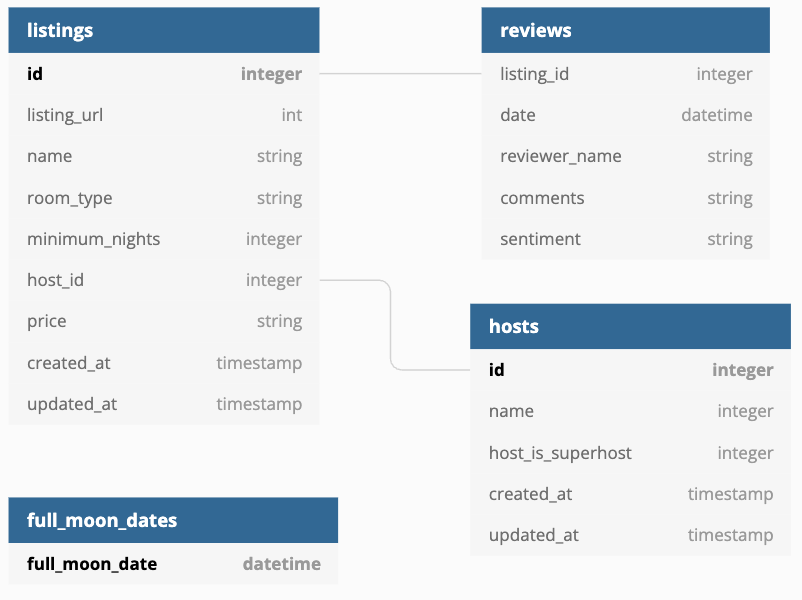
{% enddocs %}Analyses are SQL queries that are executed in the dbt context.
They are stored in the analyses folder.
Example at analyses/full_moon_no_sleep.sql:
-- run an analysis in dbt context (without materialization)
-- to compare the number of reviews during full moon and non-full moon days
WITH mart_full_moon_reviews AS (
  SELECT * FROM {{ ref('mart_full_moon_reviews') }}
)
SELECT
  is_full_moon,
  review_sentiment,
  COUNT(*) as reviews
FROM mart_full_moon_reviews
GROUP BY is_full_moon, review_sentiment
ORDER BY is_full_moon, review_sentiment
Build it with dbt compile
Execute in the target database:
snowsql -c dbt -f target/compiled/dbtlearn/analyses/full_moon_no_sleep.sqlOutput:
* SnowSQL * v1.2.32
Type SQL statements or !help
+--------------+------------------+---------+
| IS_FULL_MOON | REVIEW_SENTIMENT | REVIEWS |
|--------------+------------------+---------|
| False        | negative         |   28818 |
| False        | neutral          |  142352 |
| False        | positive         |  224678 |
| True         | negative         |    1070 |
| True         | neutral          |    4903 |
| True         | positive         |    7877 |
+--------------+------------------+---------+
6 Row(s) produced. Time Elapsed: 0.948s
Hooks are SQLs that are executed at predefined times.
Hooks can be configured on the project, subfolder, or model level.
Hook types:
- on_run_start: executed at the start of dbt {run, seed, snapshot}
- on_run_end: executed at the end of dbt {run, seed, snapshot}
- pre-hook: executed before a model/seed/snapshot is built
- post-hook: executed after a model/seed/snapshot is built
Create a dashboard in https://preset.io to represent a graph of the transformed data.
Graph examples for an Executive Dashboard:
- Full Moon vs Reviews (
models/mart/mart_full_moon_reviews.sql)
Exposures are YAML file configurations that can point to external resources like reports and dashboards, and they will be integrated and compiled into our documentation.
One good way to work with this is to create a YAML file (i.e. dashboards.yml) for all of your exposures, or for example for all of your dashboards.
For example:
exposures:
  - name: executive_dashboard
    label: Executive Dashboard
    type: dashboard
    maturity: low
    url: https://54c24f35.us1a.app.preset.io/superset/dashboard/p/Azp6gzERkrd/
    description: Executive Dashboard about Airbnb listings

    depends_on:
      - ref('dim_listings_w_hosts')
      - ref('mart_full_moon_reviews')

    owner:
      name: dashboard
      email: [email protected]
Run docs generation and serving to test:
dbt docs generate
dbt docs serveLets use https://hub.getdbt.com/calogica/dbt_expectations/latest/ package to enhance our testing.
packages:
  - package: calogica/dbt_expectations
    version: 0.10.4
Testing end-user tables with dbt_expectations tests added to models/schema.yml.
Testing source data with dbt_expectations tests added to models/sources.yml.
Use macros to call any user defined function (i.e. debug_log) with the log() function to log custom messages.
Example at macros/logging.sql
{% macro debug_log(message) %}
  {% if execute %}
    {{ log(message, info=True) }}
  {% endif %}
{% endmacro %}
Example of test debug sql file at models/src/debug_log.sql
{{ debug_log("LOGGING APPLICATION STEP") }}Erase current logs with rm logs/dbt.log for easier observation.
Run it with dbt run --select debug_log
Output:
Running with dbt=1.9.1
Registered adapter: snowflake=1.9.0
Found 1 seed, 9 models, 1 snapshot, 1 analysis, 42 data tests, 3 sources, 1 exposure, 856 macros

Concurrency: 4 threads (target='dev')

LOGGING APPLICATION STEP

Finished running  in 0 hours 0 minutes and 1.05 seconds (1.05s).
Check the logs with cat logs/dbt.log | grep "LOGGING APPLICATION"
Example Output:
[info ] [Thread-1 (]: LOGGING APPLICATION STEPThere are two types of variables in dbt:
- jinja variables: Used in the SQL files.
- dbt variables: Used in the
dbt_project.ymlfile.
Example at macros/variables.sql:
{% macro variables() %}
  {# jinja variable #}
  {% set your_name_jinja = "Fabio" %}
  {{ log("Hello " ~ your_name_jinja, info=True) }}

  {# dbt variable - can be set with --vars on command line or come from dbt_project.yml #}
  {{ log("Hello dbt user: " ~ var("user_name", "<NO USERNAME DEFINED>"), info=True) }}
{% endmacro %}
Calling with dbt run-operation variables will output:
Running with dbt=1.9.1
Registered adapter: snowflake=1.9.0
Found 9 models, 1 snapshot, 1 analysis, 42 data tests, 1 seed, 3 sources, 1 exposure, 857 macros
Hello Fabio
Hello dbt user: <NO USERNAME DEFINED>
If we pass the variable name with --vars like dbt run-operation variables --vars '{user_name: dbt}', the output will be:
Running with dbt=1.9.1
Registered adapter: snowflake=1.9.0
Unable to do partial parsing because config vars, config profile, or config target have changed
Found 9 models, 1 snapshot, 1 analysis, 42 data tests, 1 seed, 3 sources, 1 exposure, 857 macros
Hello Fabio
Hello dbt user: dbt
If we set the variable in dbt_project.yml like:
vars:
  user_name: "<UNDEFINED>"
When we run dbt run-operation variables, the output will be:
Running with dbt=1.9.1
Registered adapter: snowflake=1.9.0
Found 9 models, 1 snapshot, 1 analysis, 42 data tests, 1 seed, 3 sources, 1 exposure, 857 macros
Hello Fabio
Hello dbt user: <UNDEFINED>
Example of variable being used on incremental logic at models/fct/fct_reviews.sql.
Example calling passing date (timestamp) ranges.
dbt run --select fct_reviews --vars '{start_date: "2024-02-15 00:00:00", end_date: "2024-03-15 23:59:59"}'Orchestration is the process of automating the execution of dbt commands.
The tool we'll be using is dagster https://dagster.io/ to orchestrate dbt.
Make sure you cp ~/.dbt/profiles.yml . to the project root and add it to .gitignore to not sync credentials.
dagster-dbt project scaffold --project-name '_dagster_dbt_project' --dbt-project-dir='../dbtlearn'cd _dagster_dbt_project
dagster devOpen the browser at http://localhost:3000 and you will see the dagster dashboard.