Thanks to visit codestin.com
Credit goes to button-mapper.en.uptodown.com

Go to Android platform Display platforms icon
Go to Android platform Go to Windows platform Go to Mac platform
Button Mapper: Remap your keys icon

Button Mapper: Remap your keys

3.35
Dev Onboard
4.7 3 reviews
425.6 k downloads
security security

Customize your Android device buttons

Advertisement
Remove ads and more with Turbo
Advertisement
Remove ads and more with Turbo
Andrés López icon
Reviewed by
Andrés López
Content Editor
Andrés López is part of Uptodown's in-house Editorial Team. Translated by Uptodown Localization Team

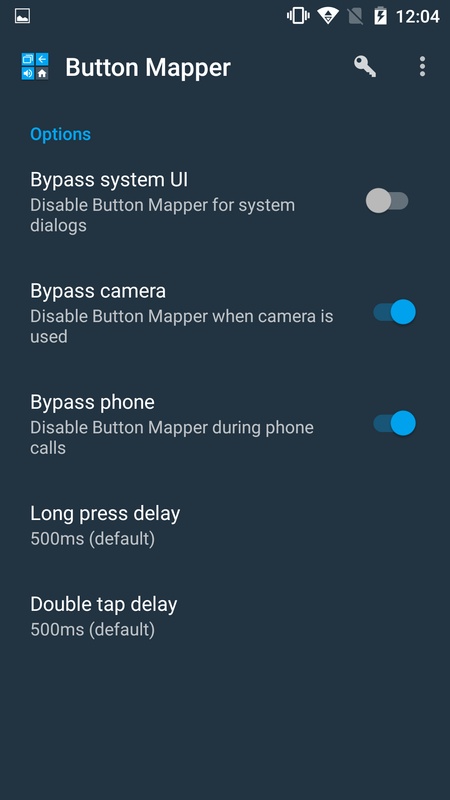
Button Mapper: Remap your keys is an app that allows you to customize the functions of all the buttons on your Android device. Almost all devices, regardless of the brand, have at least three buttons: the on/off, volume up, and volume down buttons. Thanks to this app, you can change the way these three buttons operate, so they do what you want them to.

Up to three actions for each button

You can assign up to three different actions to each of the buttons on your device: single tap, long press, and double tap. This way, for example, you could double-tap the volume up button to open one of your favorite instant messaging apps. Similarly, you could also long-press to open the recent apps list. There is a whole range of options at your disposal.

Advertisement
Remove ads and more with Turbo

Premium version with even more options

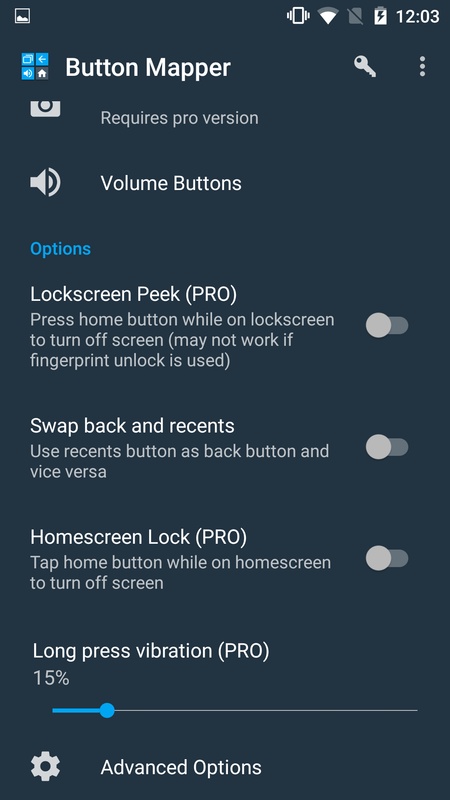
The free version of Button Mapper: Remap your keys will only allow you to customize some buttons on your device, but unlocking the Pro version will allow you to customize all the buttons on your Android device. This Pro version boasts a few additional features, such as changing button behavior when the screen is off or skipping songs with the volume up and volume down buttons. In any case, you just need to make a one-time payment to unlock the Pro version, after which you'll have the license forever.

Enable or disable the app with a single tap

Among the many useful features in Button Mapper: Remap your keys, you can find the option to enable and disable all its features with a single touch. It's very easy to do: just press the three dots in the upper right corner of the interface to display several features. Then all you have to do is press Start/Stop Service. This also means that if you want to remove all your shortcuts for a while, it is easily done. Additionally, you can choose between different visual themes and even turn on the high contrast mode from the same drop-down menu.

Customize your device and save time

Download the Button Mapper: Remap your keys APK and give your Android device that extra touch of customization. You'll be able to save a lot of time in your everyday life by doing something as simple as linking your most common actions with the press of a button, making it a must-have customization app for Android fans.

Requirements (Latest version)

  • Android 4.3 or higher required

Information about Button Mapper: Remap your keys 3.35

Basic information

Developer flar2
License Free
Category Personalization
Rating +3
Languages English
46 more

Security and privacy

Required permissions
35
Advertising Not specified
Certificate signature edd3fef236fd0b7dfc081a7c3fa56858
See security and antivirus report
Why is this app published on Uptodown? (More information)

Download info

Downloads 425,557
Date May 19, 2025
File type XAPK
Size 4.62 MB
SHA256 916ed0d05ca58153de3c2375efb25f856df2732f65694c1848913b09f3753e5c

Technical details

Package Name flar2.homebutton
Advertisement
Remove ads and more with Turbo

Older versions

See more
apk 3.34 Android + 4.3 Sep 8, 2024
apk 3.31 Android + 4.3 Sep 6, 2024
apk 3.30 Android + 4.3 Aug 27, 2024
apk 3.29 Android + 4.3 Aug 25, 2024
apk 3.26 Android + 4.3 Jul 8, 2024
apk 3.22 Android + 4.3 Feb 11, 2024

Rate this App

Review the app
Button Mapper: Remap your keys icon

Rating

4.7
5
4
3
2
1
3 reviews

Comments

bravepinklychee58900 icon
bravepinklychee58900
in 2020

I couldn't configure the key code function on my Stick, using Windows to unlock the function. Is there a way to do it?

7
Reply
Advertisement
Remove ads and more with Turbo
QuickShortcutMaker icon
Create shortcuts and access your apps in a snap
Xiaomi Themes icon
Customize your Xiaomi smartphone's theme
Samsung Theme Park icon
Create your own fully customized themes
Apex Launcher icon
Set up your phone just how you like it
VMOS Pro icon
Fully customize your ROM on Android to virtualize it
Launcher iOS 18 icon
Transform your Android into an iPhone
HiOS Launcher icon
A light, fast and sleek launcher
Launcher iOS 16 icon
Turn your Android into an iPhone with iOS 13
Uptodown App Store icon
All the apps you could ever want on your Android
TikTok icon
Welcome to the global community of short videos
PUBG MOBILE LITE icon
Play PUBG Mobile on less powerful devices
PUBG MOBILE icon
The undisputed king of Android battle royale games
UC Browser icon
Easily browse the Internet and download videos
AirCast icon
iPhone screen mirroring & cast to your Android TV via AirPlay
Headway icon
Trade global markets with Headway using secure mobile trading tools.
Pak Sim Owners Details 2026 icon
Sim Owner Details
Uptodown App Store icon
All the apps you could ever want on your Android
Secure VPN icon
Maintain your privacy and anonymity as you browse
Xiaomi Security icon
Xiaomi's official security and maintenance app
MT Manager icon
An APK file editor and manager
Shizuku icon
The easiest way to use system APIs directly
UC Browser icon
Easily browse the Internet and download videos
Xender - Share Music Transfer icon
Transfer files and share apps
Google Play services icon
Essential app to keep your apps up to date